








 Store
Store


Audiobooks are one of the best ways to enjoy stories and learn on the go, but sharing your favorite titles isn't always straightforward. Due to DRM protections and Amazon's account restrictions, handing off an audiobook to a friend isn't as simple as passing along a physical book. Whether you want to set up family sharing, gift a title to a friend, or back up your purchased library for unrestricted playback across all your devices, this guide covers every method step-by-step to share Audible books.
Part 1. Can You Share Audible Books?
Yes, you can share Audible books, but how you do it depends on who you are sharing with and what devices they use. Because Audible titles use Digital Rights Management (DRM) in proprietary AAX formats, you cannot simply forward an audio file via email to a friend.
| Feature | Amazon Household | Audible Recommendations | Audible Gifting | Audible Conversion |
|---|---|---|---|---|
| Best For | Immediate family | Direct friends to a title you enjoyed | Friends, colleagues, and non-household members | Any family or friends without limitations |
| Cost | Free | Free | Not free | Not free |
| Grants Free Full Access? | ✔️ | ❌ | ❌ | ✔️ |
| Recipient Requirement | Must link Amazon account | None | Audible account to redeem gift code | None |
| Share without Limits? | ❌ | ❌ | ❌ | ✔️ |
| Supported Devices | Audible supported devices | Web browser or Audible app | Web browser | Any device |
Part 2. How to Share Audible Books with Family
The official way to share Audible books with family members is through Amazon Household Family Library Sharing. This feature lets two adults link their Amazon accounts to share purchased audiobooks without sharing login credentials. Here’s how to share an Audible book with family.
Step 1: Set Up Your Amazon Household
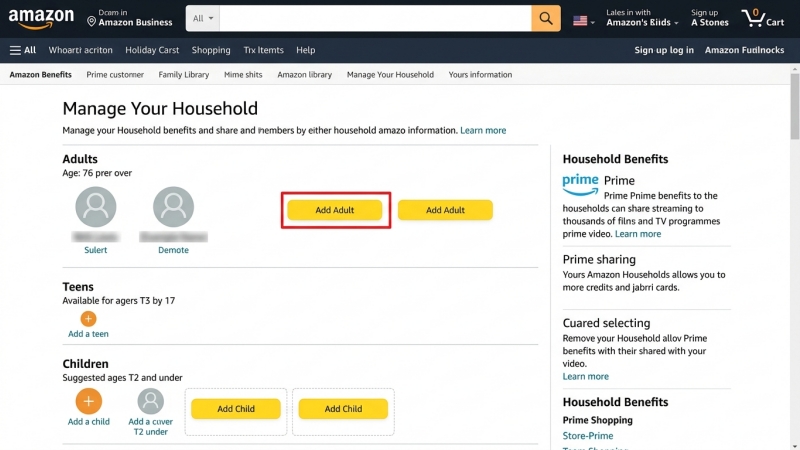
1. Go to the official Amazon Household page on your web browser.
2. Sign in with your Amazon or Audible account details.
3. Click Add Adult and enter the name and email address of the family member you wish to invite.
4. Follow the on-screen prompts to confirm account authorization and share payment methods.
Step 2: Manage and Share Your Audiobooks
1. Navigate to Manage Your Content and Devices on Amazon.
2. Click the Content tab and filter by Audiobooks.
3. Select the titles you want to share and click Show Family Library.
4. Choose Add to Library next to your household member's profile.
Important Restrictions to Keep in Mind:
-
Purchased Titles Only: You can only share audiobooks purchased with cash or Audible credits.
-
Plus Catalog Exclusions: Titles streamed from the Audible Plus Catalog cannot be shared via Family Library.
-
Region Locks: Both Amazon accounts must belong to the same regional marketplace.
Part 3. How to Share Audible Books with Friends
If you want to share an Audible book with someone outside your household, official options are limited to sending Audible recommendations or gifting Audible titles directly. Here's how to share an Audible books with a friend by sending recommendations or gifting titles.
Send a Book Recommendation Link
If you simply want to point a friend toward an audiobook you recently enjoyed, the Audible mobile app includes a built-in sharing button.
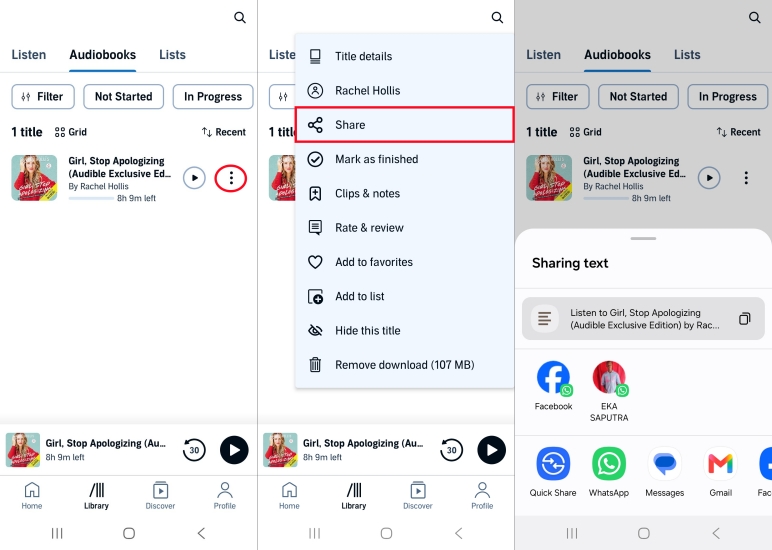
Step 1. Open the Audible app and navigate to your Library.
Step 2. Tap the three dots next to the audiobook you want to share.
Step 3. Tap Share.
Step 4. Select your preferred app to send a link.
⚠️ Important Note:
This feature sends a product recommendation or preview link. It lets your friend listen to a sample or purchase the title, but it does not give them free access to your copy.
Gift an Audiobook
When you want a friend outside your household to have permanent, full access to a specific title, the best official route is purchasing it as a gift.
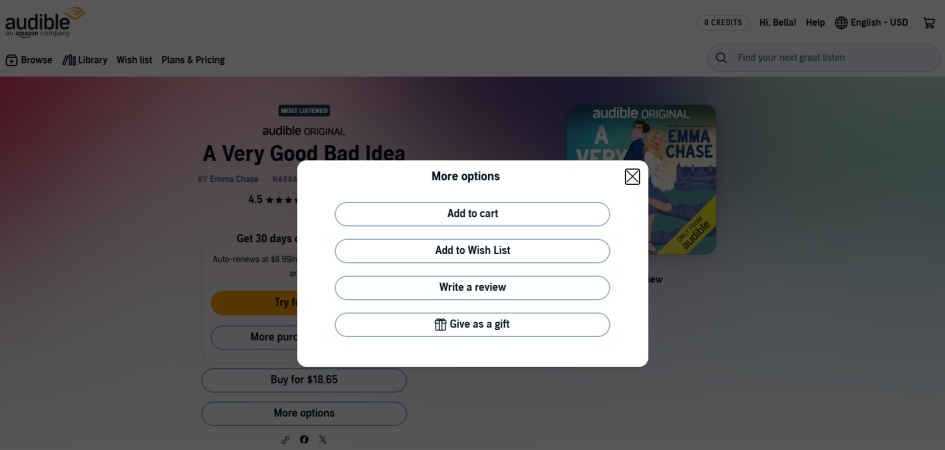
Step 1. Visit the Audible website on a desktop browser.
Step 2. Search for the title you wish to send.
Step 3. Click Give as a gift on the product details page.
Step 4. Choose to send the gift via email or print a custom gift card code.
Step 5. Follow the onscreen instruction to complete the checkout.
Part 4. How to Share Audible Books with Anyone
Audible audiobooks use proprietary AA or AAX file formats protected by DRM, restricting playback strictly to official Audible and Amazon apps. If you want to share your purchased audiobooks with your family members and friends or listen to them on MP3 players, car stereos, and non-supported devices, converting Audible audiobooks to standard MP3 or FLAC format offers a permanent solution.
TunesMake Audible Converter is designed to solve this exact problem. Using TunesMake Audible Converter, you can download and convert Audible audiobooks into open formats like MP3, FLAC, AIFF, WAV, M4A, and M4B. By converting Audible audiobooks locally, you preserve original audio quality, retain interactive chapter markers, and eliminate device constraints. Follow the steps below to convert Audible audiobooks for sharing with TunesMake.

Streaming Audio Recorder –
Download Audible audiobooks to popular audio formats
- Download purchases, podcasts, and Originals from Audible
- Convert Audible books to MP3, M4A, M4B, WAV, FLAC, and AIFF
- Remove DRM protection from Audible efficiently and safely
- Preserve the original audio quality and chapter information
- Support downloading audios from 11 popular streaming platforms
Security Verified. 100% Clean & Safe.
Step 1 Add Audible Audiobooks to Convert
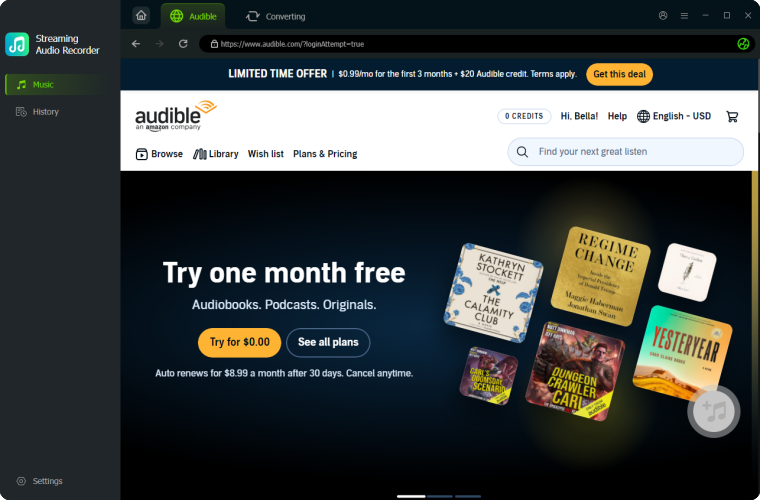
After downloading and installing TunesMake Streaming Audio Recorder, open it and select Audible from a list of streaming services displayed on the main screen of the program. Log into the Audible web player and go to your library. Find your purchased Audible audiobooks and click the + button to add them into the conversion list.
Step 2 Set the Output Audio Parameters
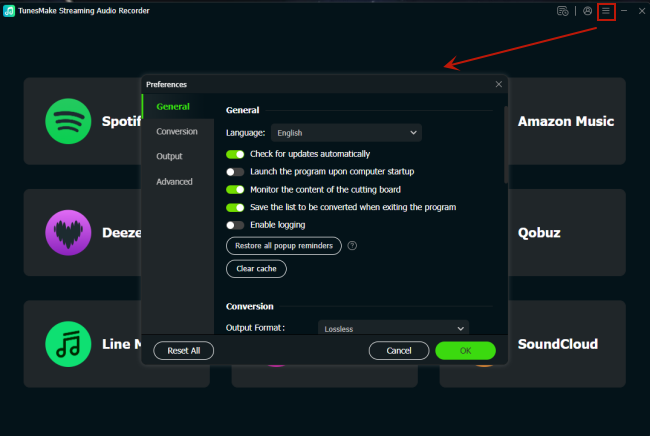
Then click the Settings button at the bottom left corner, and you can navigate to set the output audio parameters for Audible audiobooks. Here you can select MP3, FLAC, AIFF, WAV, M4A, and M4B as the output format. Besides, you can configure other parameters like bit rate, sample rate, and channel according to your demands.
Step 3 Start to Convert Audible Audiobooks
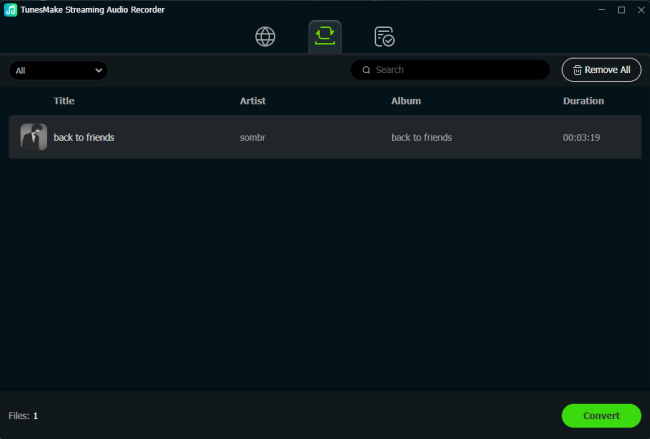
Finally, you can click the Convert button to initiate the conversion of Audible audiobooks. Wait for a while, and TunesMake will handle the conversion task immediately. After completing the conversion, you can click the History button at the left panel of the program. You can view all the converted Audible audiobooks.
Part 5. FAQs about Sharing Audible Books
Can I lend an Audible book like a library book?
No. Audible does not offer a temporary "lending" feature for individual titles. To share access officially, you must use Amazon Household or gift the title.
Will my shared Audible books disappear if I cancel my subscription?
No. Any audiobooks you purchased with cash or credits belong to your account permanently. Household members will retain access to your shared titles even if you cancel your active Audible membership.
How many people can listen to an Audible book at the same time?
With Amazon Household, two adults can stream or listen to shared titles simultaneously on separate devices without interrupting each other's progress.
Part 6. Conclusion
Sharing your favorite audiobooks doesn't have to be complicated once you know your options. If you want to share a digital library with immediate family members in the same region, Amazon Household provides a seamless, free way to pool your purchased titles. When sending a specific title to a friend outside your household, Audible Gifting and Recommendations are ideal options. However, if your goal is to share Audible books with anyone without limitations, using TunesMake Audible Converter can make your audiobook collection share with anyone.
Related Articles

A professional writer at TunesMake, crafts in-depth tutorials, practical tips and expert advice focusing on streaming music, technology, and more.
- 1
- 2
- 3
- 4
- 5
- 6
- 7
 Leave Your Comment
(0)
Leave Your Comment
(0)

 Download Center

