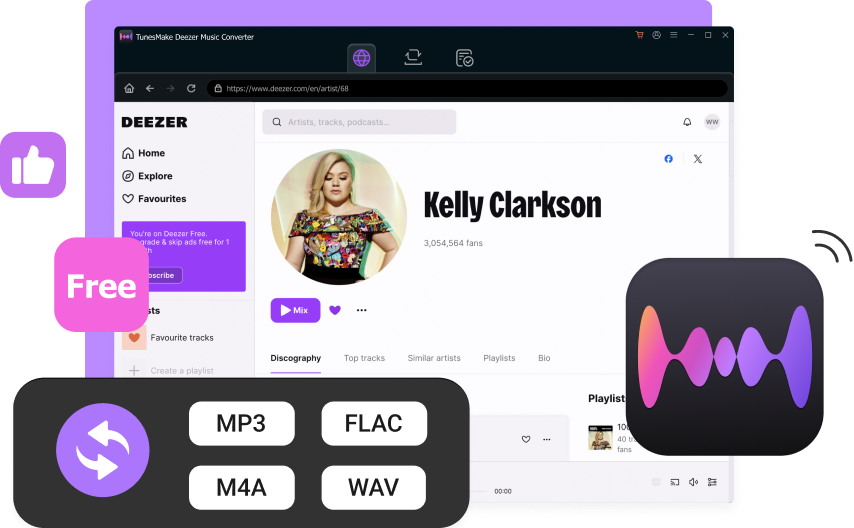



I've been using TunesMake Deezer Music Downloader to save Deezer music to mp3, and it's really impressive.
Download Your Entire Library without Deezer Content Limits
As a complete Deezer downloader, TunesMake Deezer Music Downloader allows you to download any content from Deezer, including individual tracks, complete albums, curated playlists, and engaging podcasts, and save them directly to your computer. By passing standard downloading restrictions, it gives you the ultimate freedom to back up your favorite audio and build a permanent offline collection that you truly own.
Experience Your Deezer Music in Perfect Lossless Quality
Don't settle for compressed, muffled audio. With TunesMake Deezer Music Downloader, you don't have to sacrifice audio quality for offline convenience. Boasting a leading-edge audio decoding techonlogy, TunesMake enables you to presever every single detail of your favorite tracks, exporting them in true, studio-grade lossless quality at up to 16-bit, 1,411 kbps. Just the same as you'd hear it straight from Deezer.
Convert Deezer to MP3, FLAC, and Beyond in Perfect Audio
TunesMake Deezer Music Downloader gives you the ultimate flexibility to enjoy your music on any device or media player by supporting conversion into six of the most popular audio foramts, including MP3, FLAC, WAV, AIFF, M4A, and M4B. Whether you need highly compatible MP3 files for everyday listening or studio-grade FLAC and WAV files to preserve pristine, lossless audio quality, this tool has you covered.
Keep Your Music with Full ID3 Tags and Perfect Organization
By automatically preserving all critical ID3 tags, such as song title, artist, album, artwork, and track number, TunesMake Deezer Music Downloader takes the headache out of media management. Beyond keeping metadata intact, it gives you complete control over how your files are saved, allowing you to personalize your output directory, file names, and folder structures for a perfectly organized music library.
Your Ultimate Deezer Downloader to Offline Listening Anywhere and Anytime
Looking for the ultimate way to download and enjoy your favorite Deezer tracks without any restrictions? TunesMake Deezer Downloader is your ideal choice, making your music download faster and easier.
45× Ultra-Fast Conversion Speeds
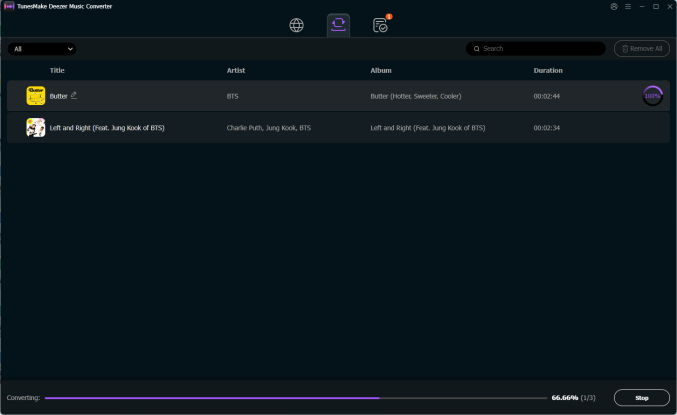
Powered by advanced hardware acceleration, TunesMake Deezer Music Downloader processes your audio queue at lightning-fast speeds up to 45×, converting massive music libraries in just a fraction of the time without lagging your computer.
Effortless Batch Downloading
Skip the tedious, one-by-one saving process. By using TunesMake Deezer Downloader, you can add multiple single tracks, entire albums, multi-hour playlists, or full podcast series to the queue and download them all simultaneously with a single click.
True Play-Anywhere Freedom
By converting Deezer's protected streams into universally compatible audio formats, your files are completely unlocked. You can play your music on any MP3 player, smartphone, car stereo, or smart speaker, totally offline and on your own terms.
Bring Additional Features for a Better Deezer Music Experience
Flexible Parameter Customization
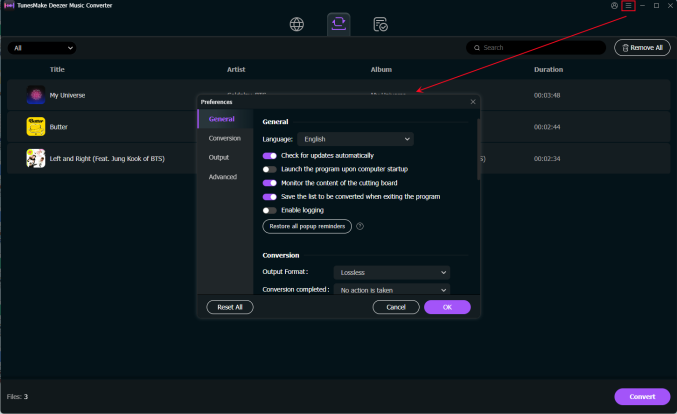
Take full control over how your music sounds. TunesMake allows you to fine-tune your output preferences by adjusting key audio parameters like sample rate. Whether you want to optimize for file size or prioritize absolute audio fidelity, the choice is yours.
ID3 Tags Personalization
Organize your music collection exactly the way you want it. This feature lets you edit and customize essential ID3 tags, including the artist name, song title, album art, and track number. You can effortlessly rename files to fit your personal archiving system.
Background Task Processing
Never let your downloading tasks slow you down. This tool is designed to run efficiently in the background, handling massive batch conversions and downloads without hogging your system's resources. You can let this tool to complete the download taks automatically.
Easy-to-Operate App Design
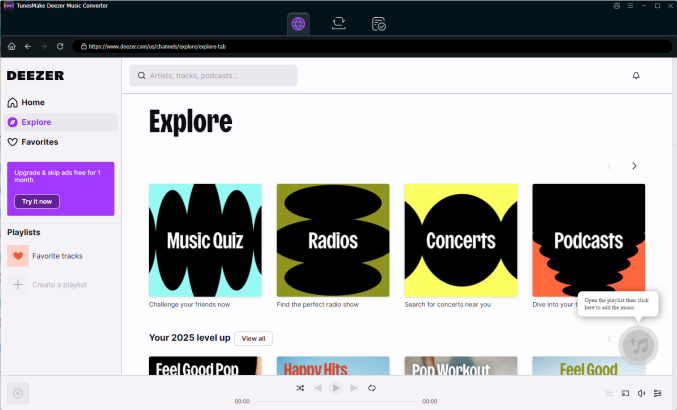
You do not need to be a tech expert to master this tool. Featuring an intuitive user interface, TunesMake is suitable for every user. With drag-and-drop functionality and clear, self-explanatory menus, converting your favorite tracks takes only a few simple clicks.
Multi-Language Interface
Designed for a global community of music lovers, TunesMake breaks down language barriers with its multi-language support. Users from around the world can toggle between several popular languages, ensuring a native-feeling experience for everyone.
Professional Tech Support
Get peace of mind with dedicated assistance always within reach. TunesMake comes backed by a professional, highly responsive technical support team ready to help resolve any issues. Paired with free software updates, the tool will always run smoothly.
How to Download Deezer to MP3 via TunesMake Deezer Music Converter
Media & Customer Reviews
If you are looking for a reliable way to download Deezer music in high quality, TunesMake Deezer Music Downloader definitely worth trying. It keeps the original audio intact and even retains lyrics for offline enjoyment, giving you the best offline Deezer music experience.
TunesMake Deezer Music Downloader emerges as a top contender for Deezer users craving versatility. Under its intuitive interface is a powerful engine, which can help you download your favorite track losslessly and convert them to a wide range of audio formats.
TunesMake Deezer Music Downloader is a powerful tool. It supports lossless downloading, ensuring every nuance and detail of the original Deezer audio is preserved in your downloaded files. With its help, you can build a high-fidelity offline collection and enhance your music experience by listening them on premium audio equipment.
Frequently Asked Questions
-
Can you use Deezer for free?
Yes. Deezer offers a free tier. However, it comes with limitations: music streaming is shuffle-based, audio ads will play occasionally, you cannot download music for offline listening, and some advanced features like high-fidelity audio are restricted to paid tiers.
-
How to download Deezer music to MP3?
Because the official Deezer app saves offline music in an encrypted cache format rather than standard MP3s, you muse a third-party Deezer downloader to get MP3s. Download and install a desktop tool like TunesMake Deezer Music Downloader. Choose MP3 as your desired output format in the program’s settings. Browse and select the Deezer playlist or album you want to save, and click Convert to download them directly to your PC as MP3 files.
-
How to download individual songs on Deezer?
Officially, Deezer does not have a "Download" button for a single track. To download a single song in the Deezer app, create a new custom playlist and add the specific individual song you want to that playlist. Then go to your playlists, open the newly created playlist, and toggle the Download switch to make that single song available offline. Or you can directly use TunesMake Deezer Music Downloader to save multiple single tracks in Deezer.
-
Is Deezer downloader legal?
Using a Deezer downloader to save music for personal, offline use, such as listening on an MP3 player or in your car falls into a legal gray area but is generally tolerated. However, using these tools to download copyrighted music for commercial distribution, sharing, or piracy is strictly illegal and violates both copyright laws and Deezer's Terms of Service.
-
What is Deezer downloader?
A Deezer downloader is a specialized software program or online service, such as TunesMake Deezer Music Converter designed to bypass the encrypted format of Deezer's streams. It records or extracts audio from the Deezer platform and converts it into universally compatible, DRM-free audio formats like MP3, FLAC, or WAV so you can play your music on any device without restrictions.
-
Can you use Deezer offline?
Yes, but only with a paid subscription, such as Deezer Premium, Duo, Family, or Student. If you have an active paid plan, you can download albums, playlists, podcasts, and your favorite tracks to the Deezer mobile or desktop app to listen without an internet connection. Offline mode is not supported on the free version or via the web browser player.
-
Can you download music from Deezer?
Yes. Paid subscribers can easily download music for offline playback directly within the official Deezer app on mobile and desktop. If you want to download music as local files like MP3s to your computer, you will need to use a dedicated third-party tool like TunesMake Deezer Music Downloader.
Hot Tips & Tricks
Use Deezer Music Freely
Play Deezer Music Anywhere
Ready to Break Limits of Your Deezer Library?
Don't let subscription limits dictate how and where you listen to your favorite tracks. With TunesMake Deezer Music Downloader, you can download your entire library in lossless quality and enjoy ultimate playback freedom anywhere.