








 Store
Store


SoundCloud is a great platform for discovering underground music, remixes, and so on. However, its streaming quality is typically compressed. For audiophiles, music lovers, and DJs, audio quality is everything. This is why many users are looking for a method to download SoundCloud to WAV.
WAV (Waveform Audio File Format) is an uncompressed, lossless audio format renowned for retaining the highest quality of the original audio. It is one of the most popular choices for professional audio editing, mixing, and long-term archiving. If you also want to know how to convert your SoundCloud songs to WAV and be free from the compromises of lossy compression like MP3, this post is your best choice. Keep reading to learn the best and most reliable 3 methods for achieving your goal.
Method 1. Download WAV from SoundCloud via the Official Method
Does SoundCloud provide the WAV format? The answer is yes. SoundCloud accepts diverse audio formats for upload, including WAV, FLAC, AIFF, MP3, AAC, and so on. Also, SoundCloud allows users to download music tracks directly. That is to say, you can download SoundCloud songs to WAV directly as long as the artist uploads audio in WAV format.
Step 1. Head to the SoundCloud web player or its app, and then sign in to your account.
Step 2. Find the song you want to download. Click the More icon beneath the track’s waveform. Then, select Download file.
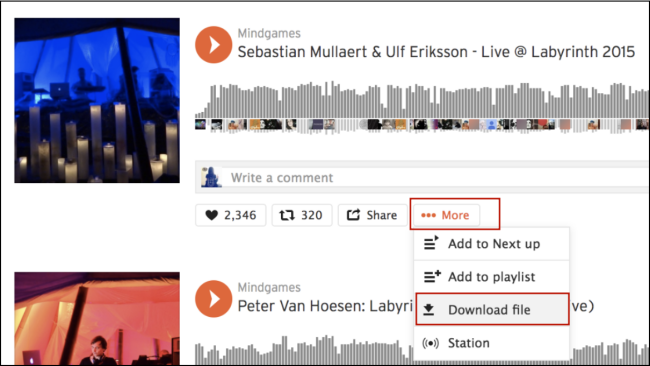
You should notice that it doesn't always allow for downloading in the WAV format. If you want WAV files specifically, or if the track isn't available for download, you will need to explore an alternative method in the next part.
Method 2. Download SoundCloud to WAV with Lossless Quality
Using the official download button is the easiest way to get SoundCloud songs in WAV format. But sometimes, there is no official download button, or the artist only uploaded a lossy format like MP3. In these cases, you will need a specialized desktop tool - TunesMake Streaming Audio Recorder. It is your best choice for high-quality conversion and efficient library management.
TunesMake Streaming Audio Recorder is an all-in-one music downloader designed for all music lovers. It can help you download and convert songs, playlists, albums, and podcasts from music streaming platforms like SoundCloud to WAV. It also provides other audio formats to satisfy different needs, such as MP3, M4A, M4B, FLAC, and AIFF. Besides, the TunesMake tool will keep the original sound quality and ID3 tags, ensuring your offline listening experience.
It also supports batch download. You can easily download your playlists once and for all. The TunesMake tool works at 22X fast speed, so it won’t take too much time. All the songs downloaded by the TunesMake tool will be saved as local files on your computer. You can have your own digital music collection and play it on any device, at any time.

Streaming Audio Recorder –
Best SoundCloud to WAV Downloader
- Unlimitedly download streaming music songs, playlists, and podcasts
- Losslessly convert streaming music to MP3, M4A, M4B, WAV, FLAC, and AIFF
- Remove DRM protection from many streaming music platforms
- Convert streaming songs with original sound quality and ID3 tags kept
Security Verified. 100% Clean & Safe.
Step 1
Set the Audio Output Format as WAV
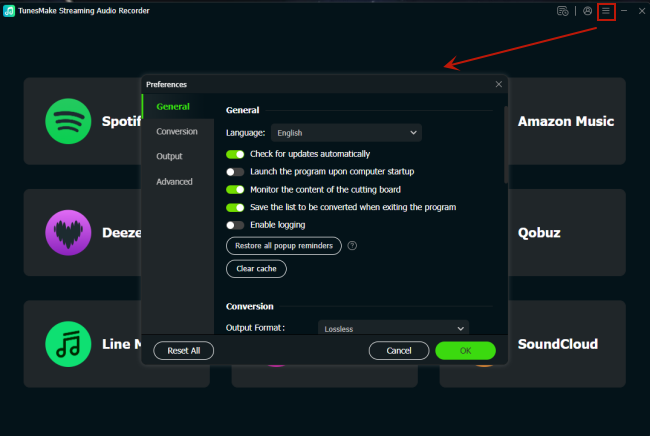
When you finish installing the TunesMake Streaming Audio Recorder on your computer, you can launch it. In the interface, click the top Menu icon. Then, select Preferences > Conversion. Here, you can change all the audio parameters as you wish. Select WAV as the output format, and then you can change other settings like channel, bit rate, sample rate, and so on.
Step 2
Log in to Your SoundCloud Account
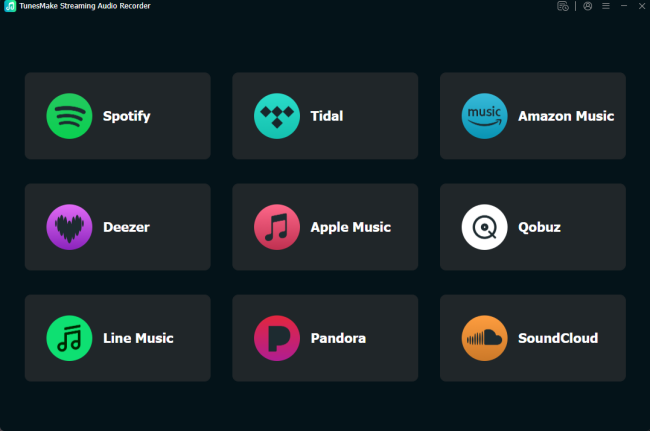
After finishing the audio settings, you should go back to the interface. Click the SoundCloud icon among all the music streaming services. Then, you will be led to the official SoundCloud web player, where you should sign in to your account.
Step 3
Find Target SoundCloud Songs and Playlists to Download
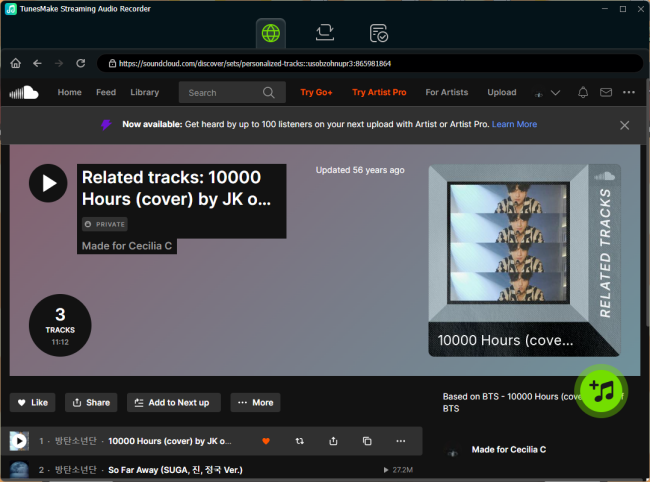
Now, you can freely browse the SoundCloud music library and find the playlist you want to download. Then, click the Add icon at the bottom. The TunesMake tool will analyze this playlist automatically and display all the songs. You can pick the songs you want or add the entire playlist to the conversion list by clicking the Add to List button.
Step 4
Download SoundCloud Music to WAV Losslessly
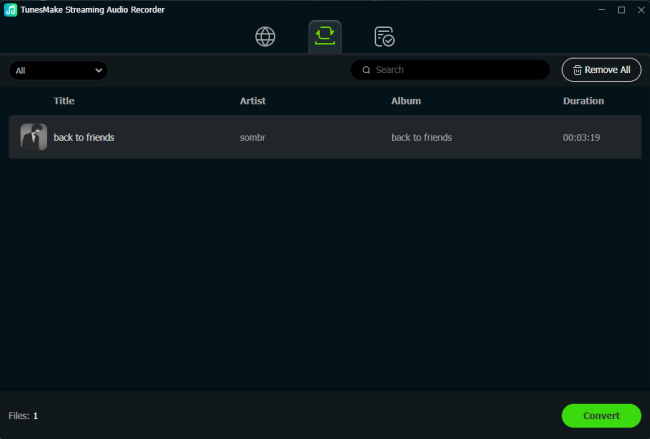
Now, everything is prepared. Just one click on the lower Convert button, and the TunesMake software will begin downloading all the songs you loaded automatically. When the downloading process is finished, click the Converted icon at the top to check all the downloaded WAV files.
FAQs about SoundCloud to WAV
Can I download any SoundCloud track to WAV?
If you use the official download button on the SoundCloud platform, the answer is no. Not all tracks on SoundCloud are available for download, and not all available songs can be downloaded in WAV format. The availability of downloads is up to the artist. But you can use a third-party tool like the TunesMake Streaming Audio Recorder to download any song from SoundCloud to WAV easily.
Is it legal to download WAV from SoundCloud?
Yes, whether you use the official download feature or a third-party tool like TunesMake Streaming Audio Recorder, it is fully legal. Just notice that you can only download SoundCloud for personal use.
Why is the WAV file size so much larger than MP3?
WAV is an uncompressed format. A 3-minute song in WAV format can be 30MB to 50MB, whereas the same song as an MP3 might be only 3MB to 5MB. So, it’s always a good idea to check your device space before downloading.
Is it possible to download WAV tracks from a SoundCloud subscription?
While SoundCloud Go and Go+ allow for offline listening, the downloaded files are encrypted and are typically saved in a compressed format instead of the standard WAV format. This file format can be played only within the SoundCloud app. To get transferable WAV files, you must use a reliable third-party tool like TunesMake Streaming Audio Recorder.
Conclusion
WAV is an uncompressed audio format and a great choice for music lovers who want to preserve the quality of SoundCloud tracks and enjoy them offline. If the song you like is available, you can use the official download button directly. If you want to ensure the best quality and a seamless experience, using a dedicated program like TunesMake Streaming Audio Recorder is your best choice.
Related Articles

A senior editor from TunesMake, dedicated to sharing professional tutorials and solutions of software, movies, and music.
- 1
- 2
- 3
- 4
- 5
- 6
- 7
 Leave Your Comment
(0)
Leave Your Comment
(0)

 Download Center

