








 Store
Store


If you are an Amazon Prime member, you probably noticed a massive shift in how Amazon Music works. Gone are the days of freely streaming any song you want on-demand. Instead, the platform heavily relies on shuffle mode, with one major exception: All-Access Playlists. This comprehensive guide will demystify the hidden rules of the Amazon Music All-Access playlist. Also, we will show you exactly how to create, find, and download an All-Access playlist on Amazon Music. Let's explore Amazon Music All-Access playlist now.
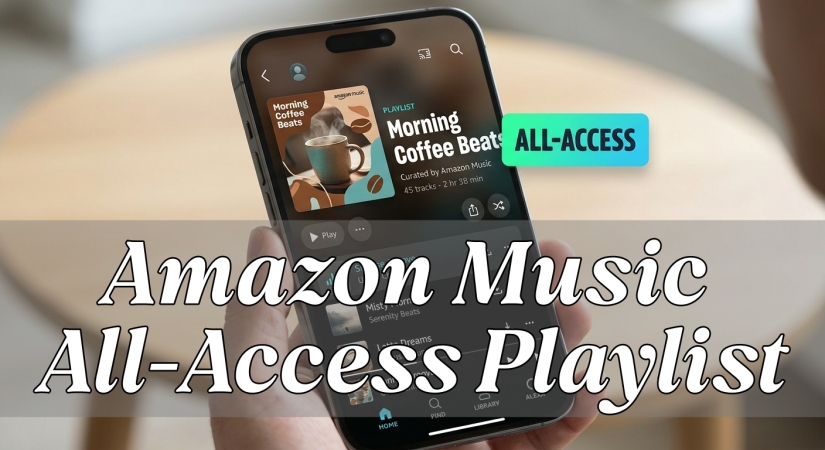
Part 1. What Are All-Access Playlists on Amazon Music?
On Amazon Music, All-Access Playlists are a special feature designed primarily for Amazon Prime members and users on the Free tier. These playlists allow Prime users to stream music on-demand, skip unlimited tracks, and download music for offline listening without upgrading to a full Amazon Music Unlimited subscription.
However, Amazon has put strict, hidden rules on how these playlists work. Here is what makes All-Access Playlists different and how they work.
Main Benefits of Amazon Music All-Access Playlist
Without paying extra for a standalone music subscription, All-Access playlists are the only saving grace for controlled listening while using a Prime account. Here is what the feature unlocks.
-
On-Demand Playback: You can select and play any specific song in an All-Access playlist rather than being forced to shuffle.
-
Unlimited Skips: Unlike standard Prime playback, which caps your track skips, All-Access tiers let you skip as many songs as you want.
-
Offline Listening: You can download these specific playlists to your smartphone to listen without using data or Wi-Fi.
Ability to Get All-Access Playlists on Amazon Music
There are two ways to get All-Access Playlists in your library. One is to choose a pre-made playlist from Amazon, and the other is to create your own custom playlist.
-
Amazon's Pre-Made Playlists: Amazon's editorial team curates a selection of roughly 15 auto-updating playlists that are automatically given All-Access status. You can stream these on-demand, but you cannot customize the tracks inside them.
-
Your One Custom Playlist: Amazon allows you to pick exactly one playlist that you created yourself and turn it into an All-Access Playlist.
Part 2. How to Create an All-Access Playlist on Amazon Music
While Amazon provides a handful of pre-curated All-Access playlists, the real value comes from creating your own. If you choose to make your own custom All-Access Playlist, you have to follow a few strict boundaries set by Amazon.
-
15-to-50 Song Limit: Your custom playlist must have at least 15 songs and no more than 50 songs. If you drop below 15 or add a 51st song, the playlist will lose its status and revert to forced shuffle mode.
-
7-Day Lock: Amazon only allows Prime members to designate one user-created playlist as an All-Access playlist at a time. Once you select or change this playlist, you are locked in and cannot switch it to a different playlist for 7 days.
-
Daily Edits Cap: You can edit the songs inside your designated playlist, but you are limited to making a maximum of 10 track changes such as adding or removing a track per day within that playlist.
If you ready to build your custom, shuffle-free listening experience, follow these steps on your iPhone or Android phone.
Step 1. Open the Amazon Music app and navigate to Library.
Step 2. Tap New Playlist, select Curate a playlist, and give it a recognizable name.
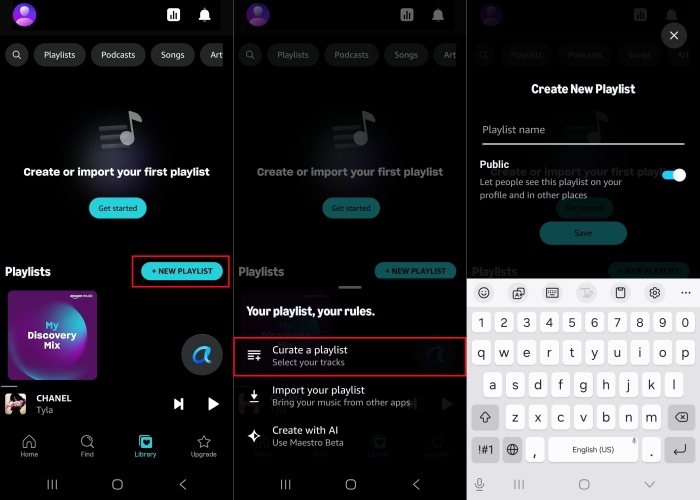
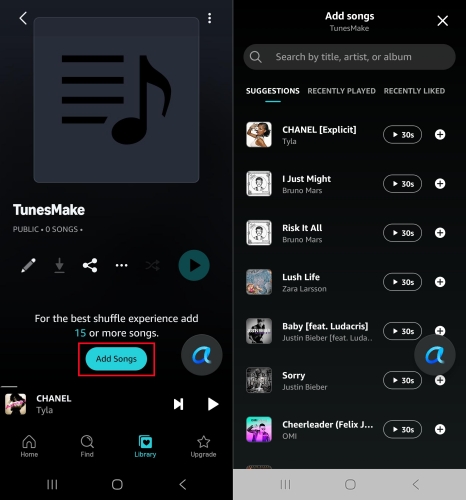
Step 3. Tap Add songs to browse and select your favorite songs to add.
Step 4. Tap Done to save all the selected songs to the playlist.
Step 5. Turn on a toggle switch saying Make All-Access within the playlist menu.
When successful, a prominent, rectangular "ALL-ACCESS" badge will appear next to the playlist title. You can then listen to your own custom playlist on-demand, rather than in shuffle mode.
Part 3. How to Find and Download Amazon Music All-Access Playlists
If you do not want to deal with the strict rules of managing your own custom playlist, Amazon provides a shortcut. The platform offers a collection of pre-made, editorial playlists that automatically come with All-Access privileges. These tracks do not count toward your single user-created limit. To find them:
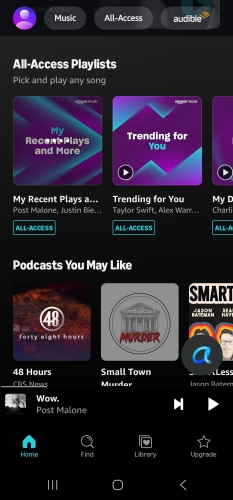
Step 1. Open the Amazon Music app and tap the Find or Home tab.
Step 2. Look for playlists featuring a bright, rectangular "ALL-ACCESS" badge next to the title.
Step 3. Select heavily customized options like "My Mix" to play on your device.
How to Download Amazon Music All-Access Playlists
Finding Amazon Music All-Access playlists for online listening is an easy and straightforward process. And for Amazon Prime members, one of the best perks of all All-Access playlist is the ability to listen offline. Here is the step-by-step breakdown of how to download Amazon Music All-Access playlists on your iPhone or Android phone.
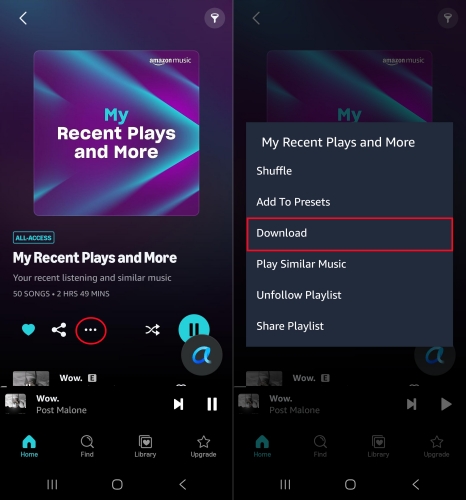
Step 1. In the Amazon Music app, select an All-Access playlist.
Step 2. Tap the three vertical dots icon next to the playlist title.
Step 3. Select Download from the pop-up options menu.
Once the download is complete, a small down-arrow or checkmark icon will appear next to the playlist, indicating it is cached to your phone and ready for offline use. You can find all downloaded music under Library > Recently Downloaded.
How to Enable Auto-download All-Access Playlists
By default, the Amazon Music app often enables a feature called "Auto-download All-Access Playlists." This mean whenever you are on WiFi, the app will automatically download these tracks to your local device storage.
Step 1. In the Amazon Music app, tap your profile image at the top left corner.
Step 2. Tap Settings, then scroll down to the Download Settings.
Step 3. Toggle on Auto-download All-Access Playlists.
How to Bypass Amazon Music All-Access Playlists Restrictions
Offline downloading of streaming catalogs is a mobile-only feature. The Amazon Music app layout for Mac and PC desktops generally only permits offline downloads for digital music tracks that you have explicitly purchased from the Amazon Digital Music Store. But using an Amazon Music downloader like TunesMake Amazon Music Downloader allows you to download and convert all the content from Amazon Music into common local audio formats such as MP3 or FLAC.
By saving the Amazon Music audio files directly to your computer, the tracks are entirely uncoupled from Amazon's app environment. This lets you transfer and play your converted Amazon Music audio files on any device without encountering forced shuffle mode. Also, you can bypass platform restrictions, including 50-song limit and 7-day swap cooldown permanently.

Streaming Audio Recorder –
Download music from Amazon Music unlimitedly
- Download songs, albums, and playlists from Amazon Music
- Convert Amazon Music to MP3, M4A, M4B, WAV, FLAC, and AIFF
- Remove DRM protection from Amazon Music completely and safely
- Preserve the original audio quality and ID3 tags for management
- Support downloading music from 10 popular streaming platforms
Security Verified. 100% Clean & Safe.
Part 4. FAQs about Amazon Music All-Access Playlist
Can I have more than one user-created All-Access playlist?
No. Amazon Prime members are limited to exactly one custom-created All-Access playlist at a time. To change which playlist has this status, you must wait out the 7-day cooldown period.
Do Amazon's curated All-Access playlists count against my limit?
No. You can listen to Amazon's pre-made All-Access playlists on-demand anytime. They do not count toward your single user-created playlist limit.
How many All-Access Playlists on Amazon Music?
On Amazon Music, the number of All-Access Playlists you can listen to depends on whether they are pre-made by Amazon or created by you. Generally, Amazon's expert music curators provide a personalized selection of 15 pre-made All-Access Playlists based on your personal listening history, likes, and genre preferences.
Part 5. Conclusion
Navigating Amazon's streaming restrictions can feel like an endless game of musical chairs. While the Amazon Music All-Access playlist feature gives Prime members a much-needed break from forced shuffling, staying within the strict 15-to-50 track ceiling, the 10 daily edits cap, and the 7-day cooldown rotation requires constant micromanagement.
If you are a casual listener who enjoys curated streams or doesn't mind managing a single rotating weekly tracklist, keeping a close eye on your playlist specs will ensure you retain your on-demand privileges. On the other hand, if you want a completely restriction-free experience, you can eliminate the app's boundaries entirely by opting for a full Amazon Music Unlimited upgrade or utilizing a tool like TunesMake to save your tracks locally.
Whichever route you choose, understanding the rules of the platform puts the control back into your hands so you can finally listen to your music on your own terms.
Related Articles



A professional writer at TunesMake, crafts in-depth tutorials, practical tips and expert advice focusing on streaming music, technology, and more.
- 1
- 2
- 3
- 4
- 5
- 6
- 7
 Leave Your Comment
(0)
Leave Your Comment
(0)

 Download Center

