








 Store
Store


With the advance of technology, today, TVs could bring better services than ever before. On the TVs, you can not only watch more TV shows and files but also have access to a host of music listening options like Spotify and Amazon Music. So, you can select your favorite songs to listen to on the TV. It’s a great thing to enjoy music while doing other tasks around the house. In this post, we will introduce how to play Amazon Music on LG smart TV. As a user of both Amazon Music and LG smart TV, it’s worth reading this post now.
Part 1. How to Get Amazon Music App on LG Smart TV
With the Amazon Music app, the owners of LG smart TV who also happen to be Prime members can finally access two million songs on their TVs. Moreover, if you are subscribing to Amazon Music Unlimited, you can even access millions more. To enjoy Amazon Prime Music on LG smart TV, you need to install the Amazon Music app on your smart TV first. Then you can select your favorites for playing on the LG smart TV. Here’s how to.
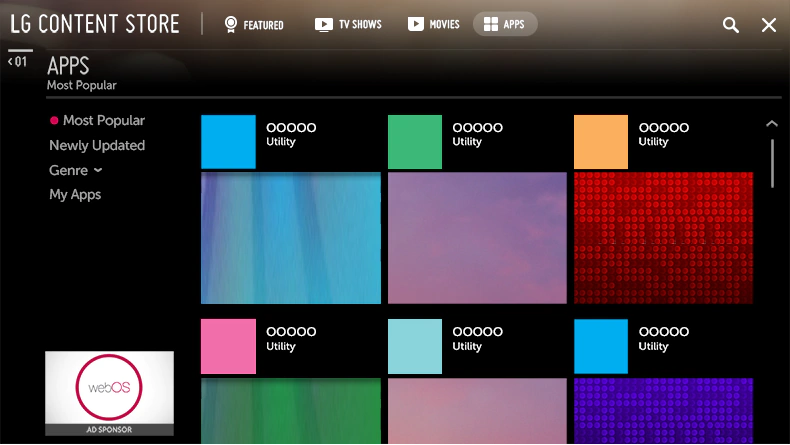
How to Install Amazon Music App on LG Smart TV
1) Turn on the LG smart TV and press the Home button on the remote control then LG Content Store will be launched.
2) Select the Apps & Games category displayed at the top of the screen. The list of available apps in the selected category will be shown.
3) Select the Amazon Music app from the shown list, then press Install to start installing the app on the TV.
How to Activate Amazon Music on LG Smart TV
1) Once the installation is completed, run the Amazon Music app on the LG smart TV immediately.
2) Log into Amazon Music with your username and password and then you’ll be asked to enter into the code on the TV screen.
3) Go to https://www.amazon.com/code on a phone or computer to get the code and then enter the code on the TV.
4) Now browse the catalog of Amazon Music then select your favorite songs to play.
Part 2. How to Play Amazon Music on LG TV via USB
Although Amazon brings its music streaming service – Amazon Music – to LG smart TVs, there still exists lots of problems such as the Amazon Music app not working on LG smart TV or Amazon Prime no sound on LG smart TV. There are several ways to help you troubleshoot those problems. However, it fails to completely fix those issues sometimes.
As a result, you could find an alternative method to help you get Amazon Music on LG smart TV. If you’d like to play Amazon Music on LG smart TV from your USB flash drive, you can constantly solve your problem and enjoy Amazon Music without any hassle. It’s easy to do, and just move your Amazon Music files to a USB flash drive for playing.
2.1 What You Need for Amazon Music on LG Smart TV
Amazon Music, as Amazon’s standalone streaming music service, provides a great service to those music lovers. With Amazon Music, you can access a deep podcast and a host of music resources on your device. But there is a common mistake among music streaming services. That is all music resource is only available within their application.
Therefore, if you want to move Amazon Music files to a USB flash drive, you’d need to remove the limitation of Amazon Music and convert Amazon Music to a widely-supported audio format. To get it done, TunesMake Streaming Audio Recorder could be a good option. It is a professional Amazon Music downloader that helps you in downloading and converting Amazon Music to songs to several plain audio formats.

Streaming Audio Recorder –
Download Streaming Music to MP3 on PC and Mac
- Unlimitedly download streaming music songs, playlists, and podcasts
- Losslessly convert streaming music to MP3, M4A, M4B, WAV, FLAC, and AIFF
- Remove DRM protection from many streaming music platforms
- Convert streaming songs with original sound quality and ID3 tags kept
Security Verified. 100% Clean & Safe.
2.2 How to Listen to Amazon Music on LG Smart TV
Since there are two versions of TunesMake Streaming Audio Recorder available, you need to download and install the correct version for your computer. After the installation is complete, you can follow the below steps to download Amazon Music to your USB drive and start to play them on your LG smart TV.
Step 1
Select your favorite tunes on Amazon Music
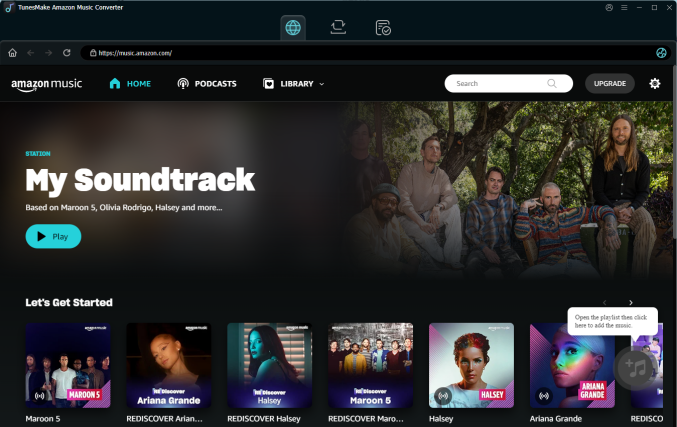
Launch TunesMake Streaming Audio Recorder on your computer, and you will be led to the Amazon Music web player. You can then sign in to your account and find the playlist you want to download. Just select the playlist and click the Add icon in the lower right corner. After that, the TunesMake tool will list all songs in the pop-up window. Next, select the songs you like and load them to the conversion list via the Add to List button.
Step 2
Set up the parameter for Amazon Music
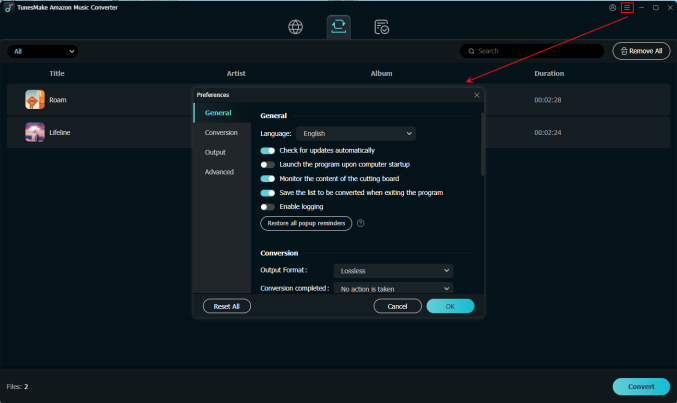
After loading the songs you need, it's time to set the output audio settings. Click the top Menu cion > Preferences. In the advanced window, switch to the Conversion tab. Here, you can choose the output format as MP3 or other audio formats that are compatible with LG TV. For better audio quality, you can also change other parameters like bit rate, sample rate, and channel.
Step 3
Start to download Amazon Music songs
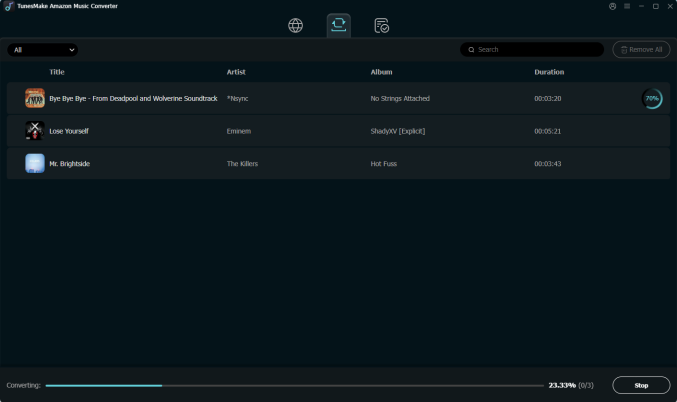
To download Amazon Music songs, you just need to click the Convert button, and the songs will start to download, but keep in mind that it may take a little while depending on the size of the playlist and the speed of your internet connection. Once saved, the playlist will be accessible from your computer. Then you can click the top Converted icon to browse all the converted music tracks.
Step 4
Listen to Amazon Music from LG smart TV
Now go to insert your USB flash drive into your computer, and move your Amazon Music files from the conversion folder to the folder in your USB flash drive. After that, you need to plug your USB flash drive into your LG smart TV. Then find your Amazon Music files on your smart TV, and prepare to use a Media Player or USB Media Player to play your songs.
Part 3. Troubleshoot: Amazon Music App Not Working on LG TV
After figuring out how to get Amazon Music on LG smart TV, we are here continuing to help you fix the Amazon Music not working on LG smart TV issue. When you find Amazon Music not playing music on LG smart TV, you can use TunesMake Streaming Audio Recorder to download Amazon Music songs for playing directly. Or you can try the solutions below to resolve the problem.
Solution 1: Check the network
The Internet is important for all the online streaming on the TV. So, you can go to check the connected network when the Amazon Prime Music app not working on LG smart TV.
Solution 2: Update the firmware
Make sure that the TV firmware has been updated to the latest version. Because the firmware will affect the use of apps on the LG smart TV. So, go to check your firmware and update it to the latest version.
Solution 3: Uninstall and Install the app
Sometimes caches or files can become corrupt. In this case, you can try deleting the Amazon Music app to remove the associated files and then visit the content store to install the Amazon Music app again.
Solution 4: Check location settings
Currently, the service of Amazon Music is only available in a part of areas and nations. If your TV’s location settings are incorrect, content from Amazon Music may not be available. Thus, you can change your location.
Solution 5: Update the Amazon Music app
If there is any update on the Amazon Music app, you need to update it to the latest version in time. Then make sure that the Amazon Music app can work well on your LG smart TV. Or you can delete the app and install it back.
Solution 6: Reset the LG smart TV
If all else fails, perform a factory reset on the LG smart TV. You can then set up Amazon Music on your LG smart TV again.
Part 4. Summary
To initiate the playback of Amazon Music on LG smart TV, there are two feasible methods available for you. The easiest way to listen to Amazon Music on LG smart TV is with the Amazon Music app. But in some cases, you’d prefer to stream Amazon Music to LG smart TV through a USB drive. If you want to freely enjoy Amazon Music on LG smart TV, TunesMake Streaming Audio Recorder could be a good option for you.
Related Articles



A professional writer at TunesMake, crafts in-depth tutorials, practical tips and expert advice focusing on streaming music, technology, and more.
- 1
- 2
- 3
- 4
- 5
- 6
- 7
 Leave Your Comment
(0)
Leave Your Comment
(0)

 Download Center

