








 Store
Store


Streaming music services like Amazon Music have changed the way we consume music on devices. Due to the DRM protection of streaming music platforms, listening to your favorite tracks offline can be a bit frustrating. Streaming platforms deliberately lock your downloads within their closed ecosystem, and you need to keep paying for the subscription to access them. This is exactly the problem that dedicated audio conversion tools like TunePat Amazon Music Converter aim to solve. In this comprehensive TunePat review, we will explore all the features of this tool and examine its performance.
Part 1. What Is TunePat Amazon Music Converter?
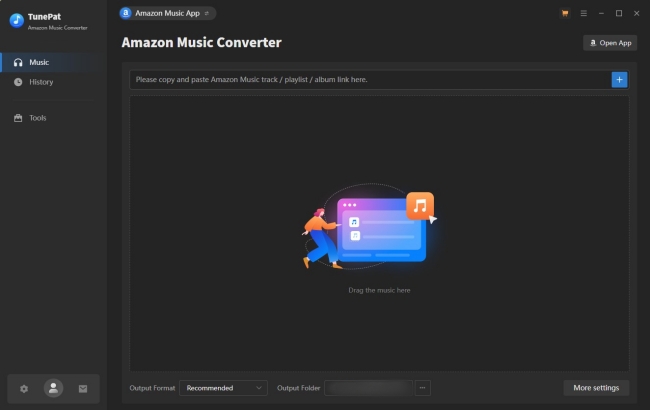
TunePat Amazon Music Conversion is a dedicated desktop application designed to convert Amazon Music songs to common audio formats like MP3 and so on. Once converted, you can play these Amazon Music files on any device you want, including MP3 players, smart TVs, car stereos, and even the devices that don't support the Amazon Music app. More so, you can still access these downloads after your subscription expires. In one word, the TunePat application can help you form your own Amazon Music collection offline.
Key Features of TunePat
Key Feature:
-
Supports downloading songs, albums, and playlists from Amazon Music
-
Converts Amazon Music to diverse audio formats, including MP3, AAC, WAV, FLAC, AIFF, and ALAC
-
Keep ID3 tags of Amazon Music songs
-
Supports downloads from both the Amazon Music app and web player
-
Supports downloading songs in batches
Pros and Cons
-
😀 Pros
- Covers popular audio formats
- Can choose to download from the Amazon Music app or the web player
- Can download entire playlists in batches
- Keep ID3 tags
-
☹️ Cons
- Record music from YouTube instead of directly downloading from Amazon Music
- Consuming too much time while handling large playlists
- Occasional conversion failures during bulk downloads
- Outdated interface design
- Require you to purchase at least 3 months
How to Use TunePat Amazon Music Converter
1. Visit the official website of TunePat. Then, you can choose to download the Windows or the Mac version of the Amazon Music Converter.
2. Once installed, you can double-click its icon on your desktop to launch it. When it is opened, the Amazon Music installed on your device will open automatically.
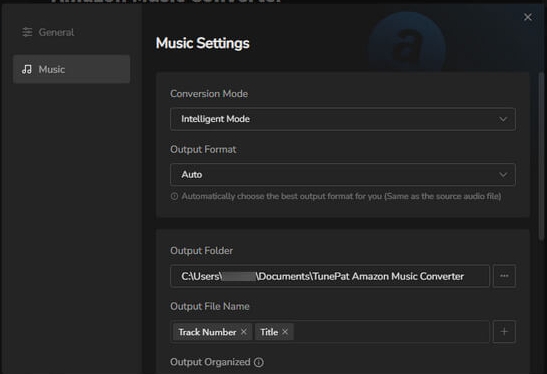
3. Head to the Music settings section, and you can choose the output audio format and change other settings.
4. After that, you can sign in to your Amazon Music account and find the song or playlist you want to download. Simply click the lower add icon and the Add button. Thus, you can choose and add songs to the TunePat tool.
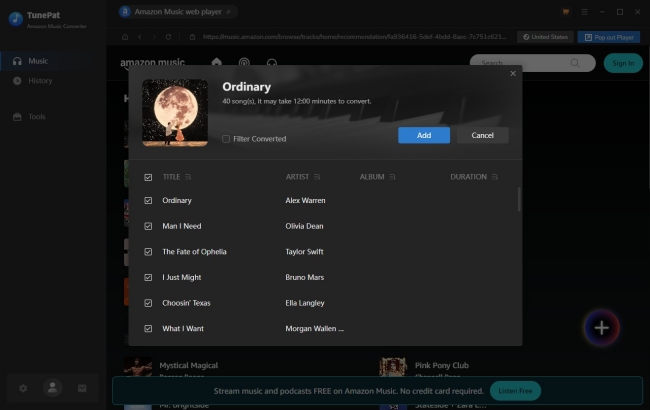
5. Click the Convert button and wait for your Amazon Music songs to be downloaded locally.
Part 2. TunePat Amazon Music Converter: Real Test Experience
To provide a balanced and authentic perspective, we put the latest version of TunePat through a series of tests on both Windows 11 and macOS. You can take this part as a preference to weigh the objective advantages against the software's known drawbacks.
After testing this tool on a computer, we have found some of the main disadvantages you should pay attention to:
- The TunePat tool sets the Amazon Music app mode as the default. If you don't have the Amazon Music app installed on your desktop, you will need to switch to the Web mode manually.
- The tool is actually recording the Amazon Music songs or download it from the source it finds on YouTube. So, the audio quality it offers may not satisfy audiophiles.
- After clicking the Add icon, you will be led to its conversion list automatically. If you need to add more tracks, you will need to go back to the interface again. For users who need to add songs from different playlists or albums, this can be a little bit frustrating.
UI Design and Ease of Use
The interface of TunePat is clear and straightforward, making it intuitive for users. You can switch the mode at the top left corner. In the left toolbar, you can easily access the Amazon Music library and find your download history. When you first launch this tool, it will pop up a series of steps to guide you on how to use it to download music tracks from Amazon Music. The download and conversion process is pretty simple. All you need to do is select, confirm, and convert. Even if you are a new user of Amazon Music, you can finish the whole process without much effort.
Conversion Speed and Stability
TunePat claims 10X conversion speed. In our test, the conversion speed is actually highly dependent on your Internet connection and the tracks you add. When you add too many songs, such as a big playlist, it takes more time and may have a task-failed errors, which do happen occasionally during our tests.
Output Audio Quality
TunePat claims that it can save music in HD and Ultra HD (typically 24-bit/192kHz), but actually, it maintains the quality up to 16-bit/44.1kHz. If you enter its Windows settings, you can choose the recording mode or YouTube mode, which means record songs directly or download from YouTube. Neither of them offers good sound quality.
Features and Flexibility
Whether you have a Prime of Unlimited subscription, you can use this tool to download songs, but the accessible songs are a little bit different. Unlimited subscribers can download all tracks in the Amazon Music library. Beyond downloading and converting, TunePat covers other audio editing and recording features. You can explore more by clicking Tools in the left.
Part 3. Best Alternative to TunePat Amazon Music Converter
Looking to overcome the limitations of TunePat? We recommend TunesMake Streaming Audio Recorder. As a premium alternative, it matches TunePat's core capabilities while introducing more efficient functions and a smoother, more reliable performance.
TunesMake Streaming Audio Converter is an efficient and easy-to-use music downloader and converter. With its built-in official music web player, you can download songs, playlists, albums, podcasts, and audiobooks from Amazon Music to your local computer. Except for Amazon Music, it also supports downloading from other platforms like Spotify, Tidal, Apple Music, YouTube Music, Deezer, LINE music, Qobuz, Pandora, and SoundCloud. According to your personal demands, you can choose to save your favorite tunes in MP3, M4A, M4B, WAV, FLAC, or AIFF format.
What's more, the TunesMake program allows you to personalize the output audio settings. You can change parameters like output quality, channel, bit rate, sample rate, and so on. If you are a user who prioritizes listening experience, you don't need to worry, because the TunesMake program smartly keeps original sound quality, ID3 tags, and even lyrics (if provided). In conclusion, it is a powerful all-in-one music tool that lets you have full control over your music.

Streaming Audio Recorder –
Best Alternative to TunePat Amazon Music Converter
- Unlimitedly download streaming music songs, playlists, and podcasts
- Losslessly convert streaming music to MP3, M4A, M4B, WAV, FLAC, and AIFF
- Remove DRM protection from many streaming music platforms
- Convert streaming songs with original sound quality and ID3 tags kept
Security Verified. 100% Clean & Safe.
Step 1
Find and Import Amazon Music tracks to TunesMake Program

Whether you are using a Windows or Mac computer, you can install the TunesMake Streaming Audio Recorder on your desktop via the Free Download button above. Once done, launch it and select Amazon Music on its interface. Then, you can select any content you want to download and add it to the conversion list by clicking the Add icon > Add to List.
Step 2
Customize the Output Settings of Amazon Music
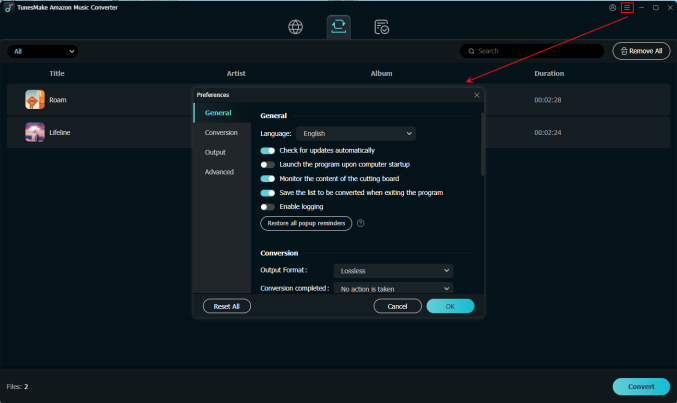
After adding all your favorite songs, you should set the output format as you wish. Click the upper-right menu icon, and then select Preferences. When the settings window prompts, you should switch to the Conversion tab and choose one output format. You can change other parameters and click the OK button to make a confirmation.
Step 3
Start to Download and Convert Amazon Music Tracks
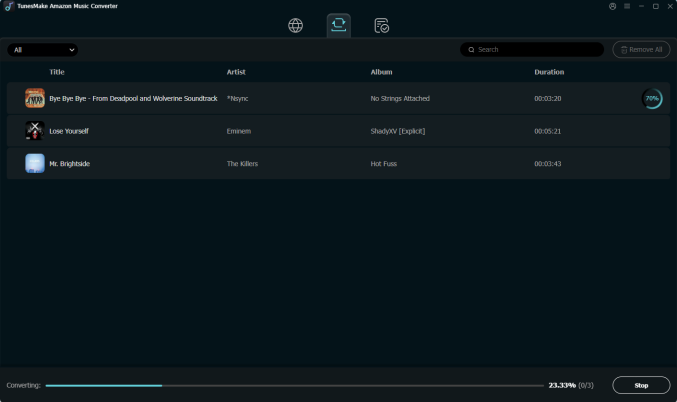
When everything is done, click the Convert button, and your music will start to download. Just wait for a while, and you can get all the converted Amazon Music songs. All music can be found in the local folder on your personal computer by clicking the Converted icon on the top of the converter. Now, feel free to play them anytime and anywhere you want.
Part 4. Free TunePat Alternative Tool
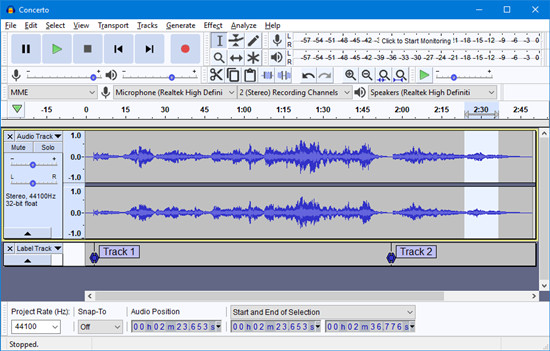
For users who prefer a completely free solution, we also find a great alternative - Audacity. Audacity is a free, open-source audio recording and editing software. Unlike TunePat or TunesMake, it doesn't directly download music from Amazon. Instead, it records audio playing on your computer. If you don't care much about the sound quality, or you only want to download one single song, Audacity is enough for you.
-
😀 Pros
- Completely free to use
- Record any audio played on your computer
- Provide additional editing functions except for recording
- Can save recordings in diverse formats, like MP3, WAV, etc
-
☹️ Cons
- Record the audio in real time
- Record the ads as well
- Complicated set-up process for beginners
- Preserve recordings with the lossy quality
How to Use Audacity
1. Visit the official website of Audacity and install it on your computer.
2. Launch Audacity, and click Edit > Preferences at the top. Once you enter the settings window, set Host to Windows WASAPI.
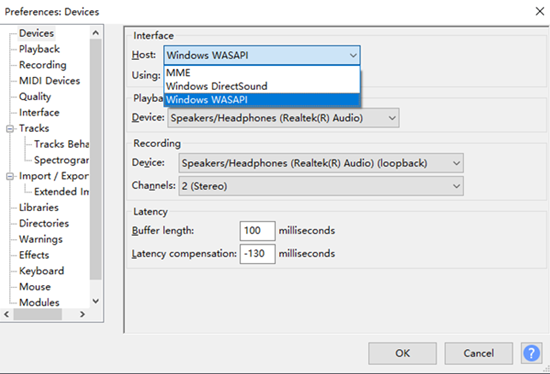
3. Then, you can select an input device in Devices > Playback > Recording.
4. When you finish, click the top Start button to begin recording any Amazon Music song you like.
5. To save the recording as local audio files, select File > Export > Export to MP3.
Part 5. Comparison and Conclusion
| TunePat Amazon Music Converter | TunesMake Streaming Audio Recorder | Audacity | |
|---|---|---|---|
| Supported OS | Windows, Mac | Windows, Mac | Windows, Mac, and Linux |
| Conversion Speed | 10X | 13X | Real-time |
| Sound Quality | High | Lossless | Low |
| Keep ID3 Tags | ✔ | ✔ | ✘ |
| Batch Download | ✔ | ✔ | ✘ |
| Output Format | MP3, AAC, WAV, FLAC, AIFF, and ALAC | MP3, M4A, M4B, WAV, FLAC, and AIFF | MP3, WAV, Ogg Vorbis, and AIFF |
| Price | Start from $29.95 | Start from $24.95 | Free |
Ultimately, TunePat Amazon Music Converter is a robust and reliable tool for users who need to save Amazon Music tracks as local files. If you prioritize audio quality and a streamlined conversion process, it is a very worthy investment. However, it has some drawbacks. If you are working with a tighter budget, you can try a free tool like Audacity. If you are looking for a more stable and cost-effective tool that offers more flexibility and high quality, TunesMake Streaming Audio Recorder is the best alternative.
Related Articles



A professional writer at TunesMake, crafts in-depth tutorials, practical tips and expert advice focusing on streaming music, technology, and more.
- 1
- 2
- 3
- 4
- 5
- 6
- 7
 Leave Your Comment
(0)
Leave Your Comment
(0)

 Download Center

