








 Store
Store


If you love listening to high-fidelity audio, Amazon Music Unlimited and Prime Music offer an impressive catalog of HD and Ultra HD tracks. However, because of Digital Rights Management (DRM), you can only listen to these tracks within the official app. This makes it impossible to transfer your favorite playlists to an old-school MP3 player, a custom car audio system, or burn them onto a CD for backup.
This is where specialized audio logging tools like Sidify Amazon Music Converter come in. In this comprehensive review, we will put Sidify Amazon Music Converter under the microscope. We will look at its core features, audio quality, real-world performance, and pricing to help you decide if it is truly worth your money. Also, we will share an alternative option to Sidify Amazon Music Converter for you to get Amazon Music playable anywhere.

Part 1. In-Depth Overview of Sidify Amazon Music Converter
Before diving into the technical details of Sidify Amazon Music Converter, let's look at a quick summary of what the software offers.
Key Features of Sidify Amazon Music Converter
Sidify Amazon Music Converter is a dedicated desktop utility designed to record and encode audio streams from Amazon Music into standard, open-source audio formats. To write an authentic Sidify Amazon Music Converter review, we have to test the software against its primary marketing claims. Here is how its main features perform in real-world scenarios.
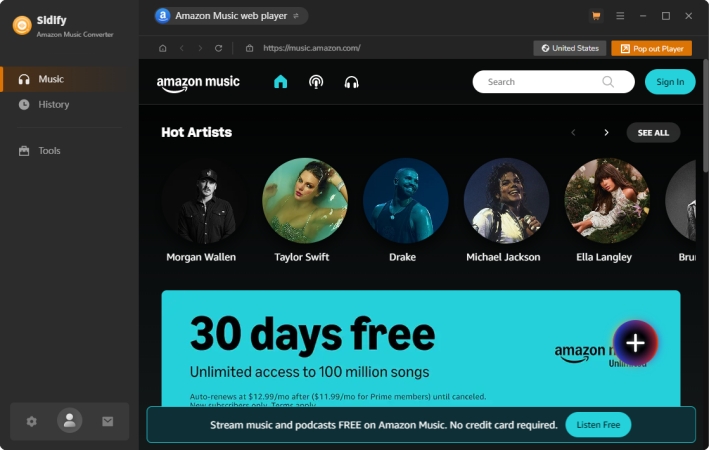
Feature 1. Audio Quality and Format Support
Sidify stands out because it can preserve high-fidelity sounds. If you subscribe to Amazon Music Unlimited, Sidify Amazon Music Converter can export tracks in lossless formats like FLAC, WAV, AIFF, and ALAC. For general listening on mobile devices, it supports highly compatible MP3 and AAC format at bit rates up to 320 kbps.
Feature 2. Conversion Speed and Performance
The software advertises conversion speeds up to 10×. In testing, achieving this speed depends heavily on your hardware and internet connection stability. While standard tracks process quickly in batches, Ultra HD files take longer because of their massive file size and the data processing required for lossless encoding.
Note
The tool cannot upscale low-quality audio. If your source track is standard definition, saving it as a FLAC file will only result in a larger file size without improving the actual sound quality.
Feature 3. ID3 Metadata Preservation
Sidify Amazon Music Converter includes built-in ID3 tag identification technology. When a song is processed, it automatically saves the artist's name, album artwork, track number, and release year into the file metadata. It also features an integrated ID3 tag editor, allowing you to manually adjust tags if you prefer custom organization.
Subscription Plans of Sidify Amazon Music Converter
Sidify operates on a free-to-try software model, but the free version has a significant catch: it will only convert the first 60 seconds of any song. To unlock full song conversions, paid licensing options are available.
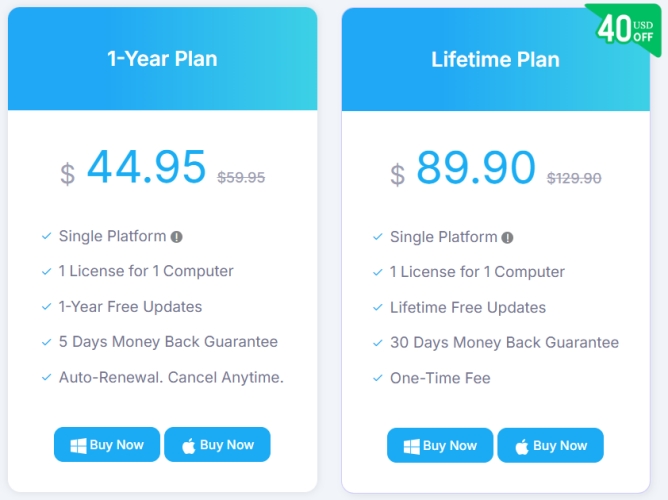
- Yearly Plan: $44.95/year
- Lifetime Plan: $89.90/lifetime
Pros & Cons of Sidify Amazon Music Converter About Audio Format
No software review is complete without exploring its drawbacks. If you are considering Sidify, there are some factors to keep in mind. To help you make an informed decision, here is a summary of the software's strengths and limitations based on hands-on testing.
-
😀 Pros
- Retain up to Ultra HD audio fidelity
- Preserve ID3 metadata automatically
- Simple drag-and-drop interface
- Built-in tools for CD burning
-
☹️ Cons
- No mobile app available
- Not offer free services
- App lag during large batch downloads
- A bit expensive to get a license
Part 2. Hands-On Experience of Sidify Amazon Music Converter
Using Sidify Amazon Music Converter is designed to be user-friendly, even for beginners. However, it is important to know that Sidify offers two modes to download content from Amazon Music. One is to record audio from the Amazon Music app by pasting the URL of the song into Sidify; the other is to download music from the built-in Amazon Music web player by logging into your Amazon credentials. Here is the standard step-by-step workflow.
Step 1 Launch Sidify and Set Output Settings
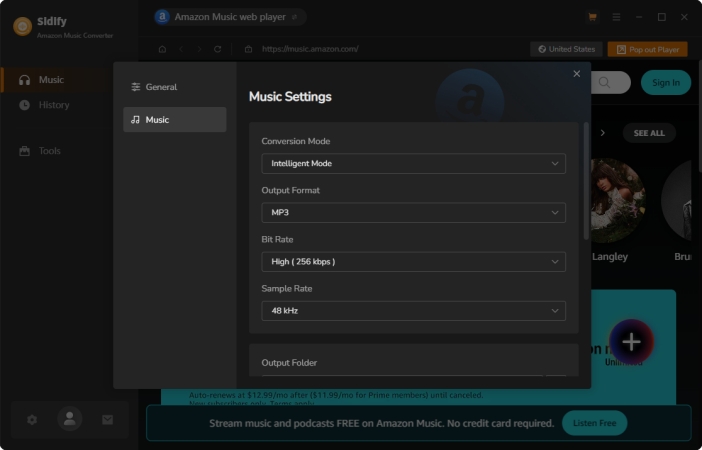
Launch Sidify Amazon Music Converter on your PC or Mac. Before choosing music to download, click the Settings gear icon. Here you can select your preferred output format like MP3 or FLAC, choose the output audio quality, and specify the folder where you want your files saved.
Step 2 Choose the Download Mode in Sidify
As there are two download modes available, you can choose Amazon App Record Mode or Amazon WebPlayer Download Mode. And the different modes adoption different methods to get Amazon Music tracks to download.
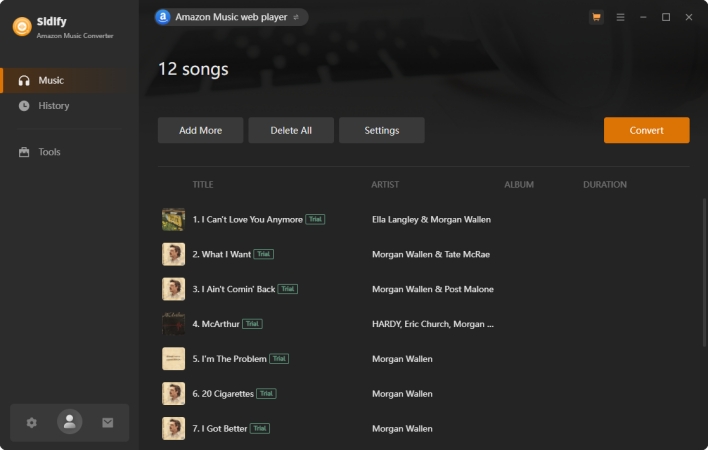
In the Amazon WebPlayer Download Mode, you have to log into your Amazon credentials and then find any music track, album, or playlist to download. After finding the content, click the + button to browse all the content and click the Add button to add them into the conversion list.
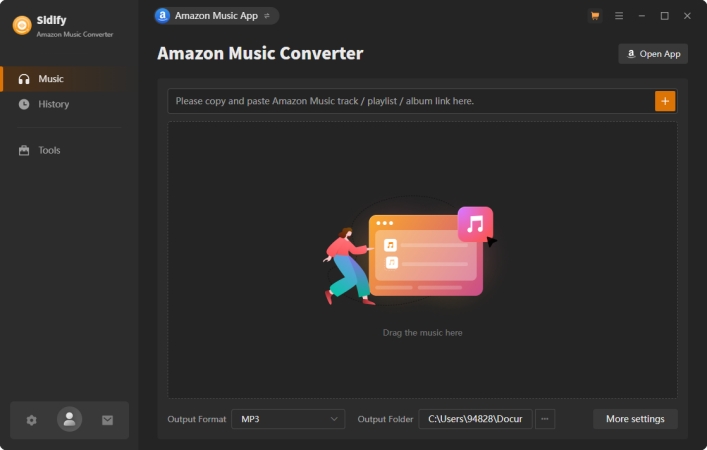
In the Amazon App Record Mode, you will be directed to the Amazon Music app installed on your computer. Go to your music library, then drag and drop your preferred music tracks to the Sidify interface. Sidify will display a list of all available tracks and click the Add button.
Step 3 Start the Conversion Process of Amazon Music
After adding the Amazon Music content into the conversion list, click the Convert button. The software will process the list sequentially. Wait for a while, and you can find all the downloaded music tracks in the History panel.
Part 3. Alternative Option to Sidify Amazon Music Converter
If Sidify Amazon Music Converter doesn't perfectly fit your workflow, there are alternative approaches on the market. Like Sidify, TunesMake Amazon Music Converter acts as a straightforward, effective solution that addresses core conversion needs.
TunesMake Amazon Music Converter can process songs, albums, and playlists from Amazon Music Prime and Amazon Music Unlimited into common formats like MP3, M4A, FLAC, or more formats. It preserves fundamental ID3 tags and handles batch processing efficiently. The most important thing is that TunesMake is often at slightly different pricing tiers.

Amazon Music Converter –
Download music from Amazon Music unlimitedly
- Download songs, albums, and playlists from Amazon Music
- Convert Amazon Music to MP3, M4A, M4B, WAV, FLAC, and AIFF
- Remove DRM protection from Amazon Music completely and safely
- Preserve the original audio quality and ID3 tags for management
Security Verified. 100% Clean & Safe.
To give you a clear view of the market, let's look at how Sidify Amazon Music Converter compares to other leading audio conversion tools like TunesMake Amazon Music Converter and TunesMake Streaming Audio Recorder.
| Feature | Sidify Amazon Music Converter | TunesMake Amazon Music Converter | TunesMake Streaming Audio Recorder |
|---|---|---|---|
| Connection Method | Requires Desktop App | Built-in Web Player | Built-in Web Player |
| Output Quality | Up to Ultra HD (Lossless) | Up to Ultra HD (Lossless) | Up to Ultra HD (Lossless) |
| Supported Formats | MP3, AAC, WAV, FLAC, AIFF, ALAC | MP3, WAV, FLAC, AIFF, M4A, M4B | MP3, WAV, FLAC, AIFF, M4A, M4B |
| Supported Platforms | Amazon Music | Amazon Music | Amazon Music, Spotify, Apple Music, Tidal, Deezer, YouTube Music, SoundCloud, Qobuz, Audible, Line Music, Pandora Music |
| Conversion Speed | 10× | 15× | 15× for Amazon Music (Depend on different platforms) |
| Bonus Features | CD burner, tag editor | Tag editor, media player | Tag editor, media player |
| Subscription Plans | $44.95/year $89.90/lifetime |
$14.95/month $44.95/year $89.95/lifetime |
$24.95/month $74.95/year $149.95/lifetime |
| Trustpilot Reviews | 4.1 | 4.7 | 4.7 |
Part 4. Conclusion
Sidify Amazon Music Converter delivers on its primary promises. It preserves high-fidelity audio quality, maintains clean metadata organization, and offers an incredibly simple user interface. But if you are an audio enthusiast who want a fast download and conversion of Amazon Music, TunesMake Amazon Music Converter is strongly recommended. With this tool, you can download and save a cast collection of your music library at a fast speed.
Related Articles




A professional writer at TunesMake, crafts in-depth tutorials, practical tips and expert advice focusing on streaming music, technology, and more.
- 1
- 2
- 3
- 4
- 5
- 6
- 7
 Leave Your Comment
(0)
Leave Your Comment
(0)

 Download Center

