








 Store
Store


Listening to your favorite audiobooks on a home theater system or TV setup can completely transform your listening experience. If you are an Audible subscriber and own a Roku device, you might be wondering how to get your audiobook library playing through your TV speakers. Here is everything you need to know about playing Audible on Roku, including step-by-step methods for iPhone, Android, and Bluetooth devices.
Part 1. Is Audible Available on Roku?
No, there is currently no official Audible app available in the Roku Channel Store. While you won't find a downloadable Audible channel on your Roku screen, you can still easily play Audible audiobooks on Roku by streaming audio directly from your smartphone, tablet, or computer.
⚠️ Warning:
Avoid downloading third-party "Audiobook" apps from the Roku Channel Store. These apps don't support official Audible or Amazon account logins and only offer access to public-domain audiobooks. To access your personal Audible library safely, use the official casting and streaming methods outlined below.
Part 2. How to Listen to Audible on Roku
Fortunately, you don't need a dedicated channel app to listen to Audible on Roku. By using screen mirroring, casting, Bluetooth, or Roku Media Player, you can easily play your entire Audible collection through your Roku-connected system. Depending on whether you use an iPhone, Android device, PC, Mac, or high-end Roku hardware, choose the method below that best matches your setup.
Method 1. Play Audible on Roku via Apple AirPlay (iPhone, iPad, Mac)
If you use an Apple device like an iPhone, iPad, or Mac, Apple AirPlay is the fastest and most seamless way to stream Audible to your Roku device.
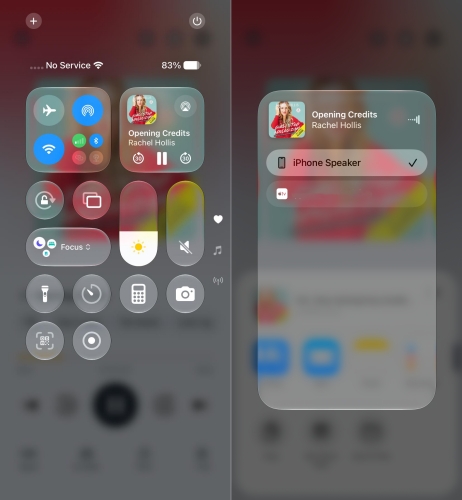
Step 1. Connect your Apple device and Roku to the same WiFi network.
Step 2. On your Roku, go to Settings > Apple AirPlay and HomeKit and ensure AirPlay is set to On.
Step 3. Open the Audible app on your Apple device and start playing your audiobook.
Step 4. Swipe down from the top-right corner of your screen to open the Control Center.
Step 5. Tap the AirPlay icon and select your Roku device from the list of available targets.
Method 2. Stream Audible to Roku via Screen Mirroring (Android)
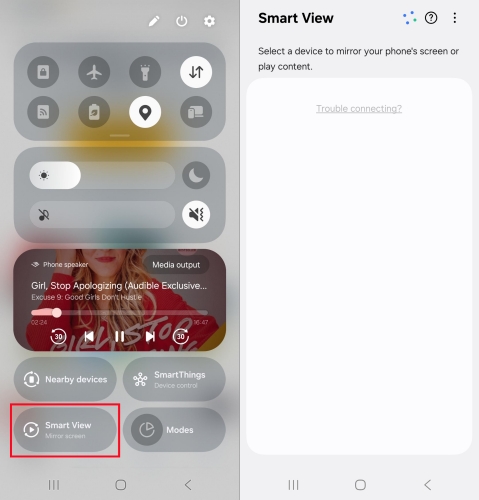
Android users can easily mirror their screen and stream Audible audio to Roku using built-in screen-casting feature called Smart View, Cast, or Quick Connect on different phone brands.
Step 1. Go to Settings on your Roku device, select System, and then tap Screen Mirroring.
Step 2. Choose Screen Mirroring Mode and set it to Prompt or Always Allow.
Step 3. Make sure your Android device and Roku are on the same WiFi network.
Step 4. Swipe down from the top of your Android screen to open the Quick Settings panel.
Step 5. Tap Smart View, Cast, or Screen Mirroring, then select your Roku device from the list.
Step 6. Once connected, open the Audible app and press play.
Method 3. Cast Audible to Roku via Casting (Windows PC & Mac)
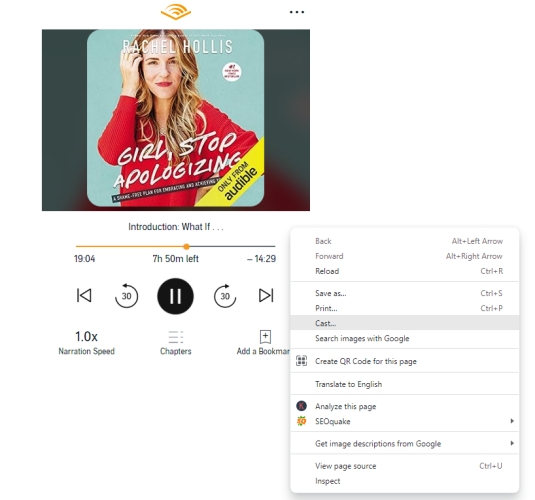
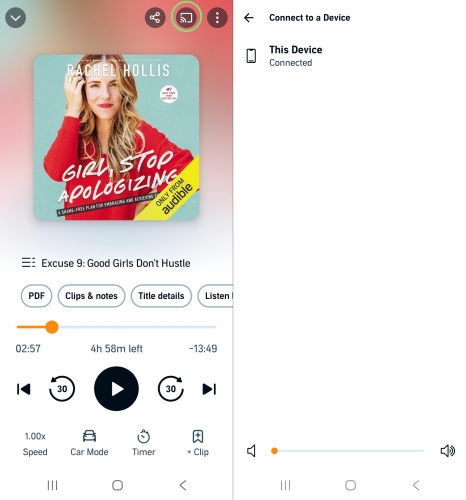
If you prefer listening from a computer, you can cast your Audible listening from the Audible Web Player on Google Chrome or Edge and use the browser's built-in Cast feature to route audio.
Step 1. Head to the Audible Web Player in a web browser on your computer.
Step 2. Sign into with your Amazon or Audible account.
Step 3. Click the Library button at the top of the window and find one title to play.
Step 4. Click the Listen Now button to start playing your selected title.
Step 5. Right-click anywhere in the Audible Web Player and select Cast to view your Roku device.
Step 6. In the list of available devices, select your Roku device.
Method 4. Connect Audible to Roku via Bluetooth (Roku Ultra, Streambars, Roku TVs)
If you own a Roku Ultra, Roku Streambar, Roku Smart Soundbar, or a Roku TV with Bluetooth support, you can pair your mobile device via Bluetooth just like a standard wireless speaker.
Step 1. Go to Settings on your Roku home screen.
Step 2. Select Remotes & devices > Smartphones & tablets.
Step 3. Choose Add a new smartphone or tablet.
Step 4. Open the Bluetooth settings on your mobile device or laptop.
Step 5. Select your Roku device from the list of available devices.
Step 6. Once paired, open the Audible app on your device and start listening.
Method 5. Listen to Audible on Roku via Roku Media Player (USB Drive)
If you want offline listening without draining your phone's battery or having your audio interrupted by incoming text notifications, you can play Audible audiobooks directly through the built-in Roku Media Player. Because Roku Media Player cannot read Audible audiobooks directly, you can use a conversion tool like TunesMake Audible Converter to remove the limitations.
With TunesMake Audible Converter, you can convert Audible audiobooks to Roku-compatible formats, including MP3, FLAC, WAV, and M4A. Then you can transfer converted Audible audiobooks to a USB drive, and play them via Roku Media Player. The whole process is easy to operate, even though you don't have any technical background.

Streaming Audio Recorder –
Download Audible audiobooks to popular audio formats
- Download purchases, podcasts, and Originals from Audible
- Convert Audible books to MP3, M4A, M4B, WAV, FLAC, and AIFF
- Remove DRM protection from Audible efficiently and safely
- Preserve the original audio quality and chapter information
- Support downloading audios from 11 popular streaming platforms
Security Verified. 100% Clean & Safe.
Step 1 Add Audible Audiobooks to Convert
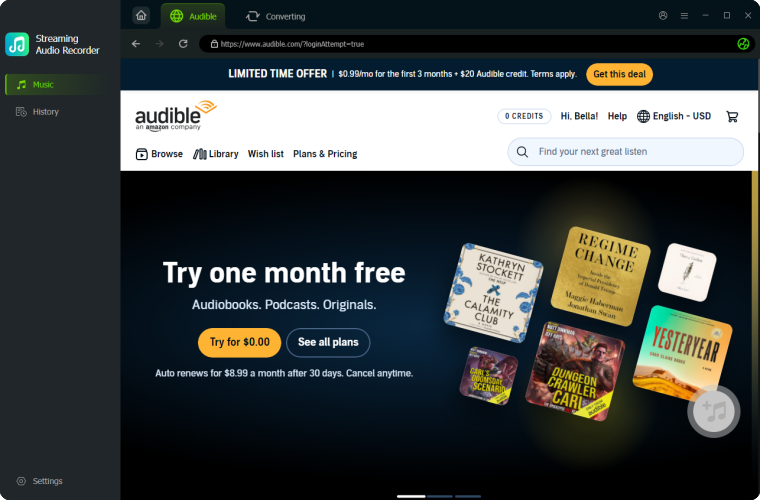
Launch TunesMake Streaming Audio Recorder on your computer, the navigate to select Audible from the main interface. After redirecting to the built-in Audible Web Player, log into with your Audible or Amazon account. In the Library section, find and select your purchased titles to download and convert. Then click the + button to add them into the conversion list.
Step 2 Choose MP3 as the Output Format
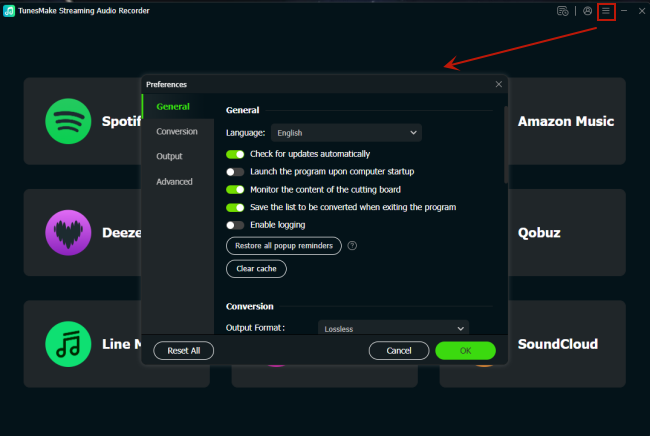
After selecting and adding Audible books to the conversion list, click the Settings button to open the settings window. You will have six audio formats that are all compatible with Roku TV. Suppose you aren't sure which option to choose, go for the MP3 option. Apart from that, you can adjust the bit rate, sample rate, and channel.
Step 3 Start to Convert Audible Books to MP3
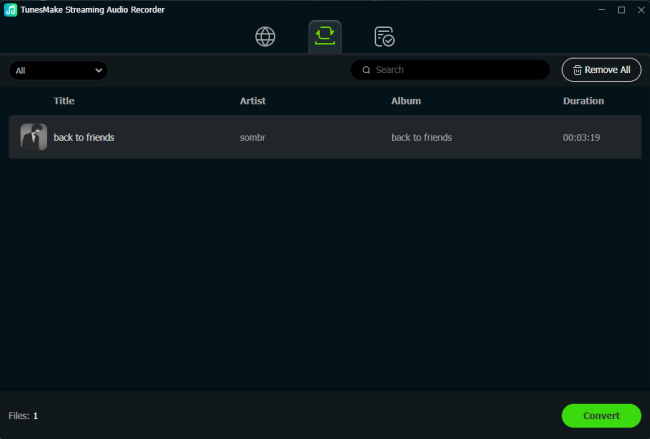
Once you're okay with the output format and setting, find the Convert button at the bottom left of the converter and click it to initiate the conversion. The time the conversion takes depends on the number of files or the size of the files. Once completing the conversion of Audible books, click the Converted button to view the Audible files you have converted.
Step 4 Play Audible Audiobooks on Roku TV
Now the conversion of Audible files to a Roku-supported format is complete. All that remains is transferring Audible books you've converted to a USB drive to play Audible on Roku TV. After that, you can plug your USB drive into the USB port of Roku TV and go to play Audible books. Make sure that you have Roku Media Player installed on your Roku device.
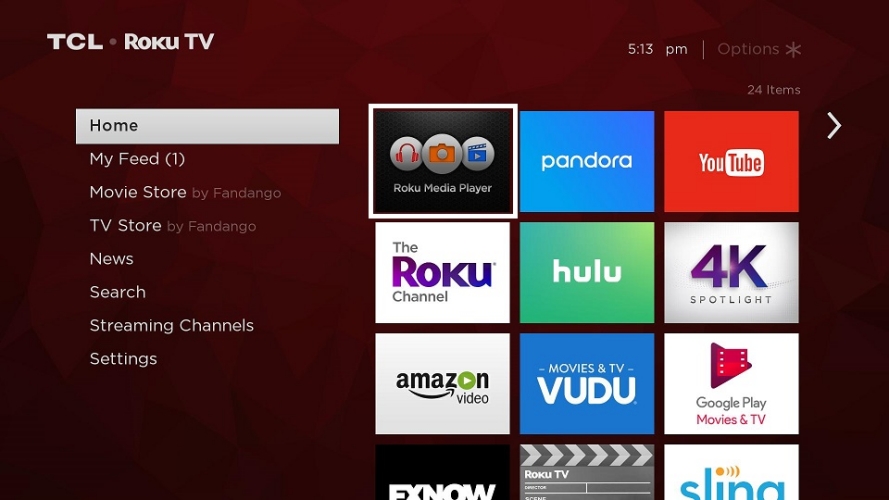
1. Launch Roku Media Player and select the icon for All, Video, Audio, or Photo.
2. On the Select Media device screen, highlight your USB drive.
3. Press Star on your Roku remote to view information about your USB drive.
4. Select Scan, then select the icon for your USB drive.
5. Navigate through your USB drive to find the content you wish to play.
6. Press OK or Play to start playing your Audible audiobooks on Roku.
Part 3. Fixes for Audible Not Playing on Roku
If you run into issues while trying to play your Audible audiobooks on Roku, try these standard troubleshooting steps. Or you can directly download and convert Audible audiobooks with TunesMake Audible Converter to get offline listening with Roku Media Player.
1️⃣ Verify Wi-Fi Alignment: Ensure your device and Roku are on the same Wi-Fi network and frequency band.
2️⃣ Toggle AirPlay or Screen Mirroring: Turn the AirPlay or Screen Mirroring feature Off and On again in your Roku settings to reset connection permissions.
3️⃣ Restart Hardware: Perform a system restart on your Roku by going to Settings > System > Power > System restart, and restart your mobile device.
4️⃣ Update System Firmware: Check for pending software updates on your Roku via Settings > System > Software update.
Part 4. FAQs about Audible for Roku
Can I play Audible on Roku via a USB drive?
While the Roku Media Player app can play local audio files from a USB drive, Audible audiobooks are in the DRM protection formats of AAX or AAXC that standard media players cannot decode. If you want to play your liked Audible audiobooks on Roku via a USB drive, try to convert Audible audiobooks using TunesMake Audible Converter first, then transfer them into a USB drive.
Can I use Amazon Alexa to control Audible on Roku?
If your Roku device is linked to your Amazon Alexa app, you can use voice commands to control basic TV power or media playback. However, because there is no native Audible Roku channel, you cannot command Alexa to launch Audible directly on Roku.
Why is there audio lag when screen mirroring Audible to Roku?
Minor audio latency can happen over screen mirroring due to Wi-Fi network congestion. If you experience lag, try switching your Wi-Fi router to a 5GHz band, moving closer to the router, or switching to AirPlay or Bluetooth connections instead.
Part 5. Conclusion
While Roku does not offer a native Audible app in its channel store, getting your audiobooks onto your home theater or TV setup is remarkably straightforward. Whether you prefer the quick wireless casting of Apple AirPlay and Android Screen Mirroring, the direct connectivity of Bluetooth on Roku Streambars, or offline USB playback via tools like TunesMake Audible Converter, you have plenty of options to fit your tech setup.
Related Articles

An experienced freelance writer at TunesMake, specializes in using various streaming services from Spotify, Apple Music, to Amazon Music, and more other platforms.
- 1
- 2
- 3
- 4
- 5
- 6
- 7
 Leave Your Comment
(0)
Leave Your Comment
(0)

 Download Center

