








 Store
Store


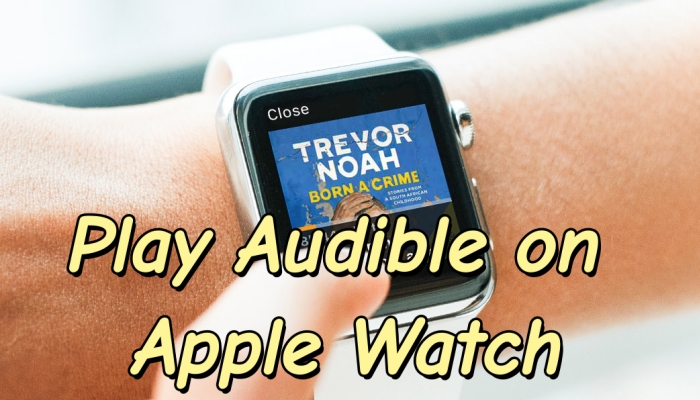
For fitness enthusiasts, runners, or anyone looking to cut down on screen time, leaving your iPhone at home while still enjoying your favorite audiobooks is the ultimate freedom. Thanks to updates to the standalone Audible app, listening to Audible on Apple Watch without your phone nearby is easier than ever. In this comprehensive guide, we will walk you through the exact setup process to install the Audible app on Apple Watch and how to download Audible books to Apple Watch directly. Also, we will offer several solutions to Apple Watch Audible not syncing.
Part 1. How to Listen to Audible on Apple Watch (Modern Series)
Gone are the days when you were forced to tether your watch to your iPhone for hours just to sync a single book. The standalone Audible app allows you to browse, stream, and download content over Wi-Fi or Cellular directly from your wrist. The following are steps to setup and install the Audible app on Apple Watch for playing from your wrist directly.
Quick Prerequisites of Audible for Apple Watch
Before diving into the setup, let's make sure your hardware and software are fully compatible with the modern Audible Apple Watch app.
| Component | Minimum Requirement | Recommended |
|---|---|---|
| Apple Watch Hardware | Series 4, SE, or Ultra | Series 7, 8, 9, 10, or Ultra 2 |
| Watch Operating System | watchOS 9.0 | watchOS 11.0 or later |
| iPhone Software | iPhone 8 or newer running iOS 16 | iPhone 15 or later running iOS 18 or later |
| Audio Output | Bluetooth headphones | AirPods with watchOS integration |
How to Setup and Install Audible on Apple Watch
Setting up Audible on Apple Watch takes only a couple of minutes. You can install it using either your iPhone or the watch itself.
Method 1. Installation via Apple Watch (Direct)
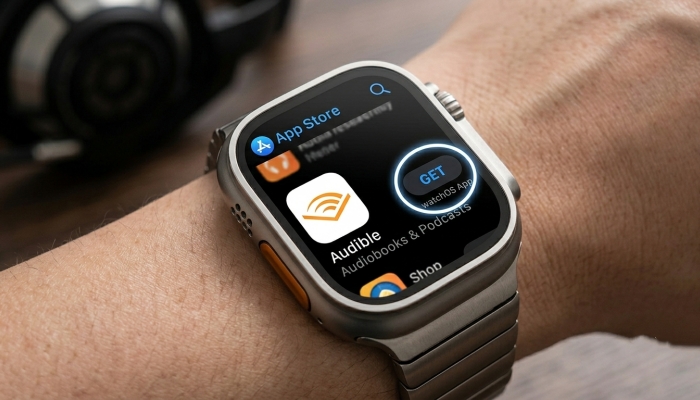
Step 1. Open the App Store directly on your Apple Watch.
Step 2. Search for Audible and tap Get or the cloud download icon.
Method 2. Installation via iPhone
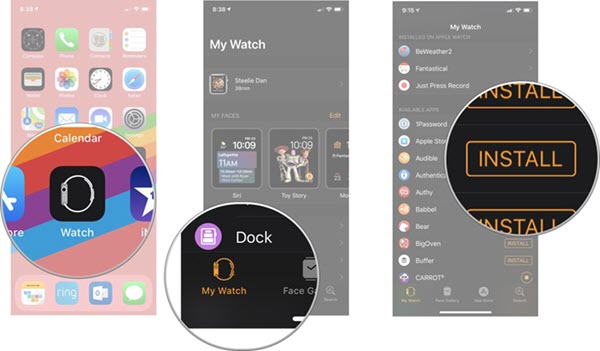
Step 1. Open the Watch app on your paired iPhone.
Step 2. Tap the My Watch tab at the bottom left.
Step 3. Scroll down to the Available Apps section.
Step 4. Find Audible and tap the Install button next to it.
How to Listen to Audible on Apple Watch
Once the Audible app for Apple Watch is installed, you have two primary methods for listening to your audiobooks on your watch, including streaming with an internet connection or offline playback with downloads.
Option 1: Direct Downloading (Recommended for Offline Use)
To listen to Audible audiobooks without carrying your phone or using cellular data, you can can download the audiobook file to your watch's local storage over WiFi before you leave.
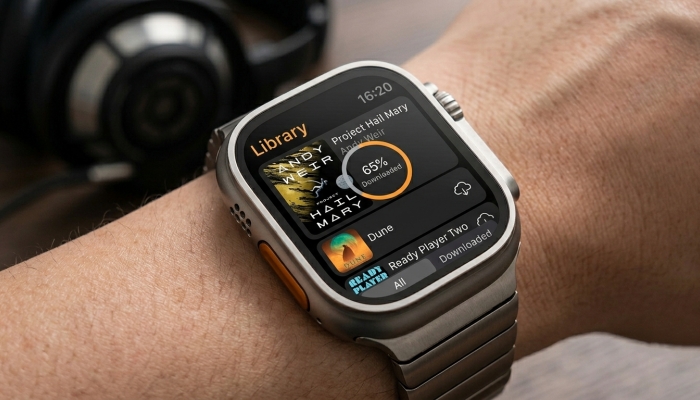
Step 1. Open the Audible app on your Apple Watch.
Step 2. Navigate to your Manage Library section.
Step 3. Find the audiobook you want to listen to and tap on the title.
Step 4. The book will instantly begin streaming, and a download progress indicator will appear.
Option 2: Cellular Streaming (For LTE Apple Watch Models)
If you own an Apple Watch with an active cellular plan, you can stream any Audible book in your library on the fly. Simply tap any book in your library while outdoors. But note that streaming over LTE increases battery consumption significantly compared to playing a pre-downloaded file.
More Tips to Control Audible Playback on Your Wrist
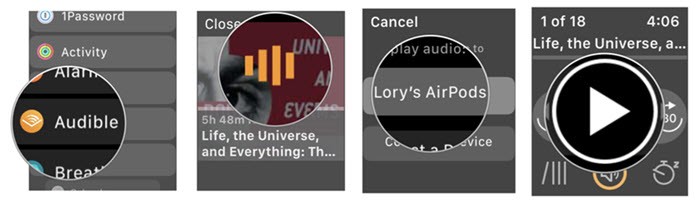
The Apple Watch interface is optimized to offer full playback control directly from the main screen. Here are some features for controlling Audible playback on your wrist.
-
Skipping and Rewinding: Tap the three-arrow icons to skip forward or rewind by 30 seconds.
-
Chapter Selection: Tap the chapter icon at the bottom left of the playback screen to view the table of contents and skip directly to specific sections.
-
Playback Speed Control: Tap the 1× icon or speed indicator to adjust narration speed from 0.5× up to 3×, matching your preferred listening pace.
-
Sleep Timer: Access the settings menu within the watch app to set a sleep timer if you enjoy listening to audiobooks in bed.
Part 2. How to Add Audible Books to Apple Watch (Legacy Series)
If the official Audible app continues to encounter synchronization glitches, or if you are running an older Apple Watch model that struggles with the standalone Audible app, an alternative solution is to bypass the app's sync architecture entirely.
By using a third-party tool like TunesMake Audible Converter, you can download your AA or AAX audiobooks from your Audible account to your computer and convert them into standard audio formats like MP3 or M4A. Since this tool maintains original chapter information and ID3 tags, you don't lose your place in the book.
Once converted into a universal format, you can import the file into your local library, sync it through the official iPhone Watch app, and listen via Apple's Books application on your watch. This approach sidesteps the app-based syncing engine entirely, offering a permanent offline copy directly in the watch's internal storage.

Streaming Audio Recorder –
Download Audible audiobooks to popular audio formats
- Download purchases, podcasts, and Originals from Audible
- Convert Audible books to MP3, M4A, M4B, WAV, FLAC, and AIFF
- Remove DRM protection from Audible efficiently and safely
- Preserve the original audio quality and chapter information
- Support downloading audios from 11 popular streaming platforms
Security Verified. 100% Clean & Safe.
Step 1 Customize the Output Audiobook Format
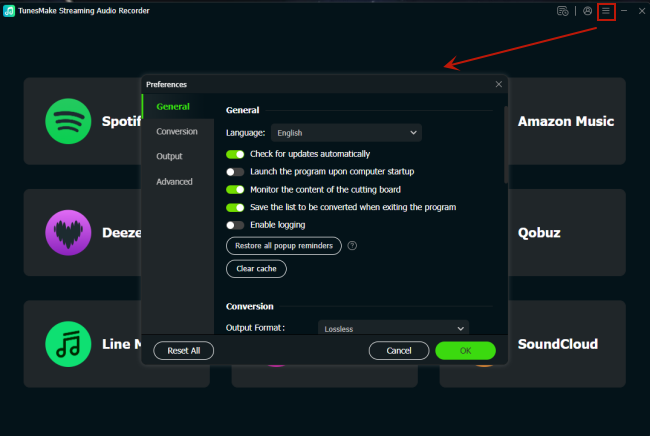
First of all, launch TunesMake Streaming Audio Recorder on your computer and you're prepared to set the output format for Audible. Click the Settings button to select the Conversion option. Here you can set the output format and adjust other audio parameters like the bit rate. For playing, you can select MP3 as the output audio format.
Step 2 Add Audible Titles to the Conversion List
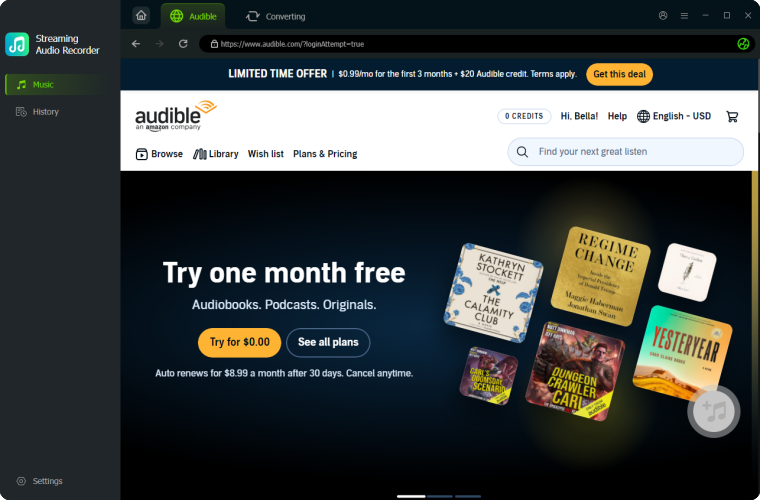
Then you go to the key step, that is, add the target Audible titles to download and convert. You can find a book in Audible to download, click the + button to see the detail, and add it to the conversion list. Or you can directly enter the URL address of an Audible title into the search bar and then add it into the conversion list.
Step 3 Start to Convert Audible Audiobook to MP3
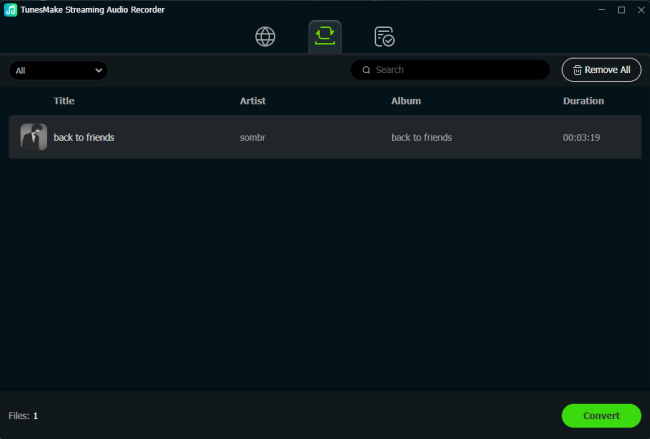
You can now click the Convert button at the lower right corner and let the TunesMake program start the conversion of Audible audiobooks immediately. Once it's done, you can find the converted Audible files in the history folder by clicking the History tab at the top of the interface and then transfer them to your watch for playing.
Step 4 Sync Audible Audiobooks to Apple Watch
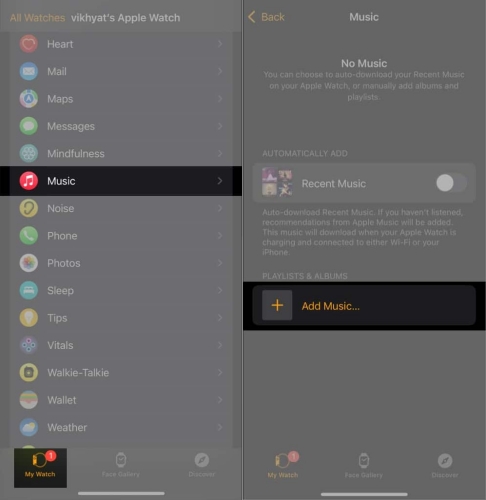
You need to sync all the converted Audible book files to your iPhone from your computer first. Just use iTunes or Apple Music to sync all the files to your iPhone. Then you can sync them through the Apple Watch app > the Music menu > Add Music easily. Now you can listen to your Audible books on your watch without limitations.
Part 3. Troubleshooting Apple Watch Audible Not Syncing
If you have used Audible on your watch before, you have likely run into the dreaded "Waiting to sync" message or downloads that take ages. This happens because the Apple Watch prefers using a low-energy Bluetooth bridge via your iPhone, which acts like a microscopic straw for massive audio files. Use these community-proven hacks to force lightning-fast download speeds.
Solution 1. WiFi Force Hack
This trick completely bypasses the slow iPhone bridge and forces your Apple Watch to use its internal Wi-Fi chip, cutting download times from hours to mere minutes.
Step 1. Start the download process on the Audible app on your watch.
Step 2. On your Apple Watch, swipe up to open the Control Center and turn off Bluetooth.
Step 3. Ensure your Apple Watch is connected directly to your home Wi-Fi network.
Step 4. Open the Audible app on the watch again. Your download will now fly through using WiFi.
Don't forget to turn Bluetooth back on when the download finishes so your watch can talk to your phone and headphones again!
Solution 2. Silent Stream Workaround
If the Audible app refuses to download while idle, you can trick the watch into thinking you are actively using it, which forces the data pipeline to stay open.
Step 1. Connect your Bluetooth headphones to your Apple Watch.
Step 2. Start streaming the audiobook you want to download.
Step 3. Turn the volume down to 0% (Mute).
Let the muted book play in the foreground. Because the app is actively processing a stream, watchOS will keep the download pipeline fully open until it reaches 100%.
Solution 3. Foreground Display Hack
watchOS is highly aggressive when it comes to battery management. If your watch screen goes to sleep, watchOS will often pause or throttle background app downloads to save power.
Step 1. Go to your Apple Watch Settings > Display & Brightness > Wake Duration.
Step 2. Temporarily set it to Wake for 70 Seconds.
Keep tapping the watch screen occasionally while the book downloads to ensure the Audible app stays active in the foreground until it reaches 100%.
Part 4. FAQs about Audible and Apple Watch
Will I lose access immediately after canceling Apple Music?
No. Whether you are paying monthly or utilizing a free trial, clicking cancel ensures you won't be charged next month, but you can continue listening to your music until the final day of your current billing cycle.
Can you listen to Audible on Apple Watch without phone?
Yes. Once an audiobook has completely downloaded to your Apple Watch indicated by a solid icon in your library, you can leave your iPhone at home. Just connect your Bluetooth headphones directly to your watch to listen completely offline.
How to remove Audible book from Apple Watch?
Audiobooks can easily take up anywhere from 50MB to over 500MB depending on their length and audio quality. To prevent your Apple Watch from running out of space, you can remove a downloaded Audible book after finishing a title.
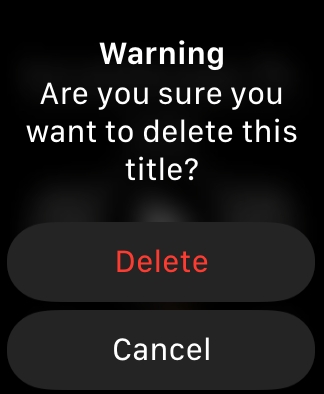
Step 1. Launch Audible on your Apple Watch and head to Manage Library.
Step 2. Find the book you have finished.
Step 3. Swipe left on the title or look for the management menu.
Step 4. Tap Remove Downloads and select Delete next to the audiobook.
Step 5. Tap Done to confirm the action.
How to sync Audible books to Apple Watch?
If you prefer to browse your massive catalog in Audible on a large screen and push titles over to your watch, you can still use the traditional iPhone sync method to sync your Audible titles.
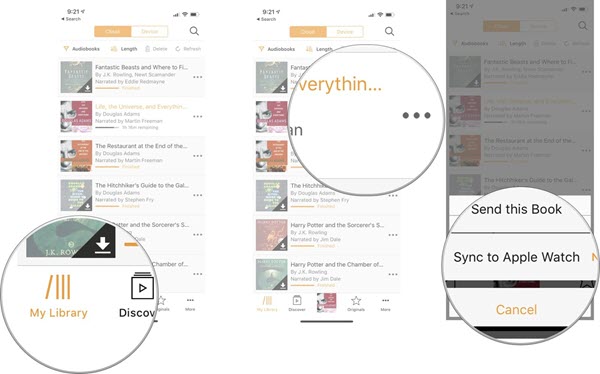
Step 1. Open the Audible app on your iPhone and go to your Library.
Step 2. Find the audiobook you want to transfer.
Step 3. Tap the three dots (...) next to the title.
Step 4. Select Sync to Apple Watch.
Step 5. Keep the Audible app open on both your phone and watch.
Part 5. Conclusion
As the standalone Audible app is available on the Apple Watch, it is easy to listen to Audible audiobooks on Apple Watch. Whether you are on the way to work or step out for a stroll, you can listen to titles that interest you on your Apple Watch. However, if you want to have Audible titles available to listen to on a legacy Apple Watch or anywhere, TunesMake Audible Converter could get it done. With its help, you can convert Audible audiobooks to several universal formats for playing on any device without hassle.
Related Articles


A professional writer at TunesMake, crafts in-depth tutorials, practical tips and expert advice focusing on streaming music, technology, and more.
- 1
- 2
- 3
- 4
- 5
- 6
- 7
 Leave Your Comment
(0)
Leave Your Comment
(0)

 Download Center

