








 Store
Store


Are you looking for a high-fidelity alternative to Spotify or Apple Music? The Deezer free trial remains one of the most generous ways to experience lossless audio without an immediate financial commitment. Whether you're an audiophile chasing that perfect FLAC sound or a casual listener wanting to escape the limitations of the Free tier, this covers everything you need to know about Deezer free trial. Here you can learn how to activate Deezer free trial and how to keep Deezer music after canceling a free trial.
Part 1. Top Features You Get with a Deezer Free Trial
Deezer has streamlined its promotional offers to cater to different lifestyles. Unlike some competitors, Deezer offers High Fidelity audio quality to all paid trials. Before starting a Deezer free trial, there are some things you need to know.
Comparison Table: Deezer Free Trial Duration and Costs
If you are a newbie to Deezer, you have a chance to get a free trial, including Premium, Duo, and Family plans. Here is the fee you will be charged after a free trial.
| Plan Type | Trial Duration | Price After Trial (Monthly) | Best For |
|---|---|---|---|
| Deezer Premium | 30 Days | $11.99 | Individual listeners or Audiophiles |
| Deezer Duo | 30 Days | $15.99 | Couples or roommates |
| Deezer Family | 30 Days | $19.99 | Up to 6 accounts |
Top 5 Features to Get with a Deezer Premium Free Trial
When you can sign up for a trial, you aren't just getting an ad-free experience. You are unlocking a suite of proprietary tools designed for deep music discovery.
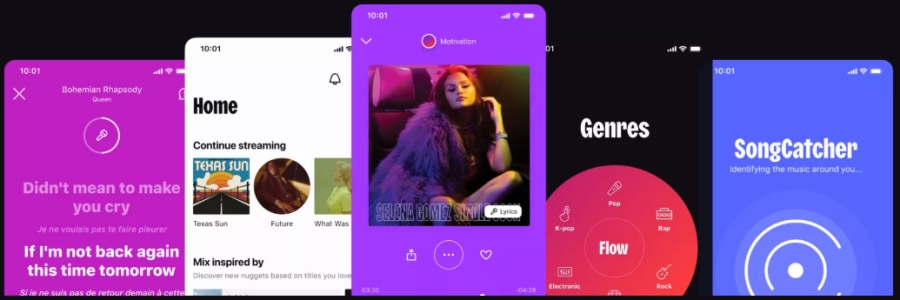
Feature 1. True HiFi Audio (FLAC)
While other services compress your music to save data, the Deezer trial gives you 16-bit, 1,411 kbps FLAC quality. It's the difference between hearing a song and feeling it.
Feature 2. Flow (AI-Powered Personal DJ)
Flow is Deezer's signature AI discovery tool that has been upgraded to include Moods. It allows you to tell the AI if you want a Melancholy, Power, or Focus vibe based on your existing library.
Feature 3. Full Offline Mode
During your Deezer Premium free month, you can download any of the 120 million songs. This is perfect for flights, underground commutes, or saving your mobile data plan.
Feature 4. SongCatcher (Hum with Search)
The trial includes SongCatcher, which can identify tracks playing around you or even recognize a tune you hum into your phone when you don't know the lyrics.
Feature 5. Lyrics and Translation
Deezer leads the market in lyrical integration. You can view synchronized lyrics in real-time and, for foreign language tracks, toggle an instant translation to understand the meaning.
Part 2. How to Get a Free Trial on Deezer
A new subscriber to Deezer stands a chance of getting a free trial of Premium, Duo, or Family. Getting started is straightforward, but doing it correctly ensures you get the full suite of features like SongCatcher and Offline Mode. Let's take a look at how to get a free trial on Deezer.
Step 1 Visit the Official Offer Page
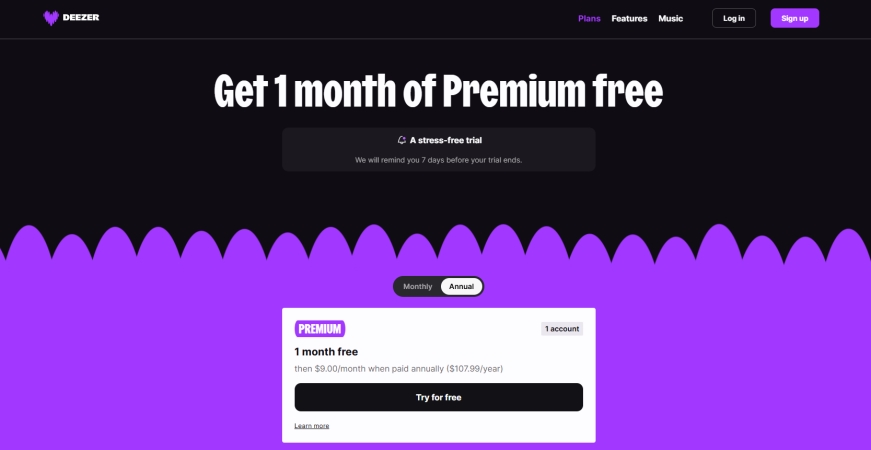
Navigate to the Deezer website or download the app. You will typically see a "Try for Free" or "Get 1 month Free" button prominently displayed.
Step 2 Create Your Account
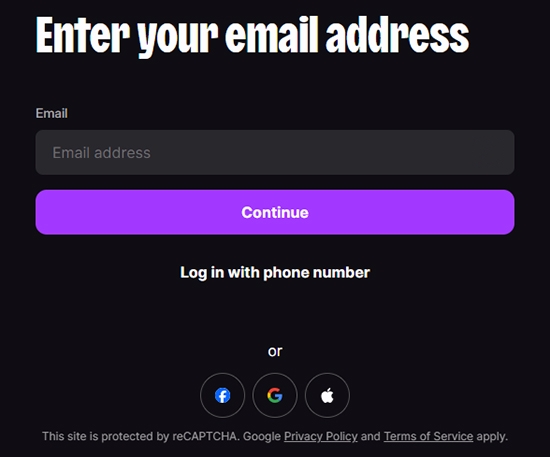
You can sign up using an email address or link to your Google, Facebook, or Apple ID. Note that to qualify for the Deezer free trial, you must be a new user. If you have previously used a trial on that email or payment method within the last 12 months, you may be ineligible.
Step 3 Select Your Payment Method
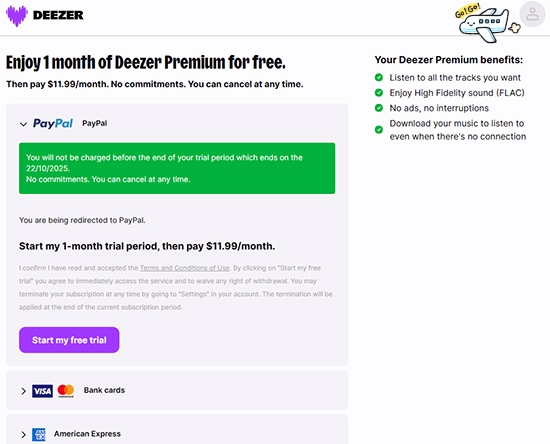
Even though the first month is $0.00, Deezer requires a valid credit card, Pay account, Apple Pay link, or Google Pay link. That is used for paying the subscription fee for the next month.
Step 4 Import Your Music to Deezer
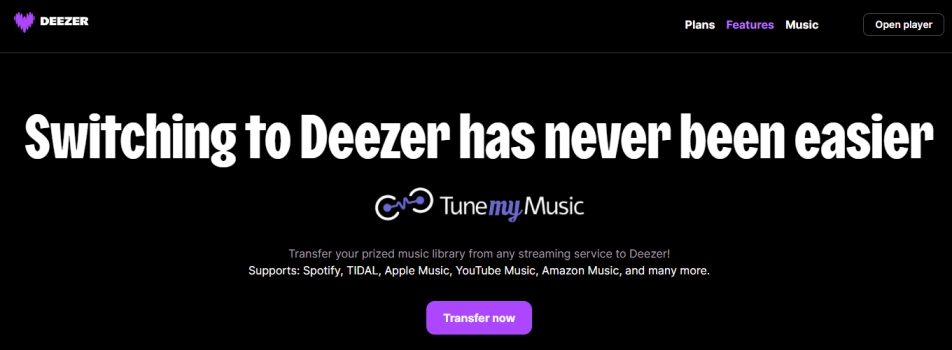
One of Deezer's best features is the integrated "Transfer Your Music" tool. During your trial setup, you can instantly sync your playlists from Spotify, Tidal, or Apple Music. So, you don't have to start your library from scratch.
How to Cancel Deezer after Free Trial
A common fear with any free trial is the subscription trap. Deezer has improved user trust by implementing a 7-day reminder. You'll receive an email or push notifications one week before your trial ends, giving you plenty of time to decide. If you decide Deezer isn't for you, you can cancel at any time. Here is how to cancel Deezer free trial on a computer or phone.
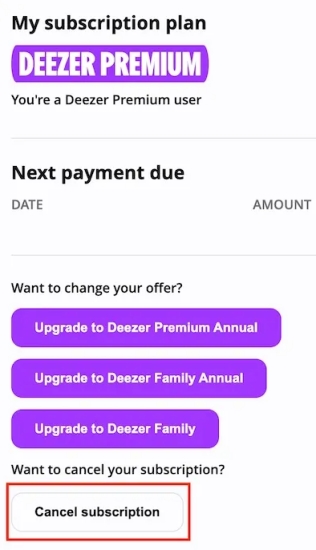
Step 1. Open the Settings in the Deezer app on your computer or phone.
Step 2. Tap on Account Management and select Manage my subscription.
Step 3. Tap Cancel my subscription and choose the reason for canceling.
Step 4. Tap Confirm to complete the canceling of the free trial.
Part 3. How to Get More Than 30 Days Deezer Free Trial
Finding more than 30-day Deezer free trial often requires looking beyond the standard 1-month offer found on the main homepage. While Deezer's default trial is currently 30 days for Premium, Duo, and Family plans, extended free trial offers are still available through specific regional promotions and partnerships.
Partner Promotions
Deezer frequently partners with other brands to offer extended trials. Look for these specific collaborations:
- Fitness Park (France): New Fitness Park subscribers often receive 3 to 6 months of Deezer Premium for free as part of their membership package.
- Hardware Bundles: Brands like Sonos, Bose, and certain mobile carriers frequently include 3-month trial codes with the purchase of new audio equipment or unlimited data plans.
- Retailer Vouchers: Sites like Kinguin or local electronics retailers sometimes sell or bundle 3-month trial vouchers for new accounts at a heavy discount or for free with other purchases.

Win-Back Offer
If you were a previous Deezer subscriber but haven't used the service in over 12 months, keep an eye on your email. Deezer often sends "Win-Back" promotions that offer 3 months for the price of 1 or a full 3-month free trial to encourage you to return.
Social Media Promotions
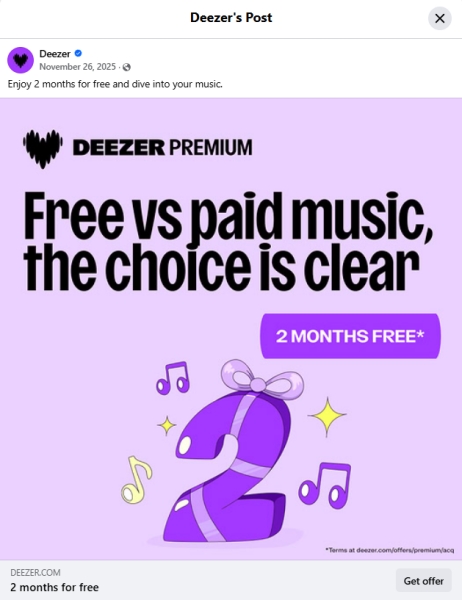
Keep an eye out for Deezer's official social platforms like Facebook and X (formerly Twitter). While 30 days is the standard available on the Deezer homepage, 60-day trials or a longer free trial will be released sometimes in a post on social platforms.
Part 4. How to Keep Deezer Music after a Free Trial
A common concern for trial users is what happens to their offline downloads once the trial ends. On Deezer, once you revert to a "Free" account, your offline access is revoked and tracks become unplayable. If you find that you need to access your favorite tracks on devices that don't support the Deezer app, some users utilize tools like TunesMake Deezer Music Converter.
TunesMake Deezer Music Converter is a safe and smart utility that allows you to download and convert your Deezer library into common formats like MP3 or FLAC. It preserves the original quality found in the Premium trial. Also, it automatically saves ID3 tags like artist, album, and artwork, making it easier to organize your local files if you decide to cancel your subscription.

Streaming Audio Converter -
Download Deezer music for keeping forever
- Download tracks, albums, playlists, and artists from Deezer
- Convert Deezer music to MP3, M4A, FLAC, AIFF, WAV, and M4B
- Preserve the original audio quality and ID3 tags for management
- Remove DRM from Deezer without compressing audio quality
- Support downloading music from over 10 popular streaming platforms
Security Verified. 100% Clean & Safe.
Step 1 Configure the Output Audio Parameters
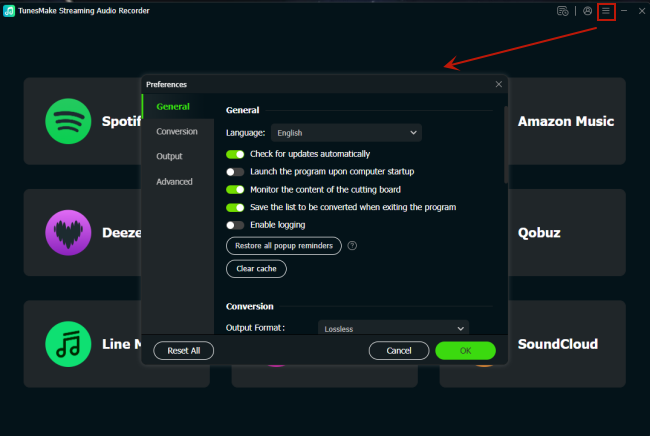
After downloading and installing TunesMake Deezer Music Converter, open it and then go to set the output audio parameters for Deezer. Click the menu icon and select the Preferences option form the drop-down menu. In the Preferences window, select the output audio format from the available options like MP3 and FLAC. Also, you can set the bit rate, sample rate, and channel.
Step 2 Import Deezer Songs to the Converter
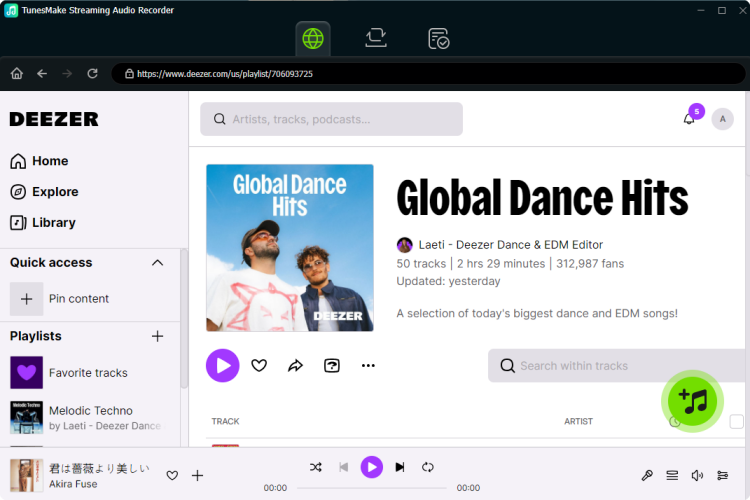
Once all is set well, go back to the main interface and select Deezer to open the web player. Now you can select any songs, albums, and playlists you want to download from Deezer. Locate the music and click the + (Add) button to add your liked songs to the conversion list. Continue to switch to the Convert tab from the top menu.
Step 3 Start to Download Music from Deezer
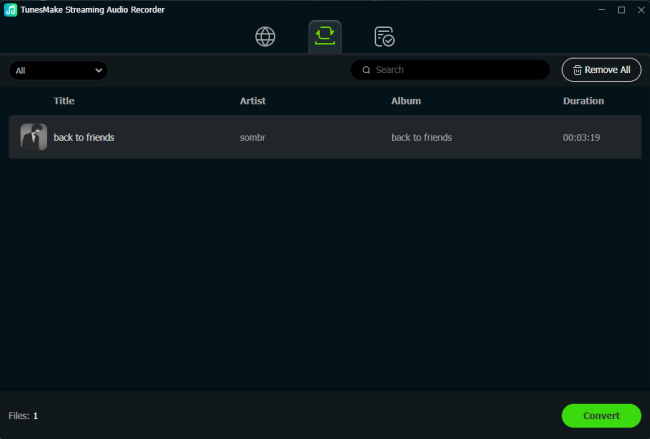
To download music from Deezer, click the Convert button at the bottom right of the converter. Wait for a while, and TunesMake Deezer Music Converter will download and save Deezer songs to your computer. After the conversion, you can view the converted Deezer songs in the history list by clicking the Converted icon.
Part 5. FAQs about Deezer Free Trial
Can I get a Deezer free trial without a credit card?
Generally, no. A valid payment method like Card, PayPal, or App Store link is required to verify your identity and prevent trial abuse, even though the charge is $0.00.
Does the Deezer free trial work on Apple Watch?
Yes! The Deezer Premium free experience extends to all your devices, including smartwatches, smart TVs, automotive systems, and smart speakers.
Will I lose my playlists if I cancel Deezer after a free trial?
Your playlists remain in your account, but you will lose the ability to play specific songs on-demand or listen offline once you revert to the Free tier.
Part 6. Conclusion
If you have no idea where to begin in getting a Deezer free trial, you can find the answer in this guide. With the above steps and methods, you can access the Deezer premium free trial. To keep Deezer songs for offline listening after canceling the free trial, try using TunesMake Deezer Music Converter. By using this tool, you can download and convert Deezer music tracks as local files.
Related Articles

A senior editor from TunesMake, dedicated to sharing professional tutorials and solutions of software, movies, and music.
- 1
- 2
- 3
- 4
- 5
- 6
- 7
 Leave Your Comment
(0)
Leave Your Comment
(0)

 Download Center

