








 Store
Store


Music streaming has revolutionized how we access millions of tracks every day. Among top-tier platforms, Deezer stands out for its high-resolution audio library, personalized recommendations, and intuitive interface. As interest in high-fidelity streaming grows, many Android users search for Deezer Premium APK in hopes of unlocking premium features without a paid subscription.
However, downloading modified software carriers significant security, technical, and privacy implications. This comprehensive guide covers what Deezer Premium APK offers, the major risks involved with third-party installers, and the steps to download and install Deezer Premium APK. Also, we will share some other ways to enjoy high-quality Deezer music safely.
Part 1. What Is Deezer Premium Mod APK?
A Deezer Premium Mod APK is an unofficial, modified version of the Android Deezer app created by third parties. It is designed to alter the original application and often claim to provide access to Premium features without requiring a paid Deezer subscription. Unlike the official Deezer app, a mod APK is not developed, distributed, or supported by Deezer.
What Features Does a Deezer Premium Mod APK Claim to Offer?
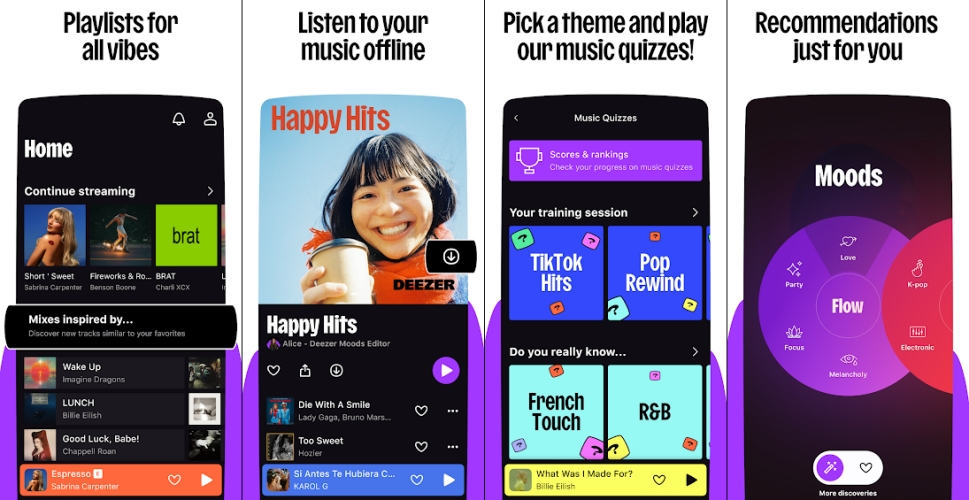
Many users search for Deezer Premium Mod APK because unofficial modified versions often advertise access to Premium functionality. A modified Deezer Premium Mod APK distributed by a third party has many features such as:
-
Ad-free music streaming
-
Unlimited song skips
-
Offline listening
-
High-quality audio
-
On-demand playback
-
Premium access without payment
It's important to note that these are claims made by third-party distributors. Whether these features work depends on the specific modified version and may change if Deezer updates its service.
How Is a Mod APK Different from the Official Deezer App?
Choosing between the official Deezer app and a Deezer Premium Mod APK involves more than comparing features. Here are the differences between the official app and an unofficial APK.
| Feature | Official Deezer App | Deezer Premium Mod APK |
|---|---|---|
| Developer | Official app stores or official APK | Third-party websites |
| Premium Access | Requires a subscription | Often claims to unlock Premium features |
| Security Updates | Regular | May not receive official updates |
| Customer Support | Yes | No |
| Reliability | Generally stable | Can vary depending on the modification |
| Privacy | Official privacy policy | Depends on distributor |
Frequently Asked Questions about Deezer Premium APK
Is Deezer Premium Mod APK Safe?
Because mod APKs are modified by third parties, they can introduce additional risks compared with the official app. These may include malware code, privacy concerns, unnecessary permission requests, app instability, missing security updates, or compatibility issues after Deezer releases new versions. Since an unofficial Deezer Premium APK is not reviewed or supported by Deezer, their integrity cannot be guaranteed.
Is Deezer Premium Mod APK Legal?
The official Deezer APK is a legitimate way to install the app. By contrast, a modified APK that attempts to bypass subscription requirements or unlocks paid features without authorization may violate Deezer's Terms of Service and could affect access to the service or support.
Part 2. How to Get Deezer Premium Mod APK Download
Those Deezer Premium Mod APKs are not available in the app store. To install a Deezer Premium Mod APK, you can only turn to some third parties like MODDROID. First, you need to install a third-party app store, then search for Deezer to download and install. Following are the steps of how to download and install a Deezer Premium Mod APK on a Samsung phone.
Step 1. Navigate to MODDROID and install Moddroid on your device.
Step 2. Tap Download > Download anyway to download the app store.
Step 3. Locate the Downloads folder in the browser and choose to install the app store.
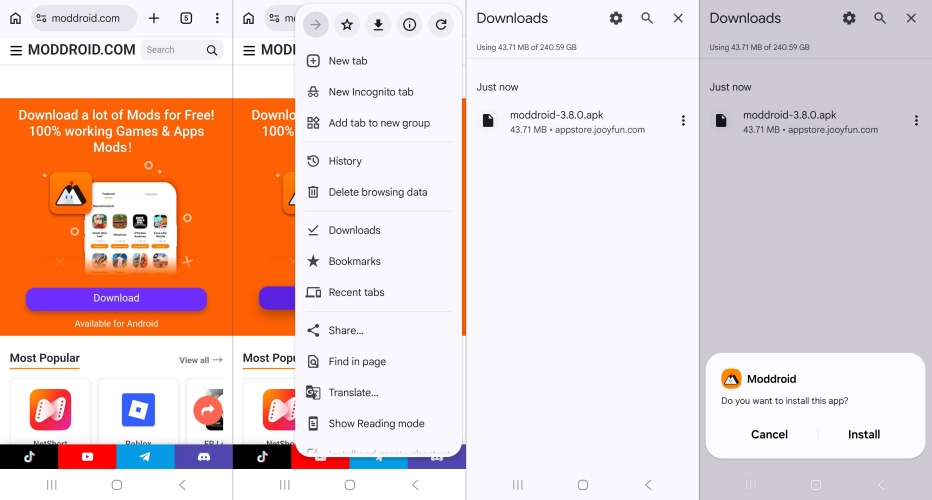
Step 4. After installing the app store, open it and search for Deezer Premium.
Step 5. In the app details windows, tap Download and allow to install the app.
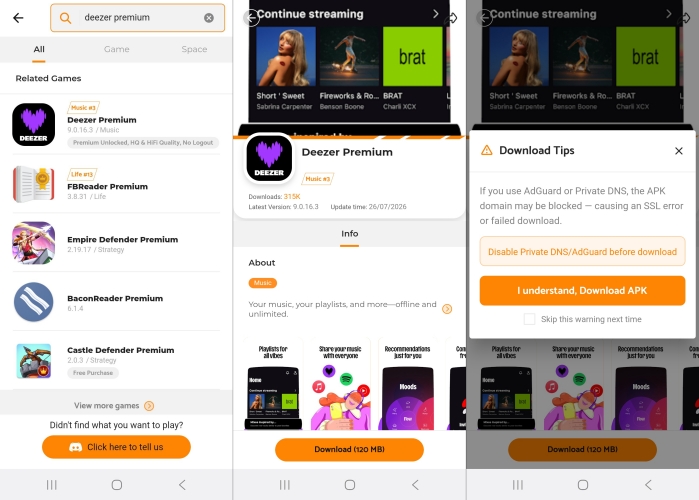
Step 6. Follow the onscreen prompt to complete the installation.
Once the installation is done, run the app on your device and log into your Deezer account. If you have install the official Deezer app on your device, you have to uninstall it and then install this Mod APK. But pay attention to protecting your personal data.
How to Install Deezer Premium Mod APK for iOS
Deezer Premium Mod APK is only available for Android devices. If you want to unlock Premium features without a subscription on your iPhone, you might as well as use Deezer Premium IPA. Like APK files, IPA is an extension for the Apple App Store package file. Deezer Premium IPA is a free application for Deezer free users to access the features of Deezer Premium. It has the same functions as a Deezer Premium Mod APK, such as offline download, ad-free listening, unlimited skips, and more at no extra cost.
Step 1. Install the AltStore app on your iPhone or iPad.
Step 2. Open AltStore and go to the My Apps tab.
Step 3. Search for Deezer and download Deezer IPA File.
Step 4. Complete the installation of Deezer Premium IPA.
Step 5. Open Deezer Premium IPA and sign into your account.
Part 3. Safer Option to Deezer Premium Mod APK
If your primary goal is to listen to Deezer music offline or save songs for playback on different devices, TunesMake Deezer Music Converter may be more relevant than a modified APK. Instead of modifying the Deezer app, it is designed to download and convert Deezer tracks into common audio formats like MP3, FLAC, WAV, AIFF, M4A, and M4B for personal offline playback and broader device compatibility. This addresses a different need than a mod APK that, and it focuses on music conversion rather than unlocking Premium features within the app.

Streaming Audio Converter -
Download ad-free music from Deezer as local audio files
- Download tracks, albums, playlists, and artists from Deezer
- Convert Deezer music to MP3, M4A, FLAC, AIFF, WAV, and M4B
- Preserve the original audio quality and ID3 tags for management
- Remove DRM from Deezer without compressing audio quality
- Support downloading music from over 10 popular streaming platforms
Security Verified. 100% Clean & Safe.
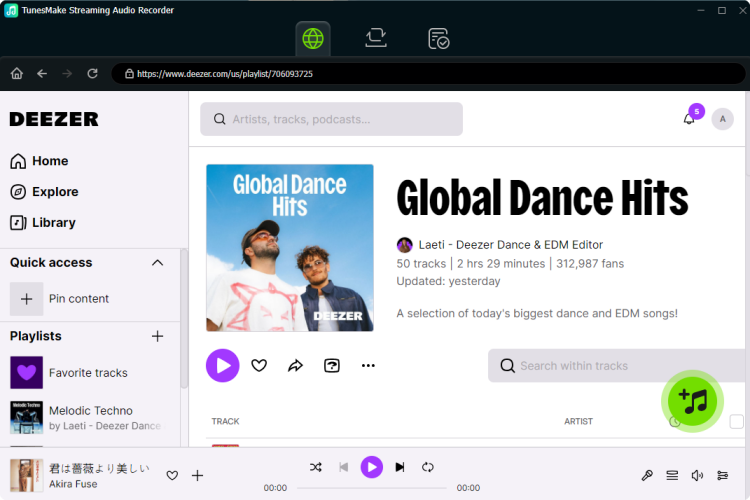
Step 1 Select Deezer Songs to Download
Launch TunesMake Streaming Audio Recorder, then from the main interface, select Deezer. The built-in Deezer web player will automatically load, and you can log into with your Deezer account and password. Now go to find any song, album, or playlist to download and click the + button to add into the conversion list.
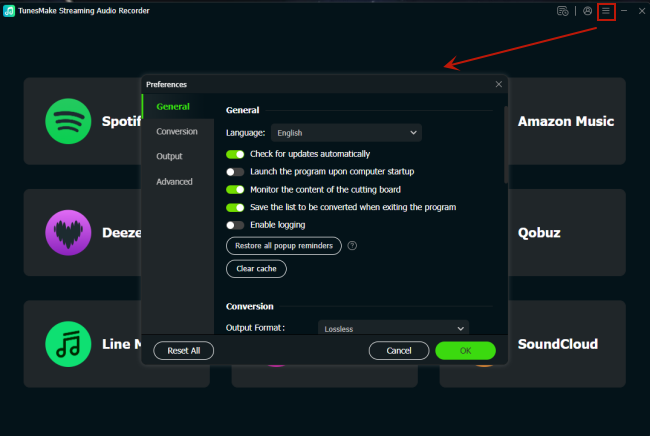
Step 2 Tune the Output Audio Parameters
To customize the output audio parameters, click the Settings button at the bottom left corner and navigate to Conversion. Then you can change the output format, bit rate, sample rate, and channel as you want. To enjoy your favorite music anywhere, the default MP3 format is mostly recommended. After changing, click OK to save all the settings.
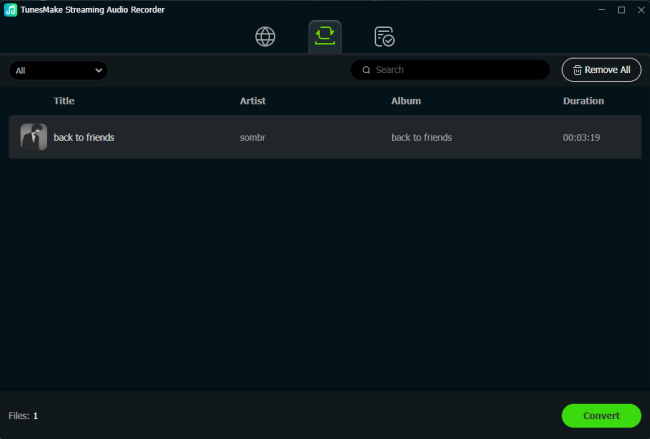
Step 3 Download Deezer Songs Locally
Click the Convert button at the bottom right corner to start downloading and saving Deezer music as local audio files. When the conversion process is complete, all the Deezer music tracks are saved into the default folder on your computer. You can click the History button to browse all the converted Deezer music and locate the folder.
Part 4. Conclusion
A Deezer Premium Mod APK is an unofficial version of the Deezer Android app that typically claims to unlock Premium features without a subscription. While these versions are widely discussed online, they are not affiliated with Deezer, and their functionality, security, and reliability can vary.
If you simply want a secure and consistent streaming experience, the official Deezer app with a legitimate Premium subscription is the most dependable option. If your main objective is offline access to music across multiple devices, a professional music downloader like TunesMake Deezer Music Converter may be a more appropriate solution than modifying the streaming app itself.
Related Articles


A senior editor from TunesMake, dedicated to sharing professional tutorials and solutions of software, movies, and music.
- 1
- 2
- 3
- 4
- 5
- 6
- 7
 Leave Your Comment
(0)
Leave Your Comment
(0)

 Download Center

