








 Store
Store


As one of the largest open audio platforms in the market, it is popular for users around the world. All music lovers can access millions of tracks, independent artists, podcasts, and exclusive remixes you simply cannot find anywhere else. Finding a great track on SoundCloud is easy, but figuring out how to download SoundCloud to PC for offline playback can be confusing. Whether you are looking for the original high-quality file provided by the artist or need a tool to archive your favorite playlist, this guide covers the most reliable methods to help you. Let’s explore the details together.
Part 1. How to Get SoundCloud Download to PC
The safest and most straightforward way to download music from SoundCloud to a PC is to use the official method that the platform and artists themselves have approved. Let’s start with the official SoundCloud desktop player and the basic download feature it offers.
1.1 How to Install the SoundCloud Desktop Player
SoundCloud provides an official Desktop player, allowing you to access and save your favorite tracks directly on your PC without relying on other third-party tools. It’s available for both Windows and Mac users.
Step 1. Visit soundcloud.com on your Chrome, Brave, or Edge browser and sign in to your account.
Step 2. hen, find and click the Install icon at the top right address bar.
Step 3. Select Install, and the SoundCloud desktop player will be installed on your PC.
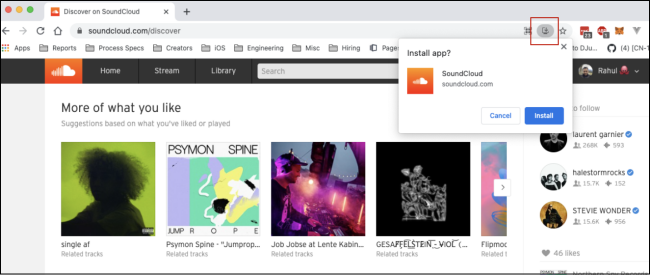
Step 4. Once done, you can open it from your apps folder and listen to your favorite music easily.
Step 5. You can install the SoundCloud PC app from the Microsoft Store as well.
1.2 How to Download SoundCloud Songs to PC
If you have a SoundCloud Go or Go+ subscription, you have access to offline listening features. Even if you only have a free account, you can still download the music tracks that the artists have made available for download.
Step 1. Open the SoundCloud app or web player on your PC. Log in to your account.
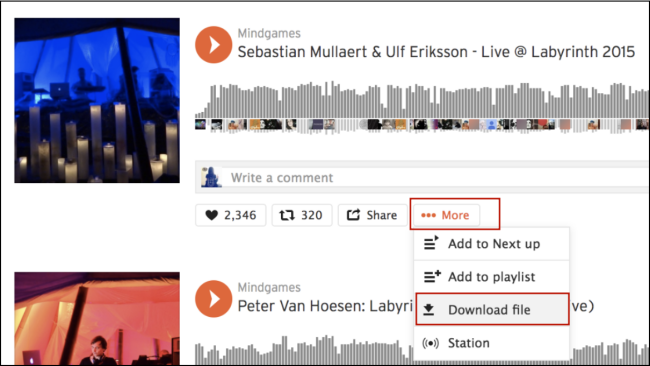
Step 2. Find the song you like. If the song is available for download, you can see a Download option beneath it.
Step 3. Click the More icon > Download file to save this song on your PC.
Part 2. Best Way to Download Songs from SoundCloud to PC
When the official download button is missing or the limitations of a SoundCloud subscription prevent you from building a permanent offline music collection on your PC, a reliable and versatile third-party tool is the best solution. You can consider using a dedicated and safe desktop software - TunesMake Streaming Audio Recorder.
TunesMake Streaming Audio Recorder is designed for all music lovers, helping you download songs, playlists, albums, and podcasts from diverse music streaming services, including SoundCloud, to your local computer. The best thing is that the TunesMake software supports batch downloading, so you can save an entire playlist or album at once. Additionally, it smartly keeps original sound quality and ID3 tags to ensure your offline listening experience. All the downloaded songs can be saved on your PC forever and can be played anywhere you want.

Streaming Audio Recorder –
Download SoundCloud to PC Locally
- Unlimitedly download streaming music songs, playlists, and podcasts
- Losslessly convert streaming music to MP3, M4A, M4B, WAV, FLAC, and AIFF
- Remove DRM protection from many streaming music platforms
- Convert streaming songs with original sound quality and ID3 tags kept
Security Verified. 100% Clean & Safe.
Step 1
Configure the Audio Parameters
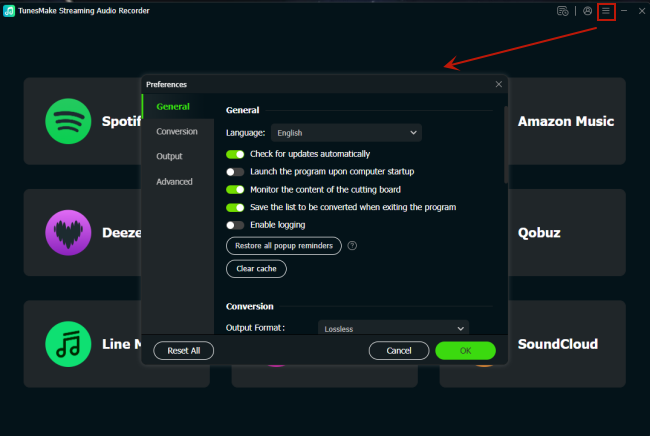
Click the Free Download button above, and you can install the TunesMake Streaming Audio Recorder on your PC. Once done, open the TunesMake software. In its interface, you can set the audio parameters according to your personal demands. Just click the Menu icon at the top > Preferences > Conversion. In the new window, pick an audio format from MP3, M4A, M4B, WAV, FLAC, and AIFF. You can change other settings like audio quality, channel, bit rate, sample rate, and so on.
Step 2
Select SoundCloud and Log in to Your Account
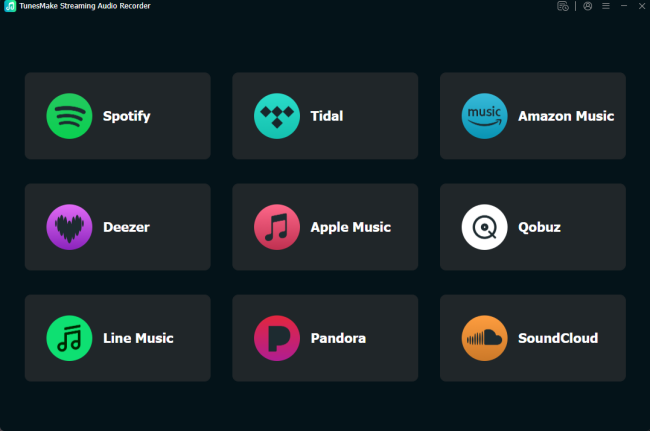
When you finish the audio settings, go back to the interface. Among all the music streaming platforms, you need to click the SoundCloud icon and sign in to your music account.
Step 3
Load Playlists from SoundCloud to the TunesMake Tool
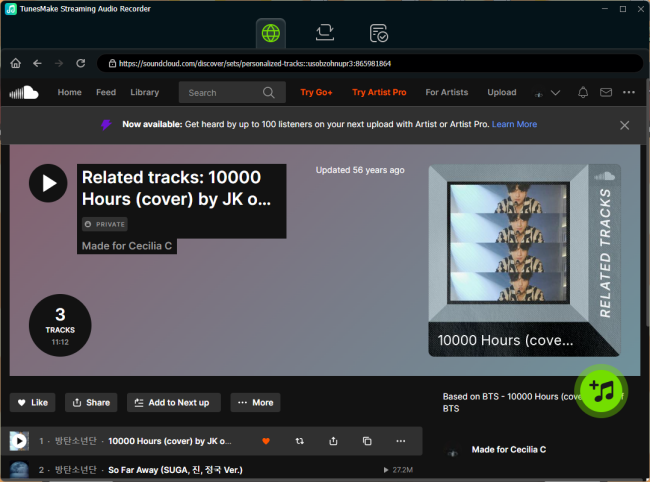
After login, you can browse the SoundCloud music library to find any playlist you like. Select one playlist, and then click the Add icon in the lower right corner. Wait for a while, and the TunesMake tool will display all the songs in it. You can then pick the songs you need and click the Add to List option to load them to TunesMake’s conversion list.
Step 4
Download Songs from SoundCloud to PC
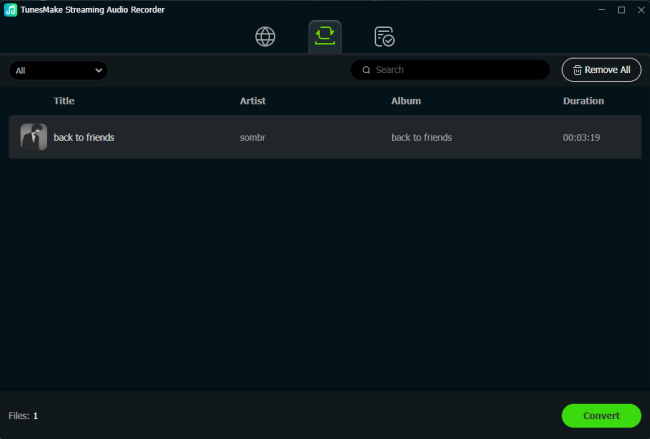
Now, you can officially download your SoundCloud songs to your PC. All you need to do is click the Convert button. Wait for a while, and all the songs you loaded will be saved as normal music files on your computer. Simply click the Converted icon at the top, and you can find their exact location on your computer.
Part 3. How to Download SoundCloud Songs on PC via Online Tools
Sometimes, you may need to download a single, non-downloadable track quickly and don’t want to install any software on your PC. Online SoundCloud downloaders can serve as a simple workaround. These tools operate by processing the SoundCloud track’s URL and generating a downloadable MP3 file.
Step 1. Go to the SoundCloud app or web player on your computer, and sign in to your account.
Step 2. Then, find the track you want to download and copy its URL.
Step 3. Select a reliable online SoundCloud downloader. Then, paste the link you copied to its search box.
Step 4. Click the Download or Convert button next to it so that you can save the MP3 file of your SoundCloud track.
Part 4. FAQs about Downloading SoundCloud to PC
Is it legal to download songs from SoundCloud to PC?
Yes, using the official download button provided by SoundCloud on your PC is 100% legal. Using a third-party downloader may violate SoundCloud’s Terms of Use, but it’s legal if you only download for personal use.
Can I download an entire SoundCloud playlist to PC at once?
The official SoundCloud app on PC doesn’t offer the batch download feature. However, if you use a dedicated tool like the TunesMake Streaming Audio Recorder, doing so is very easy.
Why can’t I find the download option on some songs?
The download button is an optional feature that artists must manually enable. If you only have a free account and there is no download option for a song, you can only download it with third-party tools, like TunesMake Streaming Audio Recorder.
Conclusion
After reading this comprehensive tutorial, the question of how to download SoundCloud to PC won’t bother you anymore. Whether you’re using the SoundCloud desktop player, third-party software, or online tools, there are various methods available to suit your needs. If you want to keep your favorite SoundCloud tracks as local music files for backups, you should not miss the professional and powerful tool - TunesMake Streaming Audio Recorder.
Related Articles


A senior editor from TunesMake, dedicated to sharing professional tutorials and solutions of software, movies, and music.
- 1
- 2
- 3
- 4
- 5
- 6
- 7
 Leave Your Comment
(0)
Leave Your Comment
(0)

 Download Center

