








 Store
Store


FLAC, also known as Free Lossless Audio Codec, is a popular lossless audio format that compresses music without throwing any data away. With this format, you can have a listening experience that is identical to the original source, for example, the CD quality. Since it keeps all details, dynamics, and frequency content, more and more users want to keep their favorite music in this format, including SoundCloud users. If you are also one of the SoundCloud user who wants to archive your favorite tracks in FLAC, don’t miss this comprehensive guidance. This guide explores the most effective ways that breaks down how to download SoundCloud to FLAC, ensuring you maintain the highest possible audio fidelity available.
Part 1. Download SoundCloud to FLAC Losslessly
If you are an audiophile or simply prefer superior sound quality, converting your SoundCloud music to FLAC is a great choice. However, SoundCloud doesn’t provide an official FLAN download option. So, the most efficient way to get high-quality audio from SoundCloud losslessly is by using a dedicated desktop downloader. While many online tools claim to “convert” audio, they often just wrap low-quality audio in a FLAC container. To truly maximize the quality of what you hear from SoundCloud, you need a professional tool that can handle the platform’s high-bit-rate streams - TunesMake Streaming Audio Recorder.
-
😀 Pros
- Offers lossless-quality FLAC files
- Support batch-downloading
- Support other music formats, like MP3, M4A, M4B, WAV, and so on
- Allow you to customize the audio parameters
- Remove SoundCloud music’s DMR protection
- Supports other music streaming platforms
- Stable, easy to use, and high success rate
-
☹️ Cons
- Limited features for the free version
TunesMake Streaming Audio Recorder is the best audio converter in the market, allowing users to download music from SoundCloud to FLAC and more audio formats, including MP3, M4A, M4B, WAV, and AIFF. In addition, it can batch-download entire playlists, albums, and podcasts directly. If you want a seamless and one-click solution, the TunesMake software is your best choice. Once the downloading process is finished, you can keep these high-quality music files on your devices permanently and play them on any device as you wish.
One of the best features of the TunesMake software is that it supports customizing the output audio parameters of the SoundCloud FLAC files. You can decide on the audio format, audio quality, codec, bit rate, sample rate, channel, and so on. In other words, you can have full control over your FLAC files and get the best listening experience.

Streaming Audio Recorder –
Best SoundCloud to FLAC Downloader
- Unlimitedly download streaming music songs, playlists, and podcasts
- Losslessly convert streaming music to MP3, M4A, M4B, WAV, FLAC, and AIFF
- Remove DRM protection from many streaming music platforms
- Convert streaming songs with original sound quality and ID3 tags kept
Security Verified. 100% Clean & Safe.
Step 1
Pick FLAC as the Output Format
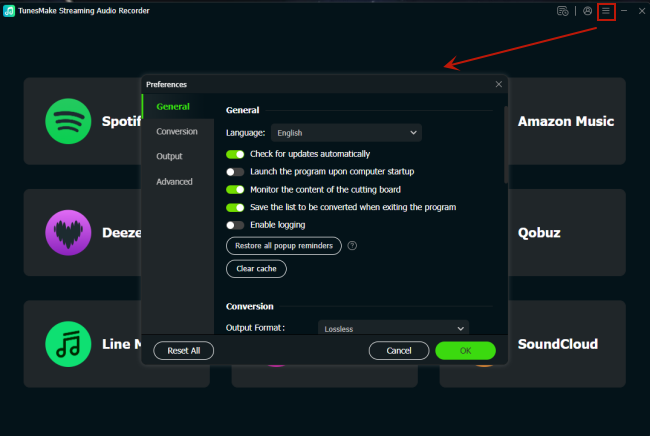
After installing and launching the TunesMake Streaming Audio Recorder on your desktop, you should set FLAC as the output audio format. In the interface of the TunesMake tool, move your cursor to the top right corner and click the Menu icon. Then, select Preferences from the drop-down options. When the settings window pops up, you can switch to the Conversion tab and select FLAC as the audio format. You can also change the audio quality to lossless to have a premier quality. When you finish all the settings, click the OK button to save them.
Step 2
Head to SoundCloud and Sign in to Your Account
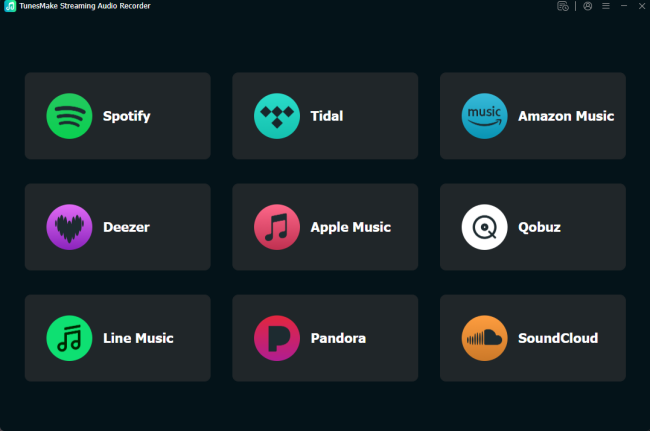
Go back to the interface. Here, you can see all the available music streaming services. Select SoundCloud, and you can go to the official SoundCloud web player. Then, you should sign in to your SoundCloud account.
Step 3
Download SoundCloud Songs to FLAC
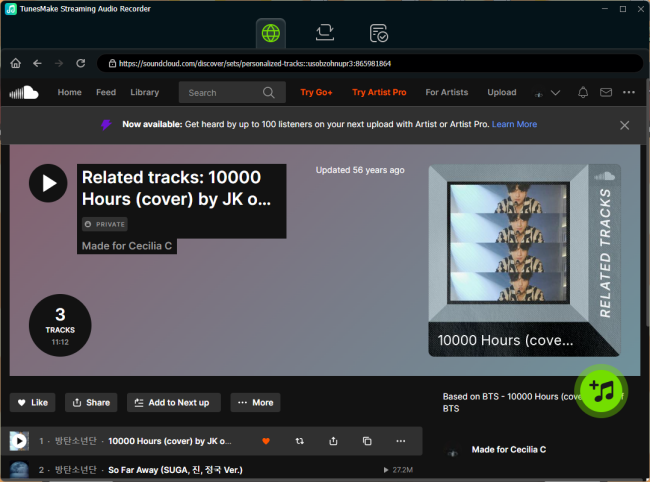
Now that you are in the SoundCloud music library, you can find any playlist you want to download. After that, click the Add icon at the bottom right corner. Thus, the TunesMake tool will begin analyze this playlist automatically. Then, you can choose the songs you want to save in FLAC and load them to the conversion list by clicking Add to List.
Step 4
Download SoundCloud Songs to FLAC without Quality Loss
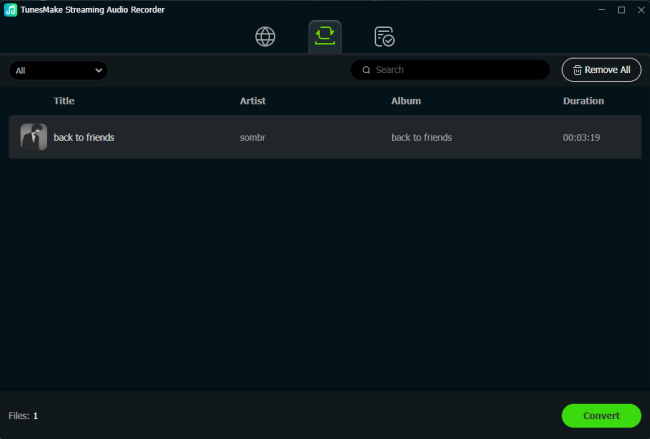
Now, everything is ready. The last step you should do is to click the Convert button. Once done, the TunesMake software will begin downloading the SoundCloud songs you loaded automatically. Since the tUnesMake tool can batch-download songs at 22X faster speed, the downloading process won’t take too long. When it is finished, you can click the Converted icon at the top to browse your SoundCloud music FLAC files.
Part 2. Record Music from SoundCloud to FLAC via Audacity
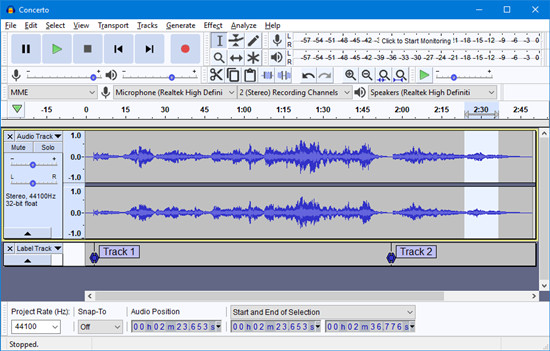
Except for a dedicated SoundCloud music to FLAC converter, there is another easy method to help you get what you hear. That is to record your favorite SoundCloud track manually and download it to FLAC. You can utilize a powerful open-source software - Audacity.
Audacity is the gold standard for audio editing and recording programs. You can use it to record music tracks from SoundCloud or other platforms and save the recording file in diverse formats. Available options include FLAC, WAV, MP3, AAC, and more. Whether you are using a Windows, Mac, or Linux device, Audacity runs well on it.
-
😀 Pros
- Free and open-source
- Compatible with many systems
- Rich functionalities and features
- Allow you to adjust audio settings
- No need for external plugins
-
☹️ Cons
- Consuming too much time for long playlists
- May cause audio quality loss
- Require technical setup
- Not easy to use for beginners
Step 1. Once you installed Audacity on your desktop, you should finish the setup settings first. Launch it, and then select Edit > Preferences at the top.
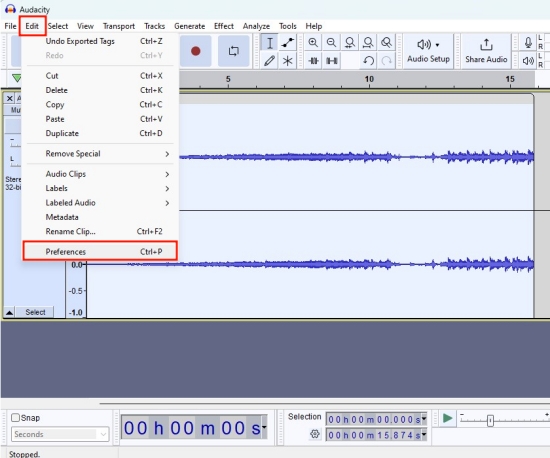
Step 2. In the Audio Settings window, you should pick Windows WASAPI as Host.
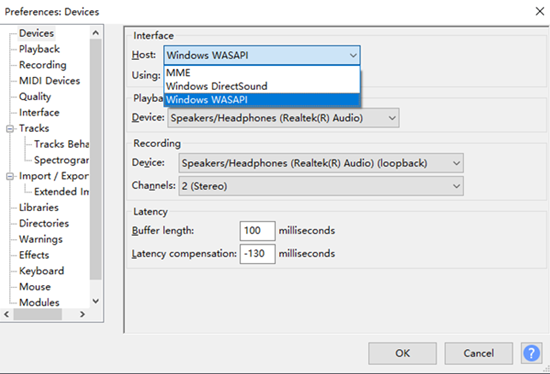
Step 3. Then, you can select the input device, such as your headphones or speakers. Click OK to save these necessary settings.
Step 4. Next, you can open the SoundCloud web player or app and play the song you want to save in FLAC format.
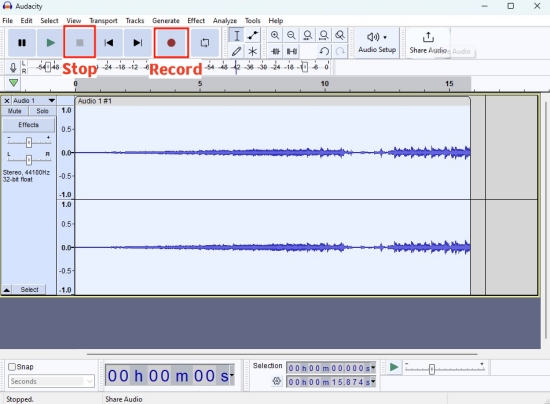
Step 5. Go back to the interface of Audacity, and then you can click the top Record button to begin recording your SoundCloud music.
Step 6. When the recording process is finished, click the top Stop button.
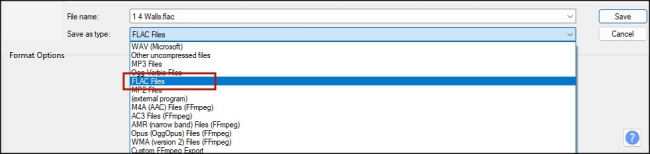
Step 7. Now you can export this recording to FLAC by clicking the File option > Export > Export Audio.... Then, select FLAC from the drop-down list.
Part 3. Convert SoundCloud Music to FLAC Online
While a professional SoundCloud downloader and an audio recorder both can save SoundCloud FLAC files easily, some users may prefer online methods without downloading software. Well, don’t worry. Several online SoundCloud converters can give you a hand. These web-based tools work on most browsers. You can convert a SoundCloud song to FLAC by using its URL link. What is worth noted is that you’d better choose a reliable tool to avoid security risks. Here, we will take soundcloudrips.com as an example.
-
😀 Pros
- No need to install additional software
- Convenient and easy to use
- Easy to access on various devices
-
☹️ Cons
- Limited features
- Lossy sound quality
- Fails to convert sometimes
- Low conversion speed
- Potential security risks
Step 1. Go to your SoundCloud music library and find the music you want to download to FLAC.
Step 2. Then, click the three-dots icon on its cover. Select Copy link from the drop-down list.

Step 3. Next, open any browser app and visit soundcloudrips.com.
Step 4. Paste the SoundCloud URL link into its top search bar.
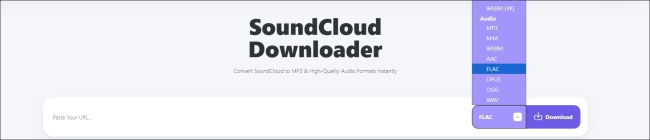
Step 5. Then, click the format part and select FLAC. Once done, you can save its FLAC file by clicking the Download button.
Part 4. FAQs about SoundCloud to FLAC
Can I download SoundCloud to FLAC directly?
No. SoundCloud doesn’t offer an official option to let you choose to download tracks in FLAC or other formats. What format you can get depends on what the uploader provided. If you want to download SoundCloud music tracks to FLAC, you will need a third-party tool like the TunesMake Streaming Audio Recorder.
Is converting SoundCloud to FLAC legal?
Downloading and converting SoundCloud to FLAC is typically considered legal as long as you only take this FLAC file for personal use. So, make sure you do not distribute or sell the downloaded content.
Can I get lossless audio quality when downloading SoundCloud to FLAC?
The audio quality of your downloaded FLAC file depends on what tool you choose. Most online converters will compress audio and cause lossy quality when downloading SoundCloud music to FLAC. If you want to ensure a 100% lossless conversion, a professional tool like TunesMake Streaming Audio Recorder is your best choice. Plus, it allows you to personalize the output audio settings, which ensures your listening experience.
Does SoundCloud FLAC offers better audio quality than MP3?
Absolutely, yes. FLAC offers better audio quality than MP3, because it is a lossless format that retains all the audio details. On the other hand, MP3 sacrifices some quality for a smaller size. So, if you are an audiophile, FLAC should be your choice.
Conclusion
As an uncompressed file format, FLAC is the perfect choice for users who are looking for the best sound quality. It is a pity that SoundCloud doesn’t offer downloading tracks in FLAC as an option for users. So, you will need the help of some third-party tools to download SoundCloud to FLAC. Among all tools, the TunesMake Streaming Audio Recorder is the best option since it helps you enjoy your favorite music in lossless FLAC on any platform or device.
Related Articles

A senior editor from TunesMake, dedicated to sharing professional tutorials and solutions of software, movies, and music.
- 1
- 2
- 3
- 4
- 5
- 6
- 7
 Leave Your Comment
(0)
Leave Your Comment
(0)

 Download Center

