








 Store
Store


SoundCloud is one of the most popular music streaming platforms, offering a variety of independent music and hosting millions of tracks you can’t find on other music platforms. For avid music lovers, the best way to enjoy music anytime is to download SoundCloud playlist for offline playback. After downloading, you can easily listen to your favorite music while commuting, flying, or exercising without interruptions. If you search for how to download a SoundCloud playlist on your device, it often leads to sketchy websites. This guide cuts through the noise to provide the safest and most effective methods, from official features to reliable archiving tools. Let’s get started.

Part 1. How to Download SoundCloud Playlists [Official Way]
SoundCloud offers official methods for downloading music directly from the platform. This ensures you are supporting the artists and getting the high audio quality you want. However, you should know that the official SoundCloud web player doesn’t allow downloading an entire playlist at once. You can only download songs from your playlist one by one.
Option 1. Download Artist-Enabled Tracks for Free
When artists upload works, SoundCloud asks them whether to enable downloading. If an artist allows, you can have a copy of this song’s original file format. This is a great option for free users who want to download a SoundCloud song or playlist.
Step 1. Open the SoundCloud app on your computer or visit its web player.
Step 2. Sign in to your SoundCloud account, and then find the playlist you want to download.
Step 3. If the song is available, you just need to click the More icon and select Download file.
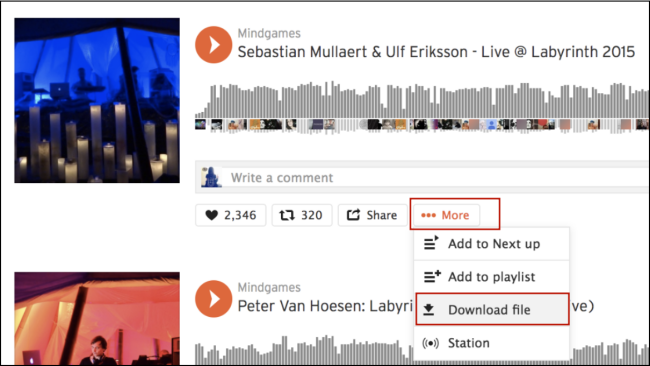
Option 2. Save SoundCloud Content with a Subscription
If you have a SoundCloud Go or SoundCloud Go+ subscription, downloading music tracks will become easier. You can save content offline directly within the app installed on your mobile device.
Step 1. Go to the SoundCloud app on your mobile phone and sign in. Then, find the song you want to download.
Step 2. You should first like this song by tapping the three dots icon next to it and selecting the heart icon. Or, you can add it to a playlist.
Step 3. Then, tap Library at the bottom and find Your likes or your playlist.
Step 4. Tap the down-arrow icon and all the songs in Your likes/ playlist will automatically download.
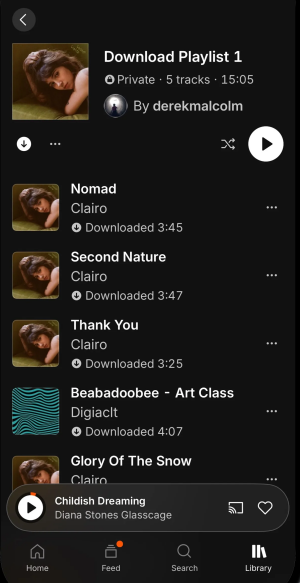
Note
On your mobile phone, you can’t actually get the files of your downloaded songs. The downloads you have saved are temporarily stored in your mobile device’s SoundCloud app.
Part 2. How to Download Whole Playlist from SoundCloud at Once
For SoundCloud Free users and desktop users, it can be tricky to download an entire SoundCloud playlist at once. Fortunately, there are several alternative methods for you. Among them, the most reliable and effective way is to utilize a professional third-party downloader, like TunesMake Streaming Audio Recorder. With its help, you can easily archive a playlist on SoundCloud for personal backups.
TunesMake Streaming Audio Recorder is designed for all music lovers, helping you download songs, playlists, albums, and podcasts from diverse music streaming platforms to your local device. SoundCloud is not an exception. With its help, there is nothing easier than downloading SoundCloud playlists as local music files and converting them to other audio formats, including MP3, M4A, M4B, WAV, FLAC, and AIFF. What’s more, it ensures your listening experience by retaining original sound quality and ID3 tags.

Streaming Audio Recorder –
Download an Entire SoundCloud Playlist at Once
- Unlimitedly download streaming music songs, playlists, and podcasts
- Losslessly convert streaming music to MP3, M4A, M4B, WAV, FLAC, and AIFF
- Remove DRM protection from many streaming music platforms
- Convert streaming songs with original sound quality and ID3 tags kept
Security Verified. 100% Clean & Safe.
Step 1
Personalize Output Audio Parameters
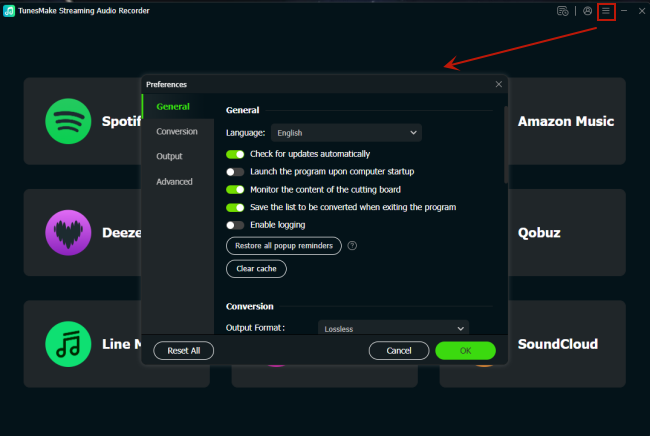
Install and launch the TunesMake Streaming Audio Recorder on your Windows or Mac computer. Then, in its interface, you should click the Menu icon > Preferences to set the audio parameters as you wish. In the new window, select Conversion, and you can decide on the audio format, quality, channel, bit rate, sample rate, and so on. When you finish, save your preferences by clicking the OK button.
Step 2
Sign in to Your SoundCloud Account
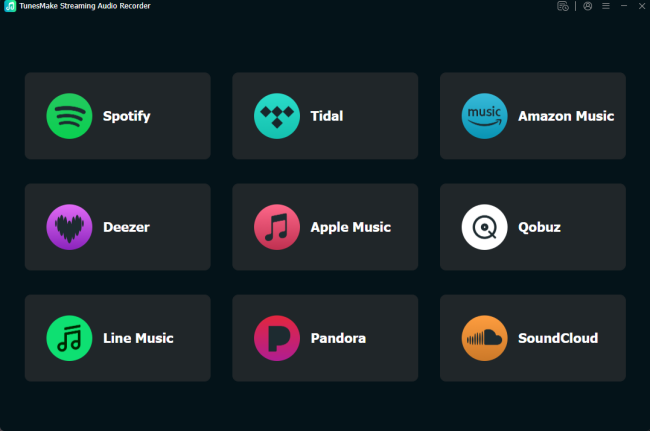
Go back to TunesMake’s interface. Here, you can see all the available music platforms. Click the SoundCloud icon and sign in to your account.
Step 3
Select Playlists to Download
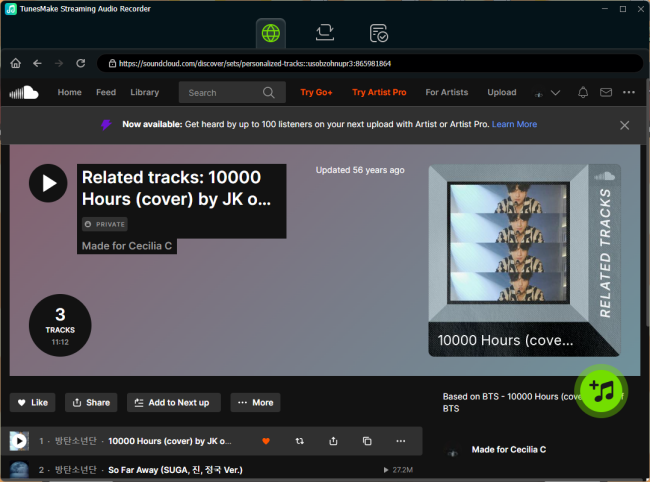
Now, you can pick any playlist you want to download. After entering its detailed page, click the lower Add icon. Then, the TunesMake tool will analyze it automatically. Next, you can select all the songs you like and click Add to List. So, these songs will be loaded to the conversion list and ready to download.
Step 4
Download SoundCloud Playlists Locally
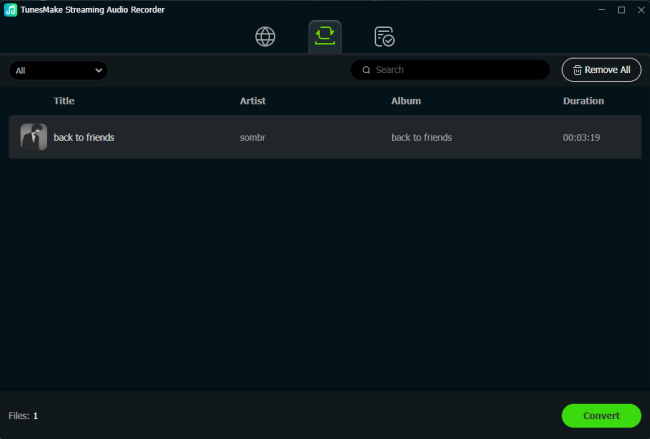
Whenever you are ready, you need to click the Convert button, and the TunesMake tool will begin downloading all the songs you added. Wait for a while, then you can find all the downloaded SoundCloud tracks in the Converted section. If you need to find their exact location on your computer’s local folder, click the file icon next to each song.
Part 3. How to Convert SoundCloud Playlist to MP3 via Online Tools
Another popular method to download an entire SoundCloud playlist at once is to use one of the many free online SoundCloud downloaders. This method is great for users who don’t want to download extra software. There are a lot of available online tools, like SoundCloud Aud, SoundcloudMe, and so on. Just pick a secure one and follow these steps to save your playlists easily:
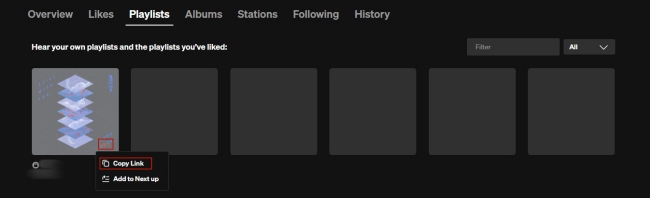
Step 1. Head to SoundCloud and log in to your account. Then, select Library > Playlists.
Step 2. Now, find the playlist you want to download. Hover the cursor over its cover, and then click the three dots icon > Copy Link.
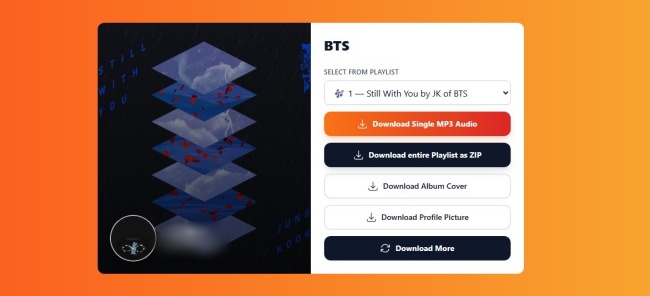
Step 3. Visit any online SoundCloud downloader, and paste the music link into its top search bar.
Step 4. Click the Download icon next to it. Then, you can select Download entire playlist to save them all.
Part 4. Conclusion
Knowing how to download SoundCloud playlist is essential for enjoying your favorite music offline. There are many methods to suit your needs, from official downloading artists-enabled tracks to using third-party tools for batch downloads. For the most versatile solution, consider using a powerful downloader like TunesMake Streaming Audio Recorder. It can help you download entire playlists and albums in high quality, and convert them to universal audio formats. With its help, you can enjoy your SoundCloud playlists anytime and anywhere you want.
Related Articles



A senior editor from TunesMake, dedicated to sharing professional tutorials and solutions of software, movies, and music.
- 1
- 2
- 3
- 4
- 5
- 6
- 7
 Leave Your Comment
(0)
Leave Your Comment
(0)

 Download Center

