









 Store
Store


If you have switched to Tidal for its superior HiRes FLAC library, you have likely noticed a glaring omission: the app doesn't have a built-in equalizer. While competitors like Spotify offer a native EQ, Tidal has historically prioritized bit-perfect audio, delivering the music exactly as the artist intended, without software interface.
However, every room, pair of headphones, and set of ears is different. Sometimes you need a little more sub-bass or a reduction in piercing highs. This guide will show you how to implement a Tidal equalizer on any device without sacrificing that signature high-fidelity sound. Also, we will share a way to use Tidal music with any equalizer without limitations.
Part 1. Does Tidal Have Equalizer?
Unlike other streaming music services like Spotify, Apple Music, and Amazon Music, Tidal doesn't have a built-in equalizer because Tidal's philosophy is centered on Audio Purity. By excluding a native EQ, Tidal ensures that the audio stream isn't processed by low-quality software filters that can introduce phase shifting or digital distortion.
For audiophiles, the goal is often to hear the Master file untouched. But for the everyday listener, the lack of an EQ can be a dealbreaker, especially if your hardware has a specific sound signature that needs correcting. No matter, there are some equalizers that work with Tidal. In addition, you can use a third-party tool to convert Tidal music for using with any equalizer freely.
Part 2. How to Set a Tidal Equalizer Directly
Even though there is no equalizer on Tidal, there are some equalizer extensions, allowing you to adjust as you wish. When you listen to your music library within the Tidal web player, ou can utilize an equalizer extension to get the best effect on Tidal music. Here we recommend Equalizer for Chrome Browser to EQ your Tidal music while listening.
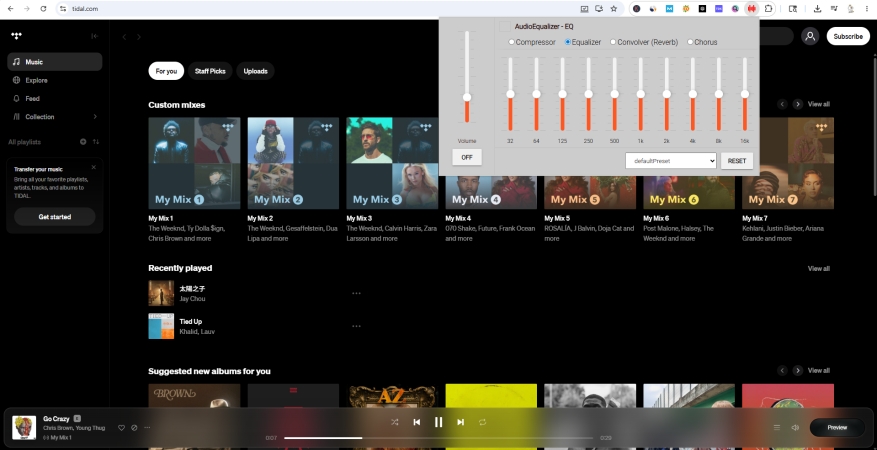
Step 1. Visit Chrome Web Store and search for equalizers like Equalizer for Chrome Browser.
Step 2. Click the Add to Chrome button, then pin it in the top-right corner of the browser.
Step 3. Open the Tidal web player and select an album or playlist to start playing.
Step 4. Click the Equalizer icon, and it will connect the playback automatically.
Step 5. Move the slider or select a preset to EQ your Tidal music.
Part 3. How to Use Tidal Music with Any Equalizer
Sometimes, the best way to get a high-quality EQ isn't fix the Tidal app, but to use a player that was built with equalization in mind like iTunes, VLC, or Winamp. However, Tidal's encrypted files usually prevent this. This is where a tool like TunesMake Tidal Music Converter becomes helpful. It allows you to convert Tidal tracks into plain formats like FLAC, WAV, or MP3 while preserving the original audio quality and ID3 tags.
Once your music is converted, you aren't stuck using the Tidal app. You can play your Tidal music files in any media player that has a professional-grade 10-band or 31-band equalizer. By using TunesMake, you can transfer your Tidal library to devices that don't support the Tidal app but do have excellent built-in EQ, such as high-end Digital Audio Players or car stereo systems. Now follow the steps below to convert Tidal music with TunesMake.
TunesMake Tidal Music Converter –
Download Tidal music for using with equalizer
- Download songs, albums, playlists, and artists from Tidal without premium
- Convert Tidal music to MP3, FLAC, WAV, AIFF, M4A, and M4B losslessly
- Handle the conversion of Tidal music up to 25× faster speed and in batch
- Save a whole set of ID3 tags during the conversion process automatically
- Preserve the original audio quality up to HiRes FLAC or 320kbps MP3
Security Verified. 100% Clean & Safe.
Step 1 Add Tracks from Tidal to TunesMake
Open TunesMake Tidal Music Converter, and the Tidal web player will be opened for a connection. Find an album or playlist that you want to make EQ settings. Then click the + button to add the item to the conversion list.
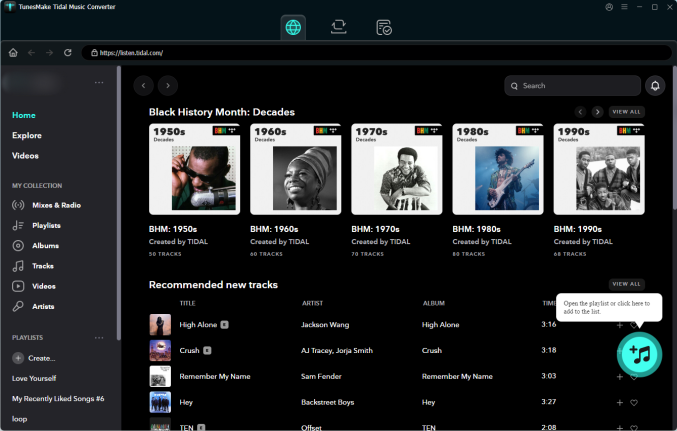
Step 2 Change the Output Audio Format
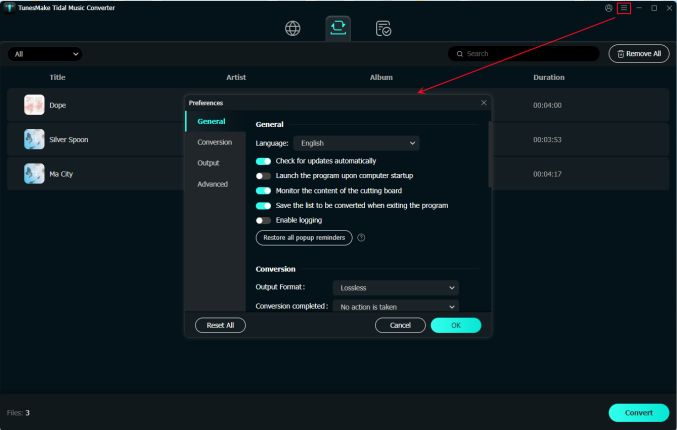
Once the selected content is loaded into the conversion list, click the menu icon in the upper right corner and select Preferences. In the pop-up window, switch to the Convert section. From here, you can change the output audio parameters.
Step 3 Download Tidal Music as Local Files
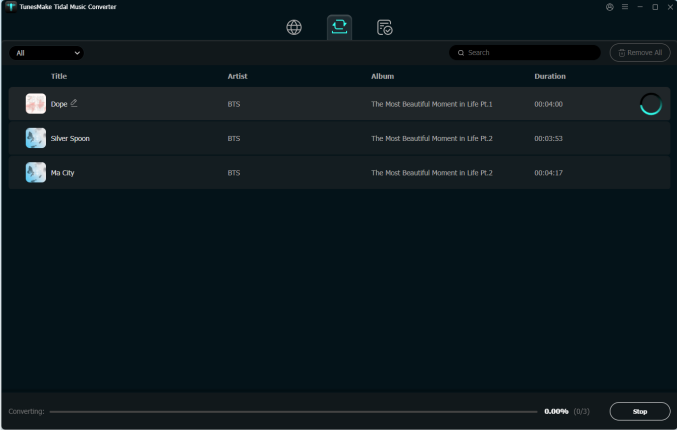
Click the Convert button at the bottom right corner, and TunesMake will automatically download and convert Tidal music to local files. After conversion, you can navigate to the Converted section to browse all the converted music tracks.
Part 4. Best Equalizer for Tidal to Optimize Sound
With the help of TunesMake Tidal Music Converter, you can get unprotected Tidal music files for using with any equalizer. But to maintain the detail of Tidal's 16-bit or 24-bit streams, we suggest to use Subtractive EQ, instead of boosting the bass, try lowering the mids and highs slightly. Here are some highly-recommended equalizers and professional EQ settings for Tidal streaming.
| Genre | Goal | Adjustment |
|---|---|---|
| Hip-Hop / EDM | Sub-Bass Impact | +3dB at 50Hz, -2dB at 400Hz |
| Rock / Metal | Guitar "Bite" | +2dB at 3kHz, +1.5dB at 100Hz |
| Jazz / Classical | Air & Clarity | +2dB at 10kHz, Neutral Bass |
| Acoustic / Vocal | Warmth | +1dB at 250Hz, -1dB at 5kHz |
Best Equalizers for Tidal on Windows and Mac
No.1 iTunes (Windows & Mac)
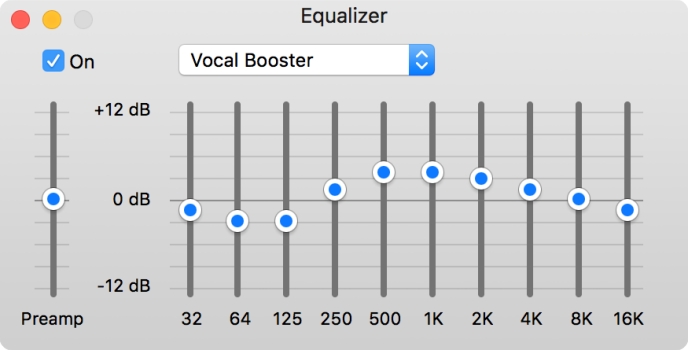
As a multi-function media player, iTunes boasts the Equalizer feature to improve sound. With this powerful tool, you can fine-tune the frequency response of your audio. Whether you want to boost the bass for a party or clarify vocals for a podcast, the equalizer allows you to customize your listening experience across your entire library or for specific songs.
Key Feature:
-
Provide 10 sliders ranging from low-end bass to high-end treble
-
Include genre-specific settings like Rock and utility settings
-
Support creating and saving frequency profiles for presets
-
Allow to assign a specific EQ preset to an individual song
-
😀 Pros
- Intuitive interface for beginners
- Lots of genre-specific presets
- Support the preset customization
- Include Sound Enhancer
-
☹️ Cons
- Fixed frequency bands
- Digital clipping risk
- Not system wide
No.2 EqualizerPro (Windows)
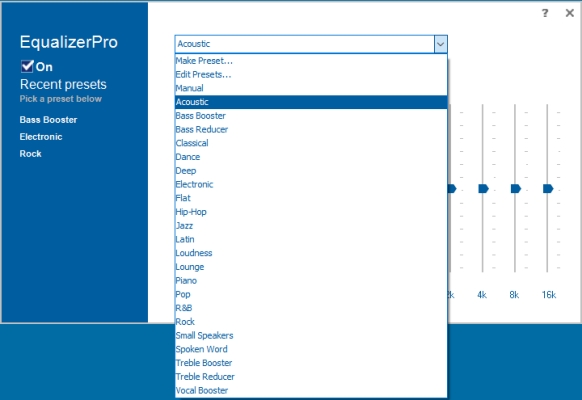
EqualizerPro is a user-friendly and system-wide equalizer for Windows. It is designed to enhance the audio output of your PC, whether you are listening to music, watching movies, or playing games. While it lacks the deep technical complexity of tools like Equalizer APO, it focuses on ease of use and immediate results for casual listeners.
Key Feature:
-
Offer ten frequency sliders for a more tailored sound signature
-
Include a wide variety of factory-tuned presets like Rock
-
Feature a dedicated bass boost effect and a preamp slider
-
Allow users to create, save, and name their own EQ settings
-
😀 Pros
- Clean and uncluttered interface
- Low system resource usage
- Quick setup for beginner
- System-wide impact
-
☹️ Cons
- Not offer free services
- No version for macOS or mobile devices
- Lack modern audiophile features
No.3 Equalizer APO (Windows)
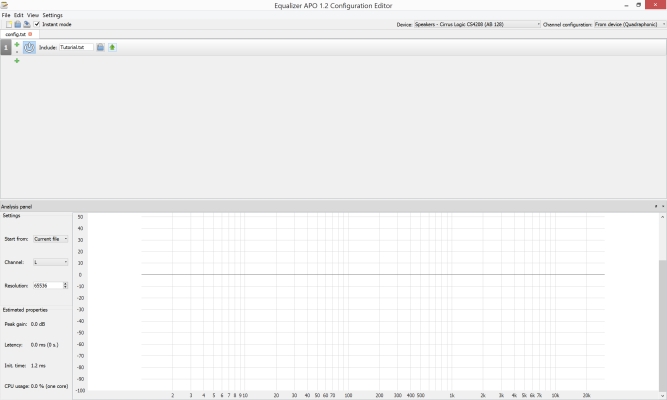
For Windows users who want total control over their audio, Equalizer APO is widely considered the most powerful tool available. Unlike standard apps that only equalize their own internal sounds, Equalizer APO is a system-wide open-source equalizer that processes every bit of audio your PC produces from YouTube videos to video games.
Key Feature:
-
Function as an Audio Processing Object
-
Offer an unlimited number of filters
-
Include over 5,000+ professionally measured profiles
-
Support both "Graphic" sliders and "Parametric" entry
-
😀 Pros
- Completely free with no hidden fees
- Extremely low CPU usage
- High hardware correction ability
- Ultra-low latency
-
☹️ Cons
- Not work on macOS, Linux, or mobile devices
- Fragile installation and steep learning curve
- Conflict with Exclusive Mode
No.4 Audio Hijack (Mac)
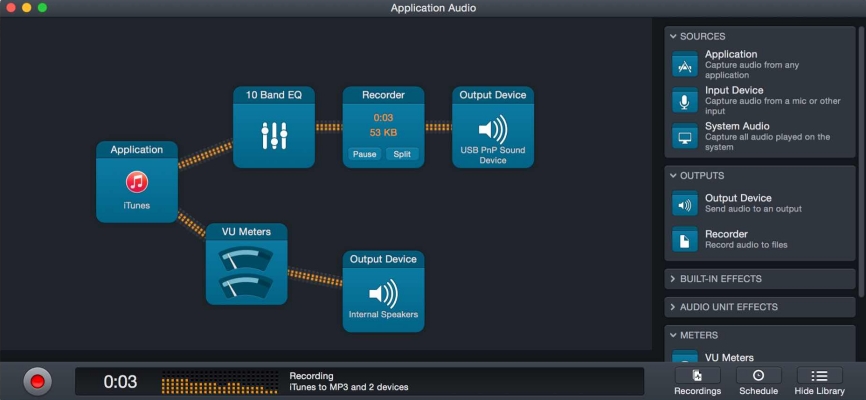
If you are a Mac user, Audio Hijack by Rogue Amoeba is the "Swiss Army Knife" of audio routing and processing. While tools like Equalizer APO dominate Windows, Audio Hijack is the premier choice for macOS users who need to capture, record, and manipulate audio from any source, including Tidal, web browsers, and microphones.
Key Feature:
-
Allow users to pause, rewind, and fast-forward live audio
-
Support JavaScript scripting and integrate with the Shortcuts app
-
Include dedicated blocks to stream audios directly to servers
-
Supporting applying a 10-band or Parametric EQ to the system or app
-
😀 Pros
- Lots of professional effects
- Unmatched flexibility
- Rock-solid stability
- Visual workflow
-
☹️ Cons
- Only exclusive for Mac
- Not offer free services
- Exclusive Mode limitations
Best Equalizers for Tidal on Android and iOS
No.1 Poweramp Equalizer (Android)
For Android users who want more than just a simple volume boost, Poweramp Equalizer is widely considered the most advanced and flexible audio engine on the platform. While Poweramp Music Player handles local files, the standalone Equalizer app is designed to work system-wide, applying professional-grade processing to apps like Tidal, YouTube Music, and Spotify.
Key Feature:
-
Allow users to configure anywhere from 5 to 32 bands
-
Offer a true parametric mode and direct volume control
-
Include advanced audio toolkit like Compressor and Limiter
-
Support AutoEq integration and per-output presets
-
😀 Pros
- 32-band graphic EQ
- System-wide flexibility
- High-Res support
- Visual polish
-
☹️ Cons
- Paid software
- Initial setup hurdles
- Battery impact
- Steep learning curve
No.2 Music Volume EQ (Android)
Music Volume EQ is a straightforward, visual-heavy equalizer for Android. It is one of the most long-standing and popular choices on the Play Store. While it doesn't offer the technical audiophile depth of apps like Poweramp or Wavelet, it is designed for users who want a classic, stereo system feel on their smartphone.
Key Feature:
-
Include a high-quality visualizer for live music spectrum
-
Include a high-quality visualizer for live music spectrum
-
Offer a convenient widget to toggle EQ settings
-
Support controlling the sound for Tidal simultaneously
-
😀 Pros
- Available without a subscription
- Extremely simple for beginners
- Visual appeal
- Low agency
-
☹️ Cons
- Limited precision
- No AutoEq
- Heavy ads
No.3 Boom: Bass Booster & Equalizer (Android & iOS)
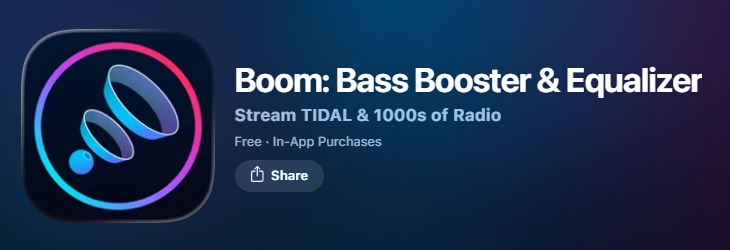
If you are looking for an immersive, cinematic sound rather than just a flat frequency adjustment, Boom: Bass Booster & Equalizer is one of the most popular multi-platform solutions. Unlike surgical tools like Equalizer APO, Boom focuses on spatial enhancement, aiming to make even basic earbuds sound like a high-end surround sound system.
Key Feature:
-
Offer a wide array of handcrafted presets
-
Provide a deep, resonant bass enhancement
-
Provide a deep, resonant bass enhancement
-
Support handling high-quality audio files
-
😀 Pros
- Immersive experience
- Appealing user interface
- Cross-platform consistency
- Great for low-end gear
-
☹️ Cons
- Faster battery depletion
- Exclusive Mode conflicts
- Require a purchase or subscription
No.4 Wavelet EQ (Android)
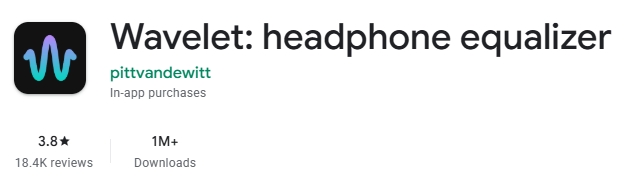
Wavelet is a specialized audio processing app for Android, but there is no official version for iOS. It is best known for its AutoEq integration, which uses a database of thousands of professionally measured headphone profiles to automatically correct the frequency response of your specific device. It is a good way to make your headphones sound better on Android.
Key Feature:
-
Contain over 5,000+ presets for specific headphone models
-
Offer a much more precise bass boost than standard apps
-
Support manually tweaking the sound if the AutoEq isn't quite
-
Work with some streaming music services like YouTube Music
-
😀 Pros
- No Root Required on Android
- Lightweight then most competitors
- Work across almost all apps like Spotify
- Offer automatic setup
-
☹️ Cons
- Not exist for iPhone or iPad
- Conflict with Exclusive Mode
- Limited 9-band compared to competitor
Part 5. FAQs about Equalizer for Tidal
Does Tidal have a 10-band EQ?
No, Tidal does not have a native EQ of any kind. You must use third-party software like Equalizer APO on a Windows PC or SoundSource on a Mac to get 10-band EQ for Tidal.
Will using an EQ lower my Tidal audio quality?
If you use a high-quality Parametric EQ and avoid Clipping, the impact on quality is negligible compared to the benefit of a better sound profile.
Does Tidal's Loudness Normalization affect the EQ?
Loudness Normalization keeps all songs at the same volume level. It does not change the frequency of your Tidal music, so it can be used alongside an external EQ without issues.
Part 6. Conclusion
While a native Tidal equalizer remains absent, you have plenty of paths to the perfect sound. You can either stay within the ecosystem by installing an extension or using system-wide tools like Captune or Amarra Luxe. Or you can use TunesMake Tidal Music Converter to move your Tidal music library into a professional media player where the EQ possibilities are limitless.
Related Articles

A senior editor from TunesMake, dedicated to sharing professional tutorials and solutions of software, movies, and music.
- 1
- 2
- 3
- 4
- 5
- 6
- 7
 Leave Your Comment
(0)
Leave Your Comment
(0)

 Download Center

