









 Store
Store


For years, the partnership between Tidal and Plex was the gold standard for audiophiles. It allowed users to seamlessly blend their high-quality streaming catalog with their personal server-side FLAC collections. However, as of late 2024, the landscape changed. The native, one-click Plex Tidal integration was officially discontinued.
If you are looking to add Tidal to Plex today, you won't find a Link Account button in your Plex settings, but that doesn't mean you are out of luck. This guide provides the most effective, up-to-date workarounds to help you maintain a unified music library. One is to sync Tidal to Plex for playing, the other is to convert Tidal for using in Plex. Let's dive into the details!

Part 1. Why Is Tidal Leaving Plex?
The Add Tidal button that used to live under Plex's Online Sources is a relic of the past. However, due to evolving licensing agreements and Tidal's shift toward different API structures, the official partnership ended in late 2024. This means some exclusive services of Tidal were gone from Plex.
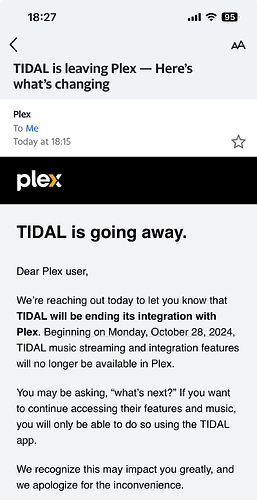
What is gone:
❌ The ability to browse the full Tidal catalog directly inside the Plex Web app.
❌ Native billing for Tidal through the Plex account.
❌ Direct Add to Library buttons for streaming tracks within the Plex interface.
If the lack of native Tidal integration in Plex is a dealbreaker, you aren't stuck. Fortunately, there are two ways available for you to get Tidal Plex playable. You can use metadata syncing like Soundiiz or third-party tools like TunesMake Tidal Music Converter to make your Plex library feel like it's powered by Tidal. For more details, keep reading.
Part 2. How to Sync Tidal to Plex for Use
Since you can't log in to Tidal through Plex anymore, the most efficient way to access your Tidal music within the Plex ecosystem is by syncing metadata. This allows your Plex server to recognize your Tidal favorites and help you organized your local mirrors. Here tools like Soundiiz or TuneMyMusic are the primary solutions. Follow are the steps to sync Tidal to Plex for use.
Step 1. Navigate to the feature of Tidal to Plex in the Soundiiz official website.
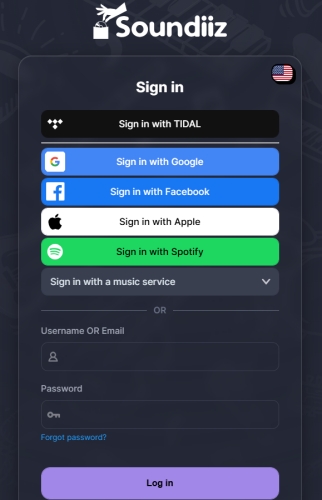
Step 2. Click the Start for free button, then log into your Tidal account.
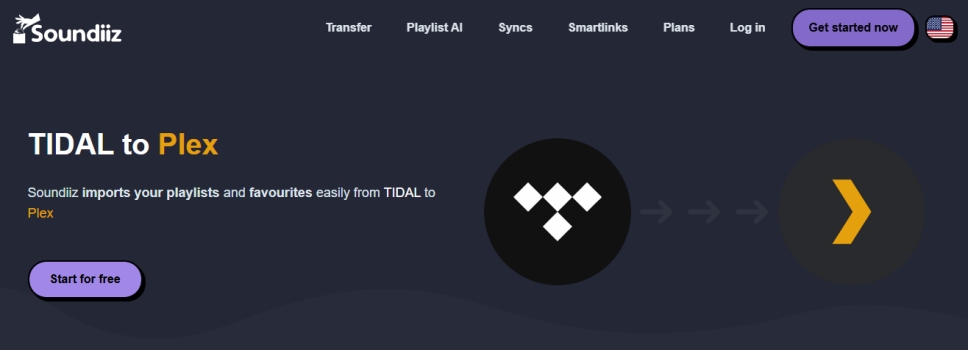
Step 3. Click the Continue button to connect your Tidal account.
Step 4. Proceed to click the Connect twice for Plex connection.

Step 5. Select any specific playlist to sync and click the Transfer button.
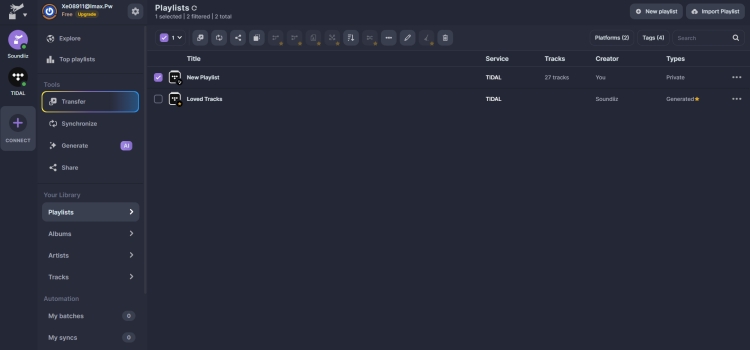
After your My Collection or specific playlists in Tidal are moved, you can search and browse them in your Plex Music Library. Then you can start the playback of your Tidal music library from the Plex Web app or the standard Plex players.
Part 3. How to Add Tidal Music to Plex (Recommended)
For those who want a truly permanent library that doesn't rely on cloud syncing or internet stability, creating a local mirror is the most robust solution. This involves turning your TIDAL playlists into local files that your Plex Media Server can host directly. Tools like TunesMake Tidal Music Converter are designed for this specific scenario.
TunesMake Tidal Music Converter allows you to download and convert Tidal tracks into universal formats like FLAC or MP3 while preserving the original ID3 tags. After conversion, you can freely upload the converted Tidal files into Plex. Once these files are moved to your Plex Music folder, they appear as local media, giving you full control over metadata and offline playback.
How to Convert Tidal Music to Plex Supported Formats
As Plex supports local files in the format of M4A, MP3, FLAC, and more, using TunesMake Tidal Music Converter convert Tidal music to those formats, allowing you to continue to use Plex's features with your Tidal library. Follow the steps below to convert Tidal music to MP3 or M4A with TunesMake.

TunesMake Tidal Music Converter –
Download Tidal music for playing on Plex
- Download songs, albums, playlists, and artists from Tidal without premium
- Convert Tidal music to MP3, FLAC, WAV, AIFF, M4A, and M4B losslessly
- Handle the conversion of Tidal music up to 25× faster speed and in batch
- Save a whole set of ID3 tags during the conversion process automatically
- Preserve the original audio quality up to HiRes FLAC or 320kbps MP3
Security Verified. 100% Clean & Safe.
Step 1 Select Tidal Songs to Download
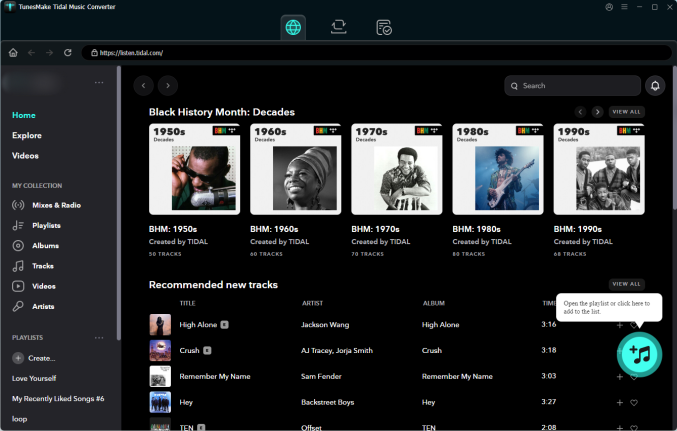
Start by opening TunesMake Tidal Music Converter on your computer, then log into the Tidal web player with your Tidal credentials. Navigate to My Collection or browse the full Tidal catalog to find any music track, album, or playlist to download. Just click the + button to load the target tracks into the conversion list.
Step 2 Configure the Output Format
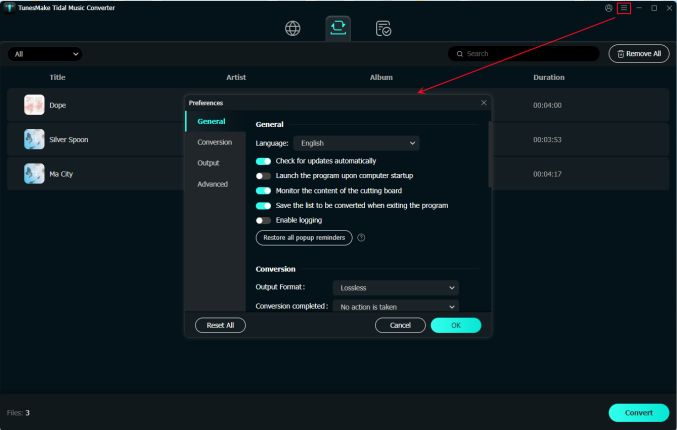
For uploading Tidal music tracks into Plex, you have to set the output audio formats supported by Plex. Go to the menu bar located at the top-right corner and select Preferences > Conversion. Here you can set FLAC or MP3 as the output audio format. Also, you can adjust the audio parameters like sample rate and bit rate to reach a better performance.
Step 3 Convert Tidal Music to FLAC
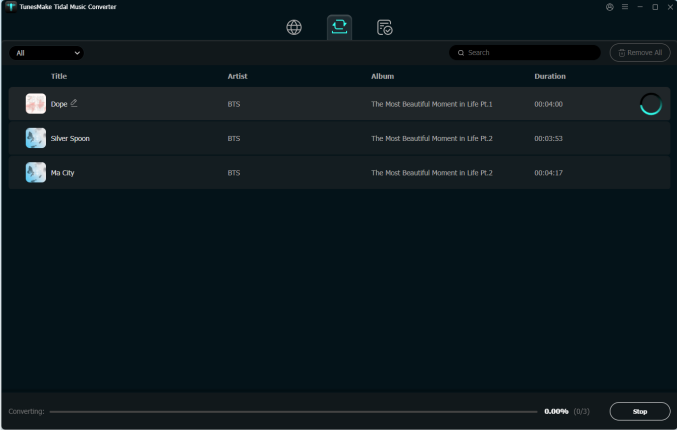
Now click the Convert button at the bottom right corner of the converter, and then the TunesMake program will start the conversion. Wait for a while, and all the converted Tidal music tracks will be saved in the format of M4A or MP3 to your computer. And you can view those converted Tidal music tracks in the Converted section.
How to Upload Converted Tidal Music to Plex
After converting your Tidal tracks into high-fidelity FLAC files locally, you can upload them to your Plex server manually. This is particularly useful for albums you listen to frequently, as it ensures they are always available even if your internet goes down. The process of uploading local files to Plex is pretty easy. Just do the following steps.
Step 1. Launch Plex Media Player on your computer and go to Settings.
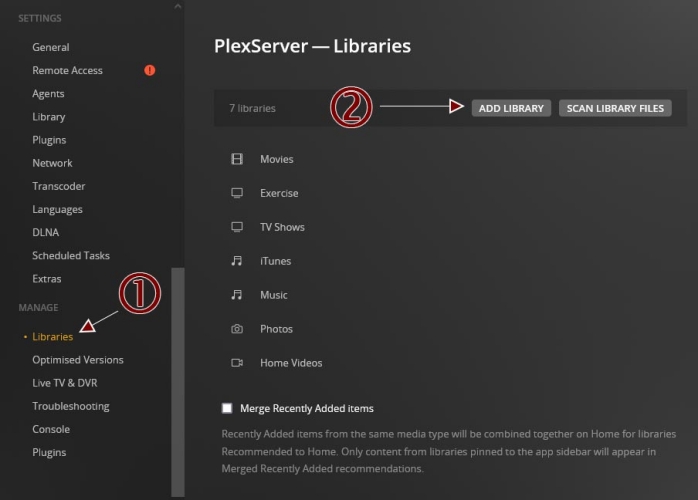
Step 2. From the left menu panel, click Manage Libraries, then click Add Library > Next.
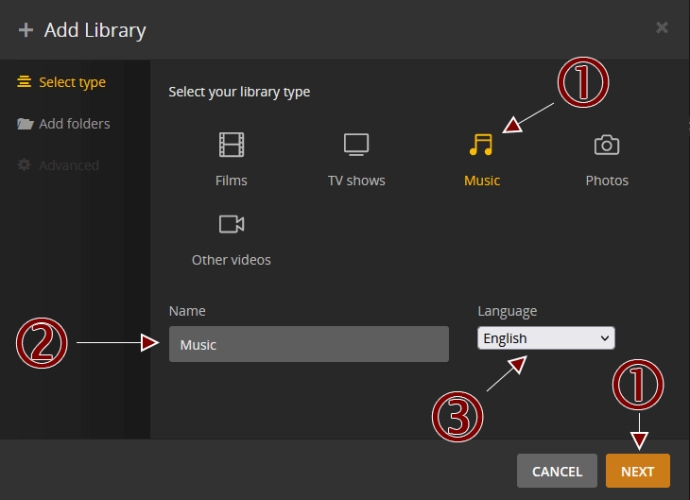
Step 3. In the Add Library window, select Music and click the Next button.
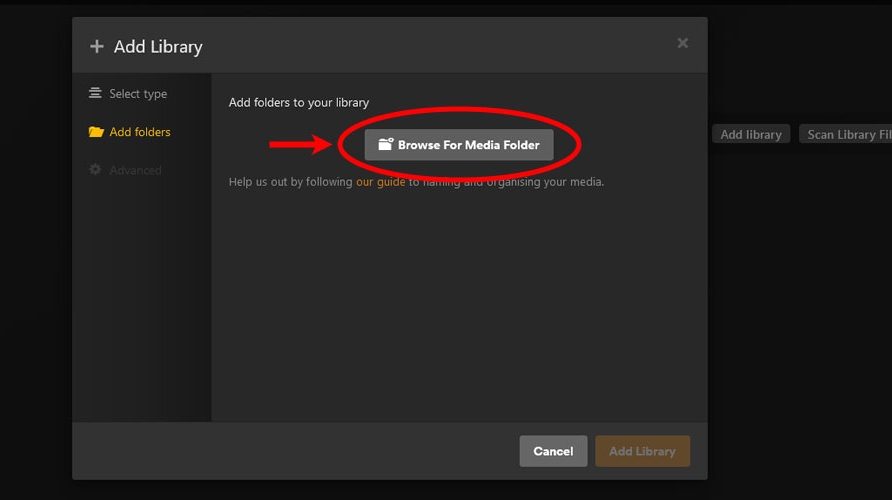
Step 4. In the next view, select Browse for Media Folder to add Tidal music files.
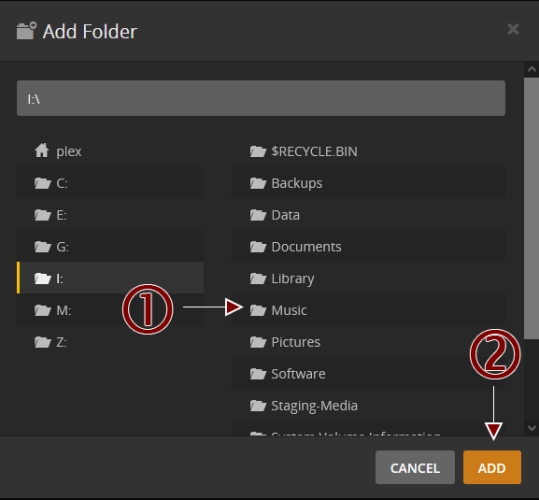
Step 5. Locate the folder where the converted Tidal music tracks are stored.
Step 6. Click Add > Add Library to upload the converted Tidal music tracks.
Part 4. Best Alternatives for Plex Tidal Integration
Although the integration of Plex with Tidal is no longer available, several competitors have stepped up to fill the void that the Plex Tidal split left behind. If the workaround above are too cumbersome and you must have a single app that integrates Tidal with your local files, you might consider these alternatives.
| Feature | Plex | Roon | Audirvāna |
|---|---|---|---|
| Tidal Native Link | No | Yes | Yes |
| Mobile Experience | Excellent | Good | Limited |
| Cost | Free | Subscription | Subscription |
| Ease of Setup | Moderate | Easy | Easy |
Roon: The Professional Choice
Roon is widely considered the ultimate successor to the Plex Tidal integration. It is designed specifically for audiophiles and offers the deepest level of metadata integration on the market.
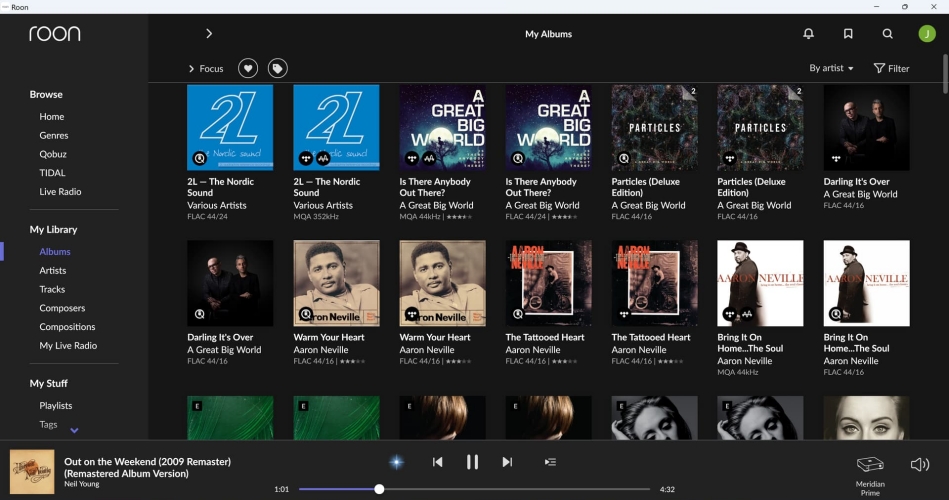
- Integration Level: Native. It merges your TIDAL favorites with your local library into a single, seamless timeline.
- Key Feature: Roon ARC, which functions like Plexamp, allowing you to access your combined library on the go.
- Best For: Serious collectors who want extensive artist bios, cross-referenced credits, and the highest possible audio fidelity, including bit-perfect playback.
Audirvāna: The High-Fidelity Purist
Audirvāna is a high-performance audio player that focuses on maximizing sound quality by optimizing your computer's audio path.
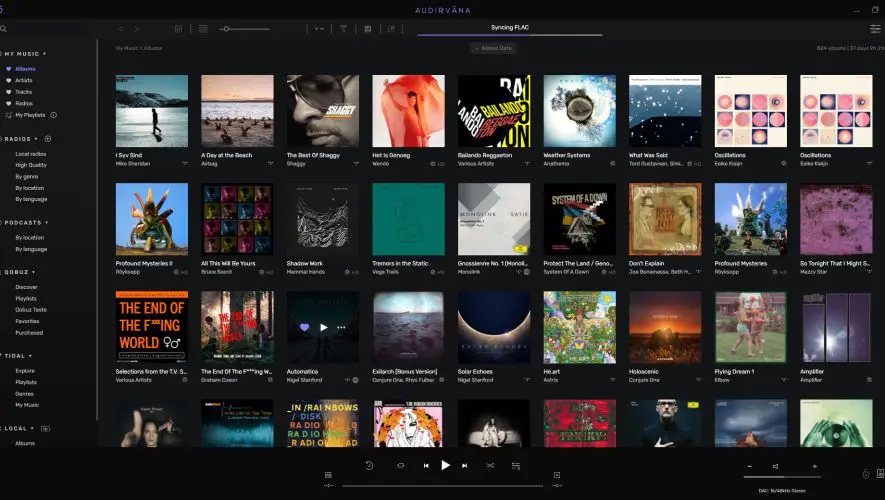
- Integration Level: Native. It has dedicated modules for Tidal, Qobuz, and HRA Streaming.
- Key Feature: Its Signal Processing and Kernel Streaming modes offer superior sound quality compared to standard media players.
- Best For: Users who primarily listen at their desk or through a dedicated Hi-Fi system and prioritize raw audio performance over multi-device server features.
Part 5. Conclusion
While you can no longer simply add Tidal to Plex with a single toggle, a third-party syncing tools like Soundiiz allows you to transfer your Tidal music library to Plex for playing. But if you prefer not to manage third-party metadata syncs, you can use a utility like TunesMake Tidal Music Converter to bridge the gap. With TunesMake, you can download and convert Tidal music to Plex for use without limitations. Start your use right now!
Related Articles



A senior editor from TunesMake, dedicated to sharing professional tutorials and solutions of software, movies, and music.
- 1
- 2
- 3
- 4
- 5
- 6
- 7
 Leave Your Comment
(0)
Leave Your Comment
(0)

 Download Center

