








 Store
Store


Streaming music services are in their heyday, and the market competition is more intense than ever, with virtually all of the tech's big dogs wanting a piece of the growing, juicy pie. Choosing your music streaming service is way more complicated than it seems. When the choice boils down to Amazon Music vs Apple Music, the decision is even harder. They are both industry giants with massive music libraries and high-fidelity audio, but their features and preferences are completely different. To break down the differences, this passage is going to make a further comparison between Amazon Music and Apple Music for your references. Keep reading, and you will find out that Amazon Music vs Apple Music, which one is your best choice.
Part 1. Overview of Amazon Music and Apple Music
When it comes to music streaming services, Amazon Music and Apple Music are two of the most popular options. In this section, we will introduce both services to set the stage for a deeper comparison.
Amazon Music
Amazon Music is deeply integrated with Amazon's ecosystem, offering multiple tiers, including the limited but free-for-Prime Amazon Prime Music, and the high-fidelity Amazon Music Unlimited. Its integration with Amazon devices like Alexa makes it a convenient choice for those already in the Amazon ecosystem. For users who prefer advanced personalization, it is appealing.
-
😀 Pros
- Great deal for Amazon Prime members
- High-resolution and lossless audio
- Spatial audio, including Amazon Music Dolby Atmos
- Deep integration with Alexa devices
- Diverse playlists carefully created by AI
-
☹️ Cons
- Weak music discovery and recommendations feature
- Some advanced features are available only in select regions
- Restricted playlists export/ import functionality
- Social aspects are underdeveloped
Apple Music
Apple Music is designed for seamless integration into the Apple ecosystem. For users who already use Apple devices, the millions of songs, curated playlists, and original content are appealing. Besides, it allows users to upload personal music collections for streaming anywhere with iCloud Music Library. Apple Music is known for its seamless user experience and high-quality sound.
-
😀 Pros
- Great integration with Apple devices
- Vase music library and lossless audio
- Divert features for music discovery
- Robust social functions, like music sharing
-
☹️ Cons
- No free or ad-supported tier
- Limited integration with non-Apple devices compared to Amazon Music
- No artist/label follow
Part 2. Amazon Music vs Apple Music: Detailed Comparison
Now that you have a basic overview of Amazon Music and Apple Music, let's compare these two streaming services in different aspects. In this section, you can evaluate the practical features that affect your daily listening experience.
First of all, let's take a glance of this comparison table that covers the key data points.
| Amazon Music | Apple Music | |
|---|---|---|
| Price | $10.99/month (Individual) | $10.99/month (Individual) |
| Music Library | Over 100 million songs | Over 100 million songs |
| Max Audio Quality | Ultra HD (Up to 24-bit/ 192kHz) | Hi-Res Lossless (Up to 24-bit/ 192kHz) |
| Spatial Audio | ✔ | ✔ |
| Podcast | Within the main app | Requires the Apple Podcasts app |
| Exclusive Content | Amazon Originals, exclusive live streams, and more | Apple Music Live, exclusive DJ mixes, artist interviews, and more |
| Device Compatibility | Computers, mobile phones, Amazon Echo, Alexa devices, Fire TV, and so on | Apple iPhone, Mac, HomePod, smart speakers, and so on |
2.1 Music Library
Amazon Music enables Amazon Prime members to access more than 2 million songs, as well as thousands of playlists and stations. Amazon Music Unlimited is the grown-up version of Prime Music, which offers a subsidized option for Prime members, over 100 million songs, along with HD tiers and other exclusives.
Apple Music's vast library provides more than 100 million songs, focusing on mainstream and international tracks. Besides, you can access exclusive music videos, live performances, interviews, and original radio content. One of its best features is iCloud Music Library, which allows you to upload your own purchased or imported tracks for personal streaming anywhere.
2.2 Audio Quality
Amazon Music's current standard music quality is up to 256 kbps, which is good for MP3. If you have an Amazon Music Unlimited subscription, you have access to high-definition sound quality - HD and Ultra HD. The HD tracks preserve more than double the standard streaming bitrates (up to 850 kbps), and Ultra HD offers up to 24-bit/192kHz sound. For audiophiles who want to experience music with more depth and clarity, Amazon Music is an appealing option.
Apple Music uses high-quality AAC files with bit rates up to 256kbps. It has also embraced lossless and high-resolution audio. You can stream your favorite music in Lossless Audio options in CD-quality, which is up to 16-bit/44.1kHz. A higher option is available - Hi-Resolution Lossless (up to 24-bit/192kHz).
2.3 Plans and Price
Amazon Music: Here, you should pay attention that there's a difference between Amazon Prime Music and Amazon Music Unlimited. Amazon Prime Music is included with Amazon Prime at no additional cost. Amazon Music Unlimited is a paid service that offers several different subscription plans.

| For Prime members | For non-Prime members | |
|---|---|---|
| Amazon Music Prime | / | $14.99/month |
| Amazon Music Unlimited Individual | 10.99/month | $11.99/month |
| Amazon Music Unlimited Family | $19.99/month | $19.99/month |
| Amazon Music Unlimited Student | $5.99/month | $5.99/month |
| Amazon Music Unlimited Single Device | $5.99/month | $5.99/month |
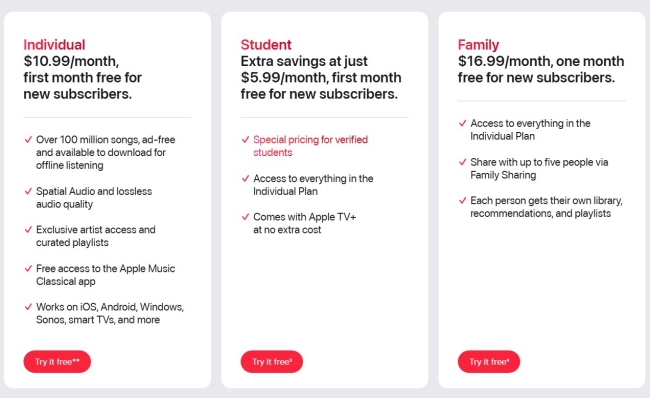
Apple Music: There's no difference between the pricing tiers of Apple Music. Each subscription plan offers access to the same catalog of ad-free content, offline listening, on-demand radio shows, and exclusive releases.
2.4 App UI & User Experience
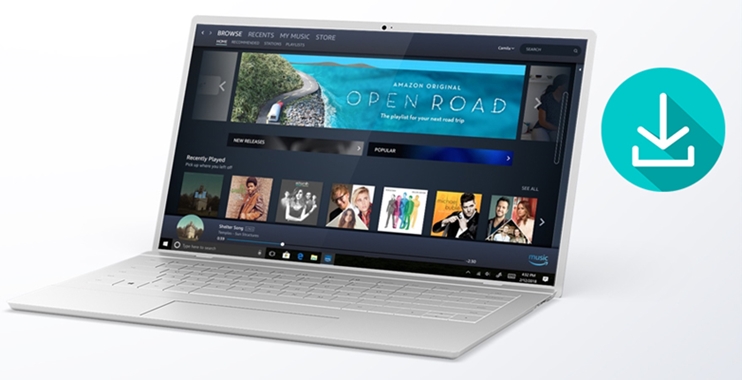
The Amazon Music user interface uses a dark color as the background and shows almost all its functionalities in the interface, showing Amazon's tendency to display a lot of information. When you enter the Amazon Music interface, you will feel it's functional and utilitarian. However, some users think the configuration is too cluttered, making it hard to just navigate to what you want. Moreover, the personalization features are less intuitive than those of Apple Music or Spotify.

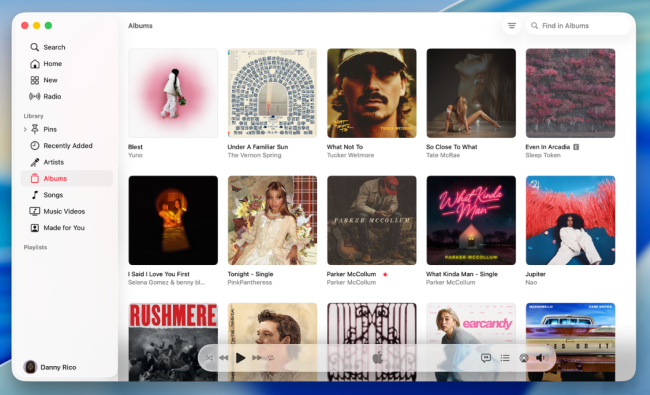
On the other hand, the design of Apple Music app interface is clean, intuitive, and built around your personal music library. It's easy to navigate and use, especially for those who want to discover new music. When you visit the Browse tab, it's like reading a premium music magazine. It not only encourages exploration but also offers recommendations based on your music taste.
2.5 Ecosystem & Device Compatibility
Available in more than 50 countries worldwide, Amazon Music now works well with a wide range of multimedia devices, including Windows, macOS, Android, iOS, FireOS, wearables, and TVs. In addition, you're able to access the Amazon web player with most browser apps. Due to its deep integration with Alexa, Amazon Music excels at cross-platform compatibility. It works seamlessly with a wide range of third-party devices. For users who are already using Amazon devices or have a mixed-device home.
Apple Music is the clear winner for Apple users since it offers deep integration with iPhone, iPad, HomePod, Apple Watch, Apple TV, and especially Spatial Audio via AirPods with Dynamic Head Tracking. While you can access its service on Android and PC, the experience is not as polished as it is on native Apple devices. It is the ongoing choice for users who are fully committed to the Apple ecosystem.
Verdict: Which one is better for you?
Both two music services offer an outstanding selection and good value, and the one you choose should have a lot to do with other products you already own.
If you're a die-hard Apple fan, Apple Music is the one to shoot for. It's perfect for listeners who want to enjoy a huge range of songs, discover new artists and releases, watch music videos, and be entertained by Beats 1 with its great range of DJs. But if you just want some tunes to pass the time and already have an Amazon Prime membership, then Prime Music is essentially a freebie that is well worth exploring before signing up to any other service.
In the end, your choice may be influenced by other factors, such as what your family wants, what your friends use, or what extra features you like. Either way, you really can't go wrong with any of your choices.
Part 3. Extra Tips: How to Keep Amazon Music/ Apple Music Songs Forever
Both Amazon Music and Apple Music are subscription-based services. You can freely enjoy your favorite music after subscribing to Amazon Music and Apple Music, but once the subscription expires, offline downloads will go with the wind. Technically, you don't own the music. This is one of the most common frustrations for devoted music lovers.
This brings up a critical questions for many users: is there a way to keep songs from Amazon Music/ Apple Music forever? Luckily, the answer is yes. To have a permanent, accessible personal music library, all you need is a professional third-party music downloader - TunesMake Streaming Audio Recorder.
TunesMake Streaming Audio Recorder is developed with advanced decryption technology, which can help you download Amazon Music songs, playlists, albums, and podcasts to local music files. Depending on your personal needs, you can choose to save these songs in different audio formats, like MP3, M4A, M4B, WAV, FLAC, and AIFF. Furthermore, this tool smartly retains the original sound quality and all ID3 tags to ensure your offline music experience. Once the downloading and converting process is finished, it's your freedom to play them anywhere and anytime you want, even without the Amazon Music app.

Streaming Audio Recorder –
Download Streaming Music to MP3 on PC and Mac
- Unlimitedly download streaming music songs, playlists, and podcasts
- Losslessly convert streaming music to MP3, M4A, M4B, WAV, FLAC, and AIFF
- Remove DRM protection from many streaming music platforms
- Convert streaming songs with original sound quality and ID3 tags kept
Security Verified. 100% Clean & Safe.
Part 4. Conclusion
Choosing between Amazon Music and Apple Music ultimately comes down to your personal preferences and priorities. No matter which service you choose, there's always a way to keep your favorite songs forever. By using a music converter like TunesMake Streaming Audio Recorder, you can save your favorite tracks for unlimited offline listening.
Related Articles


A professional writer at TunesMake, crafts in-depth tutorials, practical tips and expert advice focusing on streaming music, technology, and more.
- 1
- 2
- 3
- 4
- 5
- 6
- 7
 Leave Your Comment
(0)
Leave Your Comment
(0)

 Download Center

