









 Store
Store


Whether you're switching to a different streaming service or simply cutting down on your monthly expenses, knowing how to cancel an Apple Music subscription is straightforward once you know where to look. However, unlike some platforms that keep your library intact forever, Apple Music handles things a bit differently when you hit that cancel button.
This guide will walk you through the exact steps to cancel your Apple Music subscription on any device, troubleshoot common issues like a missing cancel button, and most importantly ensure you don't lost your carefully curated music library.
Part 1. What Happens to Your Music After You Cancel Apple Music?
Before you terminate your Apple Music service, you need to understand how Apple handles your data. When you can cancel, you will retain access to Apple Music until the final day of your current billing cycle. After that date, your access shifts.
The 30-to-90-Day Playlist Wipeout
Unlike Spotify, which simply demotes your account to a free, ad-supported tier while keeping your playlist safe, Apple Music doesn't have a permanent free tier. If your subscription lapses, Apple will remove your iCloud Music Library from their active servers after a grace period, often reported by users to be anywhere between 30 and 90 days. If you re-subscribe after this window, you may find your custom playlist and curated library completely wiped out.
How to Safely Backup Your Library Before Canceling Apple Music
If you think you might return to Apple Music in the future, or if you want to preserve your hard work, you should back up your data before your billing cycle ends.
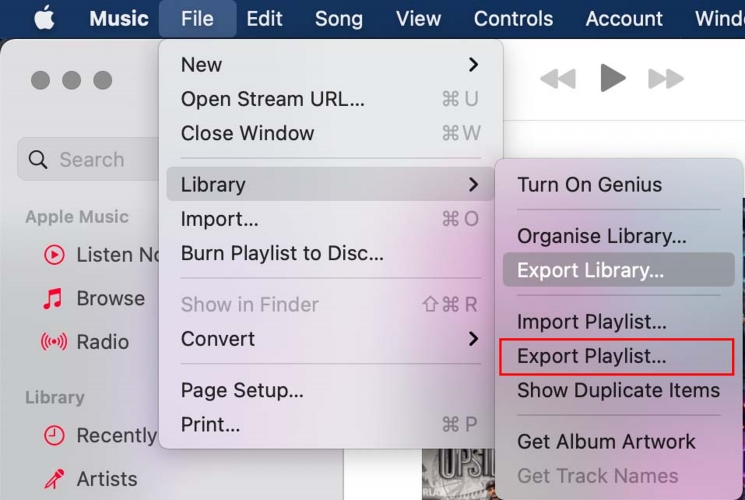
Export as an XML File:
If you use the Apple Music app on a Mac or Windows PC, you can save a copy of all your playlists in your library by going to File > Library > Export Playlist. This can be re-imported later if you reactivate your account.
Use Third-Party Transfer Apps:
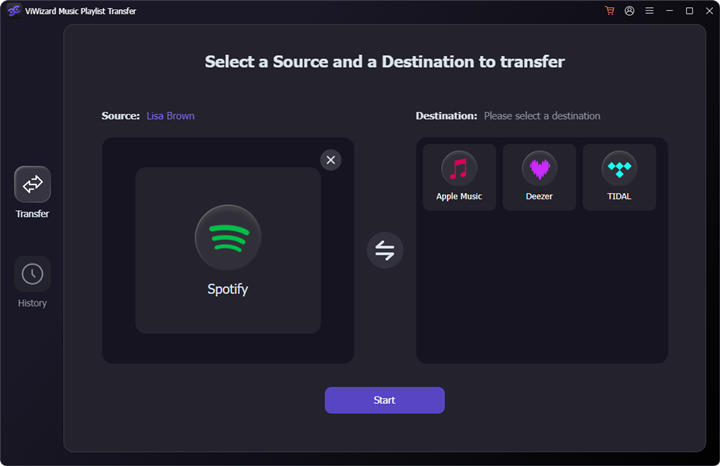
Tools like SongShift, TuneMyMusic, or ViWizard Music Playlist Transfer allow you to back up your library layout or directly transfer your entire playlist catalog to another streaming service like Spotify or YouTube Music before you lose access.
Local Apple Music Backup:
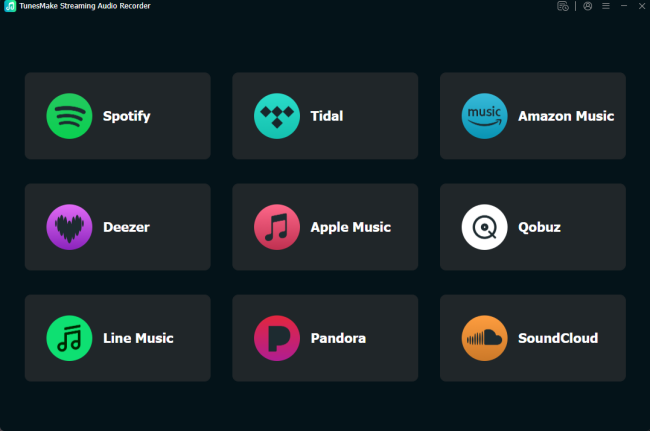
If you prefer to keep a permanent, physical backup of your curated music history on your computer rather than moving it to another subscription service, a desktop extraction tool like TunesMake Apple Music Converter can help to save your entire library locally.
Part 2. How to Cancel Apple Music Subscription across Devices
Ready to move forward? Follow the specific steps below for the device you are currently using.
How to Cancel Apple Music Subscription on iPhone & iPad
For most users, the fastest way to cancel Apple Music is directly from iOS devices like an iPhone.
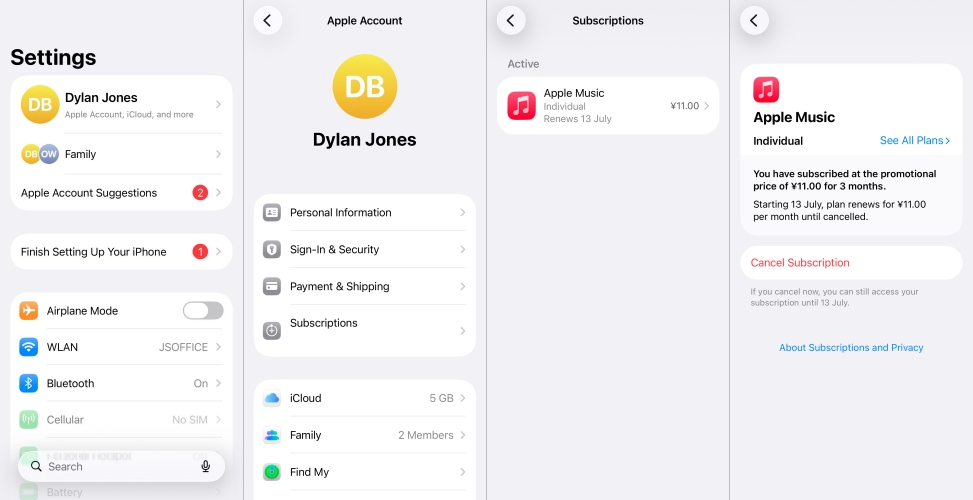
Step 1. Open the Settings app on your iPhone or iPad.
Step 2. Tap your Apple ID name at the very top of the screen.
Step 3. Tap on Subscriptions, then tap Apple Music under your active subscriptions.
Step 4. Tap Cancel Subscription, and confirm your choice when prompted.
How to Cancel Apple Music Subscription on Mac
If you aren't using an iPhone, you can easily terminate your service using a Mac.
Step 1. Open the App Store app on your Mac.
Step 2. Click your name or the sign-in button in the bottom-left corner.
Step 3. Click Account Settings at the top of the window. You may be asked to input your Apple ID password.
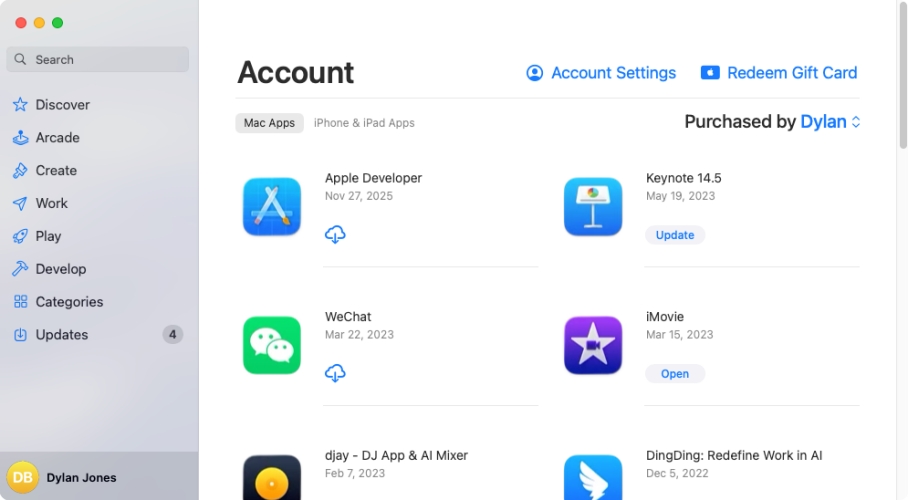
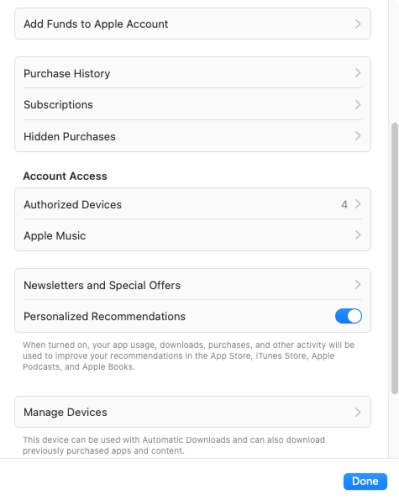
Step 4. Scroll down to click Subscriptions.
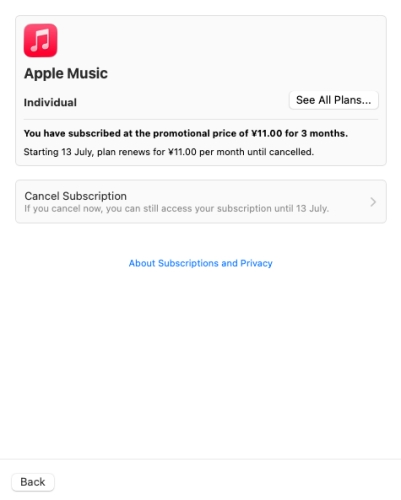
Step 5. Click Edit next to the Apple Music entry, then click Cancel Subscription and confirm.
How to Cancel Apple Music Subscription on Windows PC
On a Windows PC, you can choose to cancel your subscription using iTunes or Apple Music.
Step 1. Open the Apple Music app or iTunes if you are using an older version of Windows.
Step 2. Click on your name at the bottom of the sidebar and select View My Account.
Step 3. Scroll down to the Settings section.
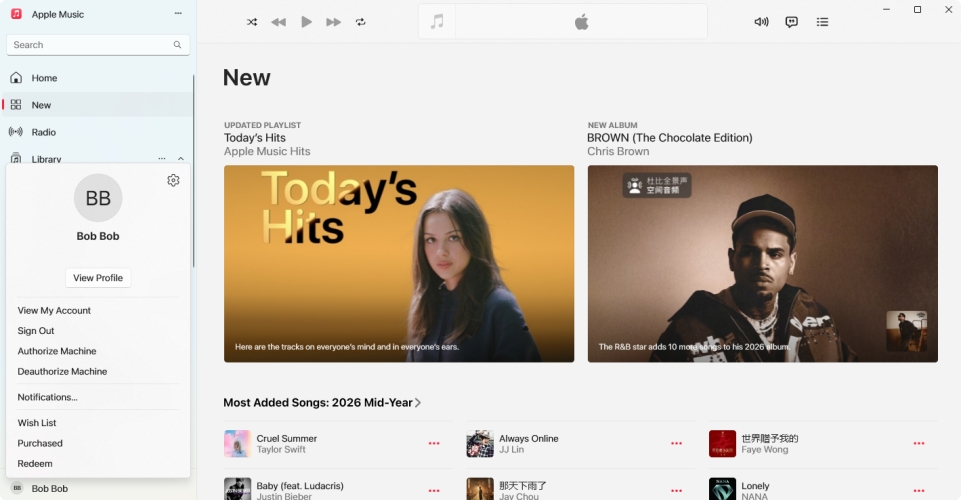
Step 4. Find Subscriptions and click Manage next to it.
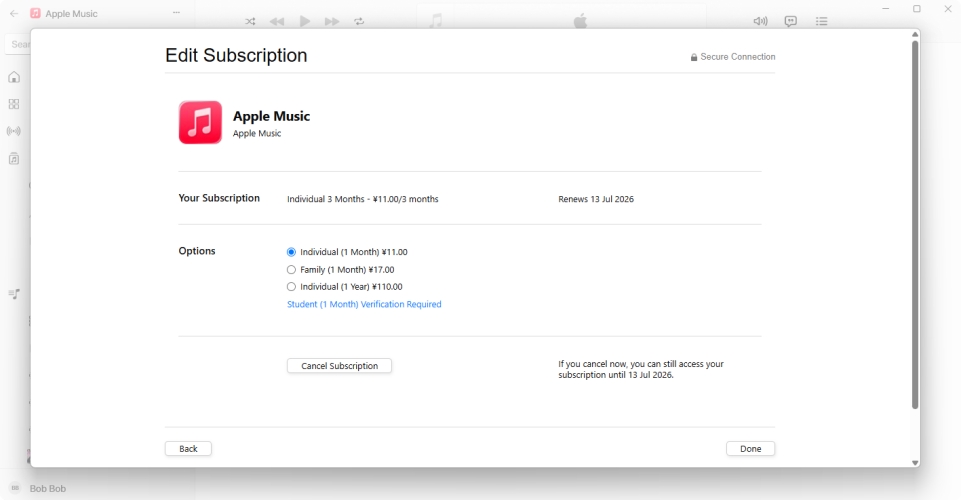
Step 5. Locate Apple Music, click Edit, and then click Cancel Subscription.
How to Cancel Apple Music Subscription on Android
Your cancellation path depends entirely on how you initially signed up:
If you signed up through the Apple Music app:
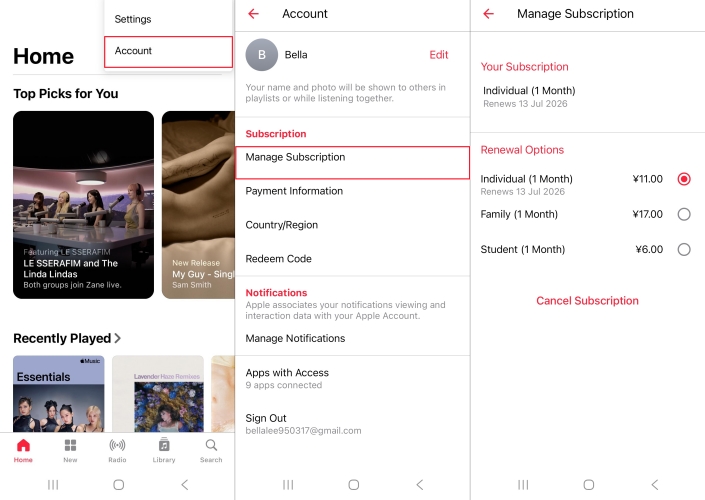
Open Apple Music and tap the three-dot menu button in the top right corner. Then go to Account > Manage Subscription and tap Cancel Subscription.
If you signed up through Google Play:
Open the Google Play Store app and tap your profile icon in the top right. Then tap Payment & Subscriptions > Subscriptions. Finally, select Apple Music and tap Cancel Subscription.
How to Cancel Apple Music Subscription in Web Browser
If you don't have access to your primary devices, you can cancel your subscription online.
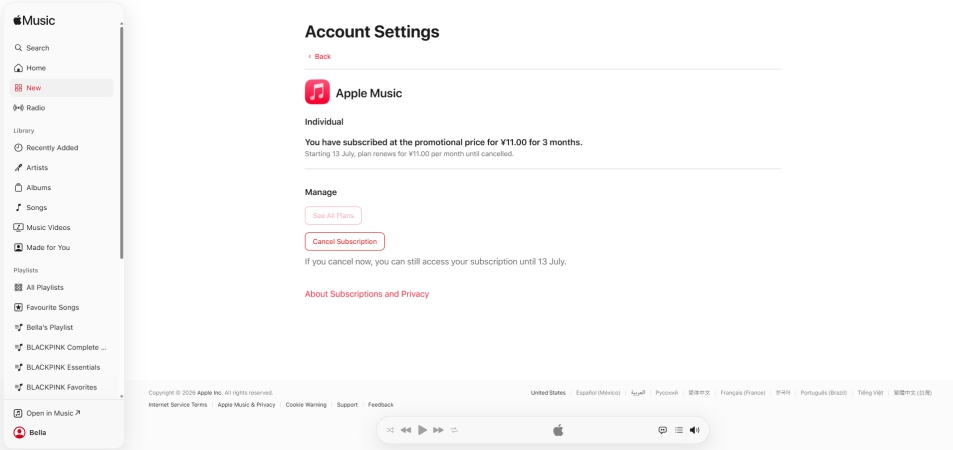
Step 1. Go to music.apple.com using any web browser.
Step 2. Sign in with your Apple ID credentials.
Step 3. Click your profile icon in the top-right corner and select Settings.
Step 4. Scroll down to the Subscriptions section and click Manage.
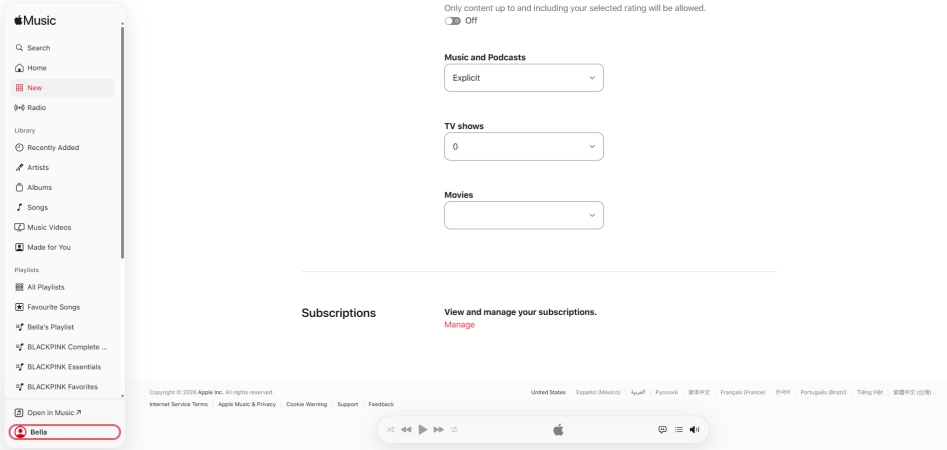
Step 5. Select Cancel Subscription.
Part 3. Troubleshooting about Can't Apple Music Subscription
If you followed the steps above but cannot find the option to cancel Apple Music, you are likely experiencing one of three common scenarios:
The Subscription is Already Canceled:
If you see a message in red or grey text that says "Expires [Date]" instead of "Renews [Date]", and there is no cancel button, you have already successfully stopped the automatic renewal.
Billed Through a Third-Party Provider:
If you received Apple Music bundled with a mobile phone plan such as Verizon, EE, or T-Mobile, Apple does not manage your billing. You must log into your mobile carrier's portal or app to remove the add-on feature.
Family Sharing Restrictions:
If you belong to an iCloud Family Sharing plan, you might be enjoying Apple Music via the family organizer's plan. If you aren't the person being charged, you cannot cancel it; only the family organizer can manage the subscription.
Part 4. FAQs about Apple Music Cancellation
Will I lose access immediately after canceling Apple Music?
No. Whether you are paying monthly or utilizing a free trial, clicking cancel ensures you won't be charged next month, but you can continue listening to your music until the final day of your current billing cycle.
Can I get a refund if I forgot to cancel an Apple Music free trial?
Yes, it is possible. If you were charged automatically because your forgot to cancel in time, immediately visit reportaproblem.apple.com. Sign in with your Apple ID, select "I'd like to request a refund," and choose "Sign up for subscription(s) was accidental." Apple usually reviews these requests within 24 to 48 hours.
How to cancel Apple Music free trial?
To cancel your Apple Music free trial, you can do it easily from your mobile phone or computer. Here is the quickest way to do it on an iPhone or iPad:
Step 1. Open the Settings app on your device.
Step 2. Tap your name at the very top of the screen.
Step 3. Tap on Subscriptions.
Step 4. Find and tap Apple Music from the list of active subscriptions.
Step 5. Tap Cancel Free Trial or Cancel Subscription at the bottom, then confirm your choice.
Part 5. Conclusion
Canceling your Apple Music subscription is a quick process, whether you do it from your iPhone, Mac, Android device, or a web browser. The most critical step is ensuring you act before your billing cycle ends if you want to back up or transfer your hard-earned playlists.
By taking a few minutes to export your library data or use an Apple Music downloader like TunesMake Apple Music Converter before you hit cancel, you can safely explore other streaming options without losing years of curated music history. If you ever decide to return to Apple's ecosystem, you will be glad you took the time to secure your backup first.
Related Articles


A professional writer at TunesMake, crafts in-depth tutorials, practical tips and expert advice focusing on streaming music, technology, and more.
- 1
- 2
- 3
- 4
- 5
- 6
- 7
 Leave Your Comment
(0)
Leave Your Comment
(0)

 Download Center

