








 Store
Store


Among the high-tech DJ software like producer-oriented Traktor DJ, refined Serato DJ, and everything-compatible Virtual DJ, Pioneer DJ has finally hit the mark with its DJ software – rekordbox. This Pioneer’s USB-enabled DJ is a powerful and easy-to-use DJ software for any upcoming or other professional DJs. And now many rekordbox users are searching for ways to import Apple Music to rekordbox for that complete feel. In this article, we’ll show you how to connect Apple Music to rekordbox and how to import Apple Music to Rekordbox for mixing your personal tunes.
Part 1. Can You Use Apple Music on Rekordbox?
Rekordbox has integrated management of multiple music libraries, such as iTunes, Inflyte, Tidal, Beatport, SoundCloud, and Beatsource. If you have accounts on these platforms, you can directly access your music library on rekordbox. Also, the tracks you purchased from iTunes can be imported into rekordbox without hassle. If you want to know how to do that, you can directly go to Part 5 to get more details.
Since rekordbox has official integration with so many music services, the problem arises: Does rekordbox work with Apple Music? Well, let’s put it clearly: yes. Rekord DJ software and some select hardware systems have finally added support for Apple Music in 2025. Now, DJs and music lovers can expand their music collection using Apple Music’s vast catalog. Apart from the official method, we have also collected an alternative that helps you mix Apple Music songs on rekordbox more freely. Keep reading to explore all the details.
Part 2. How to Get Rekordbox Apple Music Connection
In March 2025, rekordbox made a great step toward offering DJs and users more freedom by adding official support for Apple Music. This update ensures that you can play and mix millions of songs and curated playlists from the Apple Music library. To successfully connect Apple Music and rekordbox, you will need:
- Rekordbox app ver. 7.0.1 for Windows/Mac
- Rekordbox app ver. 4.4.0 for iOS
- Rekordbox app ver. 1.21 for OMNIS-DUO firmware
- A valid Apple Music subscription
- A stable Internet connection
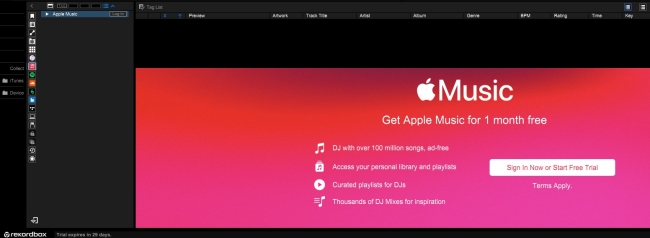
Once you ensured you have met the basic requirements, you can follow these steps to access Apple Music on rekordbox:
Step 1. Install the latest version of the rekordbox software. Launch it on your computer and sign in to your account.
Step 2. Move your cursor to the right lower panel in rekordbox’s interface. Then, find and click the Apple Music icon.
Step 3. Then, you can enter your Apple Music credentials in the right to log in to your Apple Music account.
Step 4. Follow the on-screen instructions to finish the authentication process. Once done, you can see your Apple Music library shown on rekordbox. Drag any song you like to the track, and you can begin mixing and blending it.
Part 3. How to Download Apple Music for Rekordbox
Except for the direct connection, there is a better alternative method that can help you use Apple Music songs on rekordbox. That is turning the DRM-protected Apple Music songs into normal music files. Through doing so, you can have full control over your favorite Apple Music songs. It’s your freedom to import them to rekordbox and even other DJ software for mixing without any limitations. What’s more, this method ensures your smooth music experience even if there is no stable Internet connection. To do so, TunesMake Streaming Audio Recorder is what you are looking for.
With advanced decryption technology, TunesMake Streaming Audio Recorder can easily remove Digital Rights Management from Apple Music and convert Apple Music to MP3, M4A, M4B, WAV, FLAC, and AIFF. It supports downloading diverse Apple Music content, such as songs, playlists, albums, and podcasts. It works losslessly to offer the original quality of your music after conversion. The conversion process is pretty easy and works in a few clicks.

Streaming Audio Recorder –
Download Streaming Music to MP3 on PC and Mac
- Unlimitedly download streaming music songs, playlists, and podcasts
- Losslessly convert streaming music to MP3, M4A, M4B, WAV, FLAC, and AIFF
- Remove DRM protection from many streaming music platforms
- Convert streaming songs with original sound quality and ID3 tags kept
Security Verified. 100% Clean & Safe.
Step 1
Select Apple Music Songs to Convert
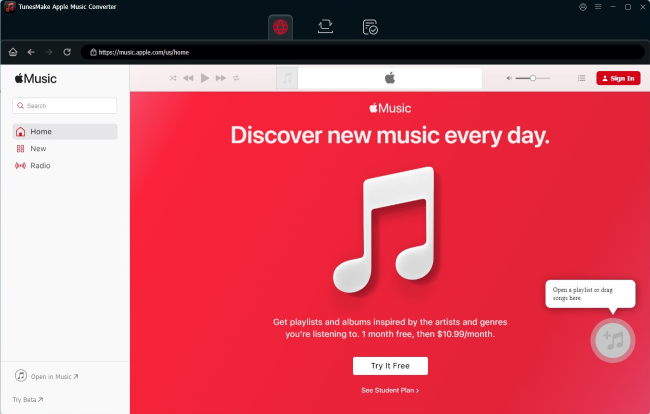
Once you installed the TunesMake Streaming Audio Recorder on your computer, launch it and go to the Apple Music player. After login, you can pick any playlist or album you like. Enter its detailed page, and click the lower Add icon > Add to List. By doing so, you can load all your favorite songs from Apple Music to the TunesMake software.
Step 2
Select the Output Format for Apple Music
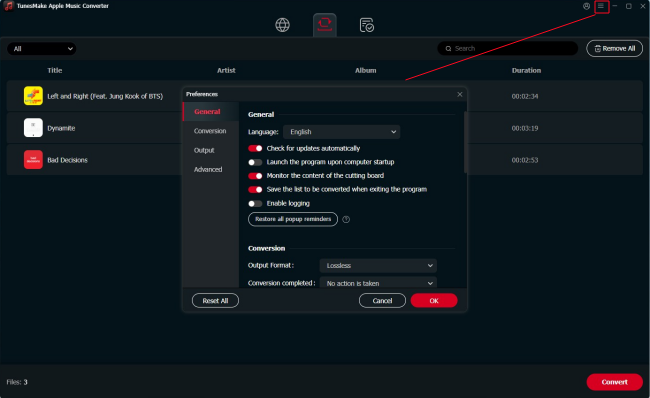
The TunesMake tool allows you to customize the output settings of your added Apple Music songs. You can click the top menu icon > Preferences to enter the settings window. Then, switch to the Conversion tab. Here are six audio formats available, and you can choose the one you need. MP3 for compatibility, and FLAC for better sound quality. You can also customize the audio parameters like codec, channel, sample rate, and bit rate to get better audio quality.
Step 3
Start to Convert Apple Music
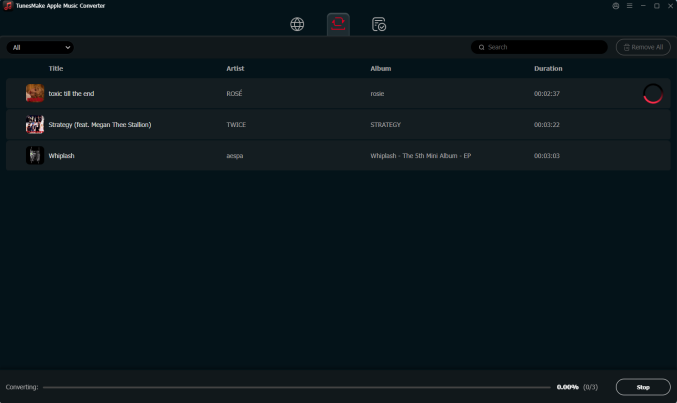
After configuring the settings as desired, you can click the Convert button. TunesMake Streaming Audio Recorder will then remove DRM from Apple Music and convert Apple Music songs to a playable audio format. Wait for a while, and you can find those converted Apple Music songs by clicking the Converted button at the top of the converter.
Part 4. How to Import Downloaded Apple Music to Rekordbox
Now all Apple Music songs you require are converted to Rekordbox-supported formats by using TunesMake software. You are now just an inch away from using Apple Music on Rekordbox. Follow the steps below to load your Apple Music downloads to rekordbox on your computer and mobile phones.
On Windows/Mac:
Way 1. Using File Import
Step 1. Run Rekordbox on your computer, then click File > Import.
Step 2. Under Import, select Import Track, Import Folder, or Import Playlist.
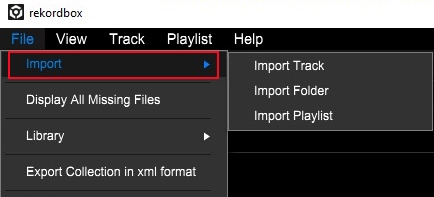
Step 3. Then there will pop up the File Explorer or the Finder.
Step 4. Head to the folder where the converted Apple Music files are stored.
Step 5. Click the Open button and start selecting the music files.
Step 6. Click the Collection at the left column in Rekordbox and browse all the music files.
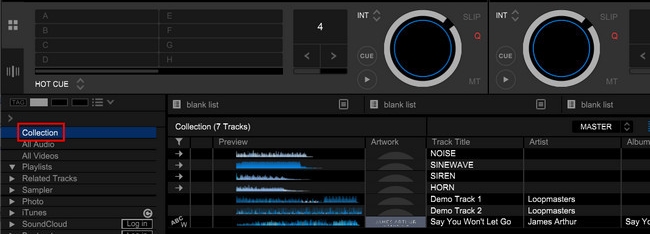
Step 7. Right-click the track and click Preview > Analyze Track to remix.
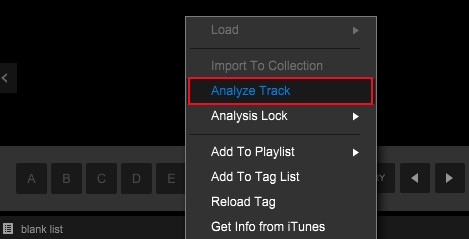
With the above steps, you can successfully import those converted Apple Music files from your computer to Rekordbox for use. In addition to using the above steps, you can also directly drag and drop the music files to the interface of the software.
Way 2. Dragging and Dropping
Step 1. Fire up the rekordbox app on your desktop.
Step 2. Open the File Explorer or Finder. Then, go to find the downloaded Apple Music tracks.
Step 3. Choose the track you want to add to the rekordbox. Then, directly drag and drop it into one of the playlists of your rekordbox app.
Step 4. Now you can go to the Collection section, and the imported track will shown there. You can edit and mix it as you wish freely.
On iPhone/Android:
If you want to import Apple Music songs to rekordbox on your mobile phone, this part can be really helpful. It’s not difficult as long as you reference the guidance below.
Step 1. In Rekordbox on your computer, click Search Mobile.
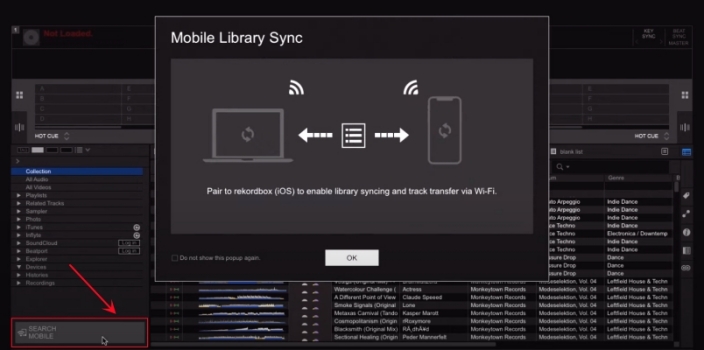
Step 2. Select your iPhone or Android device, then click OK in the pop-up window.
Step 3. In Rekordbox on your iPhone, tap Settings > Connect to Rekordbox (Mac/Win).
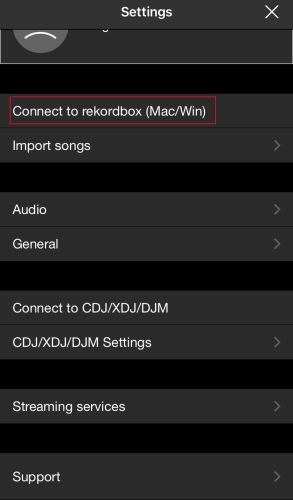
Step 4. Go back to your computer and click your iPhone, then click Connect to confirm.
Step 5. Click OK and all the music files from a collection or playlist will be transferred to your device.
Step 6. In Rekordbox for mobile, tap Demo Track 1 or 2 and go to Collection.
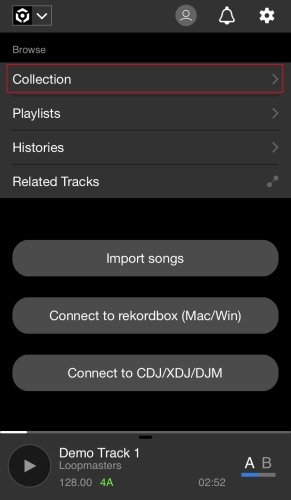
Step 7. Select the music files synced from your computer and start remixing.
Additionally, you can transfer those converted Apple Music files to your iPhone or Android device. In Rekordbox for iOS or Android, you can add them from the local folder on your mobile device by tapping Import Songs. Then you can also remix your music files with Rekordbox.
Part 5. How to Transfer Music from iTunes to Rekordbox
Unlike Apple Music – a streaming music service, iTunes is more like a shop. Once you purchase your preferred music, you can get it locally with the unprotected file. After purchasing, it can be used in other DJ software like Rekordbox. If you want to import a playlist from iTunes to Rekordbox for use, you can follow the below steps.
Step 1. Open iTunes on your computer and click Edit > Preferences.
Step 2. In the General Preferences window, switch to the Advanced tab.
Step 3. Check the box next to Share iTunes Library XML with other applications.
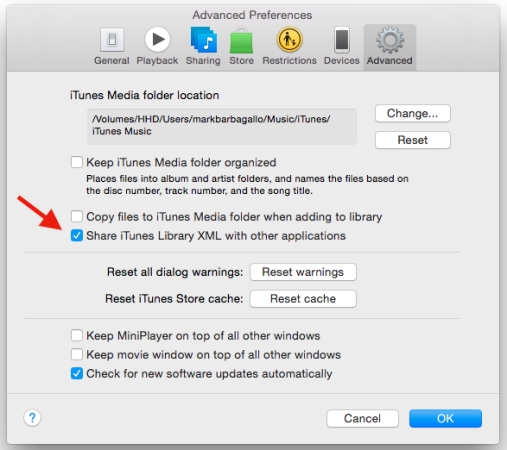
Step 4. In Rekordbox, go to Preferences and check the iTunes box.
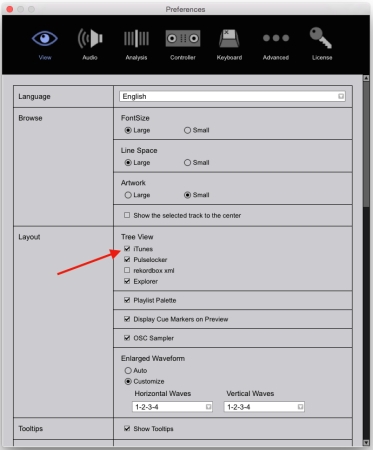
Step 5. Return to the main interface of Rekordbox, and click iTunes in the left column.
Step 6. Start browsing your iTunes music library and select any music track.
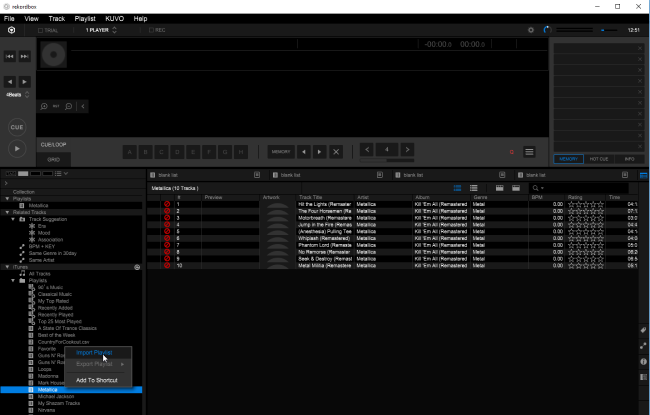
Step 7. Click Preview > Analyze Track and remix your music track with effects.
Conclusion
Whether you are a professional DJ or an amateur disc jockey, Rekordbox has some great plans in store. Although the interface seems quite busy for first-timers, the features will enhance your DJ experience for wonderful playlists. Here, TunesMake Streaming Audio Recorder is all you need to unlock the format protection and import Apple Music to rekordbox.
Related Articles


A professional writer at TunesMake, crafts in-depth tutorials, practical tips and expert advice focusing on streaming music, technology, and more.
- 1
- 2
- 3
- 4
- 5
- 6
- 7
 Leave Your Comment
(0)
Leave Your Comment
(0)

 Download Center

