








 Store
Store


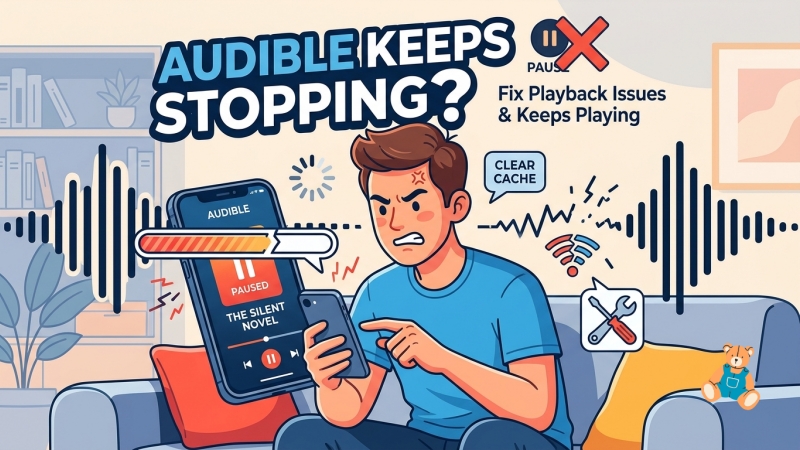
Few things disrupt a great listening experience like an audiobook that constantly cuts out. If your Audible app keeps stopping unexpectedly, the issue is rarely a problem with your headphones or your phone's hardware. Instead, it is usually driven by underlying software configurations, background restrictions, or temporary app glitches. This guide breaks down exactly why this happens and provides clear, step-by-step instructions to get your playback working seamlessly.
Part 1. Why Does Audible Keep Stopping?

Anyone else having issues with audible suddenly stopping? I'll be listening and seemingly for no reason the playback will just stop. Have to keep opening audible up and hitting play again."
On Facebook, Amazon Forum, Reddit, and more platforms, lots of users complain that their Audible app keeps stopping or pausing. However, most of them don't know why Audible keeps stopping. In fact, the Audible app usually keeps stopping due to aggressive device settings or minor software conflicts. The most common reasons include:
1️⃣ Battery Optimization Rules: Both Android's battery optimizer and iOS's Low Power Mode frequently freeze minimized apps to save power, killing Audible the moment your screen locks.
2️⃣ Audio Hijacking: Scrolling past auto-playing videos or hidden ads on social media apps like TikTok or Instagram instantly forces your device to pause your audiobook.
3️⃣ Corrupted Data or Bugs: A glitched app update or an audio file that suffered a minor error during download can cause the playback to crash or pause at specific timestamps.
Part 2. How to Fix Audible Keeps Stopping Your Screen Locks
If Audible plays perfectly while you are looking at your screen but shuts down the second the display goes dark, your operating system is likely cutting off the app's background privileges to save battery life. Here is how to configure your specific device to prevent this.
Use Lock-Screen Mini-Player Workaround
Before tweaking your global system settings, you should check for a specific app bug that can cause Audible to stop playing exactly 45 to 50 seconds after your phone screen locks. If you are experiencing this exact timed shutdown, use this quick user-discovered workaround.
Step 1. Open the Audible app and head to your Library.
Step 2. Simply tap the small Play button on the thumbnail from the list view.
Step 3. Keep the app minimized in this mini-player view and lock your screen.
This mini-player trick bypasses a known background rendering glitch. If your Audible app still keeps stopping or pausing when your screen locks, you can fix device background pauses to resolve the issue on your device.
How to Fix Audible Keeps Stopping on iPhone
Apple's iOS is notorious for aggressively freezing background apps when resources or battery power are low. When Audible stops or pauses the moment your screen locks, try to disable Low Power Mode or enable Background App Refresh.
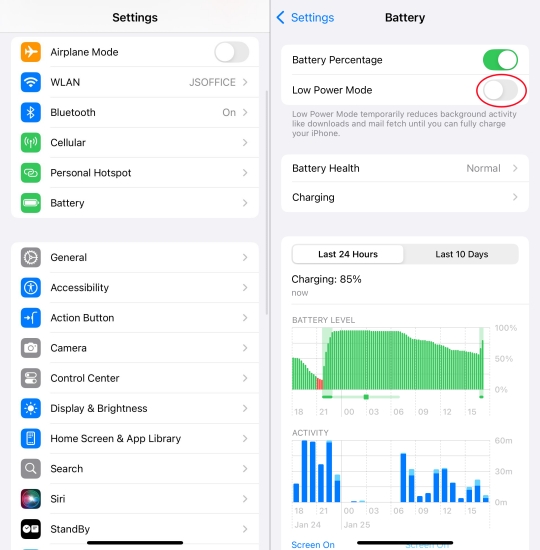
Disable Low Power Mode:
When active, Low Power Mode severely restricts background data and app processing. Go to Settings > Battery and toggle Low Power Mode off.
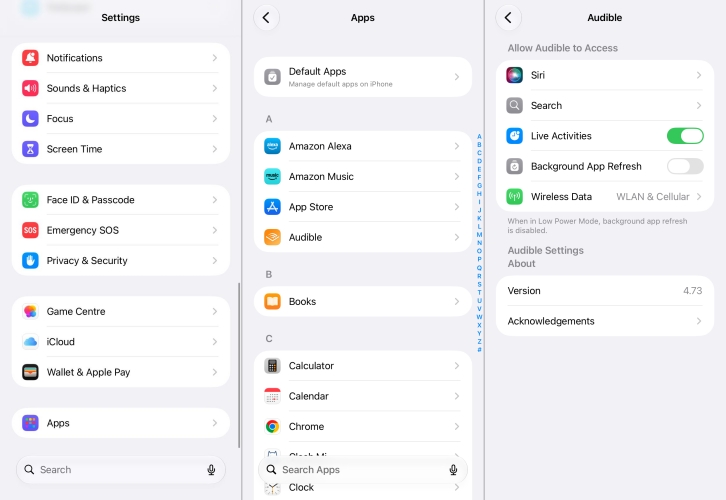
Enable Background App Refresh:
This permission allows Audible to run continuously even when your phone is locked. Go to Settings > Apps > Audible and toggle Background App Refresh on.
How to Fix Audible Keeps Stopping on Android
Android devices, especially Samsung, Google Pixel, and OnePlus feature built-in battery optimization tools that will automatically put media apps to sleep if they aren't explicitly exempted.
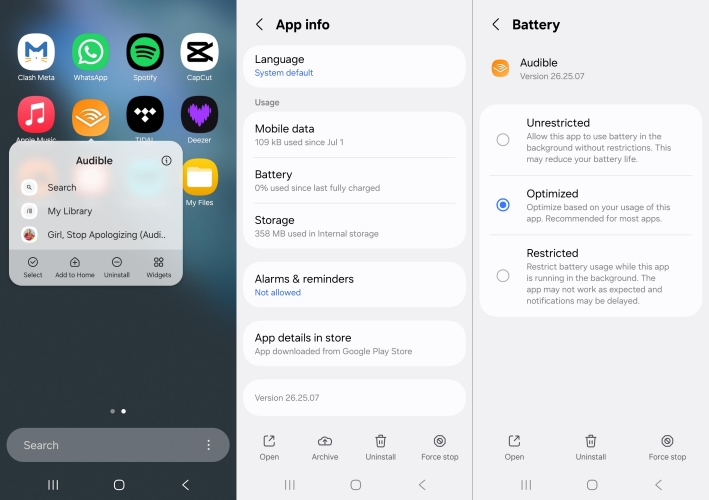
Set Battery to Unrestricted:
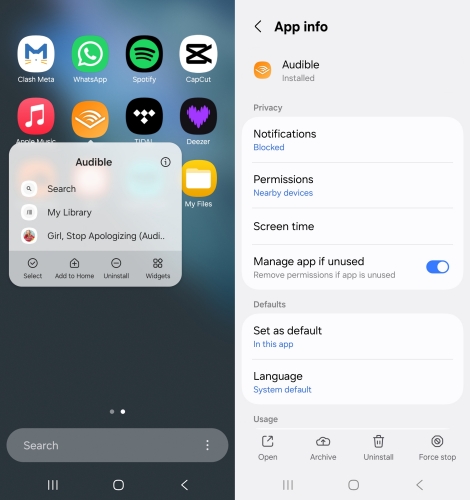
Press and hold the Audible app icon on your home screen and tap the App Info icon. Then tap Battery and change the setting to Unrestricted.
Check Unused App Permissions:
On the same App Info page, ensure that Pause app activity if unused is toggled OFF, preventing Android from clearing the app's permissions automatically.
Part 3. How to Fix Audible Keeps Pausing Every Few Minutes
If your Audible playback stops randomly while you are actively using your phone or walking around, the culprit is usually an audio stream conflict or a corrupted temporary file. Following are the feasible solutions to fix Audible keeps stopping or pausing.
Solution 1. Close Audio-Hijacking Background Apps
Modern smartphone operating systems are designed to prioritize the most recent active media source. If you are scrolling through social media feeds like TikTok or Instagram, an auto-playing video ad, even one that is completely muted, can instantly hijack your device's audio channel and pause Audible. Closing out of these apps completely when listening will stop the interference.
Solution 2. Re-download Corrupted Audible Titles
If Audible keeps stopping during a specific chapter or only on one particular book, the downloaded title itself may have suffered a minor corruption error during the download process. In this case, delete the corrupted audiobook and download it again.
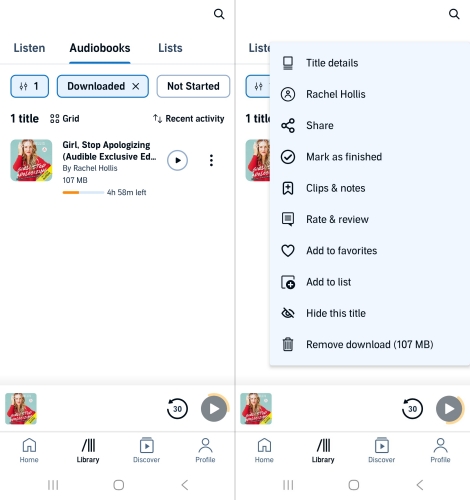
Step 1. Open your Audible Library.
Step 2. Tap the three dots next to the problematic audiobook.
Step 3. Select Remove from device.
Step 4. Tap the book cover again to trigger a fresh, clean download.
Solution 3. Clear Android App Cache
Accumulated temporary files can create internal memory conflicts that cause sudden playback stops. For Android users, you can clear app cache in the Audible app. This safely deletes temporary system junk without deleting your downloaded audiobooks.
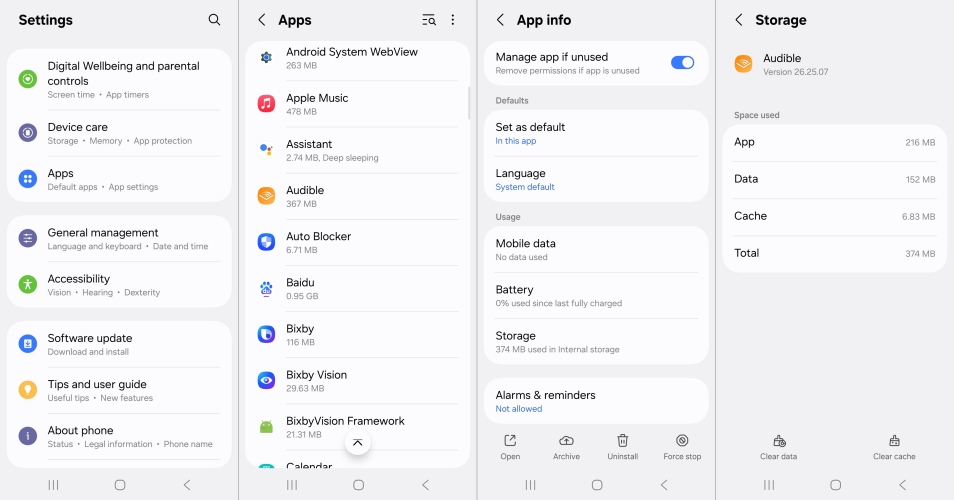
Step 1. Go to Settings > Apps > Audible > Storage.
Step 2. Tap Clear Cache in the bottom corner.
Solution 4. Upload iOS Diagnostic Data
Because iOS doesn't feature a native Clear Cache button for individual apps, Audible built a hidden maintenance reset directly into the app. This deeply clears the internal data cache and requires you to log back into your account, restoring the app to peak performance.
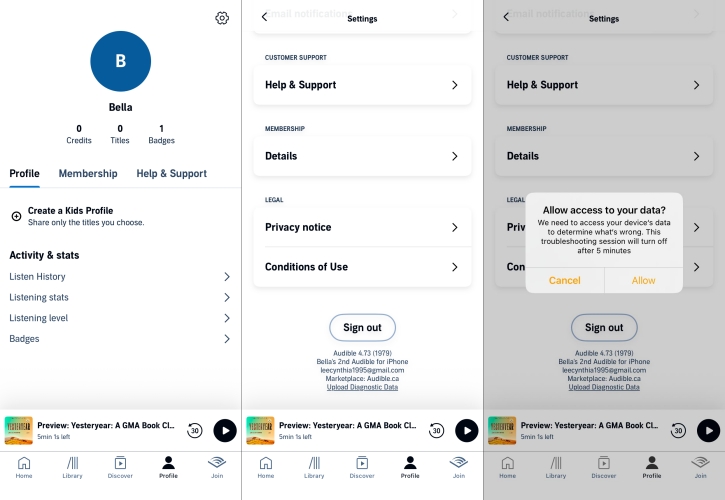
Step 1. Open Audible and tap on your Profile icon in the bottom right.
Step 2. Tap the Settings icon in the top right.
Step 3. Scroll down to the bottom of the menu where the app version is listed in small print.
Step 4. Press and hold the version number text for roughly 5 to 10 seconds.
Step 5. A prompt will appear asking if you want to reset the application sign-in. Confirm the reset.
Solution 5. Update to Latest Audible App
Occasionally, a specific version update of the Audible app may contain a bug that causes the app to crash when the screen locks. Check your device's App Store or Google Play Store to ensure the app is updated to the absolute latest version.
Solution 6. Delete and Reinstall Audible
When your Audible app keeps stopping, performing a complete, clean reinstall is your ultimate last resort. Unconditional app crashes that defy setting adjustments usually point to deeply broken core files within the app directory.
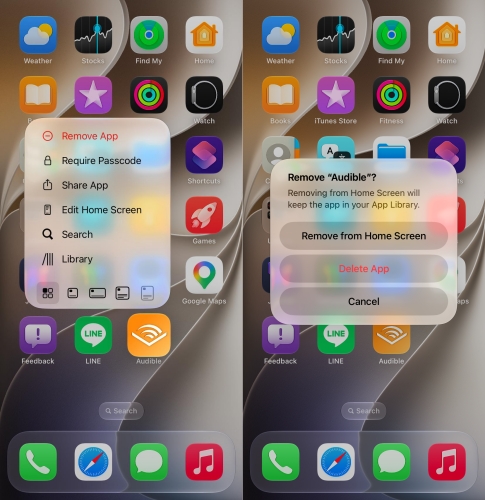
Step 1. Uninstall the Audible app from your device completely.
Step 2. Restart your smartphone to clear out any residual device RAM cache.
Step 3. Download the app directly from the official Apple App Store or Google Play Store.
Part 4. Ultimate Way to Bypass Audible App Glitches Entirely
If the Audible app continues to crash due to persistent compatibility conflicts with your operating system, an effective alternative is to bypass the Audible mobile app altogether. Tools like TunesMake Audible Converter allow you to download your purchased Audible AAX or AA audiobooks directly onto a Mac or Windows computer and convert them into universal audio formats like MP3 or M4B.
Because it retains your original chapter information and metadata, you can transfer the converted Audible audio files to any media player on your phone. This approach completely removes the Audible app's background processing from the equation, giving you an interruption-free listening experience using your device's built-in media player. Follow the steps below to convert Audible audiobooks to MP3 or other unprotected formats.

Streaming Audio Recorder –
Download Audible audiobooks to popular audio formats
- Download purchases, podcasts, and Originals from Audible
- Convert Audible books to MP3, M4A, M4B, WAV, FLAC, and AIFF
- Remove DRM protection from Audible efficiently and safely
- Preserve the original audio quality and chapter information
- Support downloading audios from 11 popular streaming platforms
Security Verified. 100% Clean & Safe.
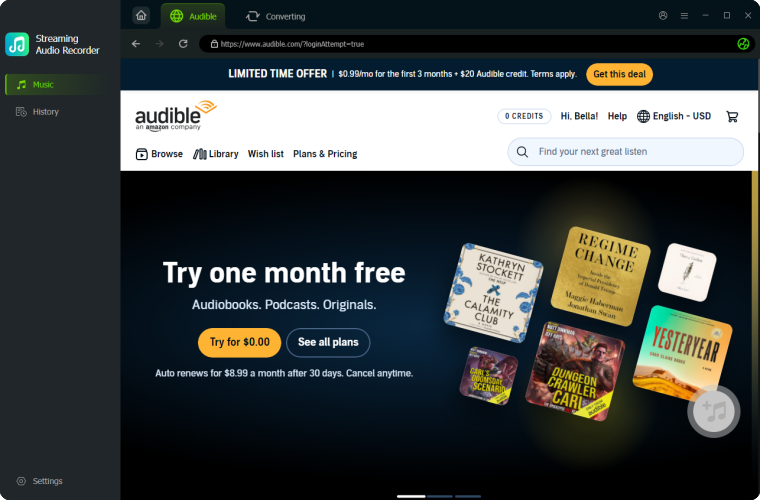
Step 1 Add Your Target Audible Titles
First of all, open TunesMake Streaming Audible Converter and click the Audible icon in the main interface. Then you can log into the built-in Audible web player with your account details. Now go to find and choose your purchased Audible audiobooks to convert.
Step 2 Set the Output Audio Parameters
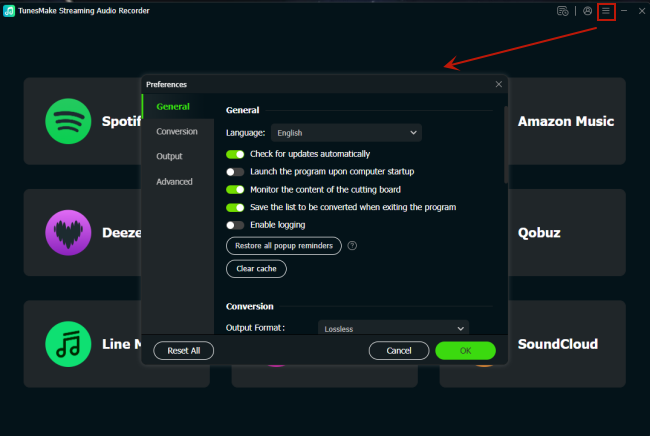
Then you can click the Settings button at the left corner of the bottom, and you can enter into the settings window. In this window, you can select MP3 from the list of audio formats. From there, you can also set the bit rate, sample rate, and channel for getting better audio quality.
Step 3 Convert Audible Audiobooks to MP3
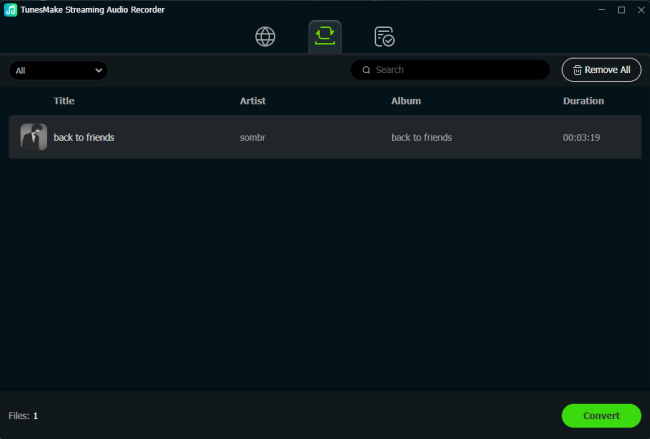
After setting the output audio parameters, you can click the Convert button to start the conversion. Just wait for a while till it is finished. When finished, you can find them in the conversion history by clicking the History icon.
Part 5. Conclusion
Dealing with an audiobook that constantly cuts out can completely ruin your listening experience. However, as we have explored, the reason your Audible app keeps stopping is rarely due to a broken phone or a corrupted account. Whether it is an aggressive battery saver putting the app to sleep, a hidden background app hijacking your audio stream, or a temporary software glitch from a recent update, the fix is usually just a few taps away in your settings. By systematically walking through these quick workarounds and system tweaks, you can easily restore a smooth, continuous narration.
Related Articles



A professional writer at TunesMake, crafts in-depth tutorials, practical tips and expert advice focusing on streaming music, technology, and more.
- 1
- 2
- 3
- 4
- 5
- 6
- 7
 Leave Your Comment
(0)
Leave Your Comment
(0)

 Download Center

