








 Store
Store


For users who prefer independent artists and creators, SoundCloud is the go-to choice since it is an open and creator-focused platform. Its massive library not only contains popular music but also indie tracks, DJ mixes, and exclusive releases. However, many users want to know whether SoundCloud offers offline listening like other music streaming platforms. If you are looking for the answer, you have come to the right place. This comprehensive guide will break down every practical way to listen to SoundCloud offline. How to listen to SoundCloud offline? Keep an eye on this post, and you will know.
Part 1. Can You Listen to SoundCloud Offline?
Nowadays, offline listening is a must-have feature for many music lovers. Whether you are commuting through a subway tunnel, boarding a long flight, or simply trying to save your mobile data plan, it’s essential to figure out how to download SoundCloud content for offline playing. So, can you listen to SoundCloud offline? The short answer is yes, but under certain conditions.
Like other music streaming platforms, SoundCloud offers offline listening functionality, but it is not available to all users by default. Except for the tracks that creators allow free downloads of their original files, only SoundCloud subscribers can download songs for offline playback. If you are subscribed to SoundCloud Go or Go+, you are able to unlock offline listening in the SoundCloud app installed in your mobile phone. However, this offline downloading feature comes with some notable limitations, such as device limits, DRM protection, and content availability issues. If you are looking for an alternative that can help you enjoy SoundCloud content offline without restrictions, you can jump to Part 4 for more detailed information.
Part 2. How Do You Listen to SoundCloud Offline on Its Website
Unlike other music platforms, SoundCloud allows independent artists to upload music directly. If artists enable the availability for offline listening, you can download the original music file they uploaded before, even if you don’t have a Go or Go+ subscription. When you find something you like, and it is available on the SoundCloud website, you can follow these steps to download it for offline listening:
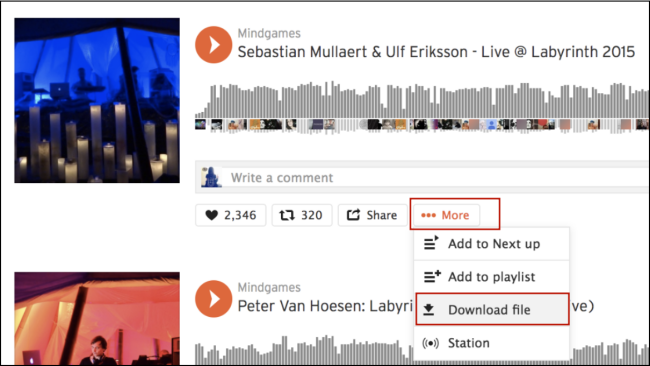
Step 1. Open any browser and visit soundcloud.com. Then, sign in to your SoundCloud account.
Step 2. Find the track you want to listen to offline. Then, click the More icon under the waveform of this track.
Step 3. Select Download file to save this music file. When it is downloaded, you can find it in the Downloads section of your browser.
Part 3. How to Use SoundCloud Offline with a Subscription
Downloading the music file directly from the SoundCloud website is the best way to listen to it offline. However, not all songs are available for direct download. For most streaming music tunes, only SoundCloud subscribers can download songs for offline listening. If you have an active subscription, you can save your Likes, playlists, and your entire library for offline listening on your mobile device. Here are the steps to do so:
Step 1. Open the SoundCloud app on your mobile phone and sign in to your SoundCloud Go or Go + account.
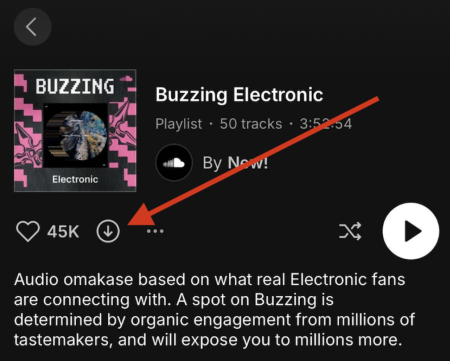
Step 2. If you want to save all the songs in your Likes, you can head to your Library > Likes and tap the download button.
Step 3. If you want to save your playlists, just go to your Library and enter the detailed page of the playlist you want to download. Then, tap the download icon to save the whole playlist.
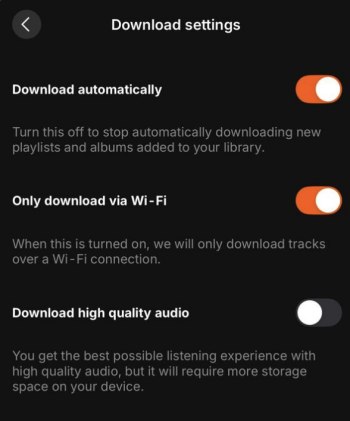
Step 4. SoundCloud also offers an automatic download feature. It can help you save your entire SoundCloud library automatically. To enable it, go to the SoundCloud Settings page and select Downloads > Download automatically.
Part 4. How to Listen to SoundCloud Offline without Limits [Subscription-free]
It is known that the official download feature doesn’t mean you can truly own your music. All the songs you downloaded are protected by DRM, which means they can not be played outside the SoundCloud app. Once your subscription ends, you will lose access to them as well. If you want to listen to your favorite SoundCloud music offline without restrictions, you will need a dedicated music downloader - TunesMake SoundCloud Music Converter.
TunesMake SoundCloud Music Converter is equipped with advanced decryption technology, which can help you remove DRM from SoundCloud music and download the content to normal audio formats, including MP3, M4A, M4B, WAV, FLAC, and AIFF. The TunesMake tool is the best choice to save SoundCloud songs, playlists, albums, and podcasts and listen to them offline, even if you don’t have a SoundCloud subscription. Besides, it automatically retains the original sound quality and ID3 tags to ensure your offline music experience. Once the SoundCloud tracks are downloaded, it’s easy to transfer them to other media players or devices for offline playback without any limits.

Streaming Audio Recorder –
Best Tool to Listen to SoundCloud Offline
- Unlimitedly download streaming music songs, playlists, and podcasts
- Losslessly convert streaming music to MP3, M4A, M4B, WAV, FLAC, and AIFF
- Remove DRM protection from many streaming music platforms
- Convert streaming songs with original sound quality and ID3 tags kept
Security Verified. 100% Clean & Safe.
Step 1
Personalize the Audio Parameters
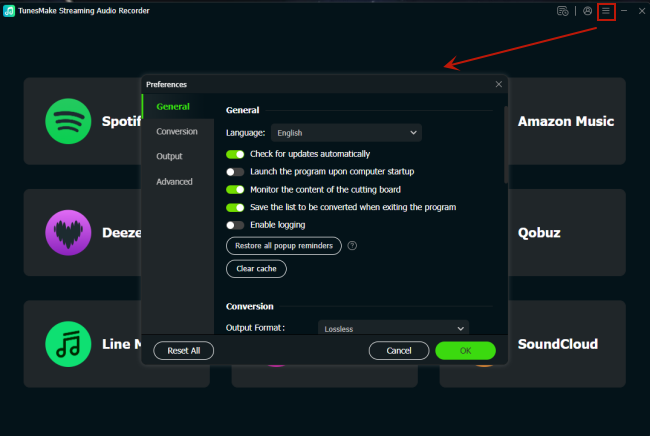
The TunesMake SoundCloud Music Converter allows you to customize the audio settings to have a personalized music experience. You can visit the settings window by clicking the top Menu icon > Preferences. Then, choose Conversion. In this tab, you can choose one audio format from the drop-down list next to Output Format. You can also change other parameters, such as output quality, channel, bit rate, sample rate, and so on. Once done, save your changes by clicking the OK button.
Step 2
Access Your SoundCloud Music Library
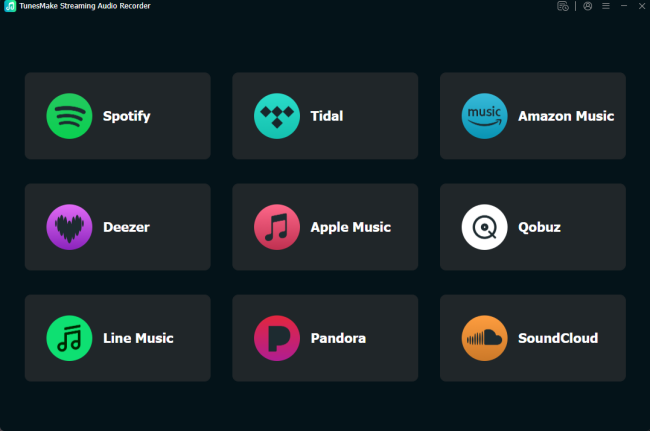
When you finish the audio settings, go back to the interface of the TunesMake program. Click the SoundCloud icon, and you will be navigated to the official SoundCloud website. Sign in to your account.
Step 3
Add Songs from SoundCloud to the TunesMake Tool
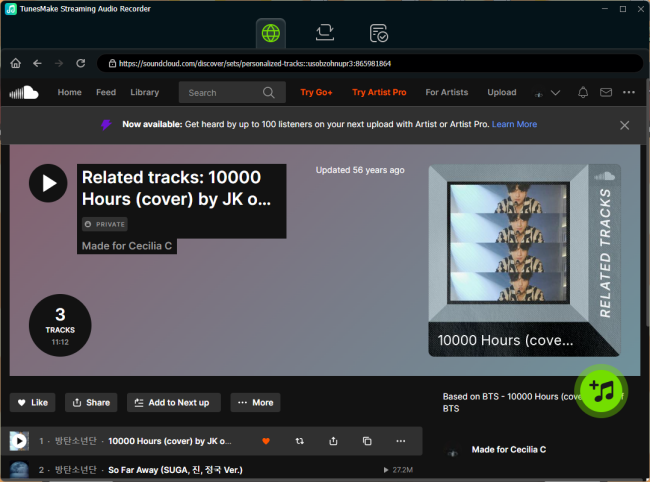
Now, you can go to your music library and find the playlist you want to listen to offline. Then, select this playlist and click the Add icon in the lower right corner. Wait for a while, and you can see all the songs listed. Find the songs you like, and then you can add them to the conversion list by selecting Add to List.
Step 4
Download SoundCloud Songs to Listen to Offline
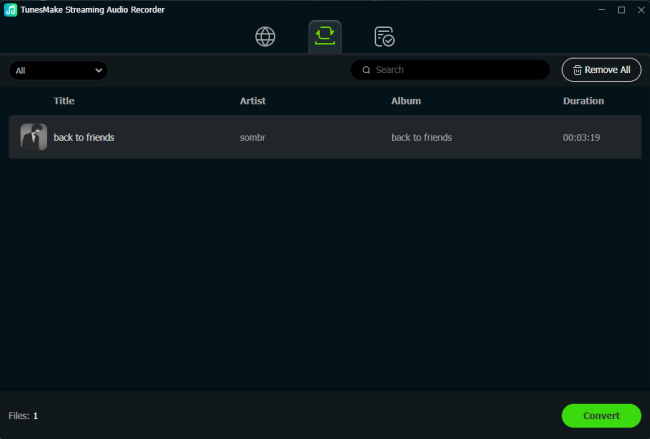
After loading all the songs you like, you can initiate the downloading process to listen to them offline. Just click the Convert button, and the TunesMake tool will do the rest for you. The time it takes depends on how many songs you loaded. When it is finished, you can click the top Converted icon to browse all the downloads.
Part 5. FAQs about SoundCloud Offline
How to remove songs from SoundCloud offline listening?
To remove your Likes or playlists from offline listening, you should click the orange arrow icon on your Likes/playlist page to turn it gray. If you need to delete all downloads on your phone, you should open the SoundCloud app and head to the Settings page > Storage > Remove all downloads. So, all your currently saved tracks and playlists will be removed. What’s more, there will be no new Likes and playlists being saved anymore.
Why did my downloaded SoundCloud songs disappear?
If you can not find your downloaded SoundCloud songs, you should head to the Offline Listening Settings page. Then, check whether you have enabled the “Only save via Wi-Fi” option. If so, you should turn it off and try to download songs from SoundCloud again. Also, check that your device is connected to a stable network to ensure the songs are downloaded successfully.
Why are some tracks not available for offline listening?
This is a common issue and can happen for several reasons, such as your SoundCloud subscription expired, the app was updated or reinstalled, SoundCloud lost licensing rights for certain tracks, and so on. To keep your favorite SoundCloud songs forever, we recommend you use the TunesMake SoundCloud Music Converter to download them to local files.
Conclusion
How to listen to SoundCloud offline? This post offers 3 practical methods for you. Whether you have a SoundCloud subscription or not, you can find available methods and a detailed guide. However, the best way is definitely to use the TunesMake SoundCloud Music Converter. It can help you save SoundCloud songs as local music files for offline playing anytime, anywhere you want.
Related Articles



A senior editor from TunesMake, dedicated to sharing professional tutorials and solutions of software, movies, and music.
- 1
- 2
- 3
- 4
- 5
- 6
- 7
 Leave Your Comment
(0)
Leave Your Comment
(0)

 Download Center

