








 Store
Store


As one of the most popular music streaming platforms in the world, SoundCloud offers millions of tracks from independent creators and DJs. For many music lovers, it is the ultimate playground for discovering music. If you are a new user, you may be curious about whether SoundCloud offers a free trial. A free trial offers a great chance to let you experience the platform’s full potential without spending a cent. This comprehensive guide takes a deep dive into the SoundCloud free trial. Whether you’re exploring SoundCloud Go or SoundCloud Go+, you can easily find all the information you need. Plus, it offers the ultimate way to help you save your favorite SoundCloud songs locally before your free trial ends so that you can make the most of your trial.
Part 1. Is There a Free Trial on SoundCloud?
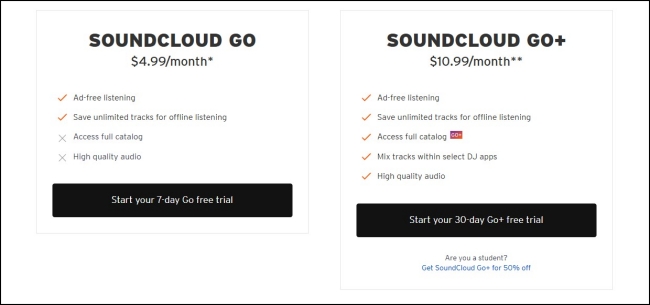
If you are wondering whether you can get a free trial on SoundCloud, the answer is absolutely yes. Like other music streaming services, SoundCloud offers free trials for its various subscription tiers to give users a taste of the enhanced experience. Before signing up to get a free trial, it’s important to understand the differences between the plans and the premium features you can get.
| SoundCloud Go | SoundCloud Go+ | |
|---|---|---|
| Free trial duration | 7 days | 30 days |
| Price after trial | $4.99/month | $10.99/month |
| Ad-free listening | ✔ | ✔ |
| Offline listening | ✔ | ✔ |
| Full Catalog | ✘ | ✔ |
| High-quality audio | ✘ | ✔ |
| DJ integration | ✘ | ✔ |
Part 2. How to Activate a Free SoundCloud Trial
The SoundCloud free trial is easy to get, but it is only available for new users. So, please make sure that it’s your first time signing up for a SoundCloud account. If you are eligible, follow the steps below to unlock the full potential of your listening experience. To ensure a smooth sign up process, we strongly recommend you do so via a web browser.
Step 1. Visit the official SoundCloud subscription website on your device.
Step 2. Then, scroll down to select the subscription plan you want to try. Click Start your 7-day Go free trial or Start your 30-day Go+ free trial to begin your SoundCloud free trial. If you need the student discount, visit this page instead.
Step 3. Once done, you will be led to the detailed bill page. Here, you should enter your payment details and follow the on-screen instructions to set all necessary settings.
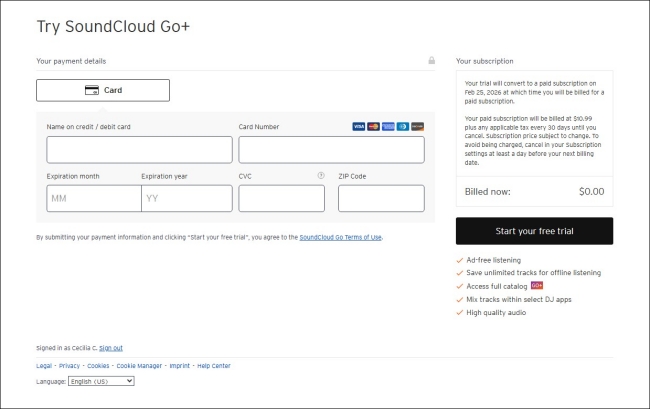
Step 4. When it is finished, you can begin experiencing your SoundCloud premium features.
Note
After getting the SoundCloud free trial, you may see a 0.00 or 1.00 entry on your bank’s e-statement. This is a validation that the payment details you provided are authentic. This amount will immediately be put back into your bank account.
Part 3. How to Keep SoundCloud Songs Before Trial Ends
SoundCloud offers a great experience, but once it ends, you will be charged. If you don’t want to spend money, you should cancel it before the expiration date. When your free trial ends, your downloaded tracks become inaccessible. This is the biggest frustration with the SoundCloud free trial. So, some users want to keep their favorite tracks accessible after the trial. Is this possible? Sure! All you need is a powerful music downloader - TunesMake SoundCloud Music Converter.
TunesMake SoundCloud Music Converter adopts decryption technology, helping you download songs, playlists, albums, and podcasts from SoundCloud to plain audio formats, such as MP3, M4A, M4B, WAV, FLAC, and AIFF. Once the downloading process is finished, you can save your favorite SoundCloud tracks as local music files and keep them on your computer as backups. Even if your free trial ends, you can still listen to them on other media players or devices offline at any time you want. What counts most is that the TunesMake tool retains the sound quality and ID3 tags to ensure your offline music experience.

Streaming Audio Recorder –
Save SoundCloud Songs Before Free Trial Ends
- Unlimitedly download streaming music songs, playlists, and podcasts
- Losslessly convert streaming music to MP3, M4A, M4B, WAV, FLAC, and AIFF
- Remove DRM protection from many streaming music platforms
- Convert streaming songs with original sound quality and ID3 tags kept
Security Verified. 100% Clean & Safe.
Step 1
Set the Output Parameters
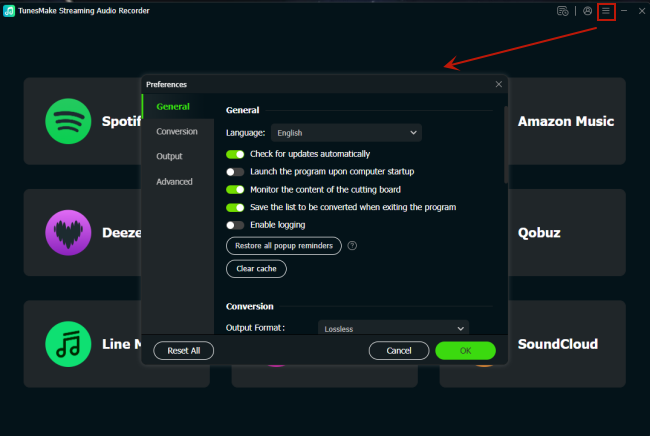
Install and launch the TunesMake SoundCloud Music Converter on your computer. In the interface, you can customize the audio settings according to your demands. Just click the top Menu icon, and then select Preferences. Once done, the settings window will pop up. Switch to the Conversion tab, and you can set the output format, output quality, audio channel, bit rate, sample rate, and so on. When you finish, click the OK button to save all your changes.
Step 2
Select SoundCloud and Log in to Your Account
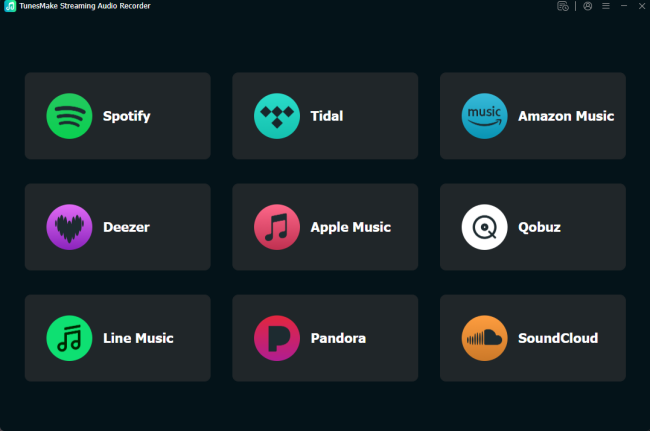
Go back to the interface of the TunesMake program after you finish the audio settings. Then, you need to click the SoundCloud icon and log in to your account when the SoundCloud web player is loaded.
Step 3
Add Songs from SoundCloud to the TunesMake Tool
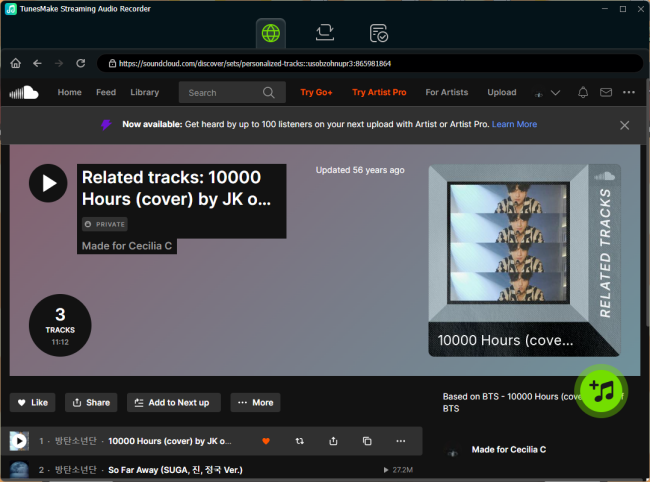
After logging in, you can find your favorite songs and load them to the TunesMake’s conversion list. Just select a playlist or album. Then, click the Add icon at the bottom to analyze it. When all the included songs appear, you can pick the songs you like and click Add to List to load.
Step 4
Start to Download SoundCloud Songs
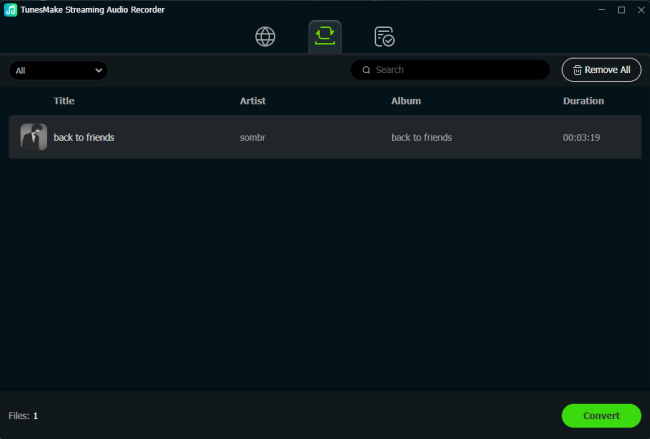
Now, everything is prepared. Click the Convert button to download the SoundCloud songs you choose. Wait for a while, the TunesMake program will download your SoundCloud songs so that you can still listen to them after your free trial ends. To browse the downloaded songs, you can click the top Converted icon.
Part 4. FAQs about SoundCloud Free Trial
How long is the SoundCloud free trial?
The free trial duration of a SoundCloud subscription depends on the plan you choose. If you choose to experience the SoundCloud Go, the trial lasts 7 days, while Go + lasts 30 days.
Can I get the SoundCloud free trial more than once?
Generally, no. SoundCloud only offers one free trial per new account. If you want to bypass this limit, you can try to create multiple accounts for signing up SoundCloud accounts. But remember to cancel the trial before it ends. Otherwise, you will be charged in the next billing cycle.
Will I lose my playlists after the SoundCloud free trial?
No. Your playlists remain saved to your account even if your free trial ends. After the free trial, you can still see your playlists via a SoundCloud free account. But your downloads and some tracks may become unavailable unless you continue your subscription. If you want to back up your playlists, downloading your SoundCloud playlists via the TunesMake SoundCloud Music Converter is also a great option.
How to cancel the SoundCloud trail before it ends?
To cancel your SoundCloud trial, you should log in to your account and then head to your subscription page. After that, you can click the Edit button to manage your current subscription.
Summary
The SoundCloud free trial is an excellent way to experience premium features without immediate cost. You can follow the detailed steps in this post to get it easily. If you don’t want to get charged, you’d better cancel the free trial before it ends. In this case, you can utilize the TunesMake SoundCloud Music Converter to save your favorite songs. Therefore, you can keep them for offline playback after your trial ends.
Related Articles

A senior editor from TunesMake, dedicated to sharing professional tutorials and solutions of software, movies, and music.
- 1
- 2
- 3
- 4
- 5
- 6
- 7
 Leave Your Comment
(0)
Leave Your Comment
(0)

 Download Center

