








 Store
Store


More and more people choose to use their smartphones to listen to music, as any iPhone or Android phone works with those subscription music apps like Tidal and Spotify. However, standalone MP3 players are still the preferred option for those music lovers. Is it possible to listen to tracks from streaming music services on an MP3 player? The answer is yes. If you are an audiophile and are looking for a method to get the Tidal MP3 player connection, you should not miss this post. It will walk you through how to play Tidal on any MP3 player without limits. Now, keep your eye on this post to explore all the details.
Part 1. Can You Play Tidal on MP3 Players?
As one of the most popular music streaming services in the market, Tidal provides millions of high-fidelity tracks and is compatible with diverse devices, including mobile, tablet, desktop, wearable, smart speaker, and more. You can find all supported devices on this page. So, the question naturally arises - does Tidal support Mp3 players? Well, it depends on the MP3 player you use. Except for a small number of smart MP3 players, like Astell & Kern, Tidal does not offer its official app and service on most traditional MP3 players.
In other words, you are not able to play Tidal on an MP3 player directly. But don’t worry. There is an effective alternative method - download Tidal tracks and playlists to MP3 files. Therefore, you can transfer them to your MP3 player for unlimited offline playback. The best thing about this method is that whatever device you use, you can enjoy your favorite Tidal tracks without limits.
Part 2. How to Download Tidal Music to Any MP3 Player
As we mentioned above, the best alternative is to download Tidal music to MP3. However, you should know that Tidal applies DRM application to its music. Thus, even though you can download Tidal songs with your subscription, you can’t get their real files. All the downloads can be played only in the Tidal app. This is where a dedicated Tidal music downloader can help. Here, we’d like to recommend the TunesMake Tidal Music Converter.
TunesMake Tidal Music Converter is a powerful music downloader designed for all Tidal users. You can utilize its decryption technology to download Tidal content to MP3 and more audio formats, including M4A, M4B, WAV, FLAC, and AIFF. Besides, it will retain the original sound quality and ID3 tags of Tidal music during the downloading process. If you need, it even allows you to personalize the audio output settings for a better listening experience. Once your favorite Tidal songs are downloaded in MP3, you can import them to your MP3 player successfully.

TunesMake Tidal Music Converter –
Best Tidal to MP3 Player Downloader and Converter
- Download any Tidal content, including songs, albums, playlists, and artists
- Convert Tidal music to MP3, FLAC, AIFF, WAV, M4A, and M4B
- Preserve a whole set of ID3 tag information in the downloaded Tidal songs
- Handle the conversion of Tidal music up to 22X faster speed and in batch
Security Verified. 100% Clean & Safe.
Step 1
Import Tidal Music to TunesMake Software
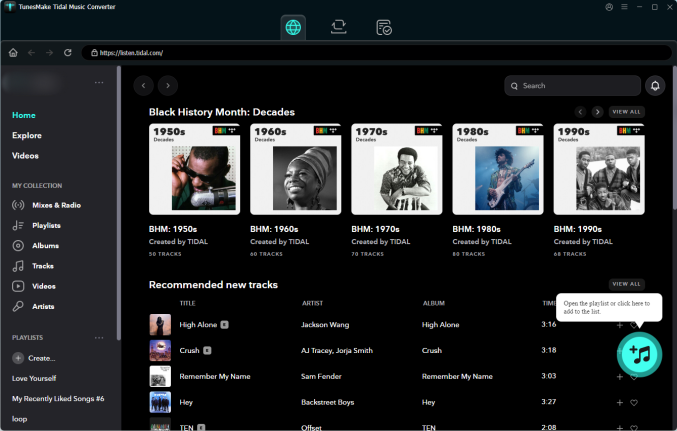
First of all, you need to install the TunesMake Tidal Music Converter on your computer. Then, launch it, and you can sign in to your Tidal account on its interface. Feel free to select your favorite Tidal playlist, and then click the Add icon at the lower right corner. Once all the tracks appear, you can pick the songs you want to enjoy on your MP3 player and load them to the conversion list by selecting Add to List.
Step 2
Choose MP3 as the Output Format
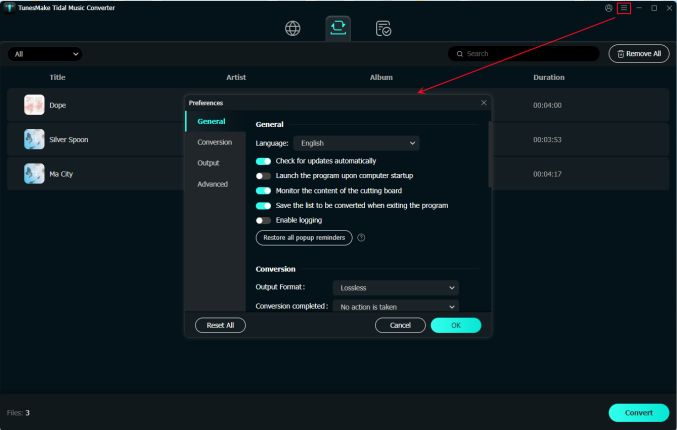
Locate the menu bar and select the Preferences option to set the output audio parameters. In the settings window, select MP3 as the output format and change other audio parameters like the bit rate, sample rate, and channel.
Step 3
Download Tidal Music to MP3
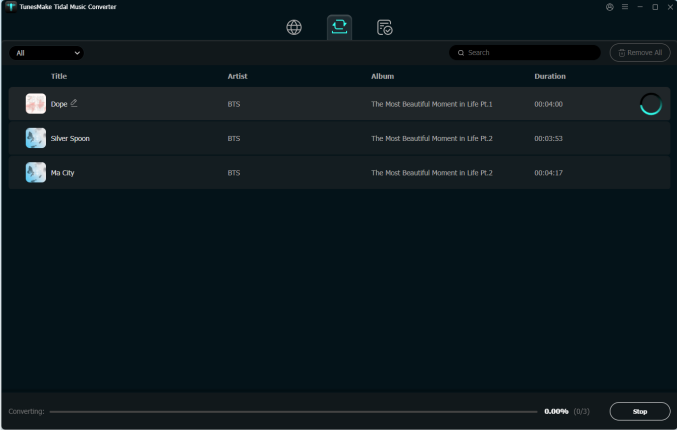
Click on the Convert button to let TunesMake Tidal Music Converter download and convert Tidal music to MP3. Wait for a while, and TunesMake Tidal Music Converter will save Tidal songs to your computer locally. You can click the top Converted icon to check all the downloads.
Step 4
Transfer Tidal Music to MP3 Player
Attach your MP3 player to your computer by using a USB cable. Then create a folder for storing Tidal MP3 songs. Open the folder where you save the converted Tidal music and move the Tidal music files to your MP3 player.
Conclusion
Tidal is compatible with most devices, but doesn’t work with an MP3 player. You cannot download Tidal music to an MP3 player even though you have a premium subscription. But TunesMake Tidal Music Converter can help you download Tidal music to an MP3 player for playing. Have a try, and you’ll find it out!
Related Articles

A senior editor from TunesMake, dedicated to sharing professional tutorials and solutions of software, movies, and music.
- 1
- 2
- 3
- 4
- 5
- 6
- 7
 Leave Your Comment
(0)
Leave Your Comment
(0)

 Download Center

