








 Store
Store


In today’s society, there is no doubt that music has become a part of people’s lives. The options for music streaming platforms are varied. So, how to choose a suitable streaming service? For audiophiles, audio quality is an important factor to consider. Therefore, Tidal, which is famous for its high-fidelity music, can be a good choice. By offering Tidal MQA, Dolby Atmos, and 360 Reality Audio, Tidal stands out from the fierce competition in the music industry. If you are new to Tidal and want to use Tidal 360 Reality Audio on your device, you should not miss this post. Let’s concentrate on the detailed information about 360 Reality Audio and the precise tutorial below.
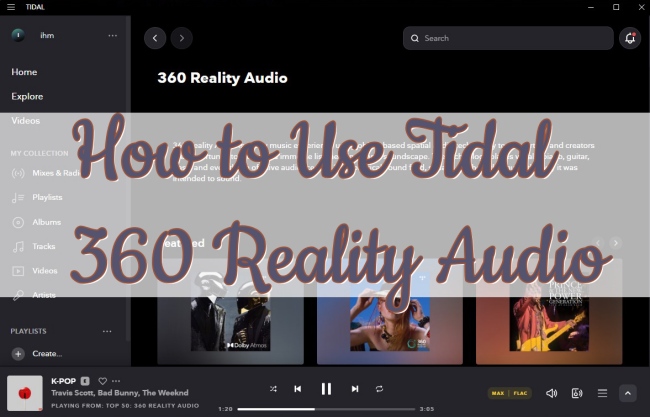
Part 1. Is Tidal 360 Reality Audio Still Available in 2026?
360 Reality Audio is an audio format developed by Sony. It uses object-based spatial audio technology to cast different sounds from 360 degrees. It will place the human voice, chorus, and instruments at different distances and angles. As a result, it can produce an immersive music effect that makes you feel as if you are at a live concert or with the artist recording in a studio. To experience unrivaled music enjoyment with 360 Reality Audio, you need a pair of headphones or a speaker. Also, a compatible music streaming service.
Many audiophiles want to know if Tidal offers 360 Reality Audio? The answer is yes, but not anymore. Tidal used to provide many tracks in 360 Reality Audio. However, as of July 2024, Tidal updated its audio format layers, shifting its highest audio quality to Hi-Res FLAC. In other words, music in the MQA or 360 Reality Audio formats is no longer accessible via any Tidal application or integration. For more detailed information about Tidal’s audio updates and changes, you can check this page.
What other software can I get 360 Reality Audio on?
If you just want to get music in 360 Reality Audio, you can try some alternative services. Currently, Amazon Music, nugs.net, Deezer, and PeerTracks all support 360 Reality Audio. But you may need to subscribe to their premium plan so that you can enjoy this immersive audio.
What happens to my old 360 Reality Audio on Tidal?
If you had a 360 Reality Audio track or album in your Tidal Collection, the track or album will be grayed out and cannot be played anymore, even if you downloaded it.
Part 2. How to Play Tidal 360 Reality Audio [Not Available]
After preparing headphones or speakers, you are ready to start your 360 Reality Audio journey on Tidal. But there is one thing you should pay attention to – 360 Reality Audio is only available for users who subscribe to the HiFi Plus plan. Now, you can read the procedures below and learn about how.
Step 1. Launch the Tidal app on your device and use your HiFi Plus account to log in.
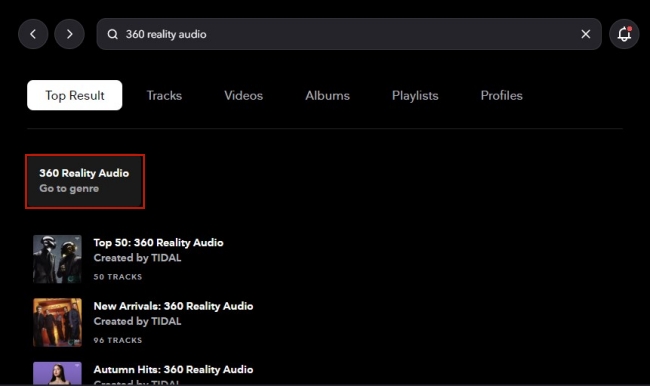
Step 2. Enter “360 Reality Audio” in the search bar to search for it.
Step 3. Click Go to genre (If you use the mobile phone Tidal app, tap Genre). Then you can see all valid 360 Reality Audio songs on Tidal.
Step 4. Connect Tidal with your headphones or speaker. Then choose one track to play and you can get an immersive music experience.
Part 3. How to Get High-fidelity Tidal Music Same as 360 Reality Audio
Although 360 Reality Audio is not accessible on Tidal anymore, you can still get high-fidelity music like Hi-Res FLAC on Tidal, as long as you have a Premium subscription. When you are in an environment that has a weak network, you may need the offline feature. However, many users are unsatisfied about the offline sound quality. If you want to get Tidal music offline same as 360 Audio Quality, a dedicated Tidal music downloader is indispensable - TunesMake Tidal Music Converter.
TunesMake Tidal Music Converter is a professional Tidal music converter to help you download tracks, playlists, and albums from Tidal and save them as local files on your device with lossless quality. According to your demands, you can select formats like MP3, M4A, M4B, WAV, FLAC, and AIFF. What’s better, the TunesMake program allows you to set the audio parameters to have a better audio quality. Once downloaded, it’s easy to transfer them to other devices and play them offline without restrictions.

TunesMake Tidal Music Converter –
Best Downloader to Save High-Fidelity Tidal Music Offline
- Download any Tidal content, including songs, albums, playlists, and artists
- Convert Tidal music to MP3, FLAC, AIFF, WAV, M4A, and M4B
- Preserve a whole set of ID3 tag information in the downloaded Tidal songs
- Handle the conversion of Tidal music up to 22X faster speed and in batch
Security Verified. 100% Clean & Safe.
No matter you use Mac or Windows, you can get a suitable version of the program. Install it on your computer ahead of time and follow the tutorial below step by step.
Step 1
Add 360 Reality Audio music to the program
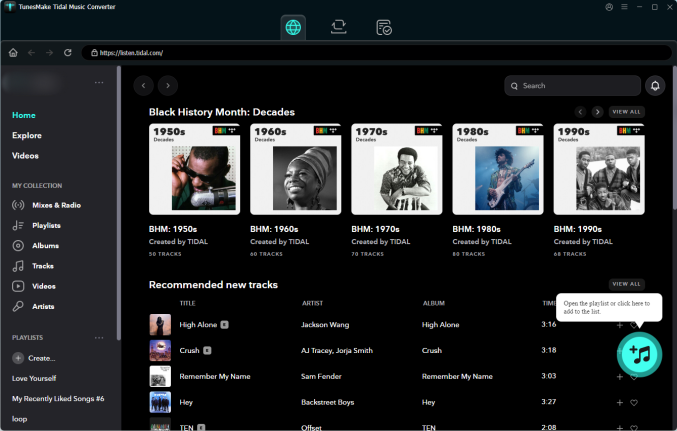
Open TunesMake Tidal Music Converter on your dekstop, and it will launch the Tidal web player automatically. Then, you can log in to your account and find the playlist you want to listen to offline. Simply select it, and then choose the Add icon in the lower right corner. When all the songs are listed, you can select your target songs and click the Add to List option.
Step 2
Personalize output settings
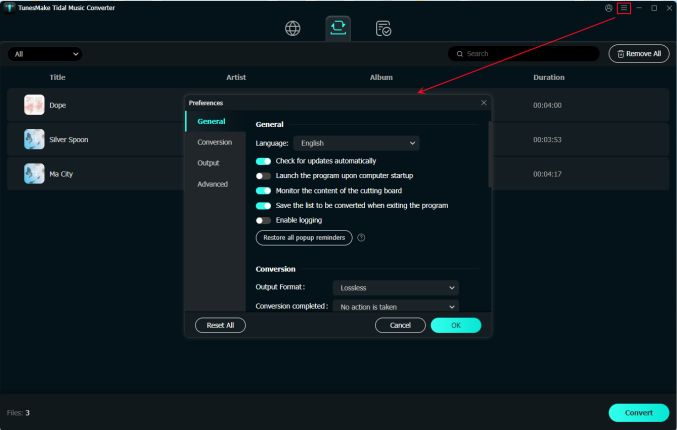
Head to the menu section at the upper right corner, then choose Preference. There will pop up a new window, and you need to click Conversion to see all the output settings. Depending on your own needs, you can change parameters like output format, output quality, channel, bit rate, and sample rate.
Step 3
Begin downloading 360 Reality Audio tracks
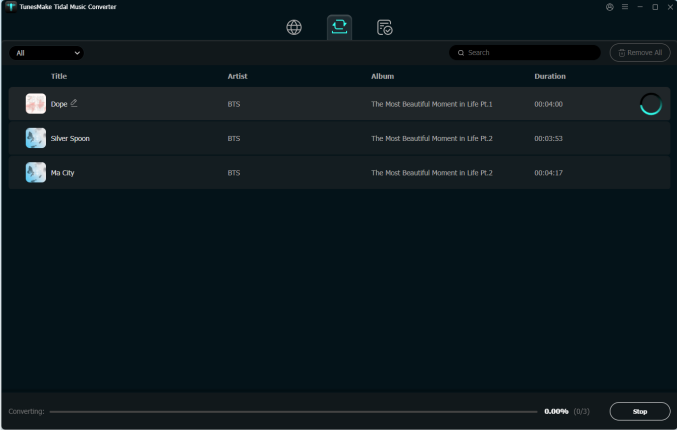
Once the setting is finished, you can click OK to confirm it. Next, you just need to click the Convert button and wait for a while. The default 22x faster speed will download the music as soon as possible. If you want to locate the downloads on your computer, you can click the Converted icon after downloading.
Part 4. Final Thoughts
In order to get an immersive and outstanding music experience, 360 Reality Audio is something you definitely don’t want to miss. If you don’t know how to use Tidal 360 Reality Audio, you can read this post and master the way to enable it. For Tidal subscribers, you can easily stream it online. However, for offline use, you may need the help of TunesMake Tidal Music Converter. It can help you download all the tracks you want from Tidal, including the reality audio. What are you waiting for? Just click the download button below to improve your music enjoyment offline!
Related Articles


An experienced freelance writer at TunesMake, specializes in using various streaming services from Spotify, Apple Music, to Amazon Music, and more other platforms.
- 1
- 2
- 3
- 4
- 5
- 6
- 7
 Leave Your Comment
(0)
Leave Your Comment
(0)

 Download Center

