









 Store
Store


If you are looking for the absolute best sound quality in the streaming world, you've likely landed on Tidal. But with subscription prices rising across the industry, savvy listeners are looking for the longest TIDAL free trial possible before committing to a monthly bill. Fortunately, there are lots of promotions and offers you can make use of to get Tidal for free. Even an effective tool can help you keep Tidal music forever after the free trial ends. Here are several methods introduced in this guide to get Tidal free trial. Go on reading to check them out!
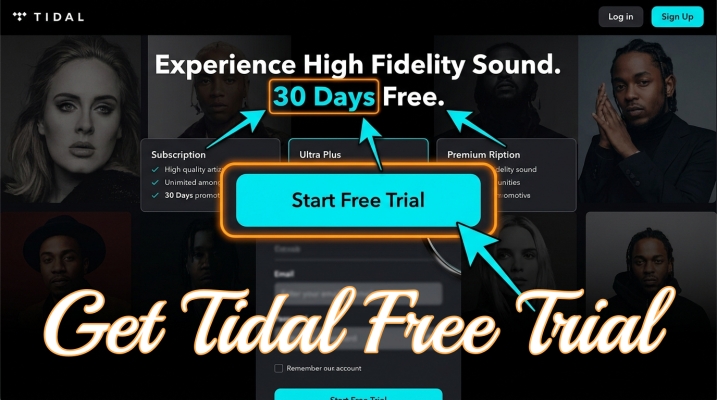
Part 1. Does Tidal Have a Free Trial?
Tidal has a free trial, and the standard Tidal free trial length is 30 days. This trial grants you full access to all plans, which now includes Tidal's entire catalog in lossless, HiRes FLAC, and Dolby Atmos. If you are a newbie to Tidal, you can get a free trial of all Tidal tiers, respectively Tidal Individual, Tidal Family, and Tidal Student. Check out the details below.
| Plan | Tidal Individual | Tidal Family | Tidal Student |
|---|---|---|---|
| Price | $10.99/month + applicable sales tax | $16.99/month + applicable sales tax | $5.49/month + applicable sales tax |
| How Many People Can Use | One member | Up to 6 members | One member |
| Audio Quality | Lossless, HiFi, HiRes FLAC, and Dolby Atmos | Lossless, HiFi, HiRes FLAC, and Dolby Atmos | Lossless, HiFi, HiRes FLAC, and Dolby Atmos |
| Features | Personalized mixes, editorial playlists, and Live sessions | Clean playlists and curated content for kids; Each member has an individual account |
Curated study playlists |
It is easy to get a Tidal free trial you're the first time to use. But some new users may have lots of questions about Tidal free trial. Before starting a Tidal free trial, figure it out clearly.
How long is Tidal free trial?
The standard Tidal free trial is 30 days. This offer is available to new users and provides full, ad-free access to their entire library in high-fidelity audio formats. Beyond the official offer, there are several ways to get a longer trial or better value through third-party partnerships.
How to get Tidal free trial without credit card?
No, there is no way to get a Tidal free trial without a credit card. If you want to get a Tidal free trial, you have to offer a payment method. Without a credit card, you cannot complete the process of the free trial.
Can you cancel Tidal during free trial?
Yes, you can cancel your TIDAL subscription at any time during your free trial. In fact, it is a common strategy for users who want to avoid the automatic charge. And Tidal typically allows you to continue using the service until your trial period officially expires.
Can I get a Tidal free trial more than once?
Officially, trials are for new users only. However, if you use a new email address and a different payment method, the system may recognize you as a new subscriber. So, you can get a Trial free trial more than once by using a different email address.
Part 2. How to Get 30-Day Tidal Free Trial
Tidal keeps its official free trial for new users. Depending on your needs, you can choose any premium plan and try it for 30 days for free. Also, you can spend $2 to extend the trial to 60 days. To ensure you enjoy your music without any unexpected hits to your bank account, follow these steps to get a Tidal free trial.
Step 1. Go to Tidal.com in a web browser and select Start Free Trial.
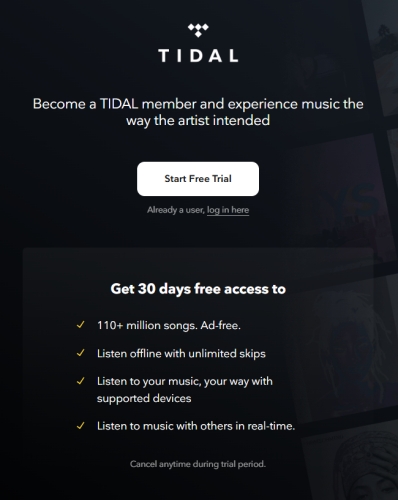
Step 2. Use an email address that has never been associated with Tidal before.
Step 3. Choose Individual Plan and click Continue.
Step 4. Provide a credit card, PayPal account or Cash App Pay account.
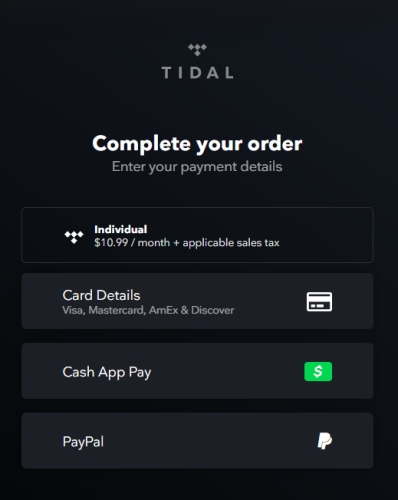
Step 5. Follow the onscreen instruction to complete the registration process.
Note
Student usually requires verification via SheerID before the trial starts.
How to Cancel Tidal Free Trial
One of the best features of Tidal's service is its cancellation policy. You can cancel your subscription immediately after signing up and you will still have access to the service for the remainder of the 30 days. Here's how to cancel your Tidal subscription.
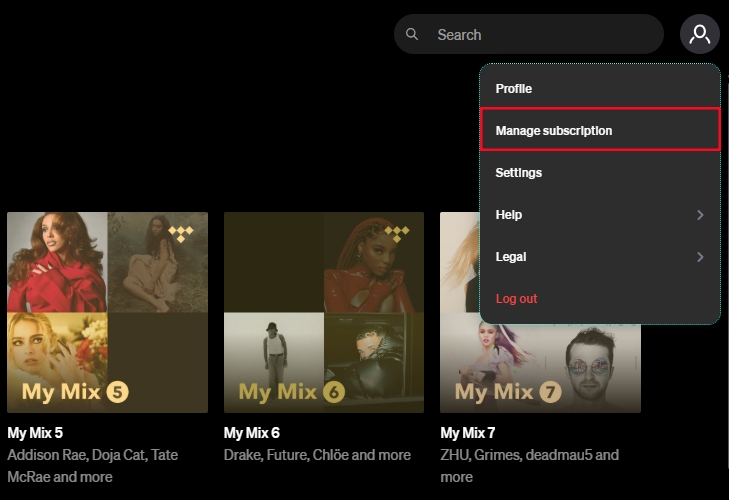
Step 1. Open the Tidal app or website and go to Manage Subscription.
Step 2. Click the Subscription button and then Cancel Subscription.
Step 3. Follow the prompts until you receive a confirmation email.
If you signed up via the Apple App Store or Google Play Store, you must cancel the subscription through your phone's subscription settings, not the Tidal website.
Signed up via Apple App Store (iOS):
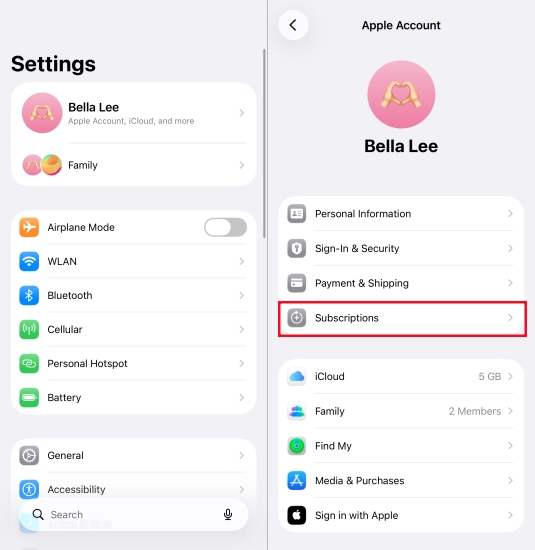
Step 1. Open your iPhone Settings.
Step 2. Tap your Apple ID name at the top of the screen.
Step 3. Tap Subscriptions, find Tidal, and select Cancel Free Trial.
Signed up via Google Play Store (Android):
Step 1. Launch the Google Play Store app.
Step 2. Tap your profile icon and select Payments & Subscription.
Step 3. Tap Subscriptions, find Tidal, and tap Cancel subscription.
Part 3. How to Get Tidal Free Trial 3 Months
While the 30-day trial is the standard, several active partnerships allow you to extend your listening time or get better value. Here are ways to get Tidal 3 months free trial.
| Platforms | Tidal Free Trial | Status |
|---|---|---|
| Mercedes-Benz | 3 months | Effective |
| Denon DJ | ||
| Sony Xperia | ||
| Swisscom | Expired | |
| JLab Audio | ||
| T-Mobile | ||
| Galaxy Gear |
Option 1. Mercedes-Benz
Owners with an active Mercedes me or Mercedes me Adapter account can often activate 90 days of Tidal through their vehicle's infotainment system.

Step 1. Head to the Mercedes me portal website and create your new Tidal account.
Step 2. Enter your Mercedes me account credentials to log into.
Step 3. Select your vehicle's image and head to the online music section.
Step 4. Go to activate your new Tidal account, then enter your preferred username and password.
Step 5. Click Sign Up to confirm your account creation.
Step 6. Download the Tidal app on your mobile phone and log in.
Option 2. Denon DJ
For creators, purchasing Denon hardware often unlocks a 3-month trial of Tidal Individual Plan with DJ Extension.
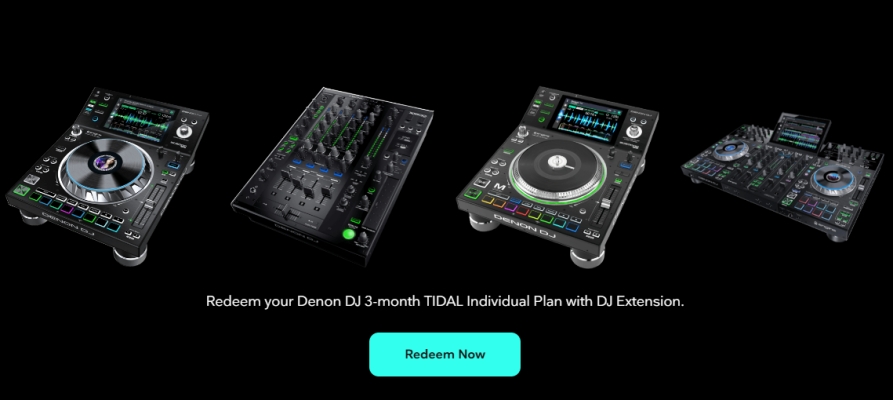
Step 1. Navigate to the Denon DJ Tidal website and click the Redeem Now button.
Step 2. Enter the voucher code got from your Denon account or device instructions.
Step 3. Complete the registration process with the onscreen instruction.
Option 3. Sony Xperia
Sony often pre-installs a dedicated redemption shortcut on compatible devices like Xperia 1 and 5 series, which allows users to get a Tidal free trial 3 months.

Step 1. Launch the Tidal 3 Months Free installer on the home screen or in the app tray.
Step 2. Create your new Tidal account and redeem your free Tidal 3-month trial offer.
Step 3. Tap the Download button to install the Tidal app from the Google Play Store.
Step 4. Complete the installation and log into Tidal with your newly created Tidal account.
Part 4. How to Get Tidal Free Trial 6 Months
In addition to a Tidal free trial 3 months, there are longer free trial of Tidal. In some countries or regions, particularly in Europe, up to 6 or 12 months of Tidal are offered for free.
| Platforms | Tidal Free Trial | Status |
|---|---|---|
| Boost Mobile | 6 Months | Effective |
| Multimedia | ||
| Walmart | 4 Months | Expired |
| Sprint | 6 Months | |
| Plus | 12 Months |
Option 1. Boost Mobile
In the past, Boost offered a 6-month trial with select plans; check your "My Boost" app under the "Add-ons" or "Rewards" section to see if this promotion is active for your account.

Step 1. Sign into your Boost account and tap the Manage Add-ons icon to access the free offer.
Step 2. Find the Other option and select the NOW and GO icons.
Step 3. Choose the Tidal 6-month trial option and add it to your cart to submit.
Step 4. Next, you will receive a text message that asks you to download the Tidal app.
Step 5. Download and install the Tidal app on your phone to listen to Tidal for free.
Note
Only for all active, new, and existing, Boost customers on a monthly plan. Current active Tidal subscribers are not eligible for a free trial.
Option 2. Vectra / Multimedia (Poland)
In certain European markets, telecom providers offer a 6-month trial as part of their high-speed internet or mobile data packages.
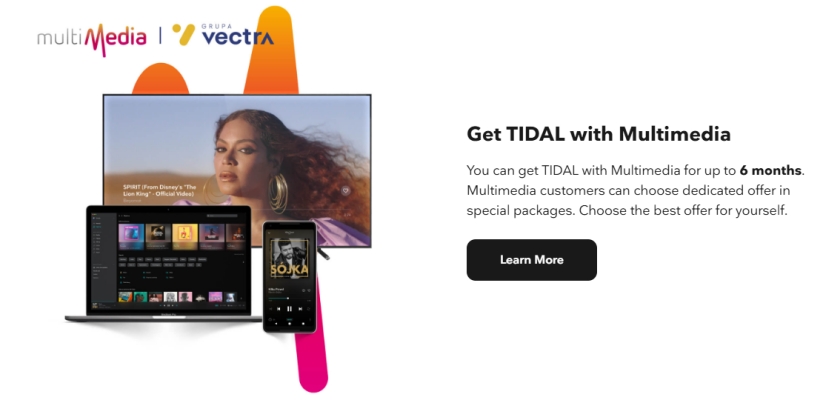
Step 1. Go to the Vectra's official website and log into with your customer account.
Step 2. Click the Entertainment, Music Services, Offers, Promotions section to find the offer.
Step 3. Click the Activate Offer button, then create a new Tidal account in the Tidal's website.
Step 4. Complete the activation and start the 6-month free trial of Tidal.
Part 5. How to Keep Tidal Music Forever after Free Trial
One significant hurdle with any trial is what happens when it ends. Since Tidal discontinued its ad-supported free tier, your library, including all your carefully curated playlists, becomes inaccessible the moment your subscription lapses.
For users who want to maintain a backup of their curated music for offline use on any device, tools like TunesMake Tidal Music Converter are often used. This utility allows you to download and convert Tidal tracks into local formats like MP3, FLAC, or WAV while retaining the original ID3 tags and audio quality.
| Feature | Valid time of downloaded music | Compatible device | The format of downloaded music |
|---|---|---|---|
| Tidal free trial | 1 month – 6 months | The Tidal app on the mobile device or desktop | Protected FLAC |
| TunesMake Tidal Music Converter | Forever | Any device you wish | FLAC, MP3, AIFF, WAV, M4A, and WAV |
If you decide not to continue your subscription after the 30-day window, having your playlists saved locally via a converter ensures you don't lose the musical discoveries you made during the trial. It's a practical way to transition your library to a personal media server or a portable MP3 player. Follow the steps below to start your amazing Tidal music journey.Tidal music journey.

TunesMake Tidal Music Converter –
Download Tidal music to computer for keeping forever
- Download songs, albums, playlists, and artists from Tidal without premium
- Convert Tidal music to MP3, FLAC, WAV, AIFF, M4A, and M4B losslessly
- Handle the conversion of Tidal music up to 25× faster speed and in batch
- Save a whole set of ID3 tags during the conversion process automatically
- Preserve the original audio quality up to HiRes FLAC or 320kbps MP3
Security Verified. 100% Clean & Safe.
Step 1 Import Tidal Music to TunesMake
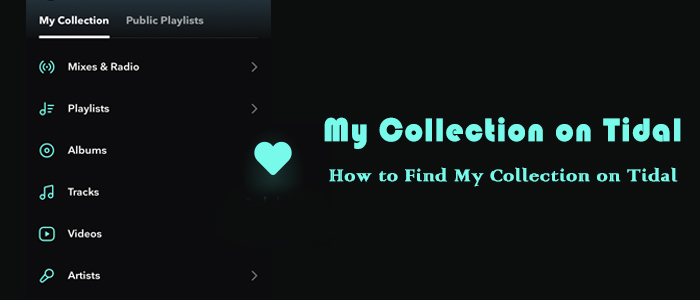
Launch the TunesMake Tidal Music Converter app, and the Tidal web player will launch automatically in its interface. Go to Tidal Music, and head to My Collection, select any song you like, and add it to the TunesMake tool by dragging and dropping it to the lower Add icon. If you need to load multiple songs at once, you can select a playlist or album and click the Add icon > Add to List.
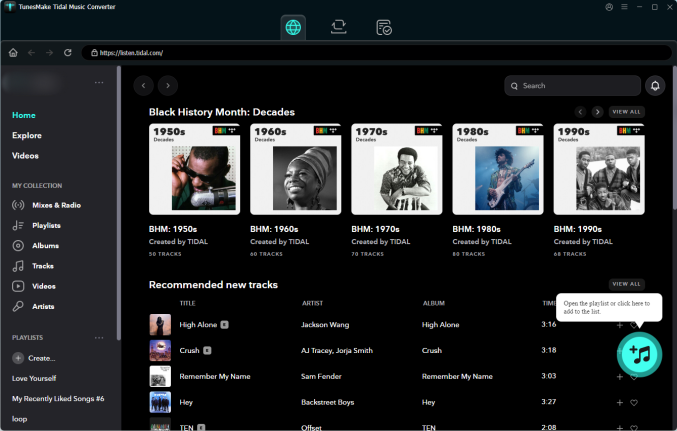
Step 2 Adjust the Output Format of Tidal Music
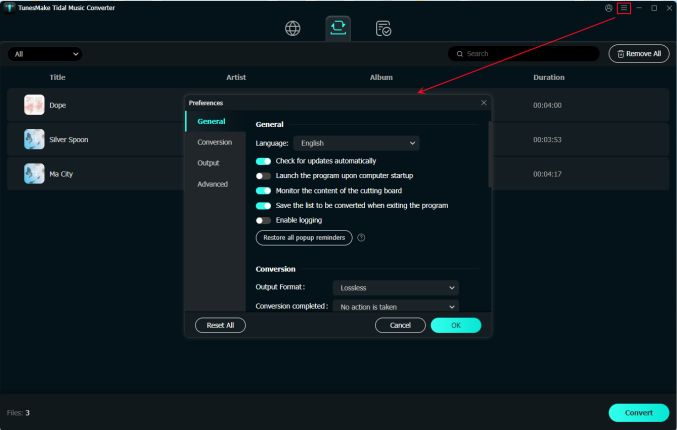
Before starting the conversion process, you can set the output audio parameters of Tidal songs. Click the Menu bar on the top right of TunesMake, and then select Preferences. You can set the audio parameters, such as output format, bit rate, channel, and sample rate. TunesMake offers MP3, M4A, M4B, AIFF, WAV, and FLAC formats to convert to. Once you finish all settings, click OK to save all changes.
Step 3 Start Converting Tidal Music
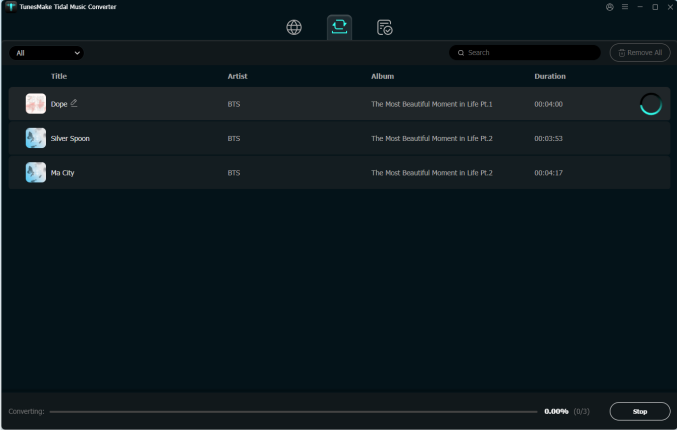
Now, click the Convert button on the right bottom of TunesMake to start the conversion process. All your added songs will be downloaded within a few minutes. The converted songs will be preserved as local files on your computer. Finally, click the Converted button to browse all converted Tidal music.
Conclusion
Securing a Tidal free trial is the most effective way to experience high-fidelity audio and spatial sound without an immediate financial commitment. Whether you opt for the standard 30-day offer or an extended partnership deal through brands like Sony or Mercedes-Benz, you gain full access to a premium library of over 110 million tracks.
However, because Tidal no longer offers a permanent free tier, your access to these high-quality playlists will end the moment your trial expires. To prevent losing your musical discoveries, using a tool like TunesMake Tidal Music Converter allows you to back up your library locally. By converting your favorite tracks into local FLAC or MP3 files, you can keep your musical discoveries accessible on any device even after your trial period expires.
Related Articles

A senior editor from TunesMake, dedicated to sharing professional tutorials and solutions of software, movies, and music.
- 1
- 2
- 3
- 4
- 5
- 6
- 7
 Leave Your Comment
(0)
Leave Your Comment
(0)

 Download Center

