








 Store
Store


Unboxing a new pair of AirPods opens up an immersive world of Spatial Audio and crisp, high-fidelity sound. However, the hardware is only half the experience, and you need a deep catalog of high-resolution tracks to truly enjoy it. Luckily, Apple packages a free Apple Music trial with many of its audio products. If you are wondering how to claim your free Apple Music with AirPods and which models qualify, this guide covers everything you need to know step by step.

Part 1. Current Free Apple Music with AirPods Offer
If you've read older guides or forum posts online, you might see references to a 6-month free trial. It is important to clear up the confusion regarding current promotion terms.
-
Standard Apple Offer: Apple officially offers 3 months of free Apple Music with the purchase of an eligible audio device for new subscribers.
-
Outdated Apple Offers: The 6-month promotion was a previous standard promotion that has mostly transitioned to 3 months directly through Apple. But certain cellular carriers such as select Verizon unlimited plans still occasionally bundle 6 months of Apple Music separately.
Which AirPods Models Qualify for Free Apple Music?
Not every wireless earbud from Apple's back catalog qualifies for this promotion. To ensure you can claim your free trial, verify that your hardware is on the supported list.
| Device Series | Eligible Models | Included Promotion |
|---|---|---|
| AirPods | AirPods 2, AirPods 3, AirPods 4, AirPods 5 | 3 Months Free |
| AirPods Pro | AirPods Pro 1, AirPods Pro 2, AirPods Pro 3 | 3 Months Free |
| AirPods Max | AirPods Max 1, AirPods Max 2 | 3 Months Free |
| Ineligible Models | AirPods 1 | Not Eligible |
Note:
Beats products such as Beats Fit Pro, Beats Studio Pro, and Powerbeats Pro also qualify for the same 3-month Apple Music promotion under Apple's audio lineup.
Part 2. How to Redeem 3 Months Free Apple Music with AirPods
This free Apple Music with AirPods offer applies to new purchases made directly through Apple or authorized retailers. And the redeeming your trial is simple. Follow the steps below to redeem 3 months free Apple Music with AirPods.
To qualify for the free trial, you must meet three basic criteria:
-
You must purchase an eligible AirPods model.
-
You must be a first-time subscriber to Apple Music.
-
You must redeem the offer within 90 days of first pairing your AirPods.
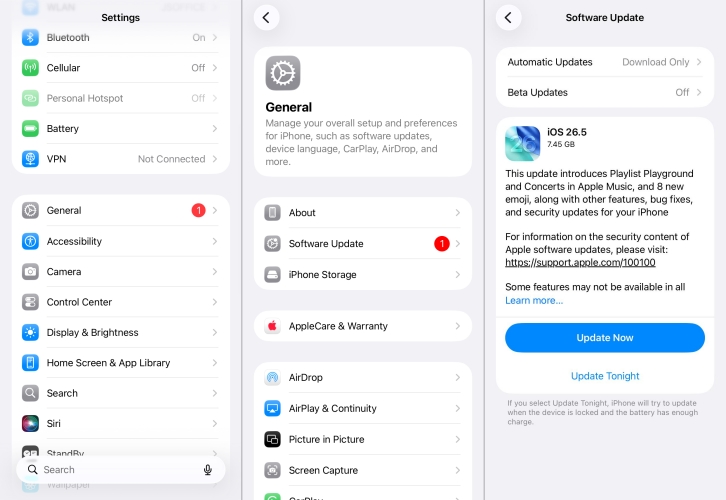
Step 1 Update Your iPhone or iPad
Make sure your iPhone or iPad is running the latest version of iOS or iPadOS. Outdated system software can prevent the promotional banner from rendering inside your apps.
Step 2 Pair Your New AirPods
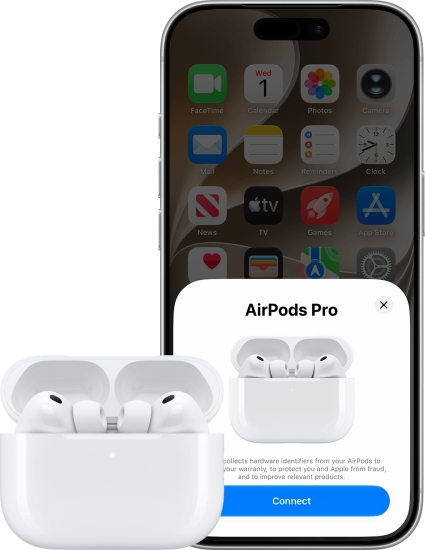
Turn on Bluetooth on your iOS device. Open the charging case next to your iPhone or iPad and follow the on-screen setup prompt to connect your AirPods.
Step 3 Open the Apple Music App
Launch the Apple Music app on your paired device. Sign in with your Apple ID if you aren't already logged in. The promotional offer should appear immediately on your screen as a pop-up card or banner on the Listen Now tab.
Step 4 Confirm Your Subscription
Tap Accept Now or Redeem 3 Months Free. Confirm the subscription details using Face ID, Touch ID, or your Apple ID password.
Part 3. How to Archive Apple Music Playlists Before the Trial Ends
Because Apple Music tracks are protected by DRM, any offline downloads automatically expire as soon as your free trial stops. If you want to back up the music collection or custom playlists you built during your 3-month trial, you can use TunesMake Apple Music Converter.
It allows you to download and convert your Apple Music library into universal formats like MP3, FLAC, or WAV while preserving original sound quality and ID3 metadata tags. This enables you to keep local backups of your favorite tracks on a computer or transfer them to MP3 players and car stereos even after your trial concludes.

Streaming Audio Recorder –
Download Apple Music tracks for playing anytime
- Download songs, albums, and playlists from Apple Music
- Convert Apple Music to MP3, M4A, M4B, WAV, FLAC, and AIFF
- Remove DRM protection from Apple Music completely and safely
- Preserve the original audio quality and ID3 tags for management
- Support downloading music from 10 popular streaming platforms
Security Verified. 100% Clean & Safe.
Step 1 Add Apple Music Tracks to TunesMake
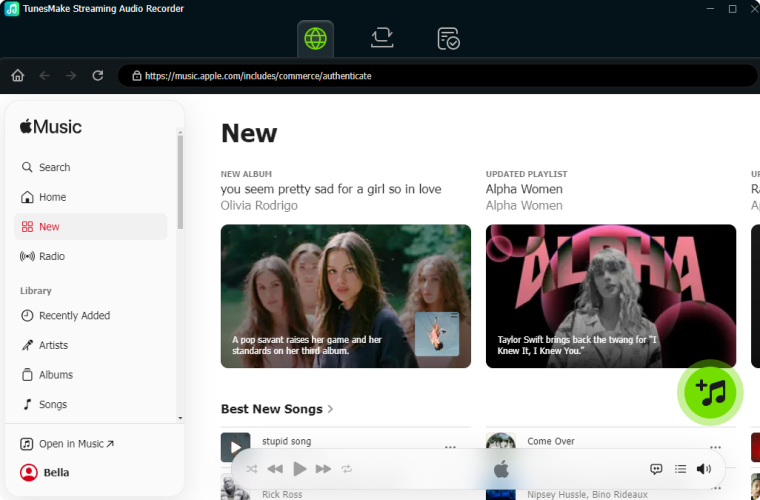
Open TunesMake Streaming Audio Recorder on your computer and select Apple Music. Browse the embedded Apple Music web player within TunesMake. Find the songs, albums, or playlists you want to download. Click the + button to load all the selected tracks into the processing list.
Step 2 Adjust Output Format for Apple Music
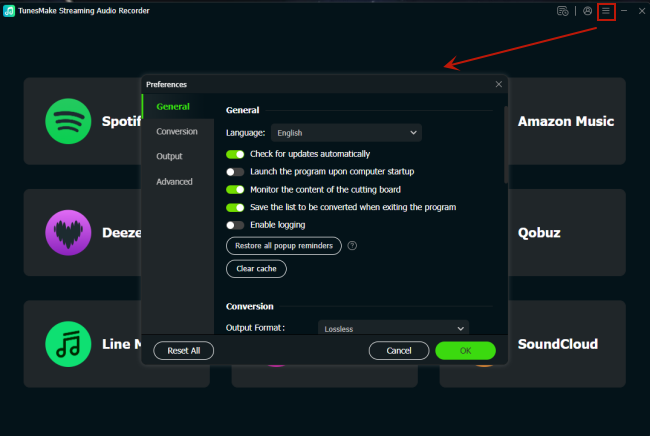
Click the Settings icon at the bottom left corner, select Preferences, and go to the Convert tab. Here, select your preferred output format. You can also adjust audio parameters like bit rate, sample rate, and output channel to ensure lossless sound quality. Click OK to save your settings.
Step 3 Download Apple Music Tracks
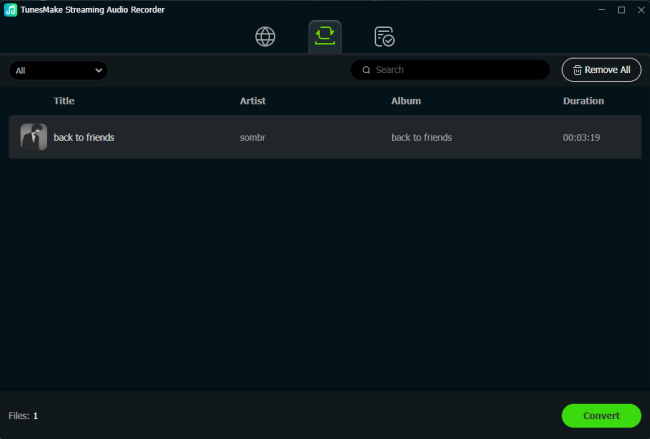
Click the Convert button at the bottom right corner to begin downloading and converting the Apple Music tracks. Once the conversion process finishes, click the History icon to locate your downloaded audio files saved locally on your computer.
Part 4. Conclusion
Claiming your free Apple Music with AirPods is one of the best perks of unboxing a new set of Apple audio gear. By pairing an eligible model, keeping your iOS software updated, and redeeming the offer within the 90-day window, you can enjoy months of ad-free Spatial Audio and high-resolution streaming at no cost. To protect your wallet from unwanted auto-renewals or to back up your favorite playlists with tools like TunesMake Apple Music Converter before your trial ends, make sure to set a calendar reminder 2 days before your 3 months expire. That way, you can enjoy all the music with zero financial surprises.
Related Articles





A professional writer at TunesMake, crafts in-depth tutorials, practical tips and expert advice focusing on streaming music, technology, and more.
- 1
- 2
- 3
- 4
- 5
- 6
- 7
 Leave Your Comment
(0)
Leave Your Comment
(0)

 Download Center

