








 Store
Store


Listening to your favorite playlists, albums, and personalized radio stations on a big screen with room-filling TV speakers is a great way to enjoy your music collection. However, if you recently tried to search for the Apple Music app on your Vizio TV, you likely ran into a common issue: there is no Apple Music app in the Vizio SmartCast App Store.
While Vizio TV OS supports popular streaming services like Netflix, YouTube, and Disney+, Apple has not released a direct SmartCast app for Vizio screens. The good news? You do not need to buy a brand-new television just to stream your music. Whether you use an iPhone, iPad, Mac, Android phone, or PC, there are several fast, reliable workarounds to stream Apple Music on Vizio TV in high quality.
Part 1. Does Vizio TV Have Apple Music?
No, Vizio SmartCast OS does not currently feature a downloadable Apple Music app in its built-in app library. Unlike Samsung Smart TVs, LG webOS, or Roku TVs, Vizio TVs cannot install the app directly from the screen.
However, almost all modern Vizio SmartCast TVs manufactured from 2016 onward come built-in with Apple AirPlay 2 and Chromecast Built-in. This allows you to easily stream Apple Music straight to your Vizio TV screen without extra effort. Below are best methods available to play Apple Music on a Vizio TV.
| Method | Best For | Requirements | Difficulty |
|---|---|---|---|
| Apple AirPlay 2 | iPhone, iPad, Mac users | Vizio SmartCast TV (2016 and newer), Apple device | Very Easy |
| Chromecast Built-in | Android users & Chrome browser users | Android device or Chrome browser on a computer | Very Easy |
| HDMI Streaming Device | TV remote navigation & on-screen lyrics | Apple TV 4K, Roku, Fire TV Stick, or Game Console | Easy |
| USB Media Playback | Offline listening | USB flash drive, computer, Apple Music converter | Moderate |
Part 2. How to Cast Apple Music to Vizio TV
Although there is no Apple Music app in the Vizio SmartCast App Store, you still can easily stream Apple Music on Vizio TV using built-in features and simple external hardware, whether you use an iPhone, Android device, PC, or streaming stick.
Method 1. Stream Apple Music on Vizio TV via Apple AirPlay 2
If you are using an iPhone, iPad, or Mac, AirPlay 2 is the fastest and highest-quality method to stream Apple Music to your Vizio TV screen. AirPlay transfers uncompressed audio over your local Wi-Fi network. But before starting, make sure AirPlay 2 is supported on your Vizio TV.
Compatibility Check:
-
Vizio OLED Series: All models (2020 and newer)
-
Vizio P-Series: All SmartCast models (P-Series Quantum, Quantum X, UHD) from 2016 onward
-
Vizio M-Series: All SmartCast models (M-Series Quantum, 4K HDR) from 2016 onward
-
Vizio E-Series: All SmartCast UHD/4K models from 2016, 2017, and 2018
-
Vizio V-Series: All models (2019 and newer)
-
Vizio D-Series: All SmartCast HD and FHD models from 2018 and newer
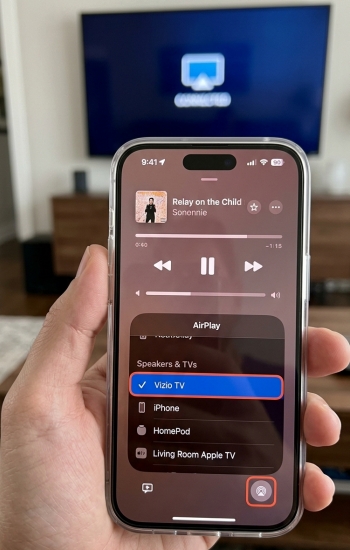
Step 1. Ensure your device is connected to the exact same Wi-Fi network as your Vizio TV.
Step 2. Press the Home button on your Vizio remote and choose Extra at the top toolbar.
Step 3. Scroll down to choose Apple AirPlay & HomeKit to enable AirPlay on the TV.
Step 4. Open the Apple Music app on your device, then play any song, album, or playlist.
Step 5. Tap the AirPlay icon at the bottom of the playback screen or in the Control Center.
Step 6. Select your Vizio TV from the list of available devices.
Method 2. Get Apple Music on Vizio TV via Chromecast Built-in
If you are using an Android phone, tablet, or a computer running Google Chrome, you can take advantage of the Chromecast Built-in feature present on all Vizio SmartCast TVs. Here are how to cast Apple Music to Vizio TV through a Google Chrome or an Apple Music app for Android.
Streaming from the Apple Music Android App
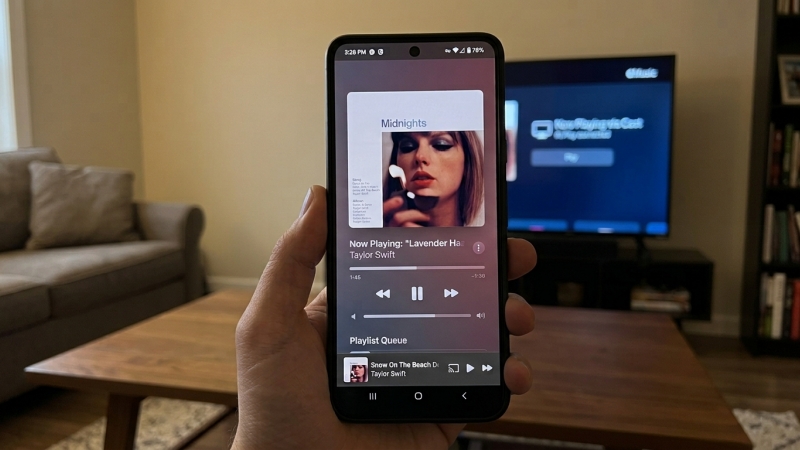
Step 1. Connect your Android device and your Vizio TV to the same Wi-Fi network.
Step 2. Launch the Apple Music app on your Android phone or tablet.
Step 3. Start playing your desired track or playlist.
Step 4. Tap the Cast icon near the top or bottom of the screen.
Step 5. Select your Vizio TV from the popup list.
Streaming from a PC or Mac via Chrome Web Player
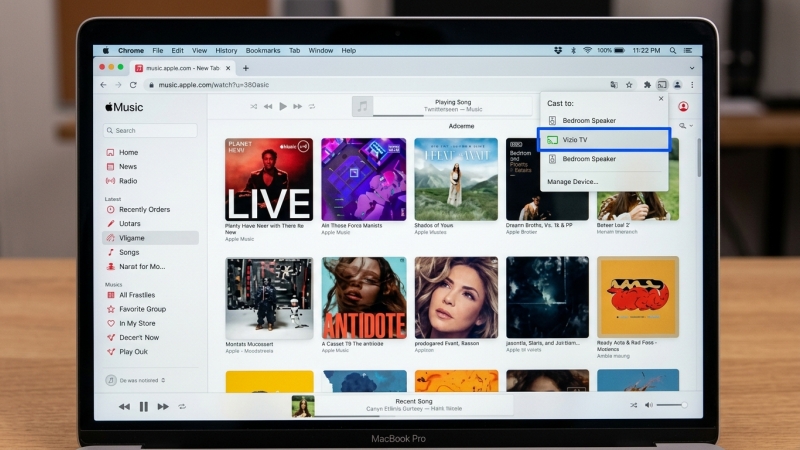
Step 1. Open Google Chrome on your PC or Mac.
Step 2. Go to the official Apple Music web player and log into your Apple Account.
Step 3. Click the three dots menu (⋮) in the upper-right corner of Chrome.
Step 4. Select Cast... and choose your Vizio TV.
Step 5. Set the Sources dropdown to Cast tab to stream directly to the TV.
Note:
If you find that Apple Music cannot be cast to your Vizio TV successfully, make sure that both your device and TV are connected to the same WiFi network. Then restart your device and TV to fix the not working issue.
Method 3. Cast Apple Music to Vizio TV via External Streaming Devices
If you want a traditional TV remote experience with on-screen menus, album art, and live lyrics without using your phone, you can plug a media player or gaming console into one of your Vizio TV's HDMI ports, then start your playback of Apple Music.
Supported Hardware:
-
Apple TV 4K / Apple TV HD
-
Roku Devices: Roku Streaming Stick, Express, Ultra, or Roku Soundbars
-
Amazon Fire TV: Fire TV Stick 4K, Fire TV Cube
-
Chromecast with Google TV / Android TV streaming boxes
-
Gaming Consoles: PlayStation 5, PlayStation 4, Xbox Series X/S, and Xbox One
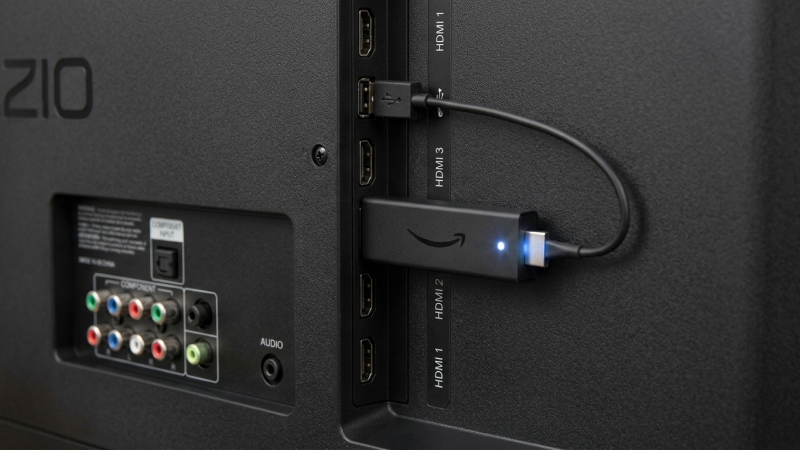
Step 1. Plug your streaming device into an open HDMI port on your Vizio TV.
Step 2. Switch your Vizio TV input to the corresponding HDMI port.
Step 3. Open the device's App Store, search for Apple Music, and select Install.
Step 4. Once installed, launch the Apple Music app on your streaming device.
Step 5. Go to scan the on-screen QR code with your phone, or enter your Apple ID credentials to log in.
Part 3. Best Way to Get Apple Music on Vizio TV
Songs downloaded directly through an active Apple Music subscription are encrypted in protected ALAC format due to Digital Rights Management. Because TV media players cannot read DRM-protected files, simply transferring downloaded Apple Music tracks onto a flash drive will result in unplayable files on your Vizio TV.
To play your personal Apple Music library offline via a USB flash drive, you will need to convert Apple Music tracks into audio formats like MP3, WAV, or FLAC first. TunesMake Apple Music Converter enables users to convert protected Apple Music audio into MP3, FLAC, or WAV formats while preserving essential metadata, including track titles, ID3 tags, and original album cover art. Then you can play your liked Apple Music tracks on your Vizio TV using a USB flash drive easily.

Streaming Audio Recorder –
Download Apple Music tracks for playing anytime
- Download songs, albums, and playlists from Apple Music
- Convert Apple Music to MP3, M4A, M4B, WAV, FLAC, and AIFF
- Remove DRM protection from Apple Music completely and safely
- Preserve the original audio quality and ID3 tags for management
- Support downloading music from 10 popular streaming platforms
Security Verified. 100% Clean & Safe.
3.1 Download and Convert Apple Music Tracks Locally
TunesMake Apple Music Converter is compatible well with both Windows PC and Mac. Free to download and install this tool on your computer. Then follow the steps below to download and save Apple Music tracks locally.
Step 1 Select Apple Music Tracks to Download
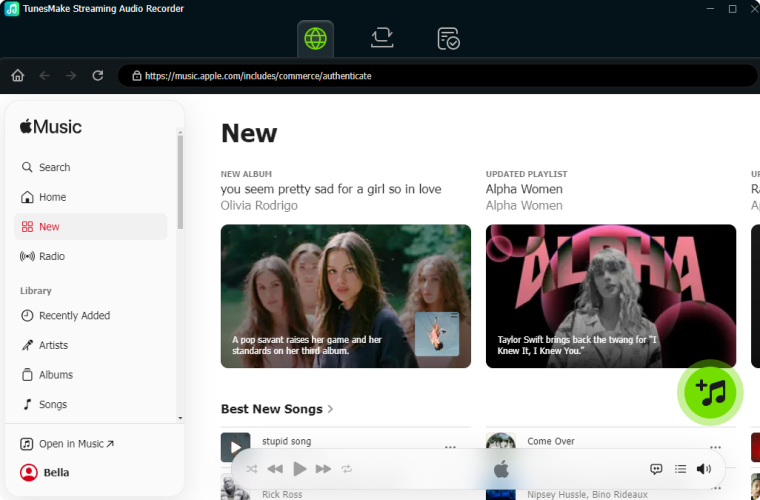
Launch TunesMake Streaming Audio Recorder on your computer and select Apple Music on the main dashboard. The built-in Apple Music web player will open automatically. Sign in with your Apple account, browse for the songs, albums, or playlists you want to save, and click the Add (+) icon to load the tracks into the conversion list.
Step 2 Set Output Audio Settings for Apple Music
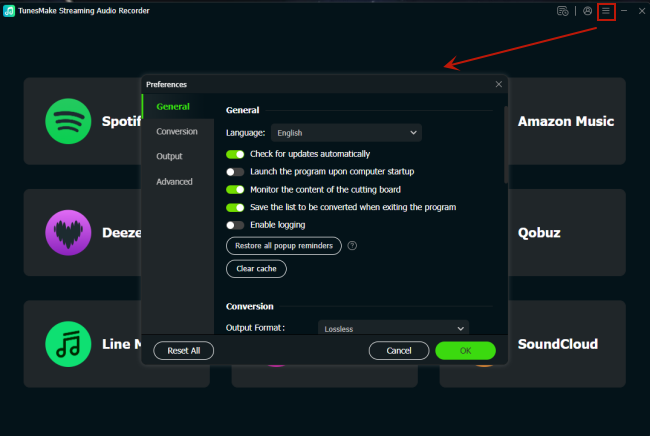
Click the Menu icon at the bottom left of the application window and select Preferences > Conversion. Choose your desired output format such as MP3, WAV, or FLAC and adjust parameters like sample rate, bitrate, or audio channel to match your playback preferences. And you can also change the storage place.
Step 3 Download and Convert Apple Music Locally
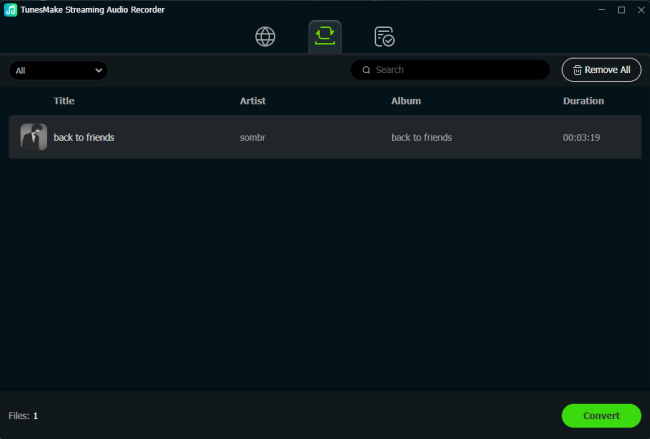
Click the Convert button to start downloading your selected songs. TunesMake Streaming Audio Recorder will automatically convert Apple Music tracks into unprotected audio files saved locally on your computer. Once finished, click the History icon to open the destination folder and access your downloaded Apple Music tracks.
3.2 Play Downloaded Apple Music Tracks on Vizio TV
Now all the converted Apple Music files are stored on your computer. You can transfer them to a USB flash drive and then start to enjoy them offline. Or you can upload them into Plex for accessing at anytime.
Option 1. Vizio Media Player
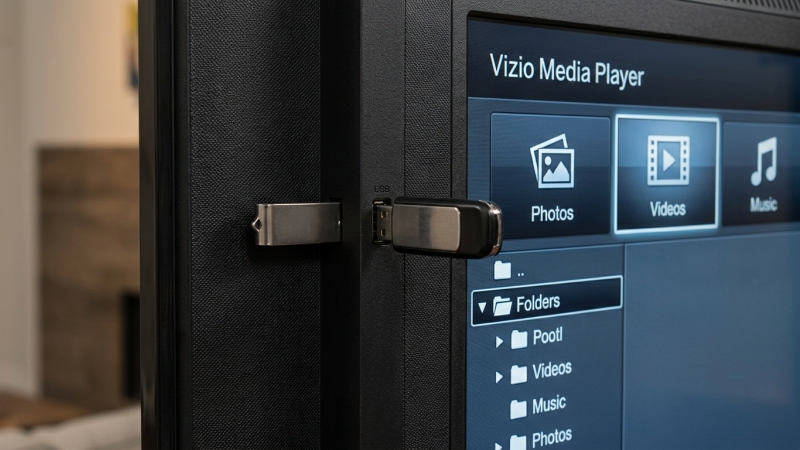
1. Connect your USB flash drive to your computer.
2. Find the converted Apple Music files and move them to the USB drive.
3. Plug the USB drive into the USB port on the side of your Vizio TV.
4. Press the Arrow button on your Vizio remote and choose the USB drive.
5. Confirm with OK and use the built-in media player to your Apple Music downloads.
Option 2. Plex Media Server
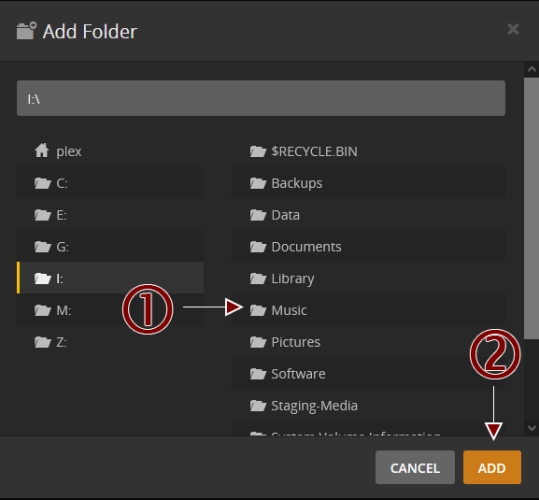
1. Download and install Plex Media Server app on your computer.
2. Launch it and log into with your Plex account.
3. In the upper right corner of the interface, click the Settings option.
4. Find the Manage section and select Libraries > Add Library.
5. Click Music, then create a new library and rename it.
6. Click Browse from Media Folder to upload the converted Apple Music files.
7. Head to the app store on your Vizio TV and install Plex Media Server.
8. Sign into with your Plex account and start listening to your uploaded Apple Music songs.
Part 4. FAQs about Apple Music on Vizio TV
Will Vizio TVs ever get an Apple Music app?
While Vizio frequently updates its SmartCast ecosystem, neither Apple nor Vizio has officially announced a dedicated SmartCast app. Using AirPlay 2, Chromecast, or an HDMI device remains the official recommended solution.
Can you get Apple Music on Vizio TV via Bluetooth?
No. Bluetooth on most Vizio smart TVs is strictly designed for audio output. Vizio TVs don't support Bluetooth audio input from mobile devices. You must use AirPlay 2 or Chromecast for wireless audio reception.
Does Apple Music via AirPlay support lyrics on Vizio TV?
When streaming Apple Music via AirPlay, your Vizio TV screen will display album art, track details, and playback controls, but it may not show synchronized live lyrics. If on-screen live lyrics are important to you, consider using an external streaming stick to run the Apple Music for TV app.
Part 5. Conclusion
While Vizio TVs do not feature an Apple Music app in their app store, getting your favorite music onto your television screen is still straightforward. For Apple users, AirPlay 2 offers the smoothest experience, while Android and Google Chrome users can rely on Chromecast Built-in. To get full on-screen remote navigation, adding a budget-friendly streaming stick like a Roku or Fire TV Stick is an excellent upgrade. If you are looking for a quick and easy way, using TunesMake Apple Music Converter is an ideal option to get local Apple Music tracks on a Vizio TV for playing.
Related Articles

A professional writer at TunesMake, crafts in-depth tutorials, practical tips and expert advice focusing on streaming music, technology, and more.
- 1
- 2
- 3
- 4
- 5
- 6
- 7
 Leave Your Comment
(0)
Leave Your Comment
(0)

 Download Center

