








 Store
Store


If you are not satisfied with the subscription of membership to Audible, you can choose to cancel or pause Audible membership. It's easy to do that no matter what your reason for doing so. Before canceling the subscription, you should be aware of what it means for your audiobook library. You then follow the instructions below to cancel or pause your Audible membership. Besides, we will also share a way to help you keep Audible books before ending your Audible subscription.
Part 1. What Happens When You Cancel Audible Membership?
Once canceled your Audible subscription, an automated email will be sent to you as proof of your plan changes, then you will no longer be charged per month. Thus, those services from Audible Premium subscriptions are not available for you anymore. So, knowing what happens to your content after you end your subscription prevents unnecessary loss of purchases or access.
What You Keep
- Purchased Titles: Any title bought with cash or a credit remains in your permanent library.
- Account Access: You can stream or download your purchased titles at any time.
- Playback Progress: Your bookmarks, notes, and listening history remain saved on your account.
What You Lose
- Unused Membership Credits: All remaining credits are forfeited instantly upon cancellation.
- Audible Plus Catalog Access: Streaming titles added from the Plus Catalog will show a lock icon and become unplayable.
- Member Discounts: You lose access to the exclusive 30% discount on additional audiobook cash purchases.
Part 2. What to Do Before Canceling Audible Membership?
Before initiating any changes to your Audible subscription, complete these two preparatory steps to safeguard your content.
1. Log into Audible: Access your account via a web browser on desktop or mobile.
2. Review Credit Balance: Look at the top menu bar next to your name to see your available credit count.
3. Spend Every Credit: Browse the store and exchange all remaining credits for audiobooks you wish to own permanently.
Step 2: Back Up Audiobooks for Offline Playback (Optional)
While purchased Audible books remain accessible in the Audible app after cancellation, they are saved in proprietary AAX format and tied to Audible's player. If you want to back up your purchased collection locally or listen on non-supported MP3 players after canceling, TunesMake Audible Converter can be useful.
It converts Audible AA or AAX audiobooks into standard MP3, FLAC, AIFF, WAV, M4A, or M4B formats while preserving original chapter markers and ID3 metadata. Downloading and archiving your purchased files to a local drive ensures you retain direct file ownership and flexibility regardless of future app or platform updates.

Streaming Audio Recorder –
Download Audible audiobooks to popular audio formats
- Download purchases, podcasts, and Originals from Audible
- Convert Audible books to MP3, M4A, M4B, WAV, FLAC, and AIFF
- Remove DRM protection from Audible efficiently and safely
- Preserve the original audio quality and chapter information
- Support downloading audios from 11 popular streaming platforms
Security Verified. 100% Clean & Safe.
Part 3. How to Cancel Audible Membership by Device
Depending on how you created your account, the process to cancel your Audible membership varies. Choose the section below that matches your device or billing provider.
How to Cancel on Desktop or Mobile Web Browser
The Audible app does not include a direct cancellation option for website-billed accounts. You must use a web browser like Chrome, Safari, or Edge to end your Audible subscription.
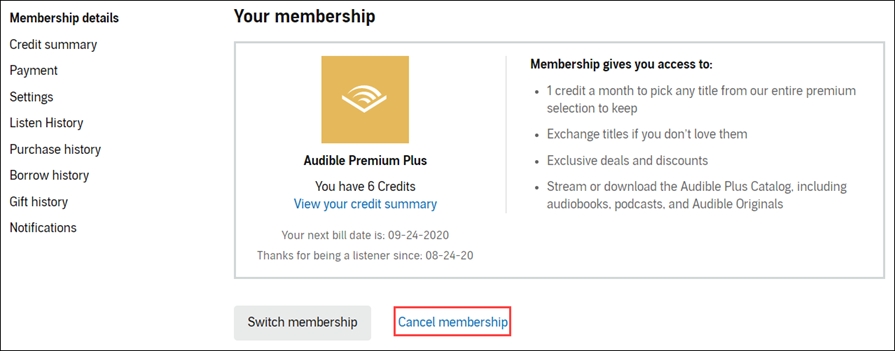
Step 1. Open your web browser and go to the Audible website for your region.
Step 2. Sign in with your Amazon account credentials.
Step 3. Hover over your username in the top page navigation, then select Account Details.
Step 4. Select Cancel membership link at the bottom of the Membership details section.
Step 5. Go to confirm your cancellation and select Continue to cancel.
After successfully canceling your Audible membership, you'll get an email confirmation. You can check your membership status on your Account Details page.
How to Cancel Audible Billed on iPhone & iPad
If you subscribed to Audible directly inside the Audible app using Apple In-App Purchase, your billing is managed by Apple rather than Audible directly.
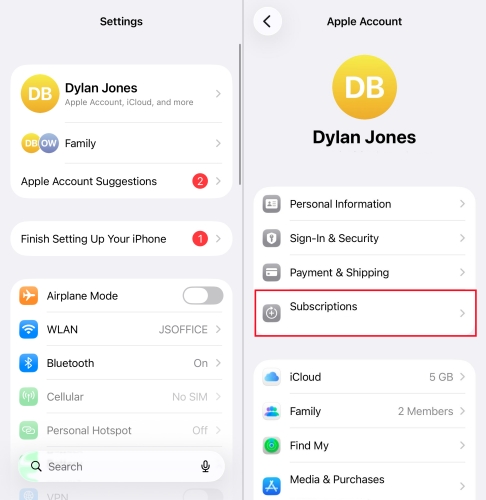
Step 1. Open the Settings app on your iPhone or iPad.
Step 2. Tap your Apple ID name at the top of the menu.
Step 3. Tap Subscriptions.
Step 4. Find Audible in your list of active subscriptions and tap it.
Step 5. Tap Cancel Subscription and confirm your choice.
How to Cancel Audible Billed on Android
If you registered your Audible subscription through the Audible app using Google Play Billing, manage your subscription through the Google Play Store.
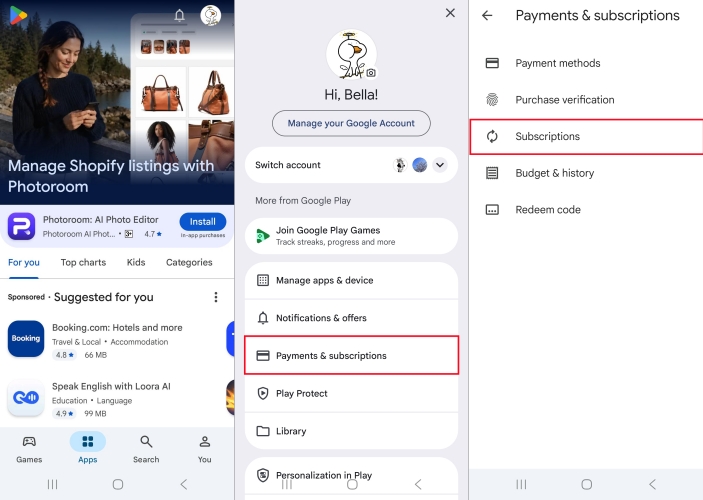
Step 1. Open the Google Play Store app on your Android device.
Step 2. Tap your profile icon in the top-right corner.
Step 3. Tap Payments & subscriptions, then select Subscriptions.
Step 4. Select Audible from the list.
Step 5. Tap Cancel subscription at the bottom of the screen and follow the on-screen prompts.
Part 4. 2 Alternative Ways to Canceling Audible Membership
If you want to take a break from monthly charges without losing accumulated credits or paying full price, consider these alternative options, including pausing Audible membership or downgrading to a lower plan. Before deciding to end your subscription completely, compare your options to choose the best financial path.
| Feature | Cancel Membership | Pause Membership | Switch to Audible Plus |
|---|---|---|---|
| Monthly Fee | $0 | $0 (30–90 days) | $7.95 / month |
| Unused Credits | Lost immediately | Kept and usable | Kept and usable |
| Purchased Books | Keep forever | Keep forever | Keep forever |
| Plus Catalog Access | Lost | Lost | Full streaming access |
| Best For | Leaving the platform completely | Temporary breaks or clearing backlogs | Reducing monthly spending |
Option 1. Pause Your Audible Membership (30~90 Days)
If you get credits with your monthly plan, you can choose to pause your membership, instead of directly canceling an Audible subscription. All subscribers of Audible membership are allowed to pause Audible subscription for up to 90 days once every 12 months. But at the end of this period, you will be automatically charged for your membership.
Difference between pausing and canceling Audible membership:
-
You can stop receiving monthly charges by pausing and canceling Audible membership. But pausing Audible membership can let you retain full access to your existing unused credits, keep getting 30% discount, and continue listening to your library.
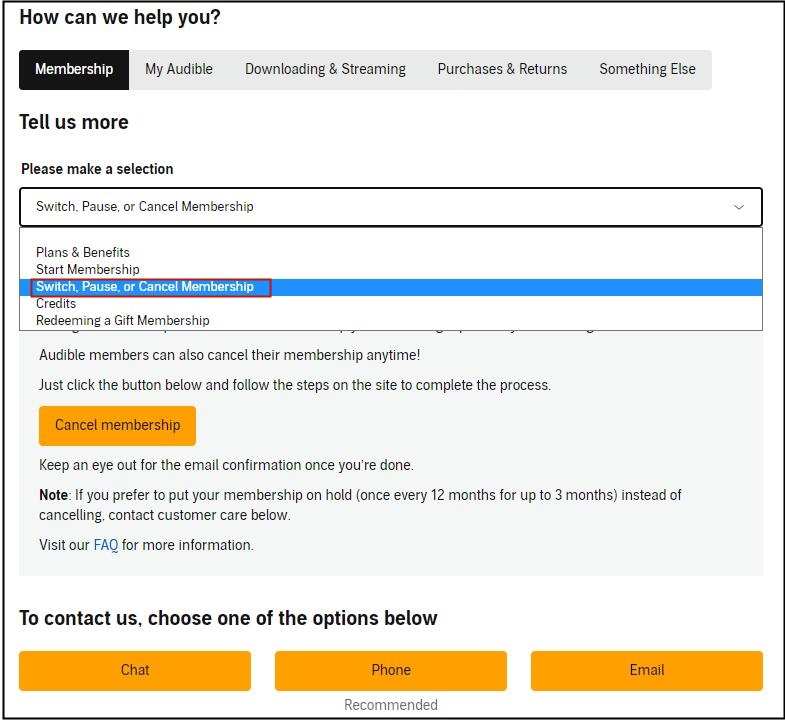
Step 1. Go to the Audible website and sign into your personal Audible account.
Step 2. Select your profile name at the top of the page and click Account Details from the drop-down menu.
Step 3. Choose the Pause membership offer presented during the retention screens.
Step 4. Click the Pause membership button to confirm.
Option 2: Downgrade to a Lower Audible Plan
If you find the standard Premium Plus plan too expensive, you can switch to a lower tier, that is Audible Plus. It gives you unlimited streaming access to the Audible Plus Catalog for a lower monthly cost, though it does not include monthly credit tokens for title ownership.
Step 1. Navigate to the Audible website and log into with your personal account.
Step 2. Click your Account Name at the top right of the navigation menu.
Step 3. Select Account Details from the drop-down menu.
Step 4. Click Switch membership to view available lower-cost alternatives.
Part 5. FAQs about Canceling Audible Membership
Can I pause my Audible membership instead of canceling?
Yes. Audible allows members to pause their subscription for 30, 60, or 90 days. During a pause, you won't be charged monthly fees, but you retain access to your unused credits and library. You can initiate a pause under Account Details in the Audible website on your computer.
Can I cancel my Audible free trial before being charged?
Yes. You can cancel your free trial at any time during the trial period. You will retain access to your chosen trial audiobook permanently, and your credit card will not be charged.
Can you still listen to Audible after canceling membership?
Yes. Any audiobook purchased using an Audible credit or cash credit card payment belongs to your Amazon account permanently. You can log into the Audible app or desktop site at any time in the future to download and listen to these books, even without an active subscription.
What should I do if I accidentally canceled with remaining credits?
If you canceled your account by mistake and lost your remaining credits, contact Audible Customer Support immediately. Customer representatives can often reinstate lost credits if you contact them shortly after the cancellation occurs.
Can you buy books from Audible without a membership?
Yes. You can buy audiobooks on Audible without an active membership. By logging into the Audible or Amazon website, you purchase audiobooks using a credit card or debit card.
Part 6. Conclusion
Canceling your Audible subscription doesn't mean giving up on your audiobooks. By taking a few quick steps before hitting the final cancellation button, such as spending all your remaining credits and creating a local backup, you can walk away with full control over your purchased library. If you aren't ready to leave completely, pausing your membership or switching to a lower-tier plan like Audible Plus offers a flexible way to save money while keeping your credit balance active.
Related Articles


A professional writer at TunesMake, crafts in-depth tutorials, practical tips and expert advice focusing on streaming music, technology, and more.
- 1
- 2
- 3
- 4
- 5
- 6
- 7
 Leave Your Comment
(0)
Leave Your Comment
(0)

 Download Center

