








 Store
Store


If you are an audiophile, standard MP3 streams just won't cut it. To truly appreciate the nuances of your favorite tracks, you need lossless audio. Fortunately, Deezer is one of the premier streaming music platforms offering High Fidelity (HiFi) sound, delivering tracks in CD-quality 16-Bit/44.1 kHz FLAC at a crisp 1411 kbps.
However, knowing how to properly stream and download these files can be confusing due to platform limitations and device requirements. Whether you want to listen offline within the official application or need local files for external audio hardware, this guide will walk you through exactly how to download FLAC from Deezer safely and effectively.
Part 1. Does Deezer Have FLAC?
Yes, Deezer supports FLAC. Deezer offers high-fidelity streaming using the FLAC (Free Lossless Audio Codec) format, which delivers CD-quality audio at 16-bit/44.1 kHz with a bitrate of 1411 kbps on both computer and mobile phone.
Unlike the past where you had to pay for a separate, more expensive HiFi subscription, Deezer has integrated lossless FLAC audio directly into all of its standard paid plans. You can access it if you are subscribed to:
-
Deezer Premium
-
Deezer Family
-
Deezer Student
Keep in mind that streaming or downloading in FLAC uses significantly more data and storage space than regular MP3 files, so it is best done over Wi-Fi!
Part 2. How to Download FLAC from Deezer (Official Method)
If your primary goal is to listen to Deezer music in high-quality offline on your smartphone, tablet, or computer without burning through your cellular data, using the official Deezer application is the safest and most straightforward method. Ensure that you have a Deezer paid account, then follow the steps below to download FLAC from Deezer on your device.
Step 1. Open the Deezer app on your computer or phone.
Step 2. Navigate to the Settings gear icon.
Step 3. Select Audio Settings or Audio Preferences.
Step 4. Scroll down to the Download Quality section.
Step 5. Select High Fidelity (HiFi).
Step 6. Return to your favorite album or playlist and toggle the Download switch.
Important Note on the Web Player:
You cannot download Deezer music for offline playback using a web browser like Chrome or Safari, even though you have a Deezer paid account. Offline downloading is strictly a feature of the dedicated Deezer desktop and mobile applications.
Part 3. Best Way to Download and Converter Deezer to FLAC
To download FLAC from Deezer, a paid subscription to Deezer is must. But those downloaded FLAC songs are protected by DRM and can only be played with the Deezer app. What's worse, once your subscription expires, these downloads are not available anymore. To get loose, To get loose, unencrypted .flac files, a specialized Deezer FLAC downloader is required.
Popular Deezer to FLAC downloading tools such as TunesMake Deezer Music Converter help to download and convert Deezer to FLAC by utilizing an integrated web player. As a professional Deezer downloader, TunesMake Deezer Music Converter is able to save all the content, including music tracks, albums, playlists, podcasts, and radios, from Deezer to FLAC and other common audio formats at a 45× faster speed and in batch.

Streaming Audio Converter -
Download music from Deezer as FLAC Formats
- Download tracks, albums, playlists, and artists from Deezer
- Convert Deezer music to MP3, M4A, FLAC, AIFF, WAV, and M4B
- Preserve the original audio quality and ID3 tags for management
- Remove DRM from Deezer without compressing audio quality
- Support downloading music from over 10 popular streaming platforms
Security Verified. 100% Clean & Safe.
Difference between Official Download and TunesMake Download
While the official way to download Deezer to FLAC is perfectly legal, safe, and fully integrated, it does come with specific platform limitations. That's the reason of uses seeking for a Deezer FLAC downloader. Here are the differences between official FLAC download and TunesMake download.
| Feature | Official Deezer FLAC Download | TunesMake Deezer Music Converter |
|---|---|---|
| Output File Format | Encrypted Cache (DRM-Protected) | Unencrypted Local Files (.flac, .mp3, .wav, .aiff, .m4a, .m4b) |
| Audio Quality | True CD-Quality (16-bit/44.1kHz FLAC, 1411 kbps) | Retains native quality (Up to 1411 kbps FLAC) |
| Account Required | Paid Subscription (Premium, Family, Student) | Paid Account (Required for true 1411kbps stream extraction) |
| File Portability | None (Locked strictly inside the Deezer app) | High (Compatible with any player and device) |
| Playback Lifespan | Temporary (Downloads expire if the subscription ends) | Permanent (Files remain yours to keep indefinitely) |
| Download Interface | Official Mobile & Desktop App | Built-in Deezer Web Player |
| Download Speed | Standard internet download speed | Accelerated batch downloading (Up to 45× speed) |
How to Download FLAC from Deezer with TunesMake in 3 Steps
Now you can download and install TunesMake Deezer Music Converter on your computer. Make sure that you have a paid Deezer account. Then you can download FLAC from Deezer as local files by following the steps below.
Step 1 Personalize the Output Audio Parameters
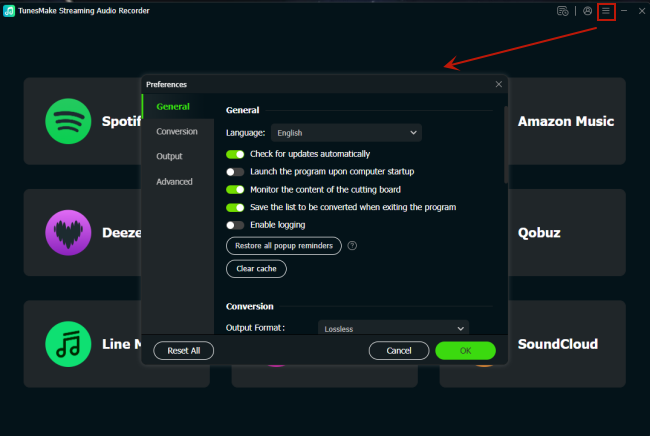
Once opening TunesMake Streaming Audio Recorder, you need to set up the output audio parameter first. Click the three-line icon at the top right corner, select the Preferences option, and it will open the Preferences window. Here you can select FLAC as the output format and adjust some parameters like the bit rate, sample rate, and channel.
Step 2 Add Deezer Songs into the Conversion List
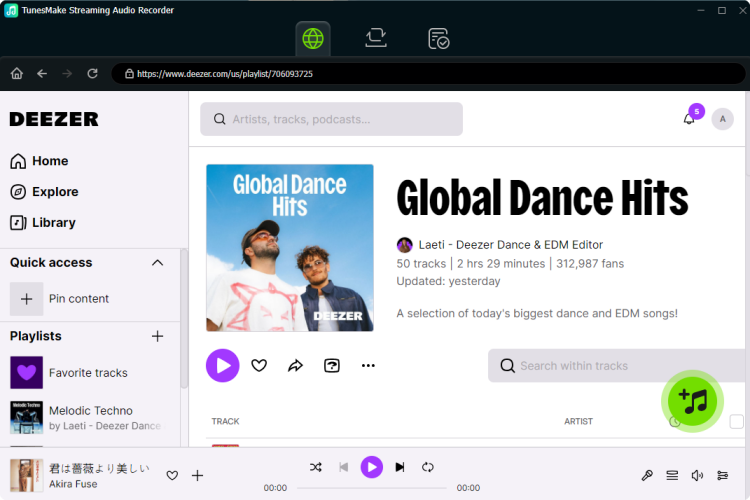
Then in the TunesMake software, select Deezer from the main interface. You will be directed to the Deezer web player where you can sign into with your Deezer account and password. Now you can browser your music library and select any song, album, or playlist to download. Simply click the + button to add the target item into the conversion list for Deezer FLAC download.
Step 3 Start the Conversion of Deezer to FLAC
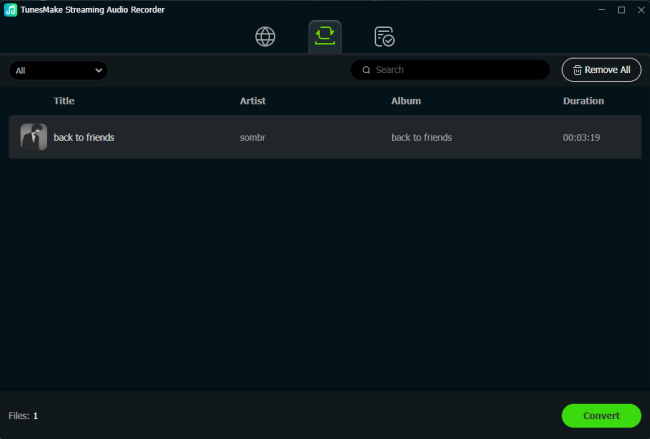
After that, you can let TunesMake Streaming Audio Recorder download FLAC from Deezer as local files by clicking the Convert button at the bottom right corner. The TunesMake program will export Deezer FLAC files to youar computer, and you can click the Converted icon to open the history folder where you can view the converted Deezer music tracks.
Part 4. How to Record Deezer to FLAC on Computers & Phones
If you want to rip FLAC from Deezer without spending a penny or adding extra applications to your computer or phone, this section is tailor-made for you. What listed below are all free Deezer FLAC rippers that you can easily get and use on your computer or phone. While they may not always perform flawlessly and can be buggy sometimes, they are still feasible tools for converting Deezer to FLAC, especially when your priority isn't high music quality.
No.1 Deezy (Windows, macOS, Linux)
Deezy is a modern open-source desktop program built using Rust, Tauri, and SvelteKit. Functioning as an alternative downloader client for Deezer, it supports single tracks, full albums, and playlist downloads. It embeds high-quality cover art and automatically populates metadata tags like the artist, album, year, and track number.

How to Download FLAC from Deezer with Deezy
Step 1. Open your web browser, go to Deezer.com, and log into your account.
Step 2. Open the browser's Developer Tools by pressing F12 on your keyboard.
Step 3. Navigate to the Application tab at the top of the developer panel.
Step 4. Look at the left sidebar, expand the Cookies section, and select deezer.com.
Step 5. Find the cookie labeled arl in the list, then double-click and copy its Value.
Step 6. Download, install, and launch the Deezy application.
Step 7. Paste the copied ARL string into the required login field and click Login.
Step 8. Head over to Settings to choose your preferred output format.
Step 9. Use the built-in search bar to find your music, and click the Download icon next to the tracks to save them.
😀 Pros
- Clean, modern interface
- Fast downloading
- Native FLAC support without re-encoding
- Folder organization customization
☹️ Cons
- Deezer premium account required
- Complicated to set up
No.2 ReFreezer (Android)
ReFreezer is an alternative, community-maintained Android app based on the older, defunct Freezer application. It acts as a full-featured streaming client and downloader that restores full search, streaming, and offline downloading directly on Android devices. It can download songs directly to external storage like a phone's MicroSD card.
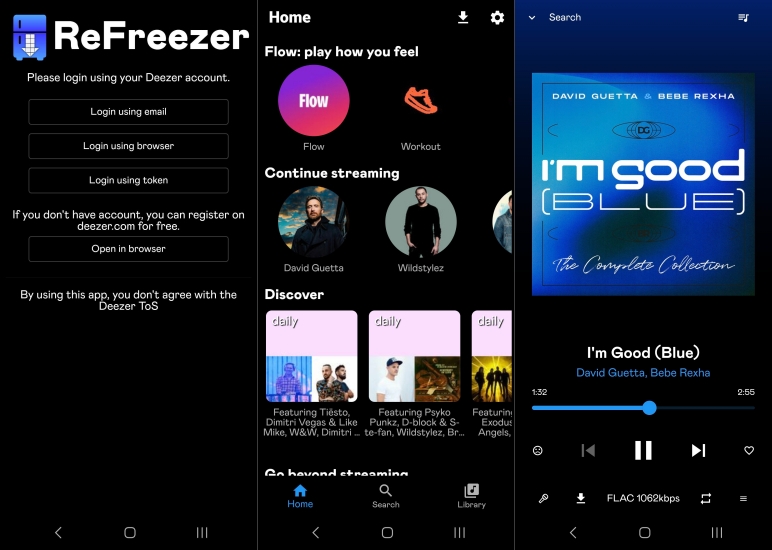
How to Convert Deezer to FLAC with ReFreezer
Step 1. On your computer, open a web browser, go to deezer.com, and log into your account.
Step 2. Press F12 on your keyboard to open the Developer Tools.
Step 3. Go to the Application tab, expand Cookies in the left sidebar, and select deezer.com.
Step 4. Locate the cookie named arl, then double-click and copy its Value.
Step 5. Download and install the ReFreezer app on your Android device.
Step 6. Open the app, select Log in with ARL, and paste the copied code into the field.
Step 7. Access the app's Settings, navigate to Download Settings, and select MP3 as your format.
Step 8. Use the search feature to find your desired track, album, or artist.
Step 9. Tap the three-dot menu next to the song and select Download to save it.
😀 Pros
- Highly convenient for mobile users
- Completely avoids the need for a PC
- Downloads true source files with integrated ID3 tagging
☹️ Cons
- Locked behind a paid Deezer Premium subscription
- Platform compliance and account safety risks
No.3 Apopkit Free Deezer Downloader (Android, iOS, Windows, macOS)
Apopkit Free Deezer Downloader is a web-based, online extraction service that is compatible with most web browsers on devices running Android, iOS, Windows, and macOS. It allows users to paste links to songs, playlists, or albums directly into a web browser. It parses the links online and lists individual tracks for download.
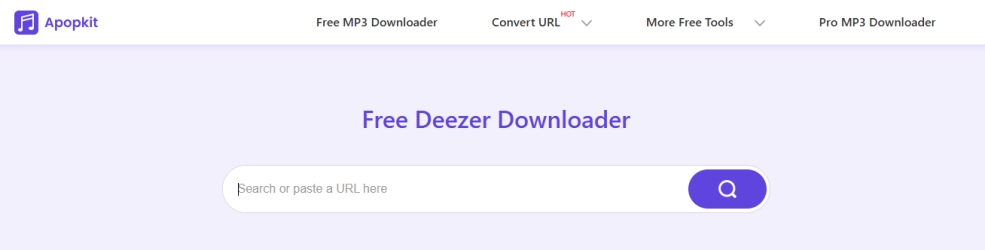
How to Convert Deezer to FLAC Online with Apopkit
Step 1. Open Deezer, locate the song, album, or playlist you want, and copy its shareable link.
Step 2. Go to the Apopkit website and paste the copied URL into the search bar.
Step 3. Click the search icon to fetch the tracks, then select your preferred output format.
Step 4. Click the Download button to save the audio file directly to your computer.
😀 Pros
- No software installation or local login credentials required
- Incredibly fast and easy for casual, single-track downloads
☹️ Cons
- Does not support true FLAC downloading via the web tool
No.4 Audacity (Windows, macOS, Linux)
Audacity is a famous, completely free, open-source multi-track audio editing and recording software. It does not interface with Deezer's servers, but it records your system's live audio output. With Audacity, you can recorder music from Deezerplaying through your computer's speakers using system sound hosts, then save the recordings as FLAC files.
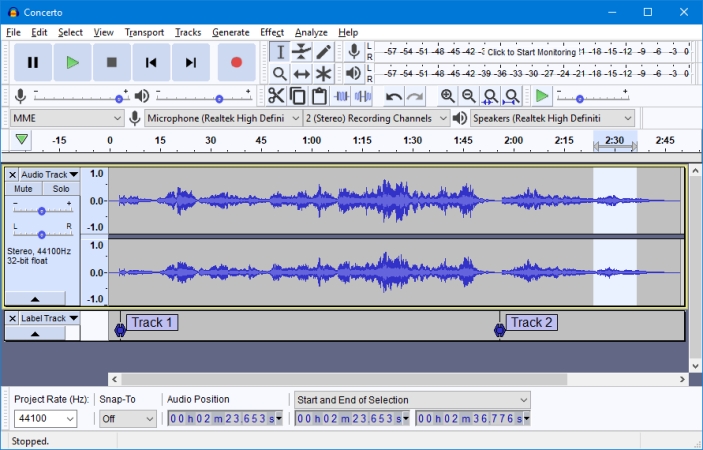
How to Record Deezer to FLAC with Audacity
Step 1. Open Audacity and click the Audio Setup button in the top toolbar.
Step 2. Change the Host setting to Windows WASAPI.
Step 3. Set the Recording Device to your computer's primary speakers or headphones.
Step 4. Set the Recording Channels to 2 (Stereo).
Step 5. Navigate to Transport > Transport Options and ensure Software Playthrough is disabled.
Step 6. Open the Deezer app or web player and prepare the song you want to capture.
Step 7. Return to Audacity, click the red Record button, and immediately start playing the music on Deezer.
Step 8. When the song finishes, click the black Stop button in Audacity.
Step 9. Go to File > Export Audio, choose MP3 as your desired format, and click Save.
😀 Pros
- 100% legal, safe, and private
- Export recorded tracks to FLAC format for free
☹️ Cons
- Not a direct downloader
- Does not automatically split tracks or fetch metadata tags
No.5 Syncios Audio Recorder (Android)
Syncios Audio Recorder is a legacy utility that records system sounds, primarily designed to capture audio streams directly on an Android device. It automatically monitors your system's audio output or app channels to capture and save real-time playing audio streams into local file formats. By using Syncios, you can record Deezer music playing on your Android device.
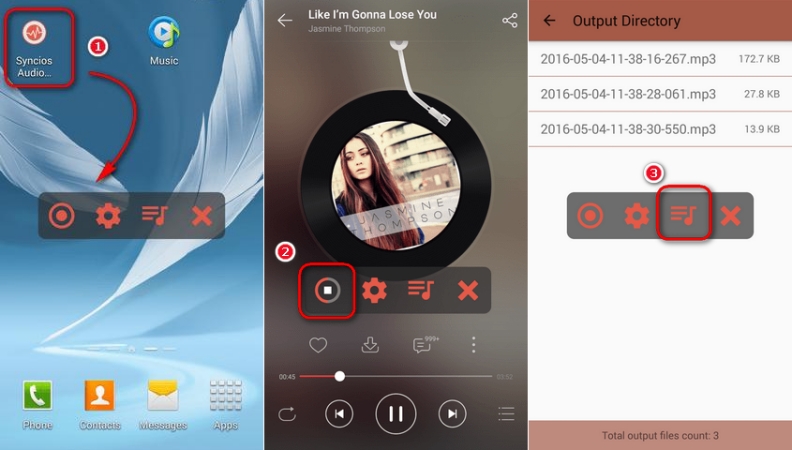
How to Record from Deezer to FLAC with Syncios
Step 1. Open Deezer and start playing the music you want to capture.
Step 2. Open the Syncios Audio Recorder app and tap the Record button to begin capturing the audio.
Step 3. When the song finishes, tap the Record button again to stop the session.
Step 4. Tap the List icon to view and manage all of your recorded audio files.
😀 Pros
- Provide an easy-to-use interface
- Zero risk of an official Deezer account ban
☹️ Cons
- Record Deezer music in real-time only
- Low audio quality
Part 5. Conclusion
That's all! If you want to download FLAC from Deezer on your computer or phone, then you can find one solution that suits you best in this guide. With a Deezer paid account, you can cache FLAC music in the Deezer app on your computer or phone, then listen to them in Offline Mode. Or you can use a Deezer FLAC downloader like TunesMake Deezer Music Converter to get lossless Deezer FLAC music on your computer. Don't hesitate, and have a try now.
Related Articles

A senior editor from TunesMake, dedicated to sharing professional tutorials and solutions of software, movies, and music.
- 1
- 2
- 3
- 4
- 5
- 6
- 7
 Leave Your Comment
(0)
Leave Your Comment
(0)

 Download Center

