








 Store
Store


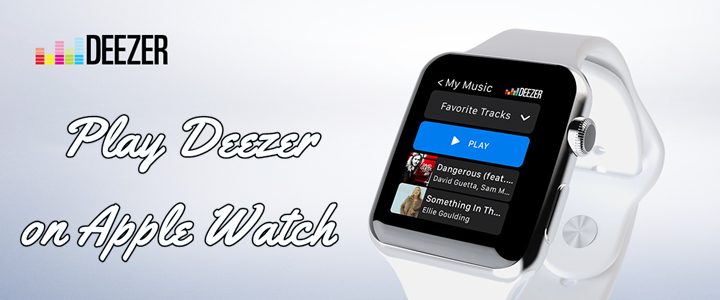
Imagine heading out for a morning run or hitting the gym without your iPhone bouncing in your pocket, yet still having your entire music library wrapped around your wrist. If you are a Deezer user, this is entirely possible to listen to music from Deezer on Apple Watch. The Deezer Apple Watch app allows you to take your soundtracks anywhere.
However, depending on your subscription tier, the Deezer Apple Watch app behaves quite differently. This comprehensive guide will walk you through setting up the app, downloading music for offline listening, and troubleshooting common issues so you can easily play Deezer on your Apple Watch.
Part 1. Deezer Free vs Premium: What Can You Do on Apple Watch?
Before installing the Deezer Apple Watch app, it is crucial to understand how your Deezer account level impacts your Apple Watch experience.
| Feature | Deezer Free | Deezer Premium / Family / Student |
|---|---|---|
| Control iPhone playback | ✔️ | ✔️ |
| Browse Library & Flow | ✔️ | ✔️ |
| Offline Downloads | ❌ | ✔️ |
| Phone-Free Standalone Playback | ❌ | ✔️ (Via Bluetooth headphones) |
If you use Deezer Free, your Apple Watch acts strictly as a remote control for the music playing on your iPhone. If you want to leave your phone at home and stream music directly from your wrist, you must have a paid subscription or use a Deezer downloader like Tunesmake Deezer Music Converter to download Deezer music.
Part 2. How to Get Deezer on Apple Watch (Initial Setup)
No matter whether you are a Deezer Free user or Premium subscriber, you need to install the Deezer Apple Watch app first. Getting the app on your wrist takes less than a minute. Because the watchOS app acts as an extension of your iOS device, the setup is incredibly straightforward.
System Prerequisites
Before configuring your devices, ensure your hardware and software meet the necessary technical baseline to run the application smoothly.
-
iPhone Requirements: iPhone running iOS 15.0 or later with the latest version of the Deezer app installed.
-
Apple Watch Requirements: Apple Watch Series 3 or newer running watchOS 7.0 or later.
-
Account Status: An active Deezer account logged in on the companion iPhone.
-
Audio Output: A paired set of Bluetooth headphones, earbuds, or an external Bluetooth speaker.
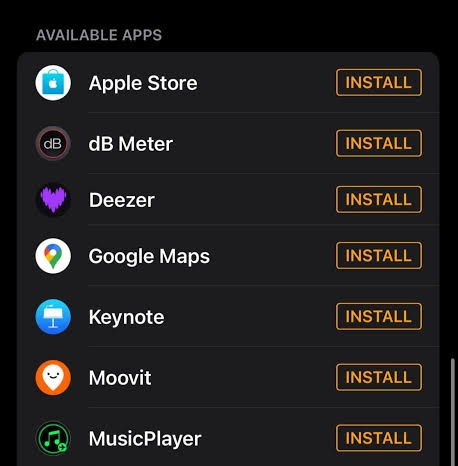
Step 1. Open the Watch app on your paired iPhone.
Step 2. Stay on the My Watch tab and scroll down to the Available Apps section.
Step 3. Find Deezer in the list and tap the Install button next to it.
Step 4. Once installed, ensure the toggle for Show App on Apple Watch is turned green.
Part 3. How to Play Deezer on Apple Watch Offline (Phone-Free)
The Deezer watchOS app acts as a powerful companion to your iOS device. However, your experience will depend entirely on your account type. Fortunately, here we will break down how to listen to Deezer on Apple Watch offline whether using a Free or Premium account.
Option 1. Phone-Free Offline Method (For Paid Subscribers)
If you pay for Deezer Premium, Family, Student, or Duo, your Apple Watch transforms into an entirely independent music player. You can download audio files directly to your wrist and leave your iPhone completely at home.
Step 1 Download Deezer Music for Offline Playback
To save data and prepare for offline environments, you must download playlists, favorite tracks, and editorial albums directly to your Apple Watch while connected to internet access.
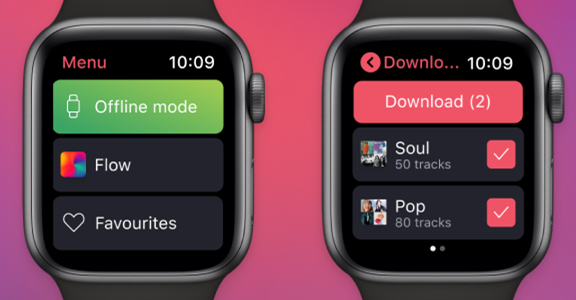
1. Open the Deezer app on your Apple Watch.
2. Swipe through the main interface to navigate to your Library or Favorites.
3. Browse for the playlist or album you want to save to your wrist.
4. Tap the Download icon.
Step 2 Pair Headphones and Going Phone-Free
The Apple Watch cannot play music out loud through its internal speaker for third-party apps. To hear your offline music, you must pair wireless earbuds directly to your watch.
1. Put your Bluetooth headphones like AirPods into pairing mode.
2. On your Apple Watch, open the Settings app.
3. Tap Bluetooth and select your headphones from the list of available devices.
4. Open Deezer on your watch, select a downloaded playlist, and hit play.
Option 2. Local Music Playback Method (For Free Users)
If you are a Deezer Free user, or if you regularly run out of internal storage on your wearable device, the official Deezer Apple Watch app restrictions can be frustrating. An alternative workaround is using a third-party utility like TunesMake Deezer Music Converter.
This software works by downloading and converting your target Deezer playlists into standard, unencrypted audio formats like MP3 or FLAC on your computer. By saving your Deezer music as standard compressed files, you can play them via the Apple Watch's default Music app without needing the official Deezer app or an active premium subscription.

Streaming Audio Converter -
Download music from Deezer as FLAC Formats
- Download tracks, albums, playlists, and artists from Deezer
- Convert Deezer music to MP3, M4A, FLAC, AIFF, WAV, and M4B
- Preserve the original audio quality and ID3 tags for management
- Remove DRM from Deezer without compressing audio quality
- Support downloading music from over 10 popular streaming platforms
Security Verified. 100% Clean & Safe.
Step 1 Import Deezer Songs to the Conversion List
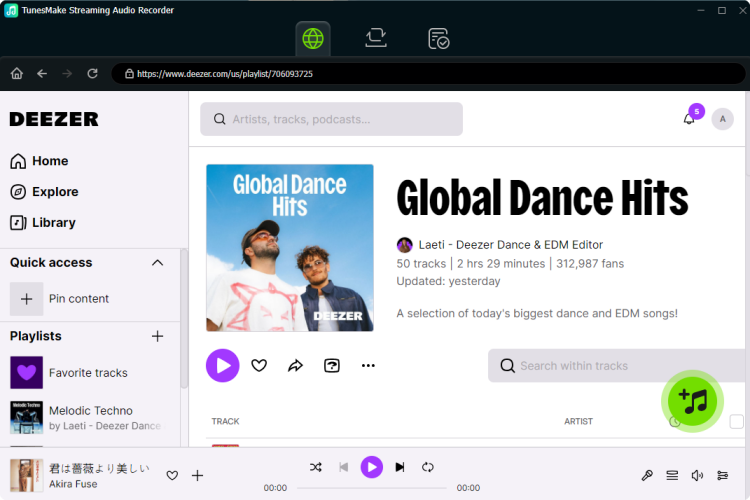
First things first, open TunesMake Streaming Audio Recorder and select Deezer from the main interface, then you’ll find the Deezer web player. Go to locate your music library in Deezer and select those songs you want to download. When finding the music you want to download, open the album or playlist and click the + button to add them to the conversion list.
Step 2 Choose the Output Format for Deezer Music
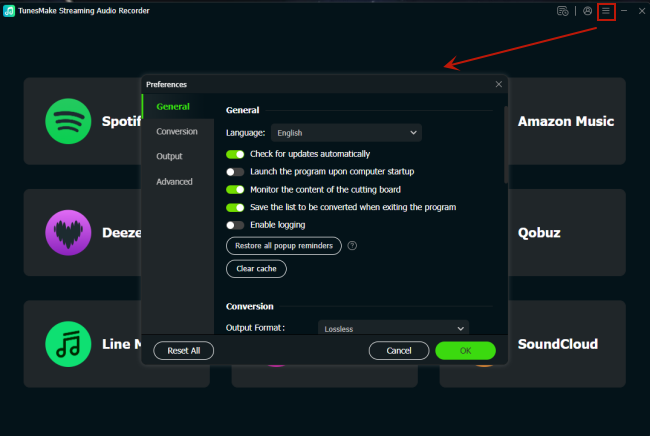
There are several audio parameters that can be personalized, including format, bit rate, sample rate, and channel. To set those parameters, you need to click the Settings icon at the top left corner and scroll down to the Conversion option. Then you can set MP3 as the output format. For better sound quality, you can continue to adjust the bit rate, sample rate, and channel.
Step 3 Download Deezer Music to MP3 or FLAC
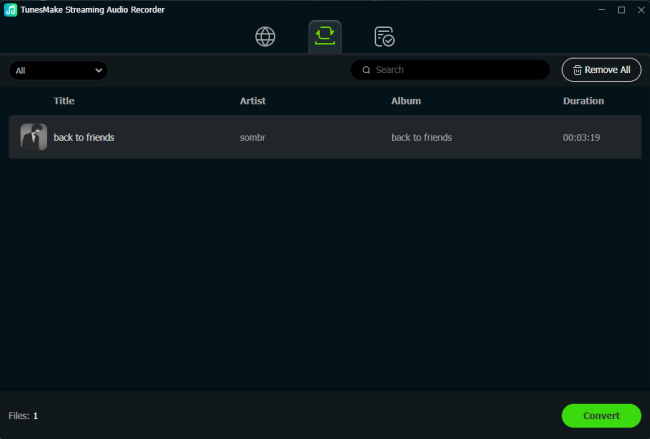
On the converter, click on the Convert button to initiate the downloading and conversion of Deezer songs. Once TunesMake receives the command, it will immediately download and save Deezer songs to your computer in the format you require. After conversion, all the converted Deezer music tracks can be viewed in the Converted section by clicking the Converted icon.
Step 4 Sync Deezer Music Files to Apple Music
Now you can go to sync all the downloaded Deezer music files to your watch and then play them on the watch without your iPhone even though you don't have a paid Deezer account.
1. Charge your Apple Watch and go to Settings > Bluetooth on your iPhone.
2. Make sure that Bluetooth is enabled and your watch is paired to your phone.
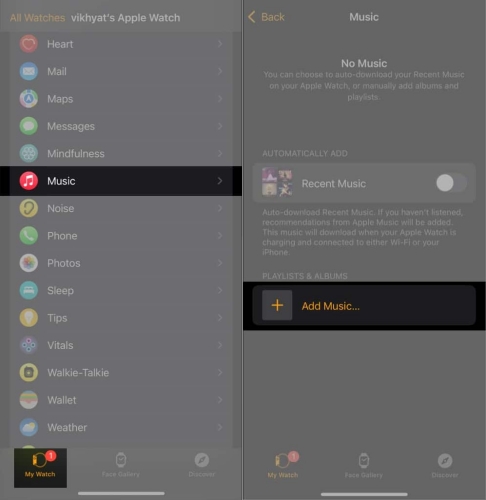
3. On your phone, launch the Apple Watch app and tap the My Watch tab.
4. Under My Watch, find and tap Music, then Add Music.
5. Select Deezer music files you want to sync with your watch and tap + to start syncing.
6. Open the Music app on your Apple Watch and find the Deezer music files you've synced.
7. Select a song or playlist and start playing on the watch.
8. Once playing, press Connect a Device to pair your watch to your Bluetooth headphones.
Part 4. Troubleshooting Common Deezer Apple Watch Issues
There are lots of complaints from users while using the Deezer Apple Watch app. If you experience playback errors, freezing screens, or sync delays, try the following quick solutions.
| Common Issue | Probable Root Cause | Actionable Troubleshooting Fix |
|---|---|---|
| Downloads Stuck at 0% | Slow Bluetooth bandwidth choking data transfer. | Start the download on your watch, then turn off Bluetooth on your iPhone. This forces the watch to use your direct home Wi-Fi network for a much faster transfer. |
| No Headphone Connected Error | No audio output path established. | Press the Digital Crown and open Settings. Then tap Bluetooth and select your wireless earbuds to link them directly to the watch hardware. |
| Playlists Missing from Watch | Synchronization lag between iOS and watchOS. | Force close the Deezer app on both your watch and phone, reopen the iPhone app first, then relaunch the watch app to trigger a data refresh. |
Part 5. Conclusion
Anyway, you have known how to listen to Deezer on Apple Watch whether you are using a Deezer Free or Premium account. With a Deezer Premium account, you can download your favorite Deezer contents to your watch and then enjoy them when you don't have your iPhone nearby, as well as, an internet connection. Or you can try TunesMake Streaming Audio Recorder and play Deezer music with your watch anytime.
Related Articles


A senior editor from TunesMake, dedicated to sharing professional tutorials and solutions of software, movies, and music.
- 1
- 2
- 3
- 4
- 5
- 6
- 7
 Leave Your Comment
(0)
Leave Your Comment
(0)

 Download Center

