








 Store
Store


SoundCloud remains the heartbeat of independent music. For music lovers who prefer underground tracks and DJ mixes, Discord is the primary hub for sharing these discoveries with friends. If you are active on both SoundCloud and Discord, you may wonder how to connect the two platforms. While Discord provides official connections to streaming music platforms like Spotify, a direct Link to SoundCloud button is still missing from the Discord settings menu in 2026. However, you don’t need to worry. There are still several powerful workarounds to bridge the gap. In this complete guide, you can learn how to connect SoundCloud to Discord in three effective methods. Whether you want to show your friends what you are listening to in real-time or stream your favorite SoundCloud songs in a voice channel, this guide is definitely helpful. Keep reading to explore every method to integrate SoundCloud with Discord.
Part 1. How to Make Discord Show SoundCloud on Your Profile
One of the most common goals of users who want to connect SoundCloud to Discord is to show their status update automatically with the song title and artist they are currently playing on SoundCloud. Since Discord doesn’t support this for SoundCloud, you will need a third-party tool to help you show the Rich Preference. Here, we will take PreMiD as an example.
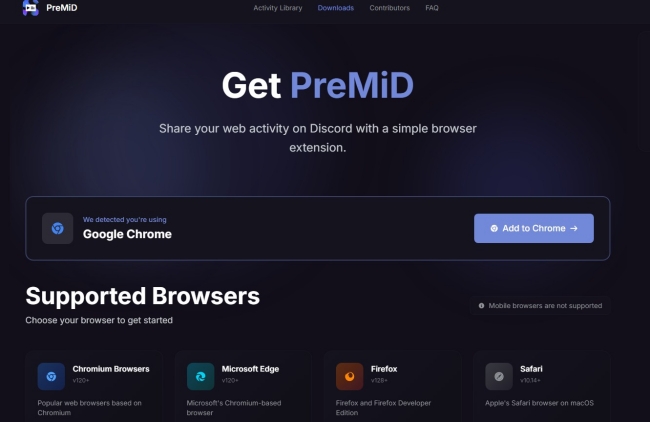
Step 1. Go to the official PreMiD website and download the extension for your browser. For example, you can click Add to Chrome to install it.
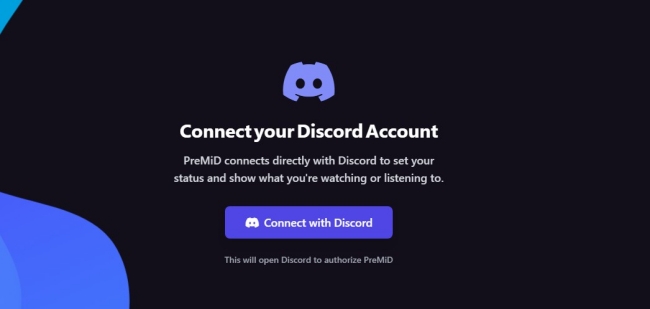
Step 2. Once installed, you should enable the PreMiD extension and open its dashboard. Then, select Connect with Discord.
Step 3. Then, you should follow the on-screen instructions to authorize PreMiD.
Step 4. After that, you should go to Discord Settings > Activity Settings and toggle on the “Share your detected activities with others” option.
Step 5.Now, you can open both Discord and SoundCloud in your browser and play any song you like. Here, you can see the Rich Presence status showing on your Discord profile.
This is the most seamless way to show SoundCloud listening activity on Discord without manually updating your status. However, you should notice that it is an unofficial third-party solution. Its stability and safety may not be guaranteed. If you want a more reliable and secure solution, you can try TunesMake SoundCloud Music Converter. Explore more detailed information on Part 3.
Part 2. How to Add SoundCloud Discord Bot to Your Discord Server
If you are running a Discord server and want to share SoundCloud music with a whole group directly in voice channels, you will need a Discord bot. Music bots can join voice channels and play music for everyone in that channel. There are a lot of SoundCloud Discord bots in the market, such as Hydra bot, Jockie Music, FredBot, and more. Here, we will break down how to use FredBoat to add SoundCloud Music to Discord for playing.
Step 1. Go to the official FredBoat website and click Invite To Server.

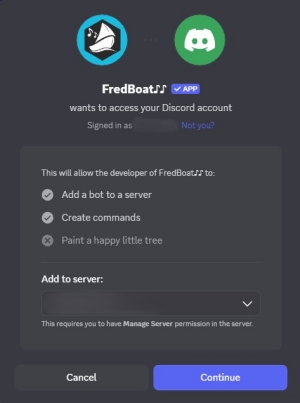
Step 2. Then, you can select one of your services and grant the necessary permissions to this bot by clicking Continue.
Step 3. Once installed, you can join a voice channel. Then, use a command like /play + the URL of a SoundCloud track/ the name of a SoundCloud track. For example: /play https://on.soundcloud.com/aGbW36qPeIbk3qwYEH.
Step 4. The bot will then join and start streaming this song. If you need to manage the listening session, you can use commands like: /skip, /pause, and /queue.
Part 3. How to Link SoundCloud to Discord for Offline Playback
While SoundCloud Discord bots work well, they rely on a stable network connection and have many limitations. If you want to play SoundCloud tracks in Discord without buffering and avoid bot restrictions, then downloading SoundCloud tracks for offline playback may be the better approach. This is where a dedicated tool like TunesMake SoundCloud Music Converter becomes practical.
By using the TunesMake SoundCloud Music Converter, you can convert SoundCloud tracks into standard audio formats, such as MP3, M4A, M4B, WAV, FLAC, and AIFF, and gain more flexibility. Once you save your preferred songs as DRM-free local music files, you can easily upload them to Discord or other platforms for unlimited offline playback. Furthermore, the TunesMake tool smartly preserves metadata and sound quality, allowing you to have the same great listening experience as online.

Streaming Audio Recorder –
Best SoundCloud to Discord Downloader
- Unlimitedly download streaming music songs, playlists, and podcasts
- Losslessly convert streaming music to MP3, M4A, M4B, WAV, FLAC, and AIFF
- Remove DRM protection from many streaming music platforms
- Convert streaming songs with original sound quality and ID3 tags kept
Security Verified. 100% Clean & Safe.
Step 1
Personalize the Audio Settings of SoundCloud Music
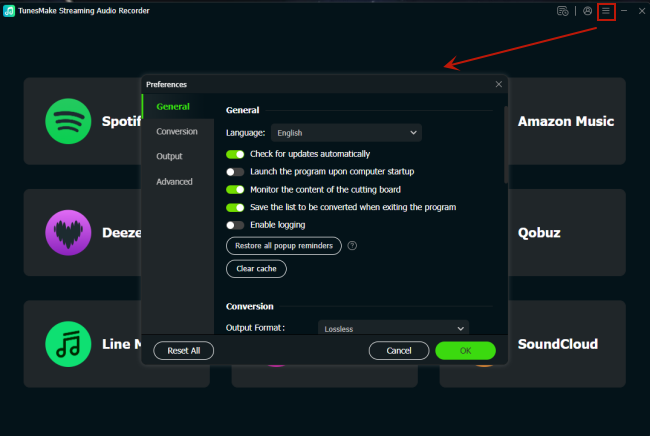
To let you have a more personalized music experience, TunesMake SoundCloud Music Converter allows you to change the audio settings as you wish. After installing and launching it on your desktop, you can click the top Menu icon and select Preferences to enter the Audio Settings window. Here, click Conversion, and you can select the output format you need. Currently, Discord allows uploading files in MP3, WAV, and FLAC formats. You can select any of them as the output format. Also, you can change other parameters like bit rate, sample rate, channel, and so on.
Step 2
Head to SoundCloud and Sign in to Your Account
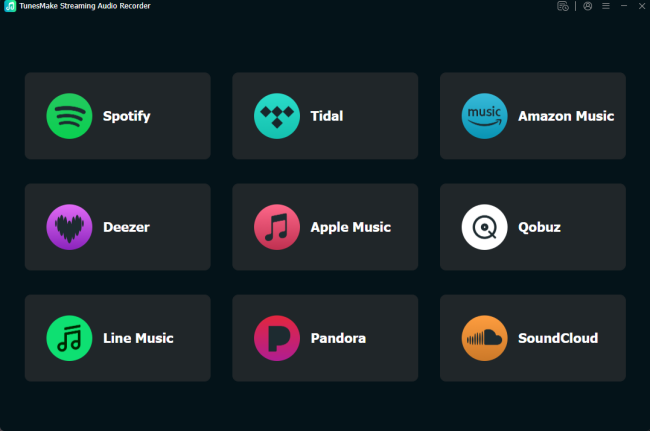
When you finish setting audio parameters, go back to the interface of the TunesMake tool. Here, you should select SoundCloud. Then, you will be led to its official website, where you should sign in to your SoundCloud account.
Step 3
Add SoundCloud Songs to the Conversion List
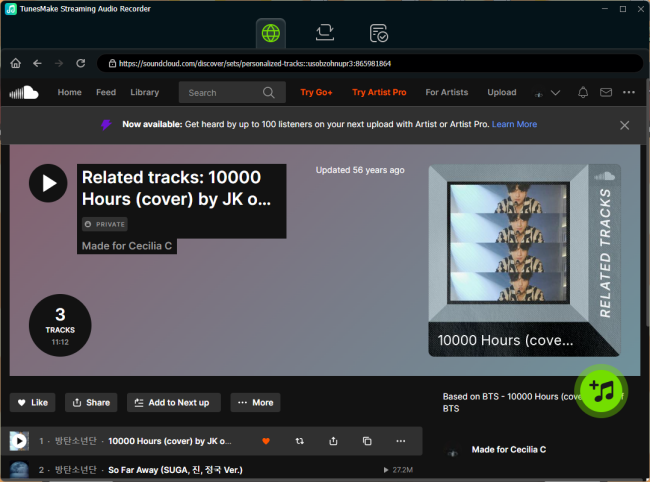
Now, you can browse your SoundCloud music library to find the songs you want to play on Discord. Just select any of your playlists or the Likes playlist, and then click the lower Add icon. The TunesMake tool will analyze and show all the songs included in it. You should then pick your favorite ones and add them to the conversion list by selecting the Add to List option.
Step 4
Download and Convert SoundCloud Songs for Discord
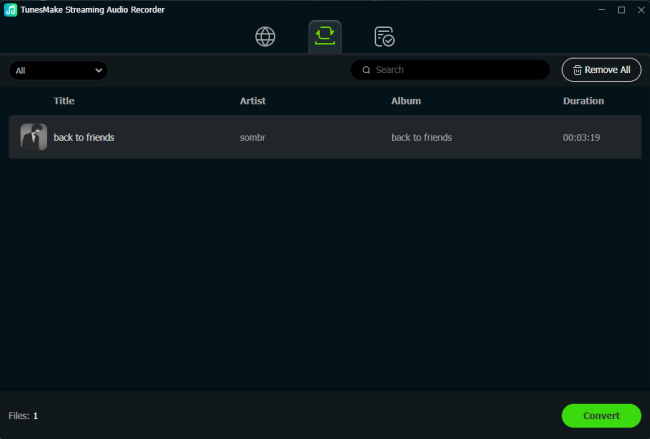
Whenever you are ready, you can begin the downloading and conversion process by clicking the Convert button. Wait for a while, the TunesMake tool will download all the songs to local files. Once completed, the converted files will be saved in the specified output folder you choose. Click the Converted icon at the top > File icon next to each song. Thus, you can find their exact location.
Now, you can upload the downloaded SoundCloud files to a Discord chat or channel for listening. You can do so by clicking the Add icon next to your chat box. Then, choose Upload a File.
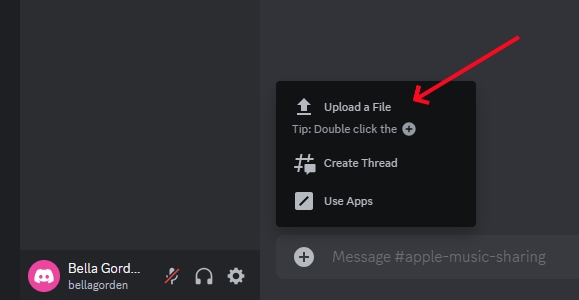
Another available method to enjoy these SoundCloud songs on Discord is uploading them to your Spotify library. After that, you can connect Spotify to Discord and play it without limitations.
Part 4. FAQs about SoundCloud in Discord
Can I connect SoundCloud to Discord directly like Spotify?
Unfortunately, the answer is no. Discord does not offer an official integration with SoundCloud. You must use a third-party tool like PreMiD, a Discord SoundCloud bot, or the TunesMake SoundCloud Music Converter.
Why isn’t SoundCloud showing on my Discord profile, even with PreMiD?
Sometimes, your SoundCloud status might not show on Discord, even using PreMiD. If so, you can go to Settings > Registered Games on Discord, and ensure that “Display currently running game as a status message” is toggled on. When the status is stuck, you can right-click the PreMiD icon to refresh it.
Is it legal to use a SoundCloud Discord bot?
It is generally legal for you to use a bot to use SoundCloud on Discord. It is not a criminal act, and users are not being sued for using these tools. However, if a bot violates a platform's rules, the bot gets shut down, and your playlists or music history within this bot might be lost.
Summary
Although connecting SoundCloud to Discord isn’t as straightforward as linking Spotify, it’s absolutely possible with the right tools. You can follow the effective methods in this post to get SoundCloud music seamlessly on Discord. Among all third-party tools, TunesMake SoundCloud Music Converter is your best option. With its help, you can easily download SoundCloud songs to local files for playing on other platforms.
Related Articles


A senior editor from TunesMake, dedicated to sharing professional tutorials and solutions of software, movies, and music.
- 1
- 2
- 3
- 4
- 5
- 6
- 7
 Leave Your Comment
(0)
Leave Your Comment
(0)

 Download Center

