








 Store
Store


SoundCloud has long been the heart of independent music. For all music lovers who want to have a seamless and uninterrupted music experience, downloading SoundCloud songs for offline playback is the best approach. If you are an Android user, the flexibility of the operating system allows you to take music on the go via multiple ways. Whether you are looking for the official route or a third-party methods to keep your favorite songs locally, you can find available methods here. In this guide, we will walk you through how to download SoundCloud songs on Android via four proven methods. Let’s dive in.
Method 1. Download Songs from SoundCloud to Android with Go/Go+
SoundCloud offers a native, built-in downloading feature on its official Android app for users who want a convenient and legal way to listen offline. Subscribing to SoundCloud GO or GO+ enables you to download tracks, entire playlists, and your Liked Songs directly. After downloading, you can play them offline within the mobile application.
Step 1. Open the SoundCloud app on your Android phone. Then, sign in to your Go or Go+ account.
Step 2. Find the song you like and add it to your Liked songs or any of your playlists by clicking the More button > Add to playlist.
Step 3. Then, go back to your library by clicking the icon in the bottom right corner. Find the playlist you want to download.
Step 4. Tap your target playlist or your Liked songs to enter the detailed page. After that, tap the download icon to save the entire playlist offline.
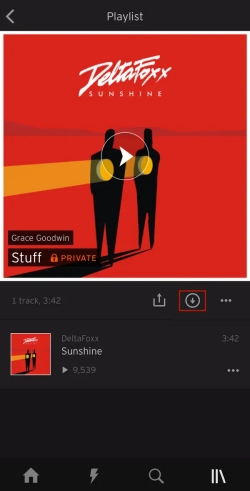
When it is downloaded successfully, you can find them in Library > Downloads and play them without an Internet connection.
Note
You can only download the entire playlist or all your liked songs at once on the SoundCloud Android app. You can’t download a single song with its app. Plus, these downloads are all cache files that can’t be moved or played on other apps. They will become inaccessible if your subscription lapses.
Method 2. Get Artist-Enabled Free SoundCloud Downloads on Android
It is known that SoundCloud is one of the best places to discover fresh music. You can find multiple underground artists, DJ mixes, and exclusive remixes. But many users don’t realize that SoundCloud actually has a native free download feature on its platform. As long as the producers actually allow users to download their music for free, you can get the original file of this track. While this is typically a desktop-centric feature, Android users can still take advantage of it by visiting it via a mobile browser.
Step 1. Open any browser app on your Android device and visit the official SoundCloud website. Then, select the three dots icon in the upper right corner of the browser and enable the Desktop site.
Step 2. Then, you can search for the song you like or browse the music library to find a downloadable track.
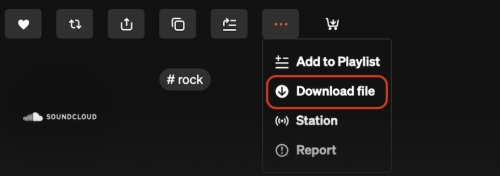
Step 3. If a song is downloadable, you can tap the More icon under its waveform.
Step 4. Then, choose the Download file option. The music file will then be saved to your Android device as a local music file.
Method 3. Download Music from SoundCloud to Android Locally
Using the official SoundCloud Android app or its web player to download songs is straightforward and easy. However, they both have some disadvantages. For downloading songs from the SoundCloud app to Android, you must have a Go or Go+ subscription. Additionally, the downloads within the SoundCloud app can not be moved and will expire. If you search for free downloadable songs on the SoundCloud website, you will find that not all songs can be downloaded freely. In this case, if you want full control over your music without restrictions, downloading SoundCloud songs as local files is the most powerful method.
Since the SoundCloud app on Android doesn’t allow direct local download for all tracks, a specialized bridge - TunesMake SoundCloud Music Converter is needed.
TunesMake SoundCloud Music Converter, also known as TunesMake Streaming Audio Recorder, is a powerful music downloader designed for all music lovers. You can utilize its decryption technology to download any song, playlist, album, or podcast to your local device in a common audio format. According to your demands, you can choose a music format from MP3, M4A, M4B, WAV, FLAC, and AIFF. Furthermore, the TunesMake tool smartly retains the original sound quality and ID3 tags of your SoundCloud songs. Thus, you can still have the best listening experience after downloading. All the downloaded songs can be stored forever, and you can listen to them offline, anywhere, and anytime.

Streaming Audio Recorder –
Best SoundCloud to Android Downloader
- Unlimitedly download streaming music songs, playlists, and podcasts
- Losslessly convert streaming music to MP3, M4A, M4B, WAV, FLAC, and AIFF
- Remove DRM protection from many streaming music platforms
- Convert streaming songs with original sound quality and ID3 tags kept
Security Verified. 100% Clean & Safe.
Step 1
Customize the Audio Settings
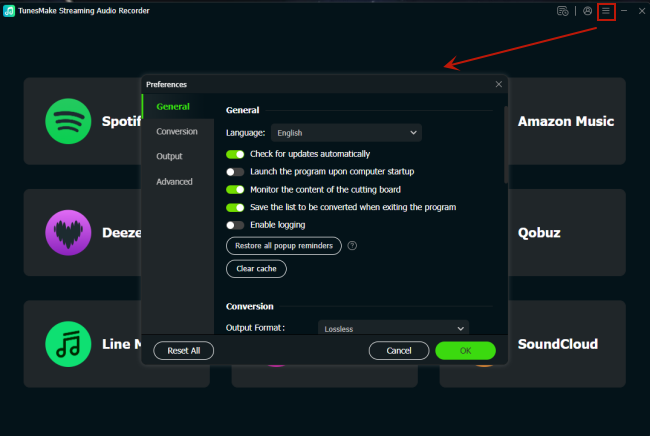
First of all, you need to install the TunesMake SoundCloud Music Converter on your Windows or Mac computer. Then, launch it. In the interface, you need to set the output audio settings on Menu > Preferences > Conversion. In this tab, you can change the output format you like. Also, you can configure other parameters, like channel, bit rate, and sample rate.
Step 2
Log in to Your SoundCloud Account
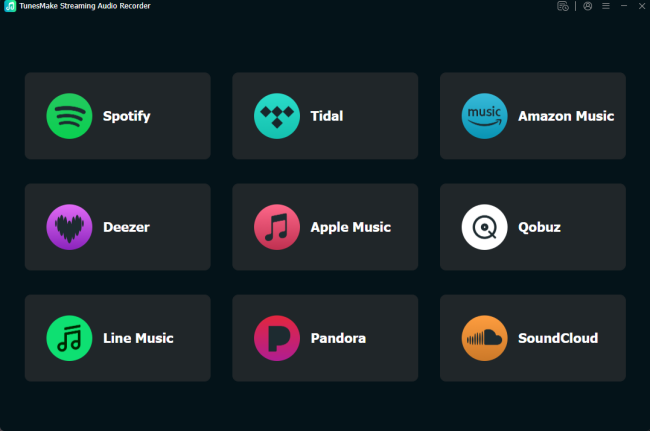
After settings, you should go back to the interface. Here, all the TunesMake-supported music platforms are listed. You can click the SoundCloud icon to visit its official web player. Then, sign in to your account.
Step 3
Find Songs You Want to Download to Android
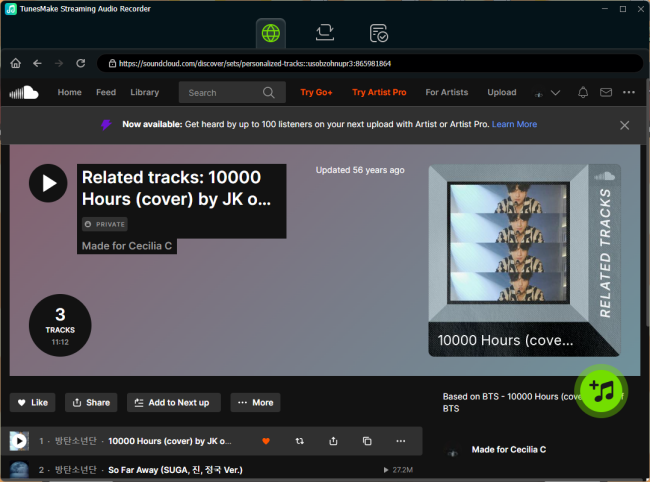
The TunesMake tool allows you to download one single song or multiple playlists at once. You can either drag and drop one song to the lower Add icon directly or select a playlist and click the Add icon > Add to List.
Step 4
Download SoundCloud Music to Local Files
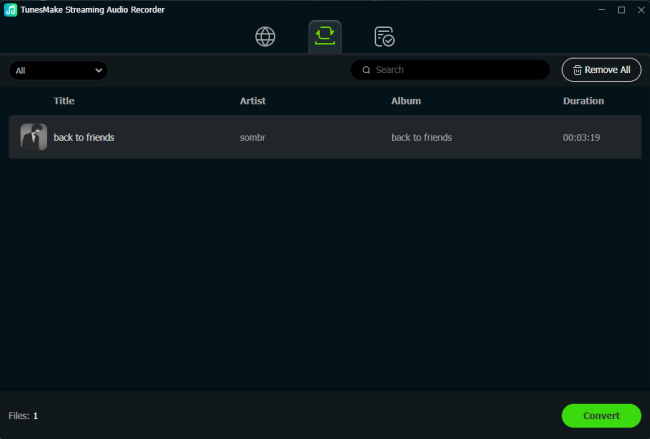
Once you add all the songs you like, it’s time to download them. All you need to do is click the Convert button. Then, the TunesMake tool will begin downloading your songs at 22X speed. Wait for a while, and then click the top Converted icon to check all the downloads.
Step 5
Transfer SoundCloud Downloads to Android Device
Now, you already have the local files of your favorite SoundCloud songs. You can then sync them to your Android phone for unlimited offline playback. Simply connect your phone and computer via a compatible USB cable. Then, copy and paste the downloaded files to the music folder on your Android phone.
Method 4. Utilize a Telegram SoundCloud Bot for Android
If you are looking for a third-party downloader tool on your Android phone directly, you can try a Telegram SoundCloud bot. Telegram bots have become a popular workaround nowadays. A valid Telegram SoundCloud bot can scrape the public audio stream of a SoundCloud link and return a downloadable file directly in the chat. For users who don’t mind the audio quality, free Telegram bots are enough.
Step 1. Open the official Telegram app on your Android phone.
Step 2. Search for an available SoundCloud bot via the search bar. Once found, begin chatting with the bot by sending /star.
Step 3. Then, you can go to the SoundCloud app and copy the link of your favorite song.
Step 4. Go back to Telegram and send the music link to the SoundCloud bot. Wait for a second, and the bot will send you back a valid audio file.
Step 5. Tap the Download icon or three dots icon next to the audio file. Then, choose Save to Music or Save to Downloads. The file will be downloaded and stored locally on your Android phone.
Conclusion
This post provides four solutions to the question of how to download SoundCloud songs on Android. For a simple, official experience, you can choose the downloading feature built into the SoundCloud Android app. Just make sure you have a Go or Go+ subscription. Otherwise, you may need some third-party tools, like Telegram bots, for mobile downloads. However, if you want full control over your SoundCloud songs, downloading them to local files via the TunesMake SoundCloud Music Converter is the best approach.
Related Articles

A senior editor from TunesMake, dedicated to sharing professional tutorials and solutions of software, movies, and music.
- 1
- 2
- 3
- 4
- 5
- 6
- 7
 Leave Your Comment
(0)
Leave Your Comment
(0)

 Download Center

