








 Store
Store


SoundCloud has become more and more popular in the music market. You can find diverse underground remixes and indie tracks that you simply can’t find on other mainstream music platforms. However, there are some limitations with the free tier, such as persistent ads, limited skips, and the inability to listen offline. These limitations lead users to search for a SoundCloud Mod APK and hope to unlock Premium features without paying for SoundCloud subscriptions. You may find these modded APK apps tempting, but it’s important to understand their drawbacks and risks. In this guide, we will take a clear and in-depth look at SoundCloud Mod APK. Keep an eye on this post, and then you will learn what it is, how to use it, and what safer, more reliable alternative exists for downloading SoundCloud music offline.
Part 1. What Is a SoundCloud Modded APK?
APK stands for Android Package Kit. A Mod APK is a modified, unofficial version of an original Android application. These APK apps are developed by third-party coders rather than the official app team. In the case of SoundCloud, third-party developers alter the official SoundCloud app’s code to remove restrictions of the free account. With this modded APK, users can access all Premium features without paying a cent.
Key Features of SoundCloud Mod APK
- Ad-free listening
- Offline listening
- Access the full SoundCloud catalog
- Enjoy high-fidelity audio
- Unlimited skips
- DJ integration
Pros and Cons of SoundCloud Mod APK
-
😀 Pros
- Free of charge
- Experience SoundCloud Premium features
- No official subscription needed
-
☹️ Cons
- May contain malware or spyware
- Potential risk of the account being banned
- Unstable and easy to break
- No updates and official supports
- Only available for Android devices
- Downloaded music files are still encrypted
Part 2. How to Download and Use a SoundCloud Mod APK
Now you know the potential risks and drawbacks of SoundCloud Mod APK apps. If you still decide to use one, you should know that the process of downloading and using an APK differs significantly from using a standard SoundCloud app. When you search for “SoundCloud Mod APK”, you will find countless websites offering APK files. It’s important to choose a safe and reliable resource. Here are some available options for your reference.
- SoundCloud v2026.01.09 MOD APK (Premium Unlocked, AD-Free)
- SoundCloud Mod APK 2026.01.27-releas e(Premium unlocked)
- SoundCloud Mod Apk v2025.09.18 (Premium Unlocked)
- SoundCloud MOD APK 2025.04.03-release [Premium Unlocked/No Ads]
- SoundCloud Premium v2026.01.27-beta MOD APK [Premium Unlocked, no ads] for Android
Step 1. Open a browser on your device, and then search for SoundCloud Mod APK.
Step 2. Find a reliable resource, and then get the APK file by selecting the Download button.
Step 3. When the APK is downloaded, you can find it on the Downloads section of your browser. Tap it to install.
Step 4. If it prompts, you need to allow your user for installing from unknown source. Just head to Settings > Security or Privacy and enable the Unknown Source option.
Step 5. When the APK is installed successfully, you can tap its icon from the home screen to open it.
Step 6. Now, log in to your SoundCloud account to unlock all advanced features.
Part 3. Safer and More Reliable Alternative to SoundCloud Mod APK
SoundCloud Mod APK is a convenient option for experiencing all Premium features, like ad-free listening and offline listening. But many users find that the Mod APK crashes from time to time. If your goal is only to enjoy SoundCloud music offline, we recommend using a safer and more reliable method without a subscription or a modded app. That is to use a dedicated SoundCloud music downloader - TunesMake SoundCloud Music Converter.
TunesMake SoundCloud Music Converter is a powerful music downloader for all SoundCloud users, helping you download songs, playlists, albums, and podcasts from SoundCloud to plain audio files in diverse formats. Your available options include MP3, M4A, M4B, WAV, FLAC, and AIFF. After downloading, you will get the DRM-free SoundCloud music files, which can be transferred to other media players and devices for offline playing without any limits. Furthermore, the TunesMake tool smartly keeps the original music sound quality and ID3 tags so that you can have the same great music experience as online. Compared to a SoundCloud Mod APK, the TunesMake software is more stable and contains no potential risks.

Streaming Audio Recorder –
Best Alternative to SoundCloud Mod APK
- Unlimitedly download streaming music songs, playlists, and podcasts
- Losslessly convert streaming music to MP3, M4A, M4B, WAV, FLAC, and AIFF
- Remove DRM protection from many streaming music platforms
- Convert streaming songs with original sound quality and ID3 tags kept
Security Verified. 100% Clean & Safe.
-
😀 Pros
- Download any songs, playlists, albums, and podcasts
- Support diverse audio formats
- Lossless downloading and conversion process
- Support customizing audio parameters
- Retain original ID3 tags and lyrics (if provided)
- Easy to use and stable
- No need to install the SoundCloud app
- Customize the audio parameters for better sound quality
-
☹️ Cons
- Limited features for the free version
Step 1
Configure the Audio Settings
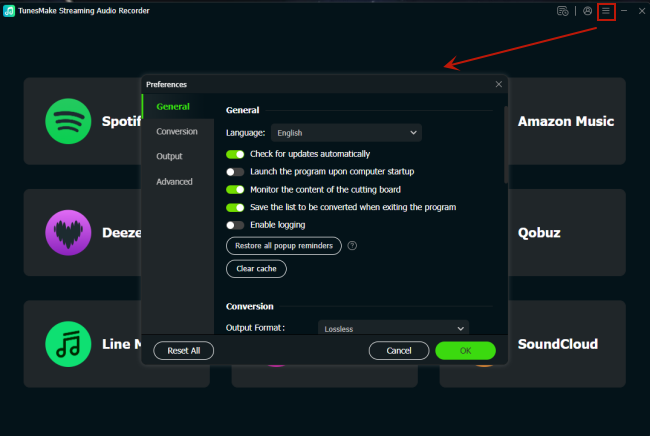
Click the Free Download button above to install the TunesMake SoundCloud Music Converter on your device. Then, you can launch it and begin configuring the audio settings. Click the Menu icon in the upper right corner and choose Preferences. When the audio settings window pops up, you can choose the output format in the Conversion tab. If you need, other parameters like channel, bit rate, and sample rate, can be changed as well. When you finish, click OK so that your changes can be saved successfully.
Step 2
Navigate to the SoundCloud Web Player
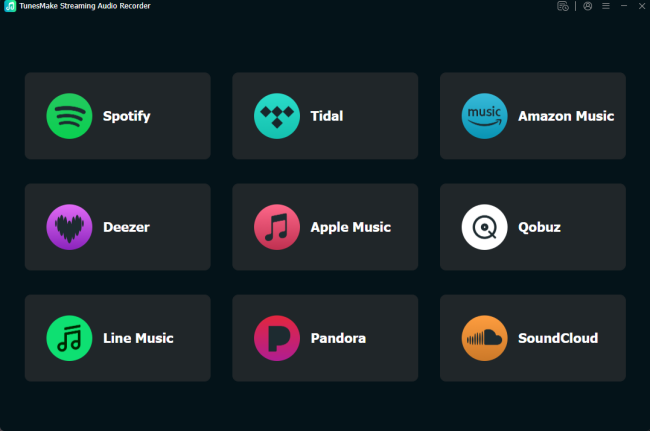
Once you finish setting, go back to the interface of the TunesMake program. Here, you can see multiple music streaming services. Choose SoundCloud and visit its official web player, where you can log in to your SoundCloud account to browse music.
Step 3
Add SoundCloud Songs for Downloading
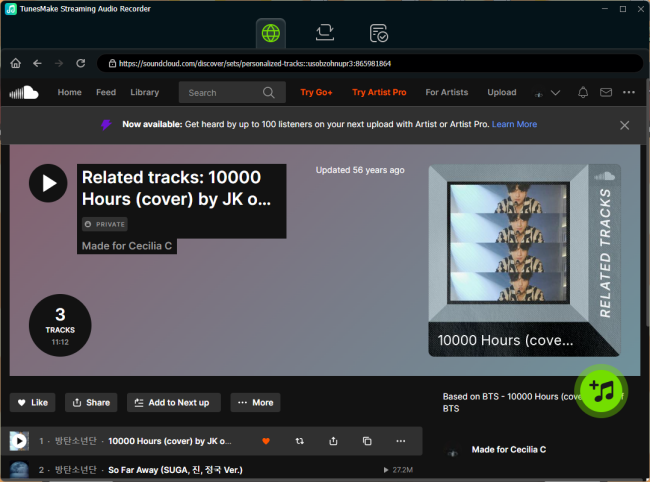
You can now head to your music library and find any playlist you want to listen to offline. Select it, and then click the Add icon at the bottom to load all the songs it contains. Pick the songs you like and choose Add to List. Thus, they will be added to the conversion list for downloading.
Step 4
Start to Download SoundCloud Songs for Offline Listening
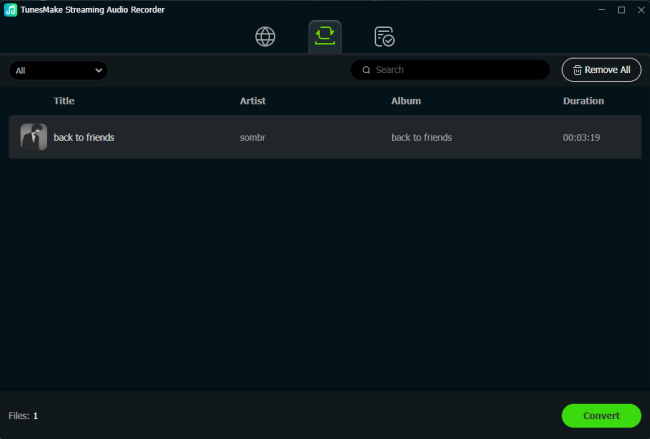
When everything is ready, you can begin downloading SoundCloud songs via the Convert button. Just wait for a while, and you can see all the songs you added are saved as local audio files on your device. To find their exact location, click the top Converted icon.
Part 4. FAQs about SoundCloud Premium Mod APK
Is SoundCloud Mod APK safe to use?
Most SoundCloud Mode APK apps are considered unsafe as they are developed by third-party creators outside official app stores. It may contain malware, spyware, or hidden scripts that can steal your personal info or damage your device. Diverse resources offer APK, so there is also no guarantee that the APK app hasn’t tampered with. If you are looking for a safer way to download SoundCloud music, we recommend TunesMake SoundCloud Music Converter.
Can SoundCloud ban my account for using a Mod APK?
Yes. SoundCloud may suspend or ban your account if it detects that you are using an unauthorized or modified app. Because this violates SoundCloud’s Terms of Use.
Why does SoundCloud Mod APK stop working?
Since the Mod APK lacks official support and updates, it may crash or fail to load tracks when SoundCloud updates its official app and server-side protection.
Does SoundCloud Mod APK work on iPhone (iOS)?
No. SoundCloud Mod APK is designed for Android devices only. iOS devices can’t recognize and install APK files.
Conclusion
For users who don’t want to keep paying for the SoundCloud subscription, SoundCloud Mod APK is an easy and convenient way to unlock SoundCloud Premium features. While it is appealing, frequent crashes and security risks make it an unreliable long-term solution. If you want to enjoy your SoundCloud music freely without risking your device, TunesMake SoundCloud Music Converter is your best option. It offers a better experience by saving SoundCloud music as local music files.
Related Articles


A senior editor from TunesMake, dedicated to sharing professional tutorials and solutions of software, movies, and music.
- 1
- 2
- 3
- 4
- 5
- 6
- 7
 Leave Your Comment
(0)
Leave Your Comment
(0)

 Download Center

