








 Store
Store


SoundCloud is one of the best music platforms for discovering indie music and underground remixes. However, many users find saving favorite track collections for offline listening is a headache. The offline experience is often locked behind a SoundCloud subscription. If you want to easily move your favorite SoundCloud playlists to other devices for unlimited offline playback, a SoundCloud playlist downloader is the essential tool. In this guide, we evaluate the top four SoundCloud playlist downloaders. With their help, you can easily extract your entire playlist with one simple click. More importantly, we’ll break down their real-world usability, strengths, and limitations. Keep reading to choose the one that fits your workflow.

Note
There are a large number of SoundCloud downloaders on the market, such as DownCloudMe, KlickAud, SoundCloudDownloader.io, and SoundCloudMate. But most of them can only analyze your playlists. You still need to click the download button one by one to download the included songs. To save your time, we focus on the tools that offer a one-click download option to save your entire playlist.
No. 1 TunsMake App (Best SoundCloud Playlist Downloader)
If you are looking for a stable, efficient, and long-term solution, desktop software is often the reliable option. Among numerous SoundCloud downloaders, TunesMake Streaming Audio Recorder is a true powerhouse.
TunesMake Streaming Audio Recorder is a powerful music downloader and converter designed for all music lovers. With its decryption technology, you can download songs, playlists, albums, and podcasts from SoundCloud to your local device. Once downloaded, you will get full control over your favorite playlists and play them anywhere and anytime you want. What’s better, the TuneMake software allows you to change the output formats to MP3, M4A, M4B, WAV, FLAC, and AIFF, but also customize other audio parameters.
During the downloading process, the TunesMake software smartly retains the original sound quality and ID3 tags to ensure your listening experience. Thanks to its 22X fast conversion speed and its support of batch download, you can save your playlists quickly.

Streaming Audio Recorder –
Best SoundCloud Playlist Downloader
- Unlimitedly download streaming music songs, playlists, and podcasts
- Losslessly convert streaming music to MP3, M4A, M4B, WAV, FLAC, and AIFF
- Remove DRM protection from many streaming music platforms
- Convert streaming songs with original sound quality and ID3 tags kept
Security Verified. 100% Clean & Safe.
-
😀 Pros
- Support diverse music platforms, including SoundCloud, Spotify, Tidal, Apple Music, Amazon Music, Deezer, LINE music, Qobuz, Pandora, and YouTube Music
- Support diverse output formats
- Stable, fast, and lossless conversion process
- High-quality audio output
- Clean and easy-to-use interface
- Reliable for large playlists
- Allows personalizing audio settings
-
☹️ Cons
- Require installation
Step 1
Configure the Audio Settings
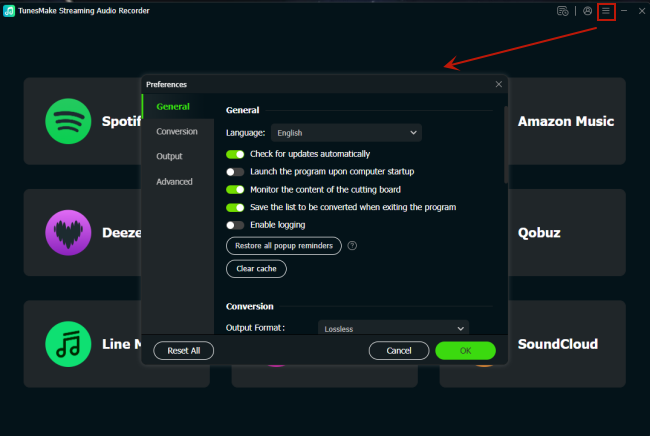
Click the Free Download button above, and you can install the Windows or Mac version of the TunesMake Streaming Audio Converter on your desktop. Then, launch it. In its interface, you should click the Menu icon in the upper-right corner. After that, select Preferences > Conversion. Now, you can choose the output format you need. If you want, you can also change other parameters, including channel, bit rate, sample rate, and so on. When you finish setting, click OK and your changes will be saved.
Step 2
Select and Sign in to Your SoundCloud Account
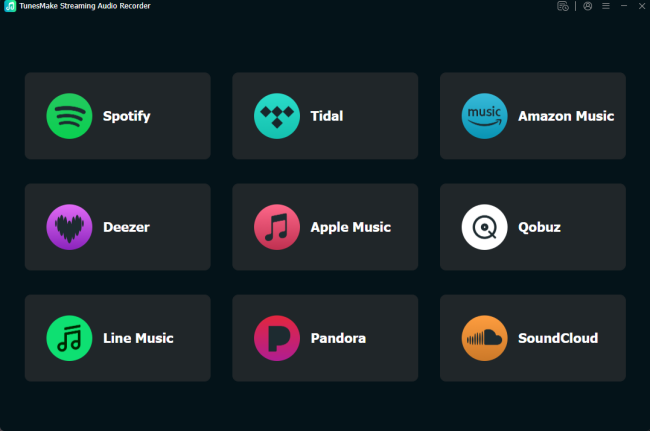
After that, you should go back to the interface of the TunesMake software. Here, click the SoundCloud icon, and you will be led to its official web player. You can sign in to your SoundCloud account and browse the library to find the playlists you want to download offline.
Step 3
Find the Target SoundCloud Playlists
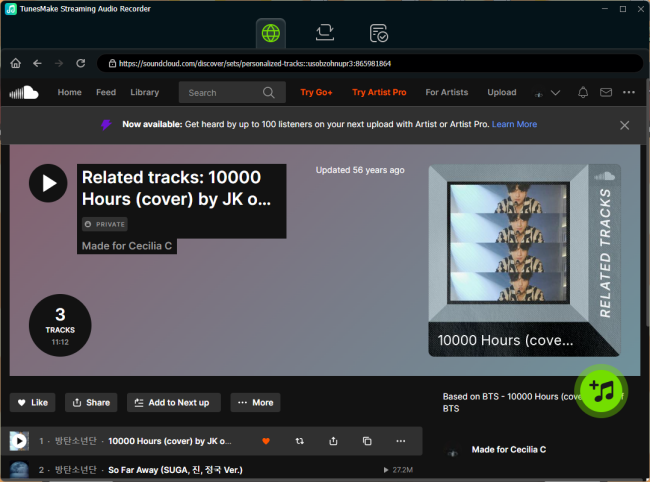
Select the SoundCloud playlist you want to save offline, and then click the Add icon in the lower right corner. The TunesMake software will then automatically analyze this playlist and list all the included songs. Click the Add to list button, and all the songs in this playlist will be added to TunesMake’s conversion list.
Step 4
Download SoundCloud Playlists at Once
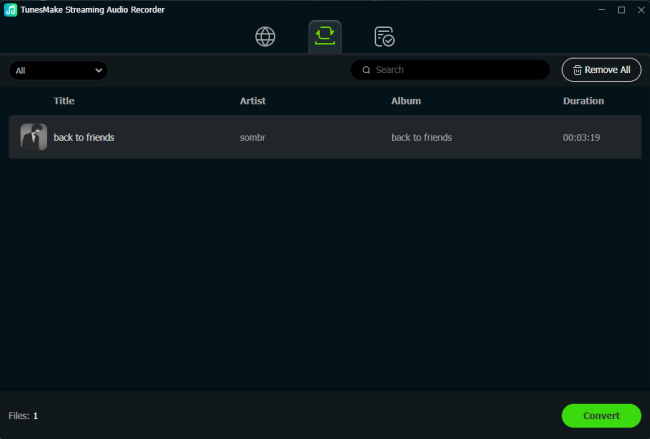
When all the things are set up, you can begin downloading your SoundCloud playlists. All you need to do is click the Convert button. Then, the TunesMake software will download and convert all the SoundCloud playlists you added automatically. Just wait for a while, you can find the downloaded playlists by clicking the top Converted icon. If you want to find their exact location on your computer, click the file icon next to each song.
No.2 Lucida.to (Efficient Online SoundCloud Playlist Downloader)
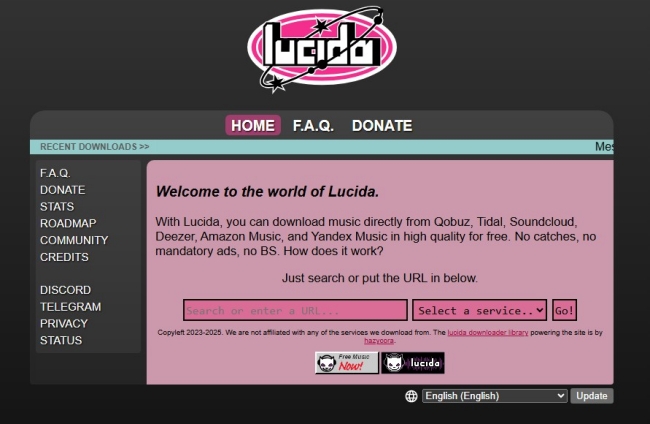
For users who want a quick, powerful tool but simply don’t want to install software on their current device, Lucida.to bridges that gap brilliantly. It is an advanced online music downloader. It allows you to download music tracks from SoundCloud and other platforms like Qobuz, Tidal, Deezer, Amazon Music, and Yandex Music for free. There is no doubt that it is the most efficient online downloader available. Many users from Reddit recommend this tool due to its ad-free and no-nonsense interface. You can get a clean and streamlined experience in this tool.
-
😀 Pros
- Free of charge
- No installation required
- Simple and easy-to-use interface
- No ads and catches
-
☹️ Cons
- Slow download for large playlists
- Limited format options
- Less stable than desktop tools
- Lossy sound quality
How to Use Lucida.to
Step 1. Visit the Lucida official website. You should select SoundCloud from the drop-down list as the source.
Step 2. Find the playlist you want to download from SoundCloud. Then, copy its URL link by clicking the share icon.
Step 3. Go back to Lucida and paste the playlist link into the top bar. Click the Go option.
Step 4. You can select the output format and save your playlists by clicking the download full album option.
No.3 MusicVerter (Online SoundCloud to MP3 Playlist Downloader)
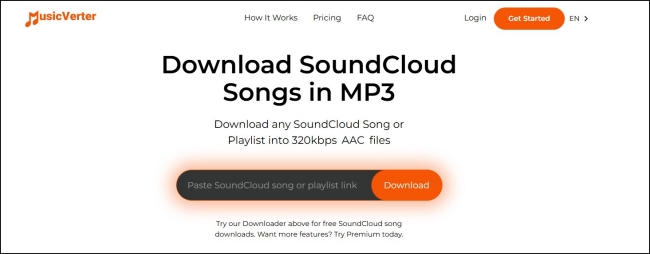
MusicVerter is another effective online SoundCloud to MP3 downloader. It simplifies the process of downloading SoundCloud songs and playlists into MP3 files. For users who primarily want a fast way to download SoundCloud content to MP3, MusicVerter is a fantastic choice since it strips away all the complicated settings and focuses entirely on speed and ease of use. You simply paste the playlist on track URL, and the downloader quickly processes the conversion. It is free to use when you only download a single track. However, if you need to download playlists in batches, you will need to get its Premium service.
-
😀 Pros
- Download unlimited SoundCloud songs
- No need to install extra software
- Easy to use
-
☹️ Cons
- Limited to MP3 format
- Require a Premium to download playlists at once
- Lossy sound quality
- Slow speed to analyze the music link and download songs
How to Use MusicVerter
Step 1. Go to the official MusicVerter website and create a new account. Once done, sign in on MusicVerter and get its Premium service.
Step 2. Then, copy the URL of your favorite SoundCloud playlist. Paste it into the top search bar on MusicVerter.
Step 3. Click the Download button to let MusicVerter analyze and download your playlists.
No.4 SoundCloudAud (SoundCloud Playlist Downloader to ZIP)
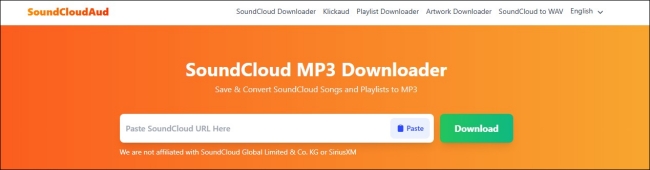
If you want to bundle downloads into a single file, SoundCloudAud is an excellent and straightforward web application. It not only supports downloading unlimited SoundCloud songs but also allows you to download an entire playlist into a single ZIP file, which is easy for storage and sharing. It is totally free and easy to use. You can use it on PC, Mac, Android, and iOS devices easily. In addition, it provides the option of downloading the album cover and profile picture.
-
😀 Pros
- Clean interface
- Free to use
- No installation and registration required
- Works on PC, Mac, Android, and iOS devices
-
☹️ Cons
- Single MP3 output
- Only download the playlist in ZIP
- Stability issues with large playlists
- Compromised audio quality during conversion
- Not able to change the audio settings
How to Use SoundCloudAud
Step 1. Open the SoundCloud application on your device or visit its web player to copy the link of your preferred playlist.
Step 2. Navigate to the SoundCloudAud website and paste the link into the top bar. Then, click the Download button near it.
Step 3. Wait for a while, and you can select the Download entire playlist as ZIP option to save all songs once and for all.
Step 4. 文本
Final Comparison and Conclusion
| TunesMake Streaming Audio Recorder | Lucida.to | MusicVerter | SoundCloudAud | |
|---|---|---|---|---|
| Type | Desktop software for both Windows and Mac computers | Online tool | Online tool | Online tool |
| Stability | High | Medium | Medium | Medium |
| Output Format Options | MP3, M4A, M4B, WAV, FLAC, and AIFF | FLAC, MP3, OGG Vorbis, Opus, M4A AAC, and WAV | MP3 | MP3 |
| Batch Speed | 22X | Fast | Fast | Medium |
| ID3 Tags | ✔ (Full & Changeable) | ✔ (Basic) | ✔ (Basic) | ✘ |
| Sound Quality | Lossless | Lossy | Lossy | Lossy |
SoundCloud playlist downloader is an effective tool when you need to download multiple playlists at once. It definitely saves your time. Choosing the best downloader depends on your specific needs. But for the majority of users, TunesMake Streaming Audio Recorder remains the most reliable long-term investment. It eliminates the errors and failures often found with online tools, ensuring your music collection is preserved in high quality.
Related Articles


A senior editor from TunesMake, dedicated to sharing professional tutorials and solutions of software, movies, and music.
- 1
- 2
- 3
- 4
- 5
- 6
- 7
 Leave Your Comment
(0)
Leave Your Comment
(0)

 Download Center

