








 Store
Store


Do you know Last.fm? Experienced audiophiles won’t be strange with this tool. And we often heard someone says scrobble with music, what does Scrobble mean? Last.fm invented a word – Scrobbler to help you check your listening data and discover more music. Well, not everyone knows Last.fm very well, they might get confused when they try to scrobble with Spotify or other streaming music. I’d like to say, if you want to access and know your listening habits as well as know more about your music data, you couldn’t miss this tool. Wonder how to connect Last.fm to Spotify? This post shares a comprehensive guide with you.

Part 1. Can You Use Last.fm with Spotify?
Yes, you can connect Last.fm to Spotify easily due to the stable and long-standing integration between Spotify and Last.fm.
What is Last.fm?
Last.fm is a music community and statistics platform founded in the United Kingdom in 2002. It is Last.fm that first initiated the word Scrobble, this term came from its music recommendation system Audioscrobbler. With this good partner, Last.fm can access people’s listening history from the internet or any music devices users have listened to music on it, then summarize and create a detailed profile with users’ listening habits or tastes.

What is Scrobbling?
Scrobbling is the process of tracking the music you’re listening to on a computer, from internet radio stations or via some third-party apps. The Scrobble process means all of these listening stats will be detected and transferred to Last.fm for analysis. Last.fm Scrobbler works across your devices, providing multiple versions for Windows computers, iOS, and Android devices.
Why you should connect?
- Real-time music tracking: Every time you play a song on Spotify, Last.fm logs it automatically. So, you can see your stats update in real-time without waiting for December for Wrapped.
- Deep insights into your music taste: Last.fm records your weekly and monthly charts, listening trends over time, and more. These details can help you know your music taste better.
- Music discovery and recommendations: According to your scrobbles, Last.fm will suggest similar artists and tracks that Spotify might miss.
- Social connection: Through Last.fm, you can follow your friends to see what they are listening to.
Part 2. How to Connect Last.fm with Spotify
Now that you know why it’s worth connecting, let’s walk through the setup process. Connecting your Spotify account to Last.fm in 2026 is faster than ever. All you need to do is follow the steps below.
Step 1. Visit the Last.fm website on any of your browsers and click on the Sign-Up or Log-In button at the top-right corner.
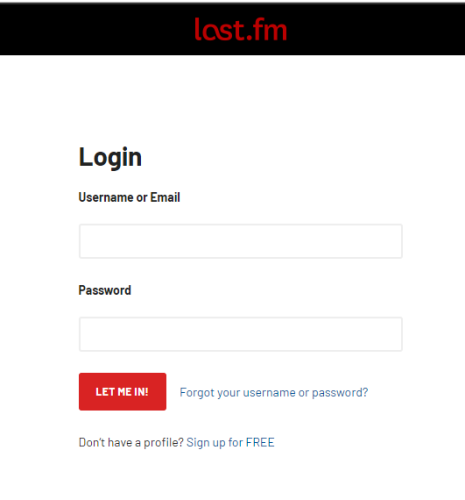
Step 2. In the next view, you can create a new account for Last.fm or log into your existing Last.fm account.
Step 3. Once logged in, click the Profile icon at the top-right and select Settings > Applications.
Step 4. Find the Spotify logo and select the Connect button to start tracking your listening stats.
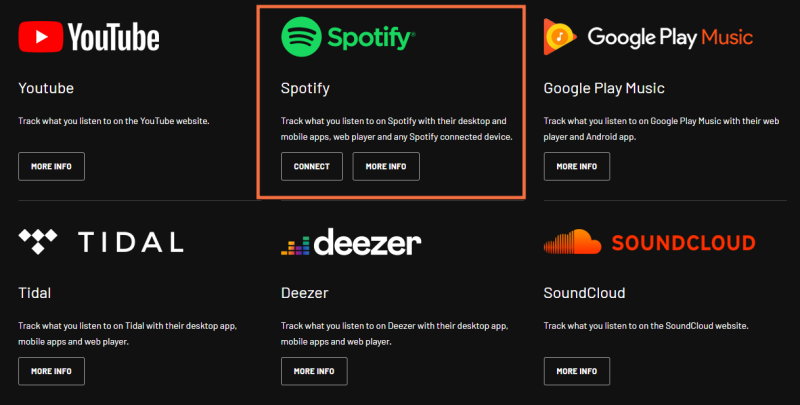
Or you can go to the Last.fm official home page and go to the TrackMyMusic page from the bottom of the screen. Then scroll down to find the Spotify logo and select Connect.
Step 5. If this is the first time you connect Spotify to Last.fm, you’ll need to enter your account credentials to log in. After then, give permission to Last.fm for tracking the listening stats when streaming on Spotify.
Once done, the Spotify Scrobbling setup process is complete. Later on, what you listened to on Spotify will be recorded to your Last.fm account. You can find your listening stats later by opening the Last.fm website or app and go to your profile.
How to See Spotify Stats on Last.fm
After connecting, you can find your listening stats later on the Last.fm website or app. Head to your Profile page, and you can explore your listening data:
The Library Tab: This is your main dashboard where you can filter by Artists, Albums, or Tracks. It includes your full listening history.
Listening Reports: Check your "Last.week" or "Last.month" reports for a stylized breakdown of your top songs.
Now Playing: When you start a song on Spotify, your Last.fm profile will display a "Scrobbling now" animation.
Part 3. How to Disconnect Spotify from Last.fm
If you don’t want to scrobble with Spotify anymore, you can choose to disconnect Spotify from Last.fm at any time.
Step 1. Go to the Spotify website from a browser on your device and log into your Spotify Premium account.
Step 2. Now click on your username or the settings icon from the top-right corner of the page, then select Account.
Step 3. Next, click Apps on the left side menu on your computer, or tap Account Overview > Apps if you use a mobile device.
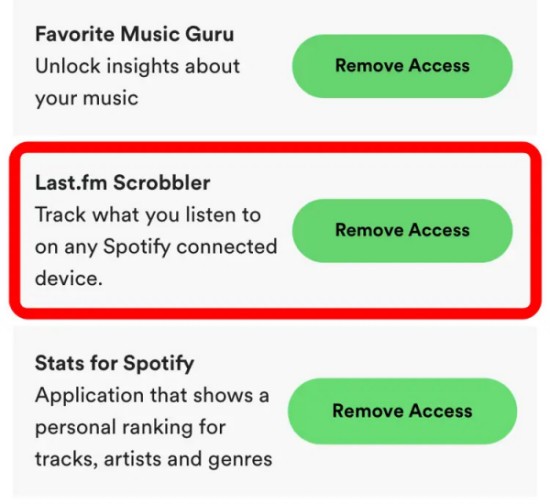
Step 4. Scroll down to find the Last.fm Scrobbler and tap on Remove Access.
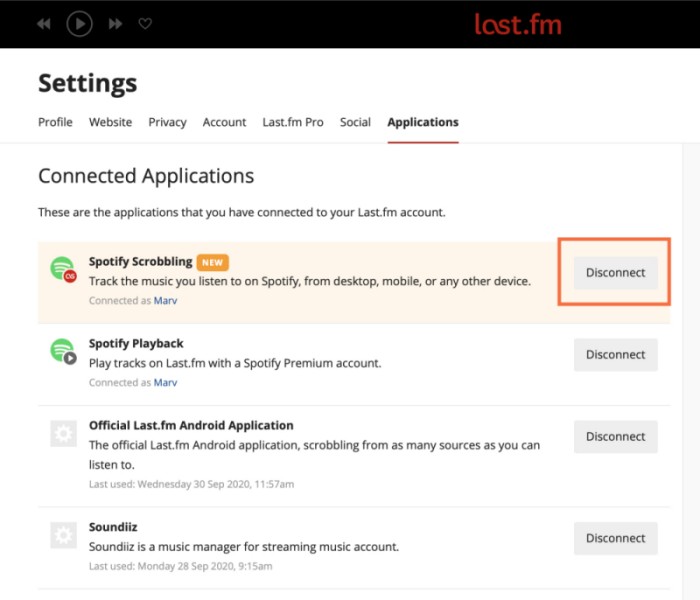
Also, you can go to Last.fm to set up. First, visit the Last.fm official website and click Settings from the top-right corner, and then head to Applications. Here you can easily disconnect Spotify from Last.fm.
Part 4. How to Fix Last.fm Spotify Not Scrobbling

Spotify stopped scrobbling and then continued again, but the songs were lost in between. Is there any way to fix this?
-- User from RedditLast.fm is a useful tool, and what has been troubling people for a long time is the not-working issue. Occasionally, Last.fm not scrobbling Spotify. In this case, we offer you some workable solutions below to help fix it.
Fix 1. Disconnect and reconnect Spotify to Last fm
If Last.fm stops scrobbling when you went offline, they will all show up eventually. This step can help clear things out as well. Do as I shared in Part 3.
Fix 2. Update your Spotify App
Please always stay tuned to Spotify app with the latest version. Check for Spotify updates on the application store on your device. Also, make sure your browser or system software is up to date.
Fix 3. Force stop or fully close the Spotify app
Sometimes the Spotify app gets glitches. In this case, a force closing can help make a refreshment.
Fix 4. Check Private Session
If you have enabled Private Session within the Spotify app settings, Spotify will block Last.fm from seeing what you are playing. So, you should disable it.
Fix 5. Contact the Last.fm or Spotify Customer Support for help
If the problem keeps occurring on your device, you can seek their help by Twitter, email, or other official access.
Part 5. Bonus: How to Download Spotify Music Offline Without Premium
While Last.fm provides the data, the actual music remains locked within the Spotify ecosystem. If you want to always have access to your music and to maintain a local library that matches your Last.fm stats, you might find a tool like TunesMake Spotify Music Converter incredibly useful.
TunesMake Spotify Music Converter is a powerful music downloader specially designed for all Spotify users. Both Free and Premium users can use it to download Spotify songs, playlists, albums, and podcasts from Spotify and convert them to common audio formats, including MP3, M4A, M4B, WAV, FLAC, and AIFF. Therefore, you can listen to Spotify songs on different devices or players as you like. In addition, the TunesMake tool gets Spotify music with lossless quality and full ID3 tags, ensuring your offline music experience.

TunesMake Spotify Music Converter –
Save Spotify Songs Locally for Last.fm
- Unlimitedly download Spotify songs, playlists, and podcasts
- Losslessly convert Spotify music to MP3, FLAC, WAV, AIFF, etc.
- Remove ads from Spotify music tracks even with Free accounts
- Convert Spotify songs at 12X faster speed with ID3 tags kept
Security Verified. 100% Clean & Safe.
In Conclusion
In terms of connecting Spotify Last.fm, we’ve provided you with the steps and the details above. We also provide some helpful solutions in case you encounter the Last.fm not scrobbling Spotify issue. While Last.fm helps you understand your music taste, taking full control of your listening experience is important. Luckily, you can use TunesMake Spotify Music Converter to save all your favorite content locally and enjoy it anytime, anywhere you want.
Related Articles


A senior editor from TunesMake, dedicated to sharing professional tutorials and solutions of software, movies, and music.
- 1
- 2
- 3
- 4
- 5
- 6
- 7
 Leave Your Comment
(0)
Leave Your Comment
(0)

 Download Center

