








 Store
Store


When it comes to brands, Sony has always been the talk of the town as its products are of high quality and maintain originality. The emergence of the Sony Walkman just brought more joy to music lovers. But as times change, so do the ways we enjoy music. With streaming services like Spotify dominating the music scene, many are left wondering: Can you play Spotify on Sony Walkman? In this complete guide, we’ll break down all possible methods, from using modern Android-based Walkman devices to converting Spotify tracks for unlimited playback. Whether you are a casual listener or an audiophile, you can find a practical solution here. Let’s explore them together.
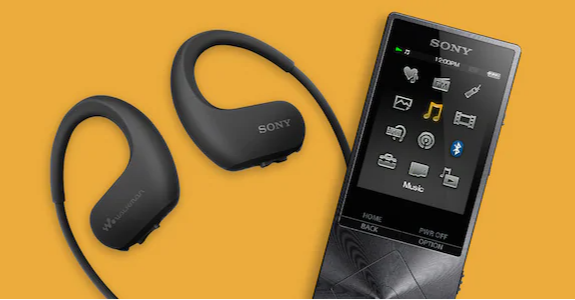
Part 1. Can Sony Walkman Play Spotify?
Let’s put it clear: yes, you can play Spotify music on Sony Walkman, but it depends on which generation of hardware you own. Currently, Sony Walkman models generally fall into two categories: modern Android-based models and classic models. For devices running on Android, you can install the official Spotify app directly and stream music over Wi-Fi. If your device is a non-Android Walkman model that doesn’t support the Spotify app, there is a workaround - downloading Spotify tracks into local songs and importing them to your Sony Walkman.
What Sony Walkman models support Spotify?
To access the official Spotify app, your Sony Walkman should run on Android OS. Currently, compatible models include NW-A100, NW-A105, NW-A106, NW-A107, NW-A306, NW-A307, W-ZX505, W-ZX507, and NW-ZX706, NW-ZX707, NW-WM1ZM2, and NW-WM1AM2.
What formats do Sony Walkman and Spotify use?
For users who use an older Sony Walkman model, such as the NW-E series, NW-S series, NW-ZX series, and so on, the key step is to convert the Spotify encrypted format to a common audio format. Thus, it’s essential to figure out the differences between Spotify and the Sony Walkman.
| Spotify | Sony Walkman | |
|---|---|---|
| Supported Formats | Ogg Vorbis (encrypted) | MP3, FLAC, WAV, AAC, Apple Lossless, AIFF, and so on |
Which method should you choose?
In conclusion, if your Sony Walkman runs Android OS, you can directly install the Spotify app for streaming music. Otherwise, you will need to convert Spotify songs first. But if you want full control over your music or prefer unlimited offline playback, converting Spotify tunes locally can be the best choice.
| Android Walkman | Classic Walkman | |
|---|---|---|
| Spotify App Support | ✅ Yes | ❌ No |
| Offline Playback | ✅ Premium only | ✅ Converted local files |
| Ease of Use | ✅ Simple | ⚠ Requires software |
| Device Compatibility | Limited | Universal |
Part 2. How to Use Sony Walkman with Spotify (Android-Based Models)
If you have an Android-based Walkman, playing Spotify music is relatively straightforward. The process is very similar to using Spotify on a smartphone. To get started, ensure your Walkman is connected to a stable Wi-Fi network. Then, you can follow the steps below to stream your favorite music.
Step 1. Head to the Google Play Store on your Walkman. Search for Spotify and install the app.
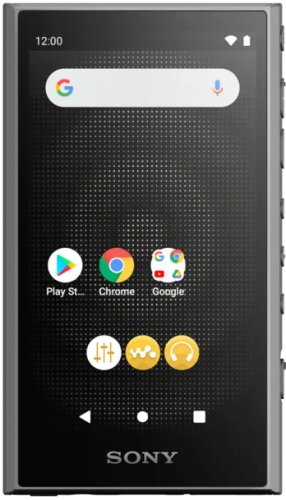
Step 2. Then, you can launch the app and sign in to your Spotify account. Feel free to browse playlists and stream the song you like.
Step 3. If you have a Premium account, you can also choose to download tracks for offline listening within the app. Just open the playlist or album and toggle the Download button.
Part 3. How to Play Spotify on Sony Walkman (All Models)
Android-based models make streaming Spotify music easy, but this method comes with some limitations. For example, it requires a stable Internet connection, all the downloads are locked within the Spotify app, and you cannot transfer them to other devices. Plus, many users prefer the battery life and interfaces of older models, or simply want full control over their Spotify songs. In these cases, your best option is to convert them into a format that all the Walkman models recognize.
3.1 How to Convert Spotify Music for Sony Walkman
What is the best tool you can use to bridge the gap between Spotify and Sony Walkman? We’d like to recommend TunesMake Spotify Music Converter. TunesMake Spotify Music Converter is a popular tool that’s user-friendly and easy to use. By using this tool, you can convert Spotify’s encrypted formats into MP3 or other file types that the Walkman can play while keeping the original audio quality. Whether you have a Premium subscription or not, you can use it to keep all your favorite songs as local songs, which can be stored permanently and played offline on any device. In the following content, you’ll get an in-depth step-by-step way to download music from Spotify to Sony Walkman for playing without limitations.

TunesMake Spotify Music Converter –
Best Spotify to Sony Walkman Downloader
- Unlimitedly download Spotify songs, playlists, and podcasts
- Losslessly convert Spotify music to MP3, FLAC, WAV, AIFF, etc.
- Remove ads from Spotify music tracks even with Free accounts
- Convert Spotify songs at 12X faster speed with ID3 tags kept
Security Verified. 100% Clean & Safe.
Note
TunesMake supports these audio formats: MP3, M4A, M4B, WAV, FLAC, and AIFF. Among them, you can choose MP3, FLAC, WAV, or AIFF. These formats are compatible with Sony Walkman.
Step 1
Check Sony Walkman Supported Formats
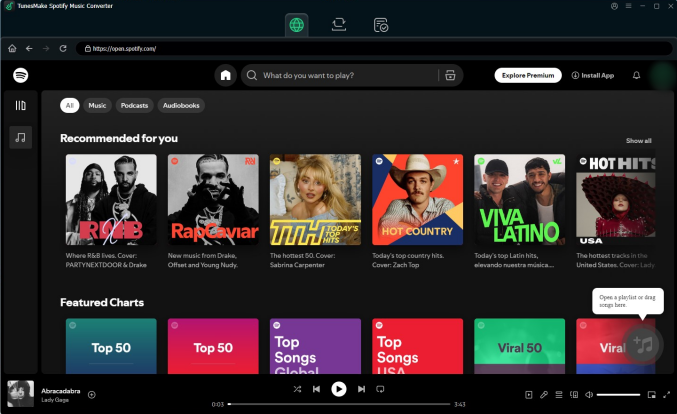
Start by launching TunesMake Spotify Music Converter on your computer. It will also automatically load the Spotify web player. When opened, head to your music library in Spotify and start selecting Spotify playlists or albums that you want to play on your Sony Walkman. To add these songs to the conversion list in the TunesMake software, you should enter the detailed page of your target playlist/album. Then, click the Add icon in the lower-right corner and select the Add to List option.
Step 2
Configure the Parameters for Spotify Music
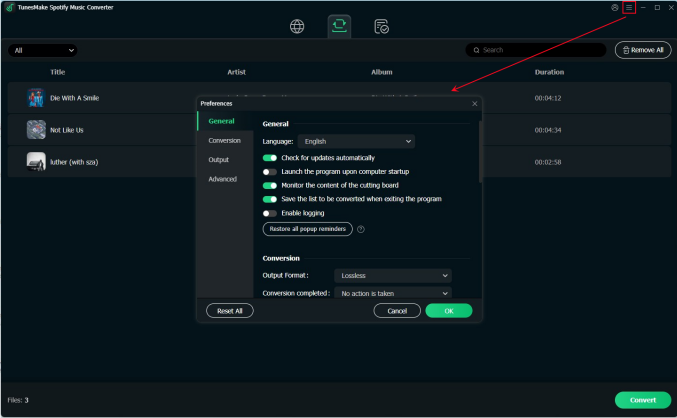
Proceed to customize the output audio parameters for Spotify music. Click the menu bar at the top right corner and choose the Preferences > Conversion option. Then, you can set the output audio settings like the output format, sample rate, audio channel, and so on. When you finish setting, you can click the OK button to save your changes.
Step 3
Download Spotify Songs to Local Files
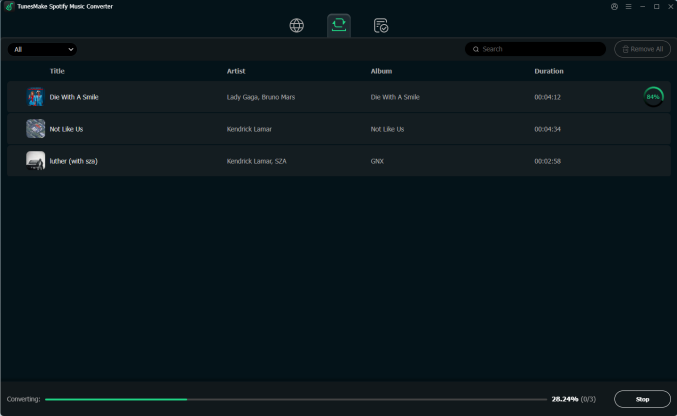
Once you have customized all the settings, it is time for TunesMake Spotify Music Converter to download and convert your Spotify songs. You can click the Convert button at the bottom right corner. Your selected songs will be downloaded and converted to the format you choose immediately. Wait for the conversion to finish and then check out for them in the conversion list. Just click the Converted icon and find your Spotify songs in the folder on your computer.
3.2 How to Move Spotify Music Files to Sony Walkman
Your Spotify songs are now in the converted format, meaning you can play them on your Sony Walkman. Before playing, you need to import Spotify music to your Sony Walkman. You can do so by using a USB cable or the Sony Content Transfer software.
Option 1. Use the USB Cable
Step 1. Make a connection between your Sony Walkman and your computer via a compatible USB cable.
Step 2. Then, open the Music section in your Walkman folder.
Step 3. You can find the folder that contains your downloaded Spotify files. Drag and drop these files into the Music folder directly.
Step 4. Once done, you can safely eject your device and play the Spotify songs you like.
Option 2. Use the Sony Content Transfer Software
Step 1. Install the Content Transfer software on your computer first. Then, you can connect your Sony Walkman to your computer with a USB cable.
Step 2. Start Content Transfer or Music Center on the computer.
Step 3. Click the double arrow to confirm your Sony Walkman is recognized.
Step 4. Open the location of the Spotify songs you want to transfer.
Step 5. Drag and then drop Spotify songs from the location onto Content Transfer.
Part 4. Conclusion
Playing Spotify on a Sony Walkman depends largely on the type of device you own. Android-based models offer the most convenience for online streaming, allowing for direct app integration and Wi-Fi downloads. However, for those using non-Android models or those who want to save battery by listening completely offline, converting your Spotify songs to local files by using a tool like TunesMake Spotify Music Converter is the gold standard.
Related Articles

A senior editor from TunesMake, dedicated to sharing professional tutorials and solutions of software, movies, and music.
- 1
- 2
- 3
- 4
- 5
- 6
- 7
 Leave Your Comment
(0)
Leave Your Comment
(0)

 Download Center

