









 Store
Store


When deciding on a music streaming service, the choice often comes down to your personal listening habits. Are you an audiophile looking to extract every drop of detail from a high-end audio setup, or a casual listener searching for a set-it-and-forget-it background stream? This comprehensive comparison between Tidal and Pandora breaks down everything you need to know, highlighting sound quality, music discovery, features, and updated pricing to help you make the right choice.
Part 1. In-depth Overview of Tidal vs Pandora
Both Tidal and Pandora are long-standing giants in the audio streaming industry, but they cater to vastly different types of music listeners. Tidal is engineered for who want master-quality sound. Pandora, on the other hand, is built around automated, zero-effort radio listening. Have a better understanding of Tidal and Pandora before exploring the differences between the two.
What Is Tidal?
Founded as a high-fidelity alternative to mainstream streaming platforms, Tidal focuses on uncompressed audio, deep editorial curation, and direct artist support.
Main Services & Features:
-
Hi-Res Lossless Audio: Delivers uncompressed FLAC streams up to 24-bit/192kHz.
-
Spatial Audio: Supports Dolby Atmos for 3D immersive listening experiences.
-
Tidal Connect: Casts audio directly to external audio hardware and home theater receivers.
-
DJ Extensions: Integration with professional DJ software platforms like Serato and rekordbox.
-
Video Content: Access to over 450,000 HD music videos, concert streams, and artist interviews.
-
😀 Pros
- Uncompromising audio quality
- Available in over 60 countries worldwide
- Feature over 180 million tracks
-
☹️ Cons
- No permanent free tier
- Limited non-music content
- Require decent gear
What Is Pandora?
Launched as an internet radio pioneer, Pandora remains a go-to service for hands-off background listening, custom radio stations, and algorithmic discovery.
Main Services & Features:
-
Music Algorithm: Analyzes up to 450 musical attributes per track to generate hyper-personalized radio streams.
-
Station Modes: Interactive controls like Deep Cuts, Crowd Faves, and Discovery that adjust station behavior on the fly.
-
Pandora Plus: Affordable ad-free radio streaming with unlimited skips and automated offline station caching.
-
Pandora Premium: Full on-demand playback, custom playlist building, and manual offline downloads.
-
Podcast Integration: Seamlessly blends popular podcasts and spoken-word content into music queues.
-
😀 Pros
- Unmatched algorithmic radio
- Budget-friendly options
- Low data consumption
- Integrated experience
-
☹️ Cons
- Not available outside the US
- Lower audio bitrates
- Smaller music library
Part 2. Side-by-Side Comparison of Tidal vs Pandora
A head-to-head comparison of Tidal vs Pandora is about discovering which one fits your specific lifestyle, budget, and audio equipment. Here we will break down how these two services stack up today so you can make the right choice.
Round 1: Price and Subscription Value
Finding the right streaming platform depends heavily on budget flexibility. Both services structure their subscription tiers differently to attract distinct types of music lovers.
Tidal: Streamlined Premium Approach
Tidal does not offer a permanent free, ad-supported tier. Instead, it packages its premium features, including its maximum audio quality and spatial formats, into a single base subscription.
-
Individual ($11.99/month): Provides ad-free access to the entire 180M+ tracks in lossless, HiRes FLAC, and Dolby Atmos.
-
Family ($19.99/month): Covers up to 6 separate individual accounts.
-
Student ($6.99/month): Discounted rate for verified academic students.
DJ Extension Add-on is an extra $9.00/month for integration with DJ software platforms.
Pandora: Budget-Friendly Tiers
Pandora remains highly competitive for cost-conscious listeners, offering modular options depending on how much control you want over your playback.
-
Pandora Free: Completely free, ad-supported radio station generation with limited skips.
-
Pandora Plus ($4.99/month): Removes commercial breaks from radio playback, unlocks unlimited skips, and permits limited automatic offline station syncing.
-
Pandora Premium ($10.99/month): Unlocks full on-demand search-and-play functionality, custom playlist creation, and higher streaming quality.
Discounted premium plans include Family Plan, Student Plan, and Military.
Round 2: Sound Quality and Technical Specs
For anyone using high-quality headphones, studio monitors, or an external DAC, the audio performance gap between these two platforms is the ultimate deciding factor.
Tidal: Audiophile Gold Standard
Tidal streams music using open-source, bit-perfect Hi-Res Lossless FLAC at resolutions up to 24-bit/192kHz. It delivers data speeds up to 9,216 kbps, ensuring that the music file you hear is an identical digital clone of the studio master tape. Tidal also includes Dolby Atmos spatial audio tracks natively within its standard plans.
Pandora: Data-Efficient Compression
Pandora optimizes its system for data savings and mobile efficiency rather than raw acoustic fidelity. With a subscription to Pandora, users can enjoy music at 192kbps AAC via the web player or 192kbps MP3on the mobile app set to "High" quality. And free users stream at lossy bitrates ranging from 64kbps to 128kbps AAC.
While Pandora's compressed audio sounds perfectly adequate for car stereos, phone speakers, or background office listening, it lacks the depth, soundstage, and clarity found on Tidal.
Round 3: Music Discovery Algorithms and Playlists
Having millions of songs at your fingertips means very little if you can't find music you actually want to hear. This is where the core philosophy of these two apps diverges completely.
Pandora: Music Genome Project
Pandora's defining feature is its algorithmic backbone. The Music Genome Project uses trained musicologists to analyze up to 450 distinct musical attributes per song.
When you create a station around a specific artist or track, Pandora generates a highly tailored stream based on actual music theory. Additionally, Pandora's "Modes" allow you to alter your station's behavior on the fly:
-
Crowd Faves: Leans heavily on popular, highly-rated tracks.
-
Deep Cuts: Focuses on lesser-known album tracks from your station's artist circle.
-
Discovery: Intentionally surfaces artists you haven't heard before who match your acoustic profile.
Tidal: Cultural Curation
Tidal approaches music discovery through human curation and cultural context. While it offers algorithmic "My Mix" choices, the user experience emphasizes editorial picks, album reviews, and curated playlists assembled by genre experts. Tidal also champions independent and underground artists directly via its TIDAL Rising incubator program.
Round 4: Library Size, Podcasts, and Video Content
The volume and diversity of media on each application may influence your subscription choice if you look for content beyond standard studio albums.
-
Catalog Footprint: Tidal features a massive archive of over 110 million tracks, giving it a distinct advantage over Pandora's catalog of roughly 70 million tracks. If you listen to obscure indie bands, import singles, or international releases, you are much more likely to find them on Tidal.
-
Video Integration: Tidal hosts a robust collection of over 450,000 high-definition videos, including official music videos, exclusive concert live streams, and behind-the-scenes artist documentaries. Pandora lacks music video capabilities entirely.
-
Spoken Word Content: Pandora integrates a massive selection of popular podcasts directly alongside its music stations, creating a central hub for talk entertainment. Tidal focuses almost exclusively on music and lacks a dedicated podcast directory.
Round 5: UI, Device Compatibility, and Geographical Limits
A platform's user interface and availability determine how smoothly it fits into your daily workflow. Also, geographical restrictions determine whether you can use this service.
-
Geographic Limits: This is an immediate dealbreaker for international users. Pandora is strictly available within the United States. Tidal operates globally across more than 60 countries.
-
Ecosystem and Integration: Pandora is built deeply into standard smart-home ecosystems, streaming seamlessly across basic Amazon Alexa devices, Google Home networks, and automotive infotainment hubs. Tidal targets premium hardware setups, using Tidal Connect to cast uncompressed lossless streams directly to high-fidelity network streamers, home theater receivers, and DJ gear.
-
Spoken Word Content: Pandora integrates a massive selection of popular podcasts directly alongside its music stations, creating a central hub for talk entertainment. Tidal focuses almost exclusively on music and lacks a dedicated podcast directory.
Part 3. A Glance Comparison of Tidal vs Pandora
For those who want the short answer, the choice between Tidal and Pandora comes down to how you listen to music. Here is a glance comparison table of Tidal vs Pandora, helping you make a decision quickly.
| Feature | Tidal | Pandora |
|---|---|---|
| Starting Price | $11.99/month (Individual) | $4.99/month (Plus) |
| Max Sound Quality | 24-bit/192kHz Hi-Res FLAC (Up to 9,216 kbps) | 192kbps AAC (Lossy compressed) |
| Catalog Size | 180M+ Tracks | 70M+ Songs |
| Music Discovery | Editorial, Human-Curated, Indie Spotlights | Algorithmic |
| Spatial Audio | Yes (Dolby Atmos) | No |
| Podcasts | No | Yes |
| Music Videos | Yes | No |
| Availability | Global (60+ Countries) | United States Only |
| Best For | Intentional, high-fidelity listening | Hands-off, automated radio |
-
Choose Tidal if: You are an audiophile, own high-quality headphones or speakers, love exploring full albums, want music videos, or care deeply about supporting artists with high royalty rates.
-
Choose Pandora if: You live in the US, prefer personalized radio stations over manual playlist curation, want a budget-friendly background music stream, or enjoy a mix of music and casual podcasts.
How to Get a Copy of Music from Pandora and Tidal
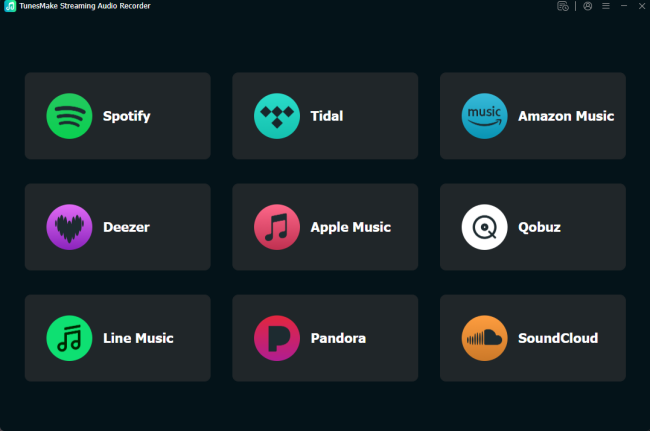
While both platforms offer offline caching to paid subscribers, those offline files remain encrypted and locked inside the software. This limits your ability to move your favorite tracks to other devices like MP3 players, un-networked car stereos, or specialized DJ gear. For users who need true offline portability across both platforms, TunesMake Streaming Audio Recorder helps to download and save local music files from Tidal and Pandora.
Part 4. Conclusion
Ultimately, neither service is a bad choice; they simply target different listeners. If you view music listening as an intentional activity, own decent audio equipment, want an expansive global library, and want to support artists with higher stream payouts, Tidal is well worth the subscription price. However, if you want an automated, hands-off music stream that learns your tastes effortlessly, prefer talk podcasts mixed into your queue, and want to stick to a lower monthly budget, Pandora remains a highly efficient tool for listeners inside the United States.
Related Articles


A senior editor from TunesMake, dedicated to sharing professional tutorials and solutions of software, movies, and music.
- 1
- 2
- 3
- 4
- 5
- 6
- 7
 Leave Your Comment
(0)
Leave Your Comment
(0)

 Download Center

