








 Store
Store


When selecting a streaming service tailored for high-fidelity listening, Qobuz and Tidal stand out as the primary platforms dedicated to uncompressed, CD-quality streaming and ultra-high-resolution playback. While both services serve critical listeners, their catalog focus, pricing structure, ecosystem compatibility, and extra features diverge significantly. This breakdown provides a detailed, category-by-category evaluation of Qobuz and Tidal to assist you in deciding which platform aligns best with your gear and listening habits.
Part 1. Qobuz vs Tidal: In-depth Overview
Both Tidal and Qobuz are high-fidelity music streaming platforms that cater to audiophiles, critical listeners, and music enthusiasts who prioritize audio quality over compressed sound. Here is a simple breakdown of Qobuz and Tidal.
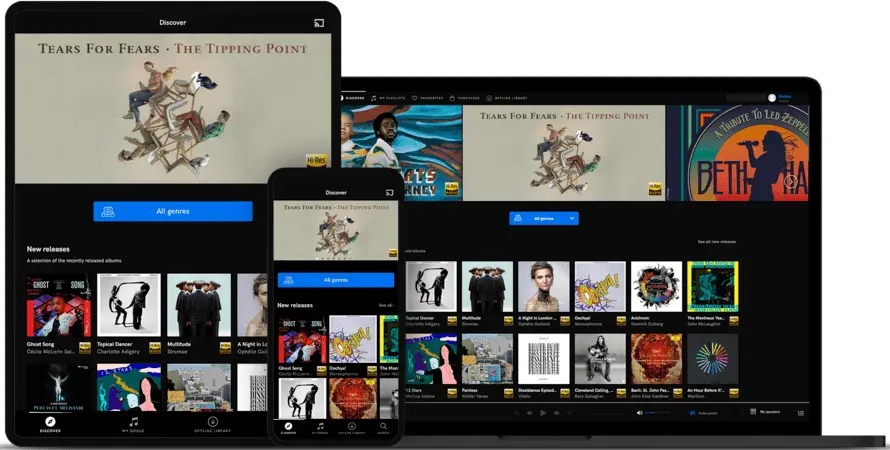
What Is Qobuz?
Qobuz is a French music streaming and download service founded in 2007. It is built specifically for audiophiles, critical listeners, and music collectors who prioritize uncompressed sound quality, album metadata, and music ownership over algorithmic recommendations.
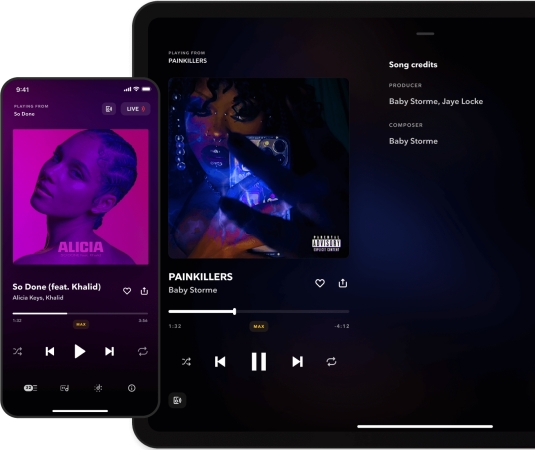
What Is Tidal?
Tidal is a subscription-based music streaming service known for its focus on HiFi audio quality, HD music videos, and artist-centric platform tools. Launched in 2014, it positions itself as a premium alternative to Spotify by prioritizing sound quality and artist compensation.
Part 2. Qobuz vs Tidal: Comparison Table
Before comparing Qobuz and Tidal feature by feature, here we summarize their core features to help you understand the main differences between them.
| Feature | Qobuz | Tidal |
|---|---|---|
| Max Audio Quality | 24-bit/192 kHz Hi-Res FLAC | 24-bit/192 kHz Hi-Res FLAC |
| Immersive Audio | No (Pure Stereo Focus) | Yes (Dolby Atmos) |
| Catalog Size | 100M+ tracks | 110M+ tracks |
| Genre Specialization | Classical, Jazz, Acoustic, Rock | Pop, Hip-Hop, R&B, Electronic |
| Video & Visual Content | 650,000+ music videos & live shows | Audio only |
| Offline Desktop Downloads | Yes (Mac & PC) | No (Mobile apps only) |
| Hi-Res Digital Store | Yes (Sublime Plan offers discounts) | No |
| DJ Software Support | Limited | Yes (DJ Extension) |
| Global Availability | 25+ Countries | 60+ Countries |
Choose Qobuz if: You prefer classical, jazz, or acoustic genres, want high-resolution downloads to own permanently, and prioritize pure stereo playback with digital album booklets on a desktop, home Hi-Fi system, or dedicated DAC.
Choose Tidal if: You prioritize personalized algorithmic playlists, want Dolby Atmos spatial audio, stream using Tidal Connect across smart devices, or require direct performance hardware support for DJ software.
 TunesMake Streaming Audio Recorder
An all-in-one audio downloader and converter, allowing to save music from Tidal, Qobuz, and more into MP3, AIFF, WAV, FLAC, M4A, and M4B.
Part 3. Qobuz vs Tidal: Side-by-Side Comparison
While both platform deliver studio-master quality audio, they differ significantly in their target audiences, music discovery features, catalog specializations, and extra features. Let's explore which streaming music service best fits your setup.
Round 1. Qobuz vs Tidal: Sound Quality
Both Qobuz and Tidal deliver uncompressed 24-bit/192 kHz Hi-Res FLAC audio. However, their approaches to signal processing and audio formats differ in key ways.
Sound Presentation & Mastering
-
Qobuz: Emphasizes audio purity and transparent signal paths. Tracks are served without default volume normalization or equalization alterations.
-
Tidal: Uses open Hi-Res FLAC across its primary streaming tiers, ensuring wide compatibility with modern DACs and network streamers without proprietary decoding requirements.
Spatial Audio & Format Features
-
Qobuz: Focuses exclusively on high-resolution stereo tracks. It does not support spatial or multichannel audio formats.
-
Tidal: Features Dolby Atmos tracks, providing immersive audio for compatible headphones, soundbars, and multichannel audio setups.
Round 2. Qobuz vs Tidal: Library Size
While both services boast catalogs exceeding 100 million tracks, their library strengths and music discovery workflows serve different preferences.
-
Qobuz: Excels in classical, jazz, classic rock, and acoustic genres. It offers human-curated editorial pieces, album spotlights, and downloadable PDF digital booklets complete with full credits, lyrics, and liner notes.
-
Tidal: Features a deeper library for hip-hop, R&B, pop, and electronic genres. Its discovery engine includes personalized daily mixes, radio stations based on listening history, and dynamic recommendation algorithms.
Round 3. Qobuz vs Tidal: Price and Plans
Understanding the value proposition of each service requires comparing flat monthly costs against long-term commitment savings and specialized features.
Tidal Pricing Structure
Tidal utilizes a unified subscription model where all subscribers receive Hi-Res FLAC and spatial audio features.
-
Individual Plan: $11.99 per month
-
Family Plan: $19.99 per month (covers up to 6 separate member profiles)
-
Student Plan: $6.99 per month
-
DJ Extension Add-on: +$9.00 per month add-on (enables integration with DJ software and hardware)
Qobuz Pricing Structure
Qobuz offers pay-as-you-go monthly options alongside discounted annual billing.
-
Studio Solo: $12.99 per month (or $10.83 per month when billed annually at $129.96/year)
-
Studio Duo: $17.99 per month (or $14.99 per month when billed annually at $179.88/year)
-
Studio Family: $21.90 per month (or $17.99 per month when billed annually at $215.88/year)
-
Studio Student: $4.99 per month
-
Sublime Solo: $14.99 per month (billed annually at $179.88/year)
-
Sublime Duo: $22.49 per month (billed annually at $269.88/year)
-
Sublime Family: $29.16 per month (billed annually at $349.92/year)
Sublime Plans provide full streaming access plus 20% to 60% discounts on permanent high-resolution file purchases.
Round 4. Qobuz vs Tidal: Hardware Compatibility
Connecting high-resolution streams to physical audio gear requires robust network protocols and driver architectures.
Dedicated Music Servers
-
Qobuz in Roon: Widely considered the gold standard for two-channel stereo purists. Qobuz delivers FLAC streams without additional processing layers or spatial audio tags. Roon reads Qobuz album credits seamlessly, mapping deep metadata alongside local NAS libraries.
-
Tidal in Roon: Operates seamlessly alongside local libraries, displaying native Hi-Res FLAC tags. Tidal's integration also passes Dolby Atmos metadata to compatible multi-channel setups, offering greater flexibility for mixed media rooms.
Tidal Connect vs Standard Casting Protocols
-
Tidal Connect: Functions like Spotify Connect for high-resolution audio. It allows users to stream 24-bit/192kHz FLAC directly from Tidal's servers straight to network streamers.
-
Qobuz Protocol Support: Relies on third-party UPnP/DLNA apps, Google Chromecast, or Apple AirPlay 2 for wireless streaming. It compresses the streaming in the process of casting.
Round 5. Qobuz vs Tidal: Offline Playback
For offline playback, Qobuz is better for desktop and true ownership, while TIDAL is better for mobile flexibility and multi-device management.
-
Qobuz: Lets you download high-resolution tracks and full albums directly within its official Windows and macOS applications. Beyond app caching, Qobuz lets you buy and permanently download DRM-free Hi-Res FLAC files.
-
Tidal: Offers cleaner, more reliable offline storage management within the mobile app, but offline listening not available in the desktop app. You can download Dolby Atmos tracks for offline playback on up to 5 mobile devices simultaneously under a single account.
Round 6. Qobuz vs Tidal: Unique Extras
Qobuz wins for album collectors and physical-media mindsets, while Tidal wins for interactive discovery, video content, and live performance workflows.
Music Ownership & Digital PDF Booklets:
Qobuz provides unique features built around the mindset of physical CD and vinyl collection.
-
Download Store: Qobuz operates an integrated store where you can buy DRM-free Hi-Res FLAC albums. These files are yours to keep on any device or home media server forever.
-
Digital PDF Liner Booklets: Qobuz includes downloadable, replica PDF booklets directly within its mobile and desktop apps. You can read original liner notes, mastering essays, composer credits, and artwork photography while listening.
Video Content, Interactive Discovery & DJ Integration:
Tidal sets itself apart with multi-media features, interactive tools, and performance extensions.
-
HD Video Content: Tidal includes a massive library of 4K music videos, behind-the-scenes documentaries, and concert livestreams integrated directly into artist hubs.
-
Interactive Credits Browsing: Tidal features a deep-dive interactive credits tool that lets you click through producers, songwriters, audio engineers, and sidemen to discover related works instantly.
-
DJ Extension Integration: Tidal offers direct streaming integrations into leading DJ platforms like djay Pro, rekordbox, and VirtualDJ , allowing live performers to pull high-quality tracks directly into performance software decks.
Part 4. Conclusion
In the battle of Tidal vs Qobuz, both platforms shine in different areas. If you are an audiophile who values native high-resolution audio and a more niche music catalog, Qobuz might be your best choice. However, if you want a larger music library, exclusive content, and a more polished user experience, Tidal is hard to beat. To get more freedom with Qobuz or Tidal downloads, TunesMake Streaming Audio Recorder makes your music experience even better.
Related Articles
- 1
- 2
- 3
- 4
- 5
- 6
- 7
 Leave Your Comment
(0)
Leave Your Comment
(0)

 Download Center

