








 Store
Store


Since YouTube Music has become more and more popular among users, there are millions of users streaming daily on YouTube Music. For some music lovers, the browser tab doesn’t fully meet their requirements. They want a dedicated standalone desktop app, which sits in your taskbar, and doesn't disappear when you accidentally close your browser. However, if you search for the YouTube Music desktop app, you will find that Google keeps redirecting you to the official YouTube Music website. Here is the reality: YouTube Music doesn’t offer a traditional desktop app for Windows and Mac like other streaming music platforms.
Don’t worry. There are still workarounds that can help you bring YouTube Music to your desktop with ease. In this guide, you can learn three effective methods to reach it. Whether you want to install the official PWA, get the popular GitHub desktop version, or save your preferred YouTube Music songs for offline playback, even without the YouTube Music desktop app at all. Let’s break these methods step by step.

Part 1. Does YouTube Music Have a Desktop App?
Let’s put it clear: no, YouTube Music does not have an official desktop app. If you search for “YouTube Music for PC download”, you won’t find an official software package from Google. Instead, YouTube Music utilizes a Progressive Web App (PWA) to turn its website into a standalone application. You can download this official PWA on your desktop for a more stable music experience.
However, the PWA is essentially a lightweight version of the website that runs in its own window. It still runs on the backbone of your web browser, like Chrome or Edge. Thus, for users who want more advanced features, a PWA isn’t enough. Luckily, developers on GitHub have rolled out an unofficial wrapper for you to use.
If you only want more flexibility on your favorite YouTube Music songs, you can try TunesMake YouTube Music Converter. It can be installed on both Windows and Mac computers. By utilizing its built-in YouTube Music web player, you can easily download YouTube Music songs to local files and play them stably within the TunesMake software.
Part 2. How to Download the Official YouTube Music PWA
The most straightforward and safest way to use YouTube Music on your computer is to install and use the official Progressive Web App (PWA). Since it is developed by Google, it stays synced with your account and receives official updates and support. For users who prefer an official and safe solution, installing the PWA is the best place to start.
Step 1. Open the browser app on your computer and head to official music.youtube.com.
Step 2. Then, move your cursor over the top address bar. Click the Download icon next to the URL link.
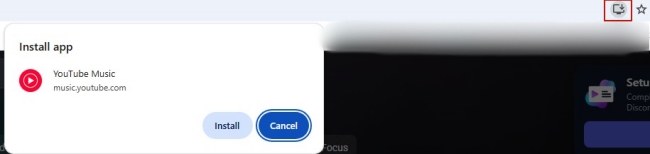
Step 3. When it prompts, select Install to download the official YouTube Music PWA on your computer.
Step 4. If you don’t see the Download icon, the alternative operation is to click the three-dots icon. Then, choose Cast, save and share > Install YouTube Music....
Step 5. Once done, you can follow the on-screen instructions to use YouTube Music PWA in a new window.
Part 3. How to Get the GitHub Version of the YouTube Music Desktop App
Some users may want more advanced features and a traditional desktop app experience. In this case, the GitHub version of the YouTube Music app is a great solution. The YouTube Music desktop app version on GitHub is a free, open-source project, adding some important features that Google doesn’t implement, such as Discord rich presence, taskbar integration, and more. Here’s how to download this desktop app from GitHub:
Step 1. Visit the official YouTube Music desktop app page on GitHub.
Step 2. Then, head to the Releases section. You can find the available installers under Assets.
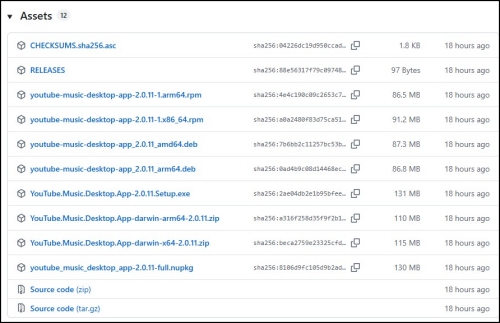
Step 3. Now, you can download the installer for your system. For example, if you are using Windows, choose the .exe file.
Step 4. When it is downloaded, you can run the installer and follow the on-screen wizard to finish all necessary settings.
Step 5. Log in with your Google account, and you can begin enjoying the YouTube Music desktop app features.
Part 4. How to Download and Play YouTube Music Without the Desktop App
For some users, the only goal of using the YouTube Music desktop app is to play YouTube Music songs offline and have a stable, seamless, and unlimited music experience. So, if all you want is permanent and playable YouTube Music files, a professional tool like TunesMake YouTube Music Converter is what you need.
TunesMake YouTube Music Converter allows users to download and convert YouTube Music songs, playlists, albums, and podcasts to common audio files. You can decide on the output format according to your personal needs, including MP3, M4A, M4B, WAV, FLAC, and AIFF. Besides, the TunesMake software will preserve original sound quality and ID3 tags to ensure your listening experience. After downloading, you can play the local YouTube Music files on any media player. Or, you can play them within the TunesMake software since it has a built-in media player. In other words, TunesMake help you get full control over your favorite music for playing anytime and anywhere you want.

Streaming Audio Recorder –
Best Downloader to Save YouTube Music to Desktop
- Unlimitedly download streaming music songs, playlists, and podcasts
- Losslessly convert streaming music to MP3, M4A, M4B, WAV, FLAC, and AIFF
- Remove DRM protection from many streaming music platforms
- Convert streaming songs with original sound quality and ID3 tags kept
Security Verified. 100% Clean & Safe.
Step 1
Personalize the Audio Settings
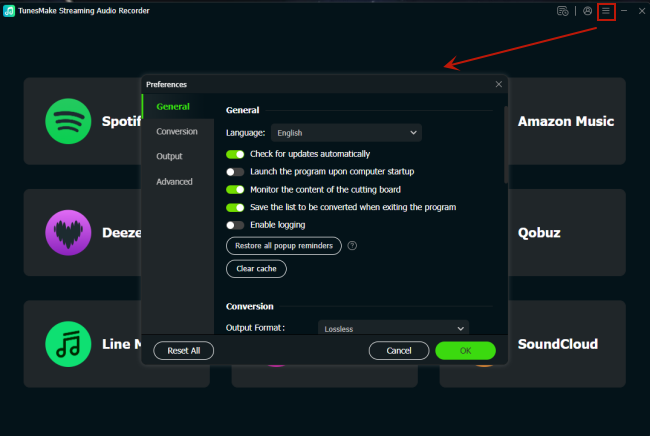
Click the Free Download button above, and you can download the TunesMake YouTube Music Converter on your Windows or Mac computer. Once installed, you can launch it and set the output audio settings. To do so, you need to click the top Menu icon and select Preferences. When the settings window open, you can switch to the Conversion tab and select the output format you need. If you need, other parameters like channel, bit rate, and sample rate can also be changed.
Step 2
Head to YouTube Web Player and Sign in to Your Account
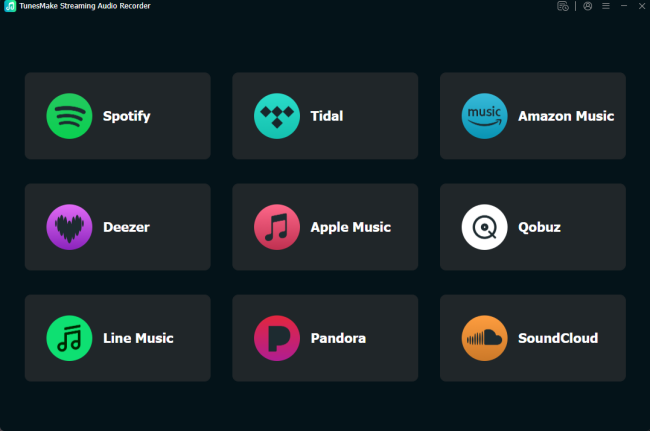
When you finish audio settings, you should go back to the interface of the TunesMake software. Then, click the YouTube Music icon to enter its official web player. Sign in to your account to browse the music library.
Step 3
Select Songs from YouTube Music to Download
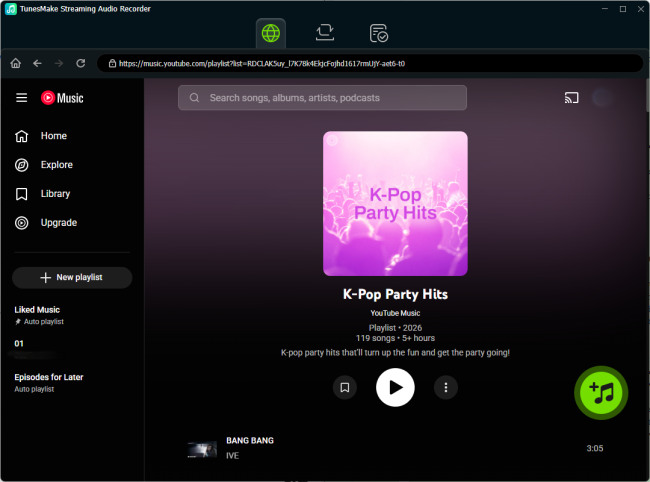
Once you find the playlist or album you want to download, you can select it and click the Add icon > Add to List. Therefore, all the songs in this playlist/album will be loaded from YouTube Music to the conversion list on TunesMake. Alternatively, you can try to drag and drop one song to the Add icon for loading.
Step 4
Download YouTube Music Songs for Unlimited Playback
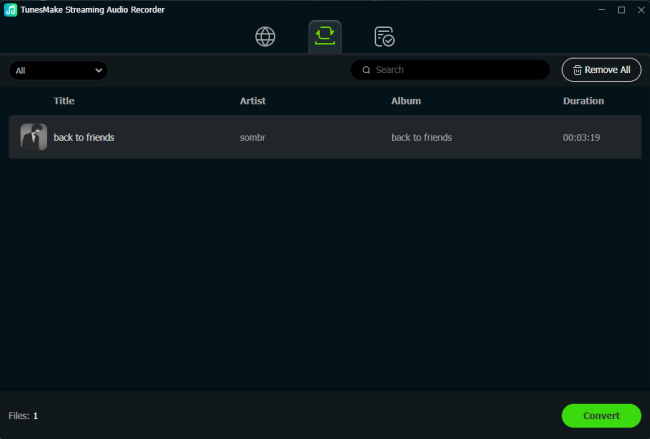
Now, everything is prepared. You can download the YouTube Music songs you added by clicking the Convert button. Then, the TunesMake software will do the rest for you. Just wait for a while, and you can click the top Converted icon to find all the YouTube Music downloaded songs. Simply click the song, and you can play it directly within the TunesMake software. If you want, you can import them to other devices for offline playback.
Part 5. Summary
When searching for the YouTube Music desktop app, you may not find an available version. But don’t worry. You can still bring YouTube Music to your desktop via alternative methods. If you are a YouTube Music Premium subscriber and want official support, just download the official PWA. If you need more advanced features, the GitHub desktop version should be your choice. But if your goal is turn offline playback, TunesMake YouTube Music Converter provides a practical solution. With its help, you can get more flexibility over your preferred YouTube Music songs.
Related Articles

A senior editor from TunesMake, dedicated to sharing professional tutorials and solutions of software, movies, and music.
- 1
- 2
- 3
- 4
- 5
- 6
- 7
 Leave Your Comment
(0)
Leave Your Comment
(0)

 Download Center

