








 Store
Store


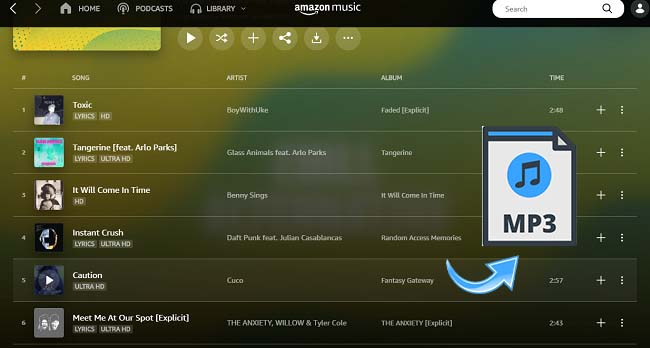
As a leading music streaming service, Amazon Music has got millions of appreciations from users all around the world. There're over 90 million HD music, albums, and a lot of exclusive playlists you can get from Amazon Music. If you have subscribed to Amazon Music, you can also download Amazon Music for offline playing during the subscription.
To overcome these DRM restrictions, many audiophiles turn to third-party software like the TuneBoto Amazon Music Converter. But is this tool actually worth its asking price, or are there better, more cost-effective solutions available? This comprehensive guide delivers a comprehensive and detailed review of TuneBoto, analyzing its audio fidelity, conversion speed, and overall user experience. We will explore its strengths and expose its hidden drawbacks. Finally, you can get the ultimate alternative tool that has superior performance.
Part 1. TuneBoto Amazon Music Converter Full Review
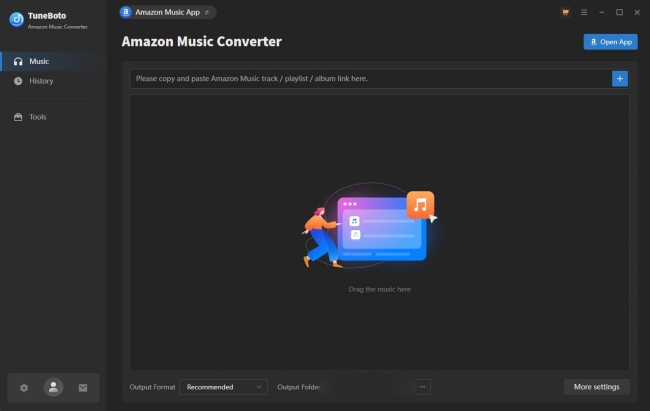
TuneBoto Amazon Music Converter is a desktop software designed to help users download and convert music from Amazon Music into common audio formats. It can successfully remove the DRM protection from Amazon Music tracks, so that you can save the local files of your favorite Amazon Music songs and play them on any device you like without restrictions. The available output formats include MP3, AAC, WAV, FLAC, ALAC, and AIFF. In addition, TuneBoto will preserve ID3 tags and sound quality.
Key Features:
- Convert Amazon Music to multiple formats
- Preserve ID3 tags (artist, album, genre, etc.)
- Batch download support
- Support downloading from both Amazon Music web player and app
- Customize audio parameters
Pros and Cons
-
😀 Pros
- Easy-to-use interface
- Supports diverse output formats
-
☹️ Cons
- Requires paid license for full features
- Occasional conversion errors
- Output quality may vary depending on settings
- High price compared to similar tools
1.1 Unlocking High-Fidelity Music
TuneBoto claims that it can help users get high-fidelity Amazon Music tracks, retaining the original sound quality from the streaming service after conversion. For audiophiles, it’s one of the standout features of TuneBoto. By providing output formats like FLAC, WAV, and AIFF, it allows you to save Amazon Music without sacrificing sound quality. If you have an Amazon Music Unlimited account, the program attempts to capture the original HD and Ultra HD streams.
In actual testing, for common 320kbps MP3 streams on Amazon Music, TuneBoto can basically maintain the same bitrate and sound texture after conversion, which can meet the listening needs of most ordinary users and most audiophiles.
1.2 Audio Quality and Metadata Preservation
Except for the raw audio, TuneBoto can automatically recognize and retain complete ID3 metadata of your Amazon Music, including basic song information such as title, artist, album, cover art, and genre. It offers a convenient method to manage and organize your converted music library. This is crucial for users with large libraries who rely on organized folders. According to our actual test, the metadata sorting is basically accurate, and there are only occasional wrong tags when converting a large batch of tracks at one time.
1.3 Pricing and Performance Bugs
While TuneBoto has robust features, its pricing mode may be a little expensive for casual users. Currently, TuneBoto Amazon Music Converter offers different tiers of paid licenses for users:
| 3-Month Plan | $29.95 |
|---|---|
| 1-Year Plan | $44.95 |
| Lifetime Plan | $89.90 |
Compared with similar tools on the market, this pricing is much higher than the average level. If you only have occasional conversion needs, this tool may not be your choice. Furthermore, in terms of actual performance, we also encountered some obvious bugs during testing. When handling large playlists containing hundreds of high-resolution files, the application occasionally stalls or requires a forced restart. This is especially frustrating for users attempting to archive massive catalogs overnight.
Part 2. Best TuneBoto Alternative: TunesMake Streaming Audio Recorder
If you find TuneBoto's Amazon-only focus too limiting, or if you encounter the aforementioned bugs, you might look for a more versatile solution. That’s where TunesMake Streaming Audio Recorder stands out. It is the definitive, most cost-effective alternative to TuneBoto.
TunesMake Streaming Audio Recorder is an all-in-one solution for music lovers. It supports downloading songs, playlists, albums, and podcasts from Amazon Music and other streaming services. According to your demands, you can choose to convert your music to plain formats, including MP3, M4A, M4B, WAV, FLAC, and AIFF. Due to its advanced technology, it can handle virtually any digital sound source with flawless precision.
Additionally, TunesMake entirely eliminates the frustrating software crashes associated with heavy batch downloading. Even if your playlists contain thousands of tracks, this tool operates smoothly in the background and delivers lightning-fast extraction. Plus, all the original sound quality and ID3 tags will be preserved well. You can even personalize audio parameters and the tags for organizing your local library.

Streaming Audio Recorder –
Best Alternative to TuneBoto Amazon Music Converter
- Unlimitedly download streaming music songs, playlists, and podcasts
- Losslessly convert streaming music to MP3, M4A, M4B, WAV, FLAC, and AIFF
- Remove DRM protection from many streaming music platforms
- Convert streaming songs with original sound quality and ID3 tags kept
Security Verified. 100% Clean & Safe.
2.1 Detailed Comparions of TuneBoto vs TunesMake
| TuneBoto Amazon Music Converter | TunesMake Streaming Audio Recorder | |
|---|---|---|
| Supported Platforms | Amazon Music only | Multiple streaming platforms (Spotify, Tidal, Apple Music, Amazon Music, Deezer, LINE Music, Qobuz, Pandora, SoundCloud, and YouTube Music) |
| Output Formats | MP3, AAC, WAV, FLAC, ALAC or AIFF | MP3, M4A, M4B, WAV, FLAC, and AIFF |
| Audio Quality | High (depends on source) | Lossless (with customizable settings) |
| Metadata | Preserved | Preserved |
| Stability | Moderate | High |
| Conversion Speed | Moderate | Up to 36x |
2.2 How to Download Amazon Music with TunesMake
Step 1
Add Amazon Music Files to TunesMake
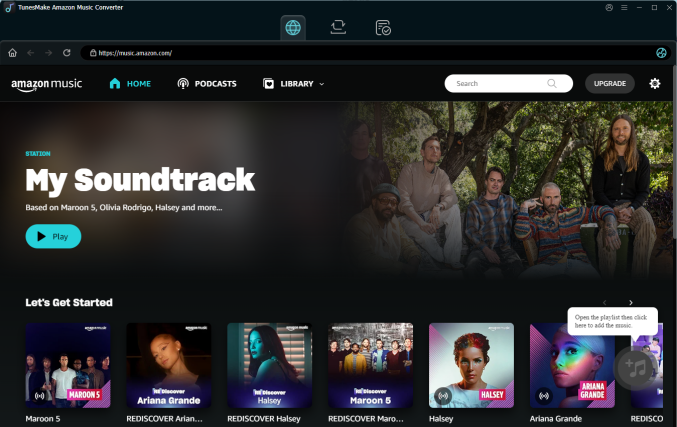
To begin, click the Free Download button above and download TunesMake Streaming Audio Recorder on your Windows or Mac computer. Then, launch TunesMake Streaming Audio Recorder and it will quickly load all the available music services. Here, you should click Amazon Music and visit its official web player. Find the playlist or album you want to save locally, and then enter its detailed page. After that, click the lower Add icon > Add to List.
Step 2
Choose and Customize the Output Format and Parameters
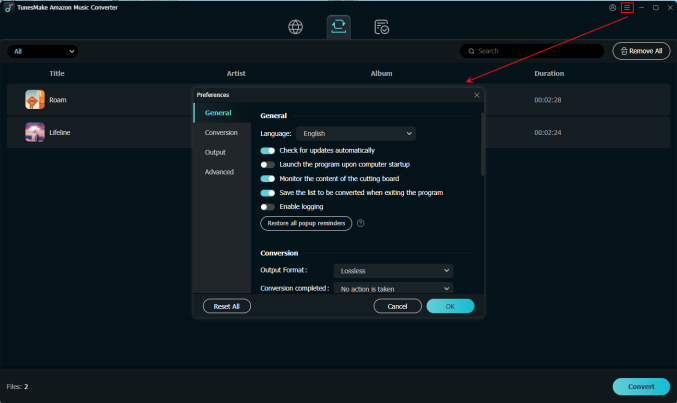
Select the Preferences option from the top menu bar, then the Conversion window. You may now specify the format, bit rate, sample rate, and channel of the output audio more simply. Here, you have the option of selecting MP3 as the output format. Then, to save the changes, click the OK button.
Step 3
Begin to Convert Amazon Music for Playing on Other Places
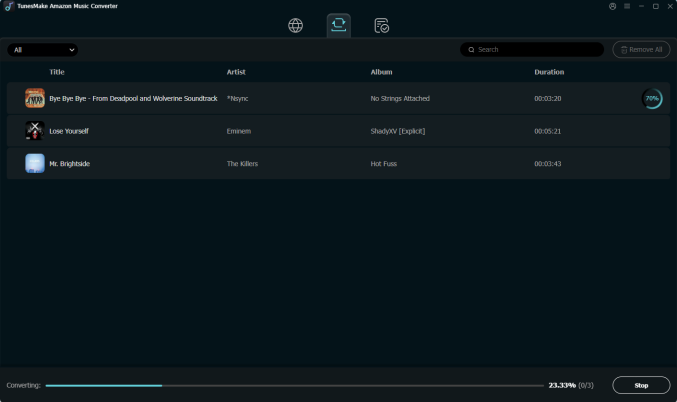
Simply click the Convert button at the bottom right of the converter to begin downloading and converting Amazon Music. The TunesMake program will quickly download and save the converted Amazon Music files to your computer. After conversion, click the Converted icon to view the conversion history. You'll be able to find the converted tracks and navigate to their final destination folder.
Part 3. FAQs about TuneBoto Amazon Music Converter
Is it legal to use TuneBoto Amazon Music Converter?
Using software to record streaming audio is legal for personal and non-commercial use. However, distributing, selling, or sharing these converted files online is strictly prohibited and violates copyright regulations.
Is it safe to use TuneBoto Amazon Music Converter cracked?
No. We strongly advise against using cracked versions of TuneBoto or any other software, since a cracked app often contains bundled malware and trojans that can compromise your personal data and computer health. It’s always a good idea to use the official version.
Can I convert Amazon Music to MP3 with TuneBoto?
Yes, MP3 is one of the primary output formats supported by TuneBoto. You can select MP3 as the output format in the settings menu.
Part 4. Conclusion
TuneBoto Amazon Music Converter provides a functional way to extract tracks. If you are deeply embedded in the Amazon ecosystem and need a reliable way to take your music offline, TuneBoto is a good choice. However, its exorbitant pricing and occasional stability issues make it difficult to recommend for the average consumer. For users who want more stability and freedom, TunesMake Streaming Audio Recorder offers a more comprehensive and robust experience.
Related Articles




A professional writer at TunesMake, crafts in-depth tutorials, practical tips and expert advice focusing on streaming music, technology, and more.
- 1
- 2
- 3
- 4
- 5
- 6
- 7
 Leave Your Comment
(0)
Leave Your Comment
(0)

 Download Center

