








 Store
Store


ReFreezer is an open-source Android application designed to provide an alternative interface for accessing the Deezer music service. Originally inspired by the now-discontinued Freezer apk, ReFreezer has been rebuilt with modern technologies to improve compatibility with recent Android versions while maintaining a familiar user experience.
Whether you're researching ReFreezer before installing it or simply want to understand how it works, this guide explains its features, supported devices, common issues, and the best alternative. Throughout the guide, we'll focus on factual information, practical guidance, and realistic expectations rather than unsupported claims.
Part 1. What Is ReFreezer?
ReFreezer servers as an alternative client for the Deezer music service. It originated as a community-driven continuation of the discontinued Freezer app and has been updated to support newer Android versions and modern Flutter development. Unlike a standalone streaming platform, ReFreezer relies on Deezer's ecosystem. As a result, available functionality can change over time depending on application updates, Deezer's service policies, and the type of Deezer account you use. Here is everything you need to know before downloading and using it.
Key Features of ReFreezer
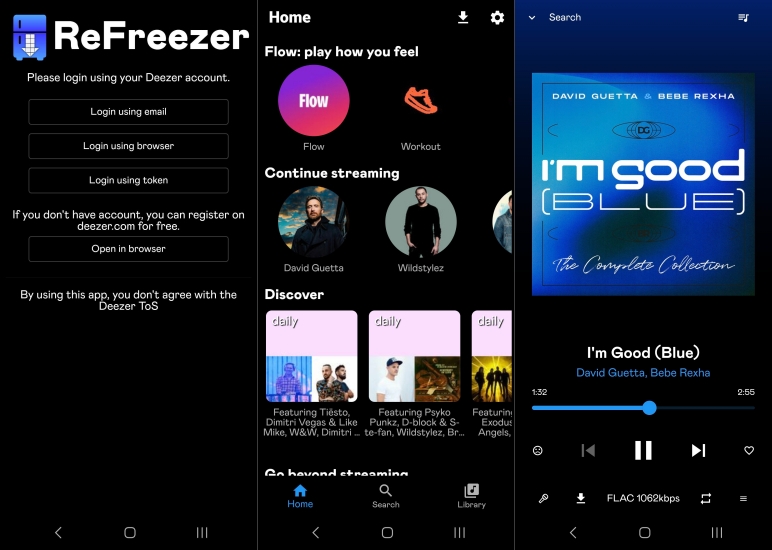
ReFreezer offers several features that make it interesting for users who prefer open-source applications. With ReFreezer, you can unlock many features like offline downloads and unlimited skips only available to Deezer Premium subscribers, even though you're using a Free account.
-
Ad-Free Playback: Enjoy uninterrupted music with zero ads.
-
Unlimited Skips: Skip any track as many times as you want without daily limits.
-
On-Demand Playback: Play any song, album, or playlist instantly
-
Lossless Audio: Listen to music up to 16-bit, 44.1 kHz (CD quality).
-
Quality Options: Adjust streaming and downloading quality based on network conditions.
-
Offline Downloads: Download tracks, albums, and playlists for offline listening.
-
Android Auto: Support Android Auto flawlessly for music controls in the vehicle.
Note:
-
The audio quality of streaming and downloading music is based on what types of Deezer account you're using. To download FLAC from Deezer, you need a Deezer Premium account. Or FLAC music cannot be downloaded in ReFreezer, even though you have set the quality to FLAC.
Pros and Cons of ReFreezer
Like many open-source projects, ReFreezer not only brings many benefits to users but also has limitations in lots of cases. To use ReFreezer, you also need to know its potential limitations.
-
😀 Pros
- Free, open-source application
- Modern Android compatibility
- Clean and lightweight interface
- Community-driven development
- Tablet and Android Auto improvements
-
☹️ Cons
- Features may change over time
- Not available on the Google Play Store
- Functionality depends on external services
- Compatibility may vary across devices
- Delayed community support
Frequently Asked Questions of ReFreezer
Is ReFreezer free?
Yes. ReFreezer is an open-source project, meaning the software itself is available without a traditional purchase cost. You can download it from the official website or GitHub for free.
Is ReFreezer available on iPhone?
ReFreezer is primarily associated with Android development. Currently, there is no iOS version of ReFreezer. Users should verify any claimed iOS versions carefully.
Does ReFreezer receive updates?
Updates depend on the activity of project maintainers and contributors. Users should check official project information for current development status.
Is ReFreezer better than official music apps?
It depends on user priorities. ReFreezer may appeal to users who value open-source software, while official applications usually provide stronger support, reliability, and integration.
Part 2. How to Install ReFreezer for Use
Android phones represent the primary target platform for ReFreezer. Before downloading and installing ReFreezer on your device, you need to consider available storage space and security settings. If you have allowed to install an application from third parties, follow the steps below to download and install ReFreezer for use.
Step 1. Navigate to the website of ReFreezer or ReFreezer GitHub to download the installer.
Step 2. After downloading the installer, choose to install it on your Android device.
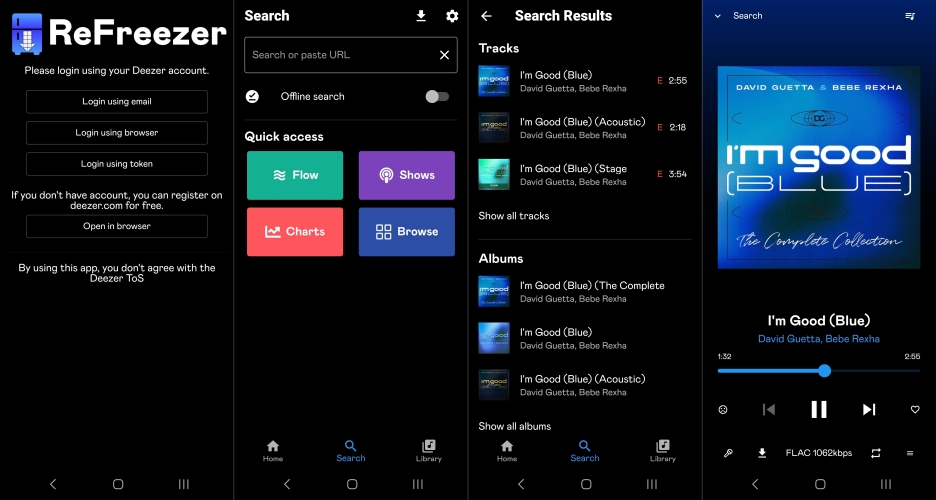
Step 3. Open ReFreezer and log in to by choosing email, browser, or ARL code.
Step 4. Once logged, you'll redirect to the main interface of ReFreezer.
Step 5. Search for any music track, album, or playlist to download.
Step 6. In the searching result, open an album or a playlist, then tap Download.
Note:
-
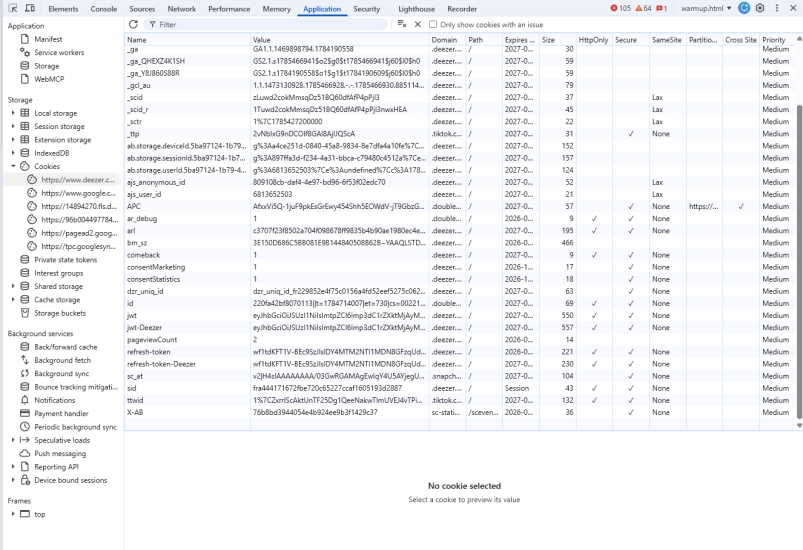
It is inevitable that the account will be banned by Deezer when using a third-party tool like ReFreezer. To reduce the risk, you can choose to log in to ReFreezer with the ARL code. By logging into the Deezer web player on your computer, press F12 to open Developer Tools, switch to the Applications tab, and click Storage > Cookies. Then you can scroll down to find the ARL code of your Deezer account.
Part 3. Common Errors of ReFreezer
It is easy to download and install ReFreezer on an Android device by following the above steps. However, many users encounter problems when using it. If you encounter problems, these general troubleshooting steps may help.
Problem 1. The App Doesn't Open
Possible causes include incompatible Android version, corrupted installation, and outdated application build. To fix the issue, reinstall the latest official version, restart your device, or check whether your Android version is supported.
Problem 2. Service Is Not Available
Some users receive a prompt of the service not available in your country. This is because Deezer only offers its services to a part of countries and regions. If you want to use Deezer in non-supported countries or regions, simply turn on a VPN service.
Problem 3. Search Results Are Missing
If searches return incomplete or no results, this is mainly caused by the internet connection. You can verify your internet connection to fix the issue. Or ensure the application is up to date and check community announcements for known service interruptions.
Problem 4. Music Playback Issues
If the music playback in ReFreezer is interrupted, you need to confirm that your network connection on your device is stable. In this case, you can close background applications consuming bandwidth and restart the application.
Part 4. Best Alternative to ReFreezer APK
If ReFreezer does not fully match your needs, several alternatives may be worth considering. The best choice depends on whether you prioritize official support, open-source software, or greater control over your personal music library. For users whose main goal is managing their Deezer music library more flexibly, TunesMake Deezer Music Converter is another option to consider.
Best & Safer Alternative to ReFreezer Mod APK
Unlike ReFreezer, which functions primarily as an alternative Deezer client, TunesMake Deezer Music Converter focuses on downloading and converting Deezer music into common audio formats for personal library management. Potentially useful features include:
-
Converting Deezer tracks into widely supported audio formats like MP3 and FLAC
-
Adjusting output settings such as bit rate, sample rate, and channel
-
Organizing converted music files for easier playback on any device without limits
-
Creating a more flexible offline music collection for keeping forever

Streaming Audio Converter -
Download ad-free music from Deezer as local audio files
- Download tracks, albums, playlists, and artists from Deezer
- Convert Deezer music to MP3, M4A, FLAC, AIFF, WAV, and M4B
- Preserve the original audio quality and ID3 tags for management
- Remove DRM from Deezer without compressing audio quality
- Support downloading music from over 10 popular streaming platforms
Security Verified. 100% Clean & Safe.
Differences between TunesMake and ReFreezer
Although TunesMake Deezer Music Converter and ReFreezer are both associated with Deezer music, they are designed for different purposes. ReFreezer is an open-source Android client that offers an alternative interface for accessing Deezer, while TunesMake Deezer Music Converter focuses on converting and managing music from Deezer for personal offline use. The below highlights their key differences.
| Feature | TunesMake Deezer Music Converter | ReFreezer |
|---|---|---|
| Primary Purpose | Convert Deezer music for personal offline playback | Alternative Android client for Deezer |
| Platform | Windows and macOS | Android |
| Open Source | No | Yes |
| Security & Stability | Stable, not changing with Deezer's updates | Unstable, greatly relying on Deezer's ecosystem |
| Target Users | Users who want to build a personal offline music library | Users who look for an alternative Android interface |
| Output Formats | MP3, FLAC, WAV, M4B, M4A, and AIFF | Not designed as an audio conversion tool |
| Music Library Management | Organizes converted audio files for playback in compatible media players | Organizes music within the application interface |
| Offline Listening | Converted files can be played in compatible music players without relying on the original application | Depends on the app's available functionality and the connected music service |
| Ease of Use | Desktop-based workflow with guided conversion process | Mobile-focused interface |
| Official Support | Commercial software with customer support | Community-supported open-source project |
Steps to Download Deezer Music as Local Files
This type of the tool may be more suitable for users who want to manage their own music files across different players rather than relying on a specific streaming application interface. With the help of TunesMake Deezer Music Converter, you can download and convert Deezer music into high-quality FLAC files or widely-supported MP3 files. Follow the steps below to start your download and conversion of Deezer music with TunesMake now.
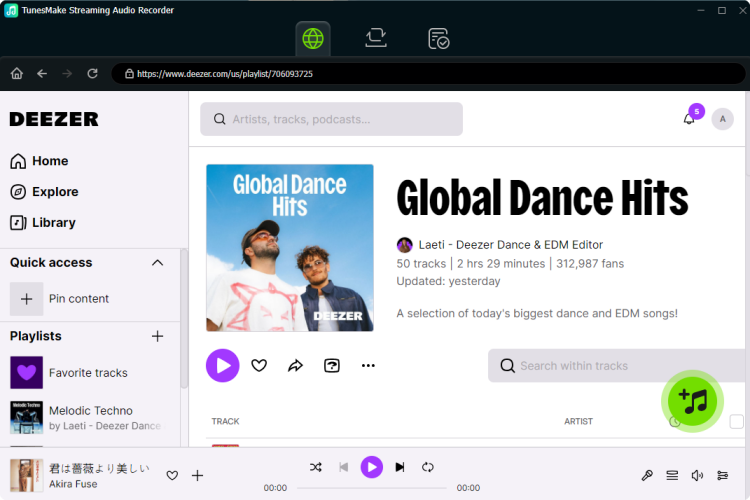
Step 1 Select Deezer Songs to Download
After opening TunesMake Streaming Audio Recorder, you can choose Deezer from the main interface, and you will be redirect to the built-in Deezer web player. Now log into with your Deezer account and find the content you want to download. Simply open the content and click the + button to add them into the conversion list.
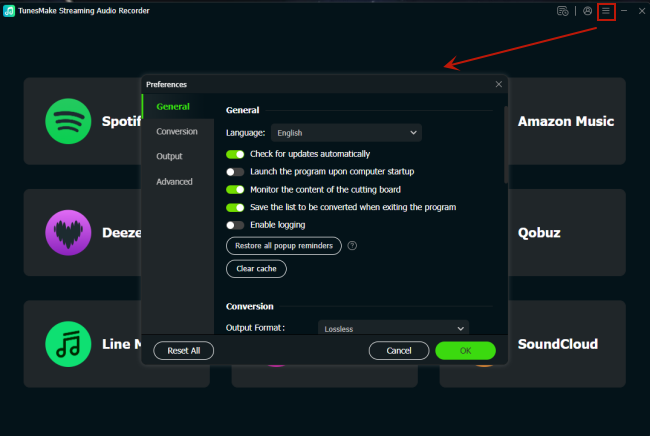
Step 2 Personalize the Output Parameters
Here you can set the output audio parameters, including the output format, bit rate, channel, and sample rate for Deezer music. To open the settings window, click the Settings button and locate the Conversion tab. Now you can personalize the audio parameters. Also, you can choose to export Deezer music by album or by artists.
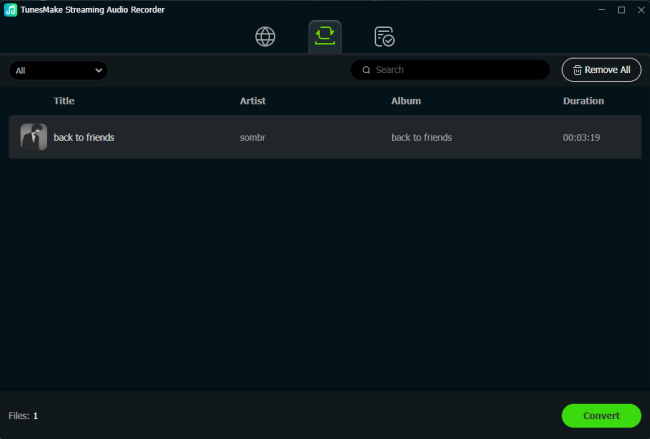
Step 3 Start to Download Songs from Deezer
TunesMake Streaming Audio Recorder will immediately download songs from Deezer when you click the Convert button at the bottom right corner. Wait for a while, and the conversion time depends on the number of music tracks you add. After completing the conversion, you can view the converted Deezer music tracks in the history list by clicking the History icon.
Part 5. Conclusion
ReFreezer is an interesting example of a community-developed Android application that demonstrates the benefits and challenges of open-source software. Its strengths include free access to premium features and a lightweight user experience. However, users should also understand its limitations such as community-based support and unstable features
For users who appreciate open-source projects and understand these trade-offs, ReFreezer can be an interesting application to explore. For those who prioritize professional support and maximum music management, a commercial tool like TunesMake Deezer Music Converter may be a better fit. Have a try, and you'll find it out.
Related Articles

A senior editor from TunesMake, dedicated to sharing professional tutorials and solutions of software, movies, and music.
- 1
- 2
- 3
- 4
- 5
- 6
- 7
 Leave Your Comment
(0)
Leave Your Comment
(0)

 Download Center

