








 Store
Store


Setting a favorite song as a personalized phone ringtone is one of the easiest ways to customize your smartphone. If you use Deezer as your primary music streaming service, you might be wondering how to take a track from your library and set it as your incoming call tone.
Because Deezer streams music in an encrypted format, you cannot directly assign a track from the Deezer app as your system ringtone, even if you have downloaded it for offline listening. However, with the right solution, you can easily transform any Deezer track into a high-quality ringtone. This guide breaks down the process of converting Deezer songs and setting them up as custom ringtones on all phones, including iPhone and Android devices.
Part 1. Best Method to Download Deezer Songs for Ringtones
Deezer, as a subscription-based streaming service, provides different features for users. If you are a Free user, you can listen to music in Deezer online. With a paid subscription, you can download music from Deezer for offline playback on your device. However, those songs downloaded from Deezer are cache files only accessible with the Deezer music player. To download Deezer songs for ringtone, you need the help of a third-party tool like TunesMake Deezer Music Converter.
TunesMake Deezer Music Converter is an excellent music downloader and converter for Deezer users. With this tool, it's easy to download music tracks, albums, playlists, artists, and podcasts from Deezer. Also, you can choose to save Deezer audios as six popular formats like MP3. Then you can freely set your Deezer songs as ringtones on your mobile device.

Streaming Audio Converter -
Download Deezer music for use as ringtones
- Download tracks, albums, playlists, and artists from Deezer
- Convert Deezer music to MP3, M4A, FLAC, AIFF, WAV, and M4B
- Preserve the original audio quality and ID3 tags for management
- Remove DRM from Deezer without compressing audio quality
- Support downloading music from over 10 popular streaming platforms
Security Verified. 100% Clean & Safe.
Step 1 Select Deezer Music to Download
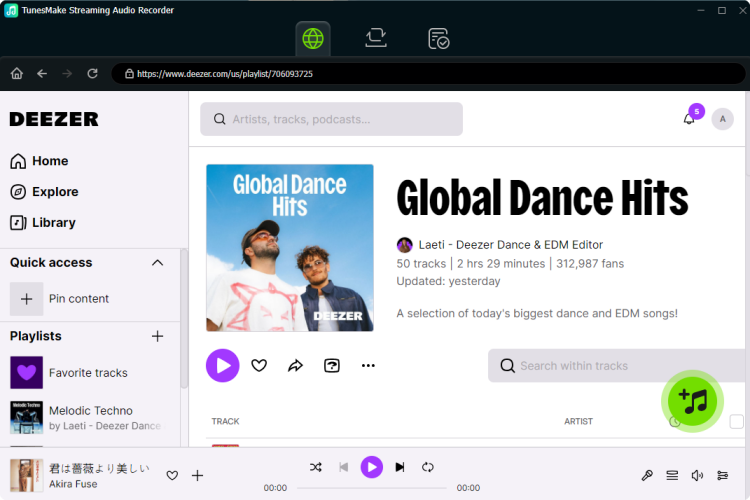
Launch TunesMake Streaming Audio Recorder on your computer, then select Deezer on the main dashboard and wait to load the built-in Deezer web player automatically. Go to select songs you want to download for use as ringtones and then add them to the conversion list. To add to the conversion list for downloading, you can click the + button to load the songs.
Step 2 Set MP3 as the Output Audio Format
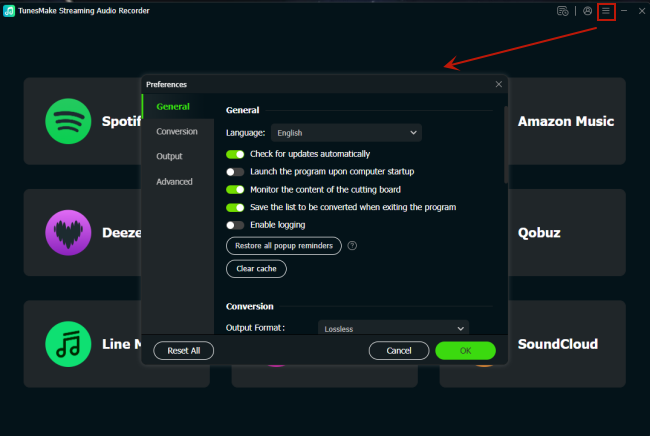
Before downloading Deezer songs, you need to personalize the output audio parameters. By clicking the Settings button and navigating to the General tab, you can select the output format and set the bit rate, sample rate, and channel. TunesMake software supports MP3, AIFF, M4A, M4B, FLAC, and WAV, and you can set MP3 as the output format.
Step 3 Download Songs from Deezer to MP3
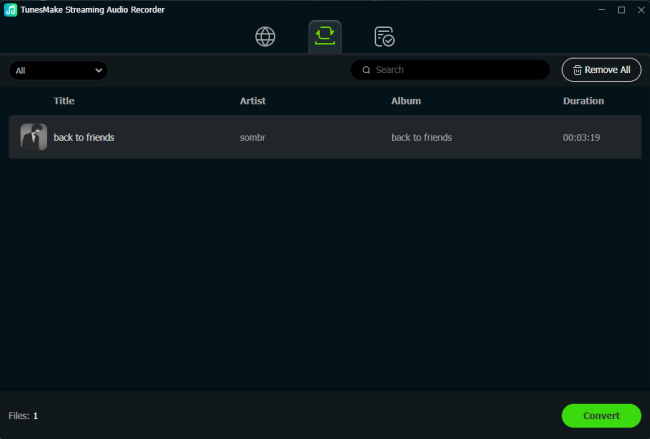
After you complete the settings, you can click the Convert button to start downloading and converting Deezer songs to MP3. This process can take anywhere from two minutes to half an hour depending on the number of music tracks. Once the conversion is complete, you can click the History icon to browse the converted Deezer music tracks in the history list.
Part 2. How to Set Music as a Ringtone from Deezer on iPhone
To make Deezer songs your ringtone on your iPhone, you need to upload the converted music files to iTunes or Apple Music first. Then you can set a Deezer song as your new ringtone on your device. Now follow the below steps to use Deezer music as a ringtone.
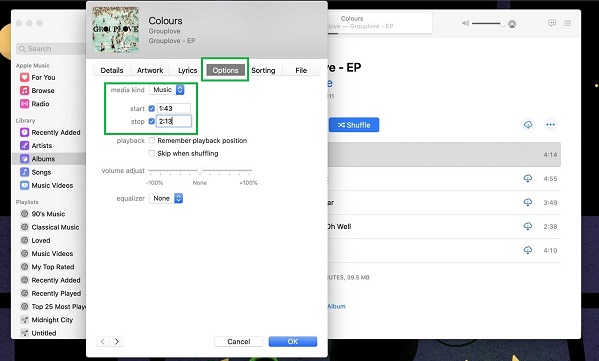
Step 1. Go to upload Deezer songs to your music library on iTunes.
Step 2. Select a Deezer song you want to set as a ringtone on your iPhone and view Song Info by right-clicking the song from the resulting drop-down list.
Step 3. At the top of the window, click the Options tab and set the times you want for Start and Stop.
Step 4. Then click OK at the bottom and click File > Convert > Convert to AAC Version or in Music Create AAC Version.
Step 5. After that, click the AAC version of your Deezer song and drag it to the desktop.
Step 6. Right-click the AAC file and from the drop-down menu, choose Delete from Library.
Step 7. Click the name of the file and change the extension from .m4a to .m4r.
Step 8. Use a USB cable to connect your iPhone to the computer and add the .m4r ringtone file to your iPhone.
Step 9. Finally, go to Settings > Sounds & Haptics then tap Ringtone to set your Deezer ringtone.
Part 3. How to Make a Deezer Song Your Ringtone on Android Phone
Now you have completed the conversion of Deezer songs to MP3. You can transfer Deezer music files to your Android phone and set it as a ringtone. If you don't know how to, perform the following steps to set music as a ringtone from Deezer.
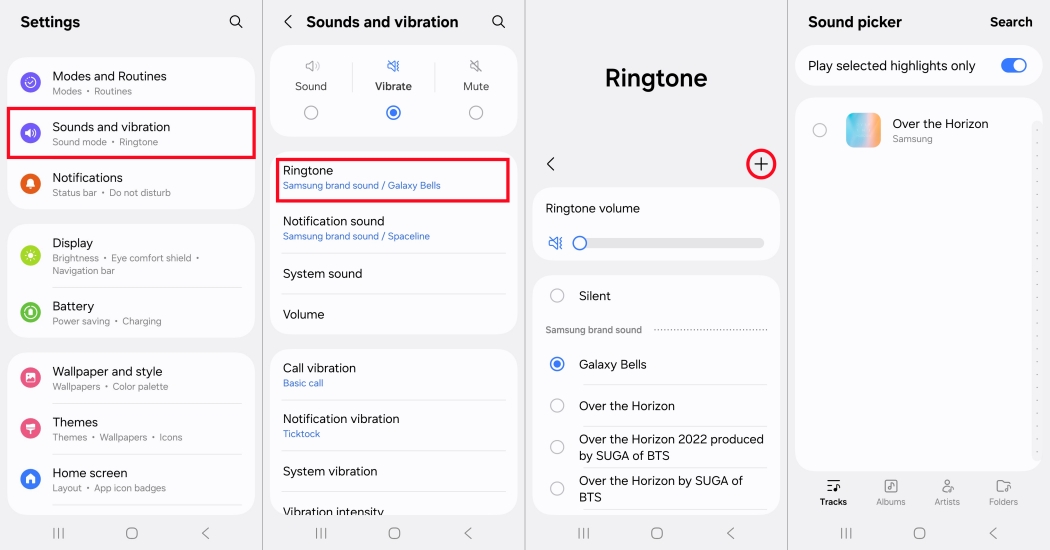
Step 1. Launch Setting on your Samsung phone and tap Sounds and vibration.
Step 2. Tap Ringtone and you'll find all the ringtones on your device.
Step 3. Then tap the + button to use your own music files.
Step 4. Choose a Deezer song you've uploaded and tap Done to save your settings.
Part 4. How to Use Deezer Songs as Ringtones on Windows Phone
If you want to use a Deezer song as a ringtone on a Windows Phone 8, you need to download and install a Windows Phone App for Desktop. Now you go to make a Deezer song your ringtone by following the below steps.
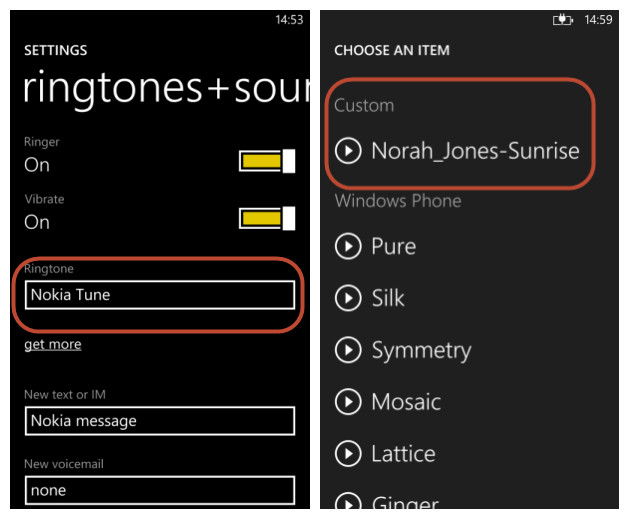
Step 1. Connect your Windows phone to the computer by using a USB cable.
Step 2. Click Ringtones and select Deezer songs that you want to set as a ringtone.
Step 3. Click Add to upload your converted Deezer songs and unplug your phone.
Step 4. Tap Settings > Ringtones & Sounds on your Windows phone and set your Deezer song as a ringtone.
Part 5. FAQs about Deezer Ringtones
Why can't I directly set a downloaded Deezer song as a ringtone?
Songs downloaded within the official Deezer app are encrypted with DRM protection. They are cache files designed to play exclusively within the Deezer application and cannot be accessed by your phone's operating system as standard ringtone files.
What is the maximum duration for an iPhone ringtone?
The iPhone strictly enforces a 30-second maximum limit for ringtones. If you attempt to sync or export an .m4r file longer than 30 seconds, the iPhone will either automatically truncate it or fail to display it under your system sound settings.
Is it legal to convert Deezer songs for personal ringtones?
Converting streaming audio for personal, non-commercial use like creating a personalized ringtone generally falls under personal use guidelines, provided you do not redistribute or sell the audio file.
Can I set different Deezer ringtones for specific contacts?
Yes. Once the custom ringtone is imported into your device's system settings, open your Contacts app, choose a contact, tap Edit, select Ringtone, and choose your imported Deezer track.
Part 6. Conclusion
While Deezer does not offer a direct feature to export tracks as system sounds, extracting an unprotected audio file with TunesMake Deezer Music Converter can resolve the issue. By converting your track to an MP3 format and utilizing your phone's audio controls, you can set any Deezer track as your personal ringtone on your phone.
Related Articles


A senior editor from TunesMake, dedicated to sharing professional tutorials and solutions of software, movies, and music.
- 1
- 2
- 3
- 4
- 5
- 6
- 7
 Leave Your Comment
(0)
Leave Your Comment
(0)

 Download Center

