








 Store
Store


There is nothing quite like a jarring audio advertisement to ruin the flow of your favorite music playlist. If you are using Deezer Free, you are likely all too familiar with these regular interruptions, alongside mobile restrictions like shuffle-only music playback and a strict limit of six song skips per hour.
While it is tempting to look for quick workarounds to make Deezer no ads, finding a solution that is reliable, legal, and safe for your device requires navigating a few technical realities. This guide breaks down several ways to enjoy an uninterrupted listening experience, comparing official options with common workarounds.
Part 1. Does Deezer Have Ads?
Yes, Deezer has ads, but only if you use their free version. Deezer Free is an ad-supported service. If you use this tier, you will experience regular interruptions, including:
-
Non-skippable audio ads between songs
-
Video advertisements
-
Banner ads displayed within the app
To get rid of ads entirely, you must subscribe to one of Deezer's paid plans, such as Deezer Premium, Deezer Duo, or Deezer Family. In addition to removing all advertisements, upgrading unlocks other features like high-fidelity audio quality, unlimited song skips, and the ability to download music for offline listening. The table below outlines exactly how the user experience shifts between the tiers.
| Feature | Deezer Free | Deezer Paid |
|---|---|---|
| Audio Advertisements | Supported by regular audio and banner ads | 100% ad-free |
| Audio Quality | Standard 128Kbps (MP3 format) | High-Fidelity Lossless (16-bit, 44.1 kHz FLAC) |
| Track Selection | Mobile: Shuffle-only Desktop: Restricted |
Full on-demand playback control |
| Skip Restrictions | Maximum of 6 song skips per hour | Unlimited track skips |
| Offline Mode | Require active internet connection | Download tracks directly for offline use |
Part 2. How to Make Deezer No Ads
Instead of upgrading to Deezer premium accounts, there are some ways to help you remove ads from Deezer. Here you can make Deezer no ads with a Deezer ad blocker on a computer or installing a Deezer no ads APK on a mobile device. Let's explore more details.
How to Get Deezer without Ads on Desktop
If you primarily listen to Deezer music on a computer, you can use the Deezer web player interface within an ad-blocking browser environment. When accessing Deezer via a desktop web browser like Chrome, Firefox, or Brave, reputable ad-blocking extensions such as uBlock Origin or AdBlock can successfully suppress visual banners and standard audio ad scripts.
uBlock Origin
Despite what its name suggests, uBlock Origin is is a wide-spectrum content blocker developed by Raymond Hill. It uses various community-maintained filter lists to detect and block ads, pop-ups, trackers, malware domains, and even coin-miners the moment you load a webpage.

-
Availability: Available on major browsers like Firefox, Chrome, Microsoft Edge, and Opera.
-
Key Advantage: Highly regarded for being incredibly lightweight, meaning it blocks ads effectively without slowing down your browser.
-
Customization: Feature advanced tools for power users, including an element-zapper, live traffic logs, and the ability to turn off JavaScript globally or on specific websites.
AdBlock
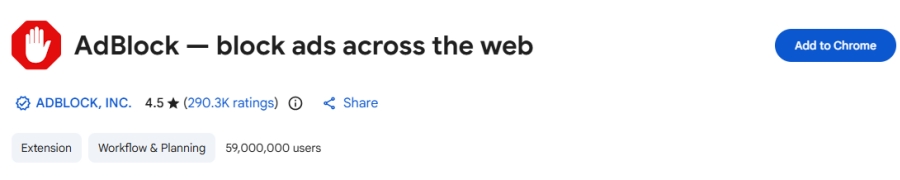
AdBlock is one of the oldest and most widely recognized ad-blocking extensions in the world, trusted by tens of millions of users. Like uBlock, it installs directly into your browser toolbar and automatically blocks video ads, disruptive pop-ups, and sidebar banners from loading.
-
Availability: Available on major browsers like Firefox, Chrome, Microsoft Edge, and Opera.
-
User-Friendly Interface: Focus heavily on simplicity, allowing casual users to easily pause the blocker on a specific site.
-
Extra Features: Offer premium upgrades that let you do things like hide cookie consent banners, stop auto-play videos, or customize the background themes of your interface.
How to Install and Use a Deezer Ad Blocker
Step 1. Open the Chrome Web Store, then find and install AdBlock.
Step 2. Go to the Deezer web player and log into your Deezer account.
Step 3. Click the AdBlock icon and select Don't run on pages on this site.
Step 4. Use the slider to verify that AdBlock only matches the Deezer web player.
Step 5. Click Exclude and then the red AdBlock icon will turn green.
Limitations of the Web Player:
While browser extensions provide a temporary relief on desktop, this method has significant limitations.
-
Regional Restrictions: In certain regions, including the United States, Deezer restricts free accounts on desktop to 30-second song previews rather than full tracks.
-
Detection Scripts: Deezer frequently updates its platform to detect ad-blocking extensions. When detected, the web player may pause playback.
-
Feature Capping: An ad blocker will not unlock premium features like high-fidelity audio quality, offline downloads, or unrestricted mobile playback.
How to Get Deezer without Ads on Mobile
A Deezer ad blocker is only available for the Deezer web player. When searching for ways to listen to Deezer without ads on a mobile device, you will likely encounter websites offering modified versions of the application, often referred to as "cracked APKs" for Android or tweaked IPA files for iOS. To listen to ad-free Deezer music, find and install a Deezer no ads APK.
Limitation of the Deezer No Ads APK:
While these modified apps promise free access to premium features, using them introduces major risks.
-
Account Suspensions: Using an unauthorized client directly violates Deezer's Terms of Service. The platform uses automated security detection to identify abnormal API requests, which frequently results in permanent account bans.
-
Security Threat: Because these applications are hosted on unverified third-party websites, they are frequently bundled with malware, spyware, or keyloggers designed to compromise your personal data or mobile device security.
Part 3. Best Way to Get Deezer without Ads
If browser extensions fail due to regional track restrictions or active ad-block detection, users often utilize local Deezer music downloading tools. Dedicated utility software, such as TunesMake Deezer Music Converter, provides a workaround by linking with the Deezer web player to download ad-free music directly.
By converting and saving the tracks into standard open formats like MP3 directly onto your hard drive, it creates a local library completely stripped of ad scripts. This method bypasses the limitations of the free tier and allows you to transfer the saved audio files to alternative media players, though it does require a computer to run the initial conversion process.

Streaming Audio Converter -
Download ad-free music from Deezer as local audio files
- Download tracks, albums, playlists, and artists from Deezer
- Convert Deezer music to MP3, M4A, FLAC, AIFF, WAV, and M4B
- Preserve the original audio quality and ID3 tags for management
- Remove DRM from Deezer without compressing audio quality
- Support downloading music from over 10 popular streaming platforms
Security Verified. 100% Clean & Safe.
Step 1 Add Deezer Songs to the Converter
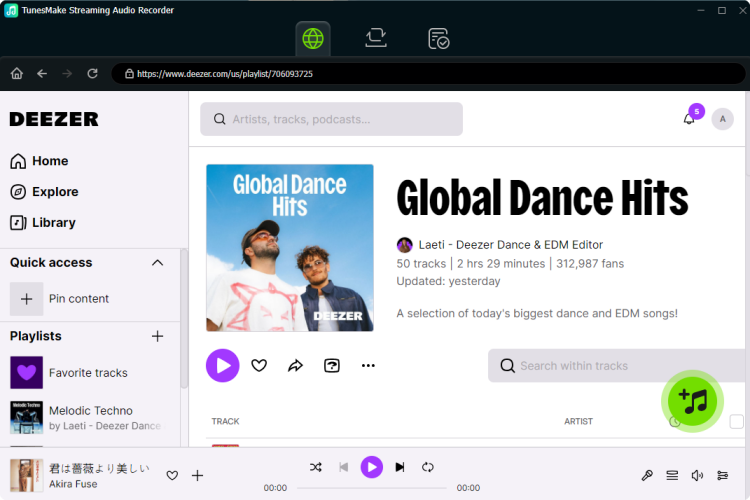
Start by opening TunesMake Streaming Audio Recorder, then you can select Deezer from the main interface and the Deezer web player will be launched at the same time. Log into your Deezer account and select any music track, album, or playlist in Deezer you want to download. You can click the + button to add Deezer music to the conversion list for download.
Step 2 Change the Output Audio Parameters
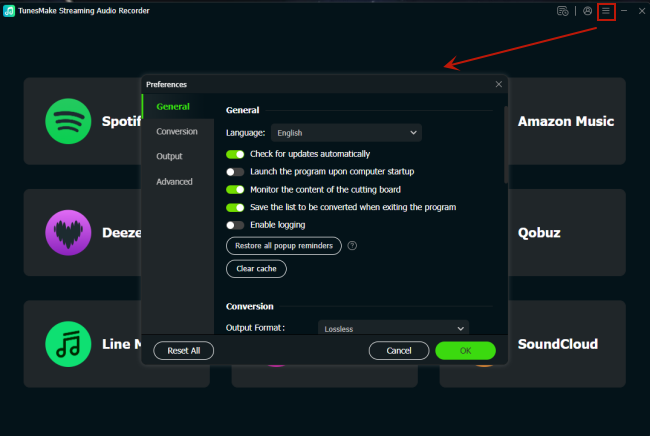
After all the selected Deezer songs are successfully imported into the conversion list, you can click the Settings button and select the Conversion option. Then you can select the output format and change the bit rate, sample rate, and channel. There are six audio formats, including MP3, AIFF, FLAC, WAV, M4A, and M4B, available on the converter.
Step 3 Start to Download Ad-free Deezer Music
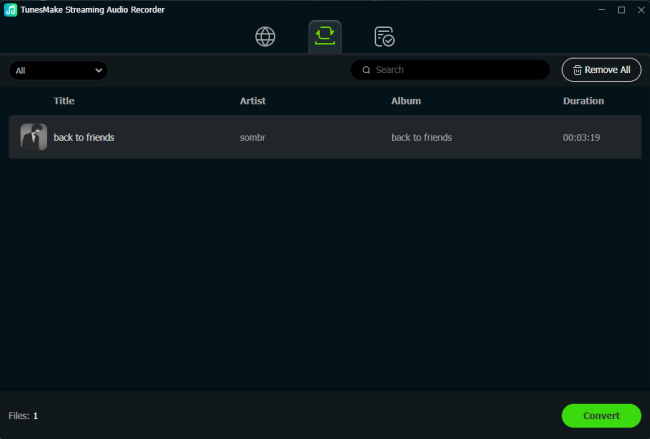
Click the Convert button at the bottom right corner of the converter, and TunesMake Streaming Audio Recorder will immediately download and save ad-free Deezer music tracks. After the conversion, all the Deezer music tracks will be saved to your computer. By clicking the History icon, you can browse all the converted Deezer music in the history list.
Part 4. Conclusion
If you are looking for a way to make Deezer ads, you can consider upgrading to a paid Deezer account or using a Deezer ad remover. But the best option is to download Deezer music without ads via TunesMake Deezer music Converter. It can save unprotected, ad-free Deezer music tracks to your computer. Then you can keep ad-free Deezer music forever and listen to them anytime.
Related Articles

A senior editor from TunesMake, dedicated to sharing professional tutorials and solutions of software, movies, and music.
- 1
- 2
- 3
- 4
- 5
- 6
- 7
 Leave Your Comment
(0)
Leave Your Comment
(0)

 Download Center

