








 Store
Store


Few things disrupt a good listening session quite like hitting a grayed-out skip button on Spotify. If you use the free version of the mobile app, you have likely encountered the message informing you that you have run out of skips. Here is everything you need to know about how the Spotify skip limit works, when it resets, and the best ways to bypass these restrictions to keep your music playing smoothly.
Part 1. Does Spotify Still Have Limited Skips?
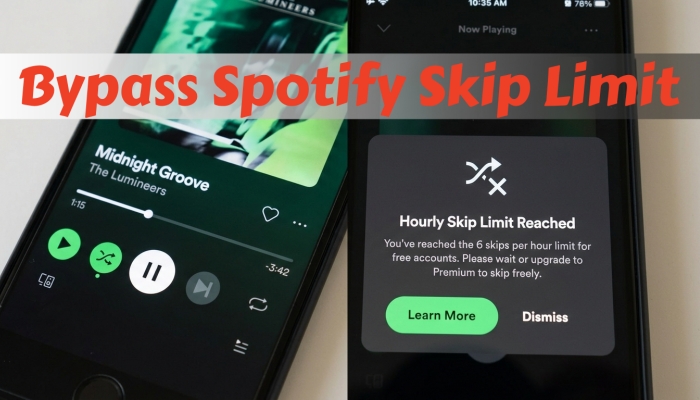
Yes, Spotify still limits skips for Free users while listening on mobile devices. Under this rule, free account holders are allowed up to 6 track skips per hour. Once you use all six skips, the skip button becomes unclickable until the timer resets.
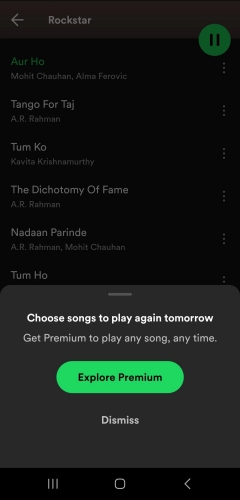
Spotify implements this barrier primarily due to music licensing agreements and revenue distribution models:
- Licensing Costs: Performance rights organizations and record labels charge interactive streaming fees when users explicitly pick and skip tracks.
- Ad Revenue Balance: Limiting skip privileges encourages continuous ad exposure and incentivizes users to upgrade to a paid tier.
- Freemium Incentive: On-demand control serves as the primary value proposition driving conversions to Spotify Premium.
Part 2. How Many Skips Do You Get on Spotify?
The Spotify skip limit does not apply equally across every device or tier. Depending on how and where you listen, your experience with Spotify Free will vary significantly.
| Tier | Skip Allowance | Shuffle-Only Restriction |
|---|---|---|
| Spotify Free (Mobile) | 6 skips per hour | Yes (Forced Shuffle on most playlists) |
| Spotify Free (Desktop & Web) | Unlimited | No (On-demand listening) |
| Spotify Free (Tablets) | Unlimited | Varies by account and region |
| Spotify Premium (All Devices) | Unlimited | No (Full control & offline mode) |
Mobile App Experience
On smartphones, free users are forced into shuffle playback across custom and standard playlists. Tapping the skip track button deducts from your 6-skip hourly pool.
Desktop & Web Player Experience
When accessing Spotify via PC, Mac, or a web browser, the skip limit disappears. Free desktop users can skip tracks without hourly caps and pick specific individual songs on demand, though periodic audio ads still play.
Spotify Premium Experience
Paying for Premium completely removes all platform limitations, granting unlimited track skipping, zero ads, maximum audio bitrate options, and full offline downloading capabilities.
Part 3. 4 Ways to Remove Spotify Skip Limit
If you do not want to purchase a monthly subscription, several practical strategies allow you to listen without hitting the constant 6-skip barrier.
Method 1. Listen to Curated "Made for You" Playlists
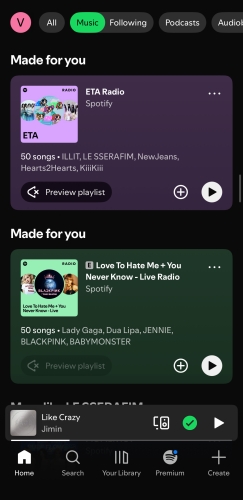
Spotify grants free mobile users full playback control on specific algorithmically generated playlists. Look for playlists labeled "Made for You", "Daily Mix", or "Discover Weekly" that lack a green shuffle icon on the playlist header. On these specific mixes, you can select tracks on demand and skip songs without deducting from your 6-skip hourly allowance.
Method 2. Switch to the Spotify Web Player or Desktop App
If you are at a desk or working on a computer, switch from the mobile app to the Spotify Desktop Client or Web Player. The desktop environment allows free accounts to pick exact songs and skip tracks without any hourly limitations.
Tip for Mobile Users:
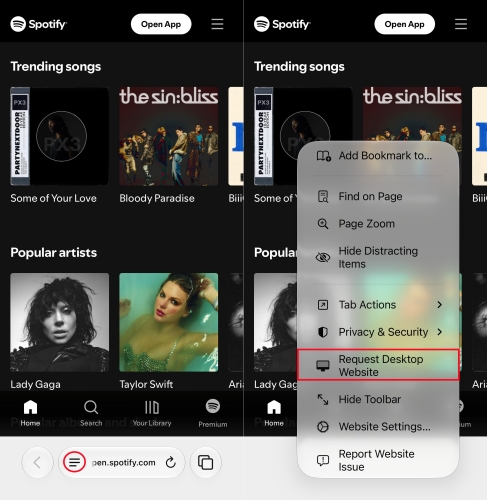
You can open your web browser like Safari or Chrome, visit the Spotify Web Player, and select "Request Desktop Site" in your browser settings to access on-demand playback on your phone.
Method 3. Download Spotify Music to MP3 for Local Playback
If you want to bypass skip limits, audio ads, and network requirements permanently without committing to a recurring subscription, storing your music as local audio files is a practical workaround. TunesMake Spotify Music Converter addresses the skip limit by downloading Spotify playlists and converting them into unprotected formats like MP3, FLAC, or WAV.
Once converted, you can transfer the files to any standard media player app to enjoy unlimited skips, custom playback orders, and 100% offline listening without maintaining an active Premium subscription. Here's how to download Spotify music to MP3 with TunesMake for local playback.

TunesMake Spotify Music Converter –
Download music from Spotify without premium
- Download Spotify songs, albums, playlists, audiobooks, and podcasts
- Losslessly convert Spotify music to MP3, FLAC, WAV, AIFF, and more
- Remove ads from Spotify music tracks even with a Free account
- Convert Spotify music at 15× faster speed in batch with ID3 tags kept
Security Verified. 100% Clean & Safe.
Step 1 Input Spotify Music to TunesMake
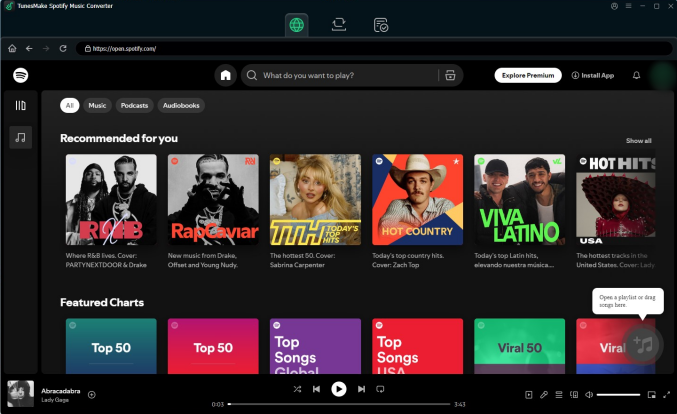
Launch TunesMake Spotify Music Converter on your computer, and then it will automatically load the built-in Spotify Web Player. In the web player, you can log into with your Spotify account and credentials. Then navigate to select any album or playlist to download and add them into the conversion list by clicking the + button.
Step 2 Configure the Output Audio Parameters
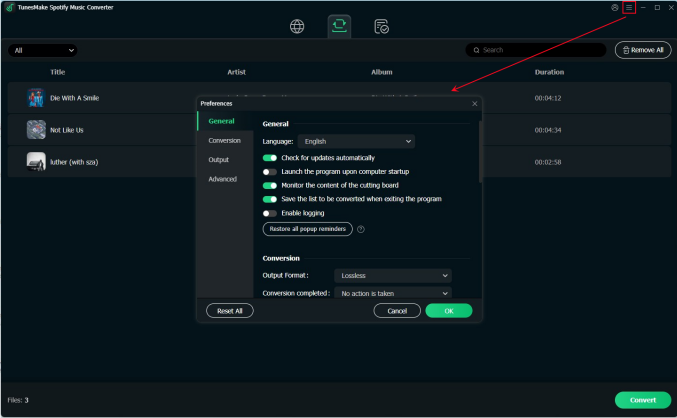
TunesMake allows you to customize the output audio parameters to enhance your experience. Just click the menu tab, select the Preferences option, and switch to the Conversion section. In this section, you can select the output format. If you pursue better audio for your streams, continue to set the bit rate, sample rate, and channel. After that, be sure to click OK.
Step 3 Download Spotify Music as Local Files
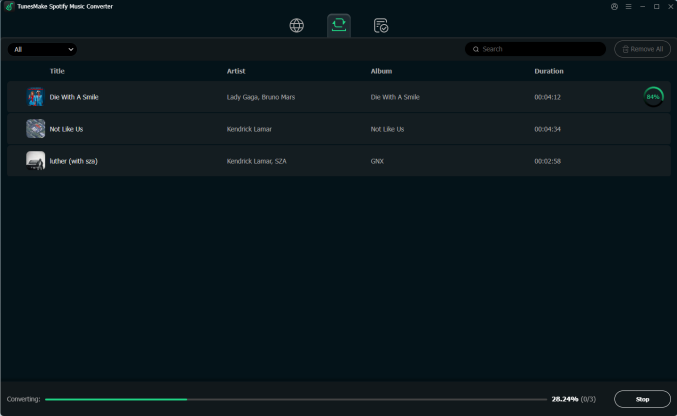
Now you can click the Convert button to initiate the download and conversion of your selected Spotify music. After the conversion, go to browse your downloads by clicking the Converted tab at the top center. You can also locate each track in the local drive by clicking the search icon.
After that, double-click any track to start playing. This time, you are able to skip without limited skips on Spotify. These converted Spotify music files also support playing on your smartphone once you transfer them with a USB cable.
Method 4. Download Spotify Premium APK for Use (Android Only)
A Spotify Premium APK or Spotify Mod APK is a cracked, modified version of the official Android app. It is modified by third-party developers to unlock paid features like unlimited skips, ad blocking, and on-demand song selection on free accounts without paying for a subscription. While installing a modified APK can bypass the 6-skip limit, using modified apps carries several serious risks and limitations, including frequent app breaks, security vulnerabilities, and account suspensions. Consider carefully before you install it on your phone.
Part 4. FAQs about Limited Skips on Spotify
When does the Spotify skip limit reset?
The skip counter operates on a rolling 60-minute window rather than resetting at the top of the hour. Your skips gradually become available again one hour after each individual skip was used.
Do ad skips count toward my 6-skip limit?
No. You cannot manually skip audio advertisements on Spotify Free. The skip button is disabled during ad breaks. Ad plays do not consume any of your 6 track skips.
Why does my skip counter run out even if I didn't skip 6 songs?
Accidentally tapping the skip button, scrubbing forward to the very end of a song, or letting a track play for less than a few seconds before changing tracks can all register as official skips within the app system.
Does fast-forwarding a track consume a skip?
Dragging the playback slider near the end of a track or scrubbing past songs quickly can register as a full skip within the Spotify app interface.
Part 5. Conclusion
Hitting the 6-skip limit on Spotify Free can bring your music session to a halt, but you aren't stuck waiting for the clock to reset. Whether you choose to listen to curated "Made for You" playlists, switch to the Web Player in desktop mode, convert your playlists to local MP3 files using TunesMake Spotify Music Converter for permanent offline playback, or install a Spotify Premium APK, regaining control over your queue is straightforward. By understanding how Spotify's restrictions work across different platforms, you can easily maintain an uninterrupted listening experience without unexpected playback barriers.
Related Articles

An experienced freelance writer at TunesMake, specializes in using various streaming services from Spotify, Apple Music, to Amazon Music, and more other platforms.
- 1
- 2
- 3
- 4
- 5
- 6
- 7
 Leave Your Comment
(0)
Leave Your Comment
(0)

 Download Center

