








 Store
Store


In the modern DJ landscape, the ability to access millions of tracks on the fly isn't just a luxury, as it's a competitive advantage. However, as of now, the rekordbox Tidal integration has moved beyond a simple plug-and-play feature. With the introduction of specific subscription extensions and advanced AI stem separation in Rekordbox, there are technical nuances every DJ must master to ensure a flawless performance.
Whether you are a mobile DJ taking requests or a club resident looking to explore new genres, this guide will walk you through the professional way to use TIDAL with Rekordbox while you are online or offline. Let's see how to get it done now!
Part 1. Can You Use Tidal with rekordbox?
Yes, you can use Tidal directly within rekordbox. But before you open rekordbox, you need to ensure you have met these specific requirements. Or you will get rekordbox Tidal fails.
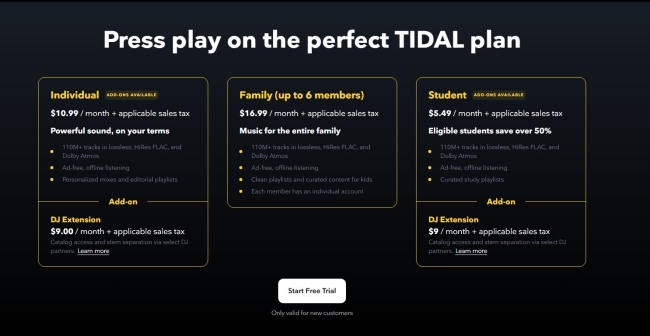
Tidal DJ Extension Add-on:
You cannot use a standard Tidal subscription alone. To unlock integration with rekordbox, you must have an active Tidal Individual or Student subscription plus the DJ Extension. The DJ Extension currently costs an additional $9 per month.
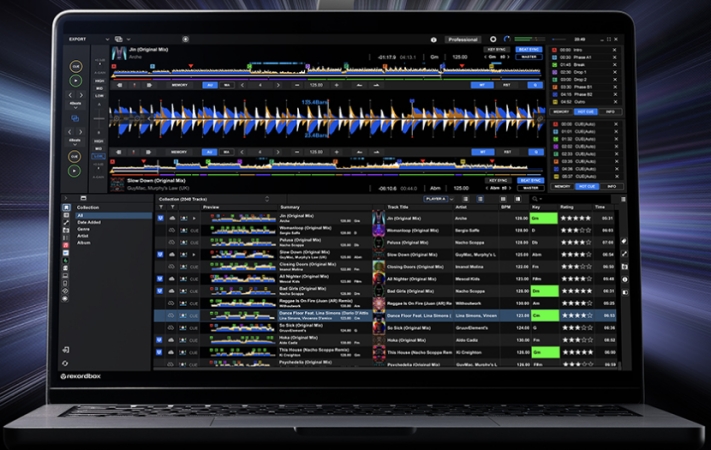
Updated rekordbox Version:
This integration is natively supported in rekordbox version 6 and version 7. rekordbox version 7 is recommended as it features improved stability and significantly lower CPU usage when streaming. It is important to update rekordbox to the latest version.
It is so easy to use Tidal with rekordbox if you meet the above requirements. But there is a workable way to help you get Tidal music tracks in rekordbox when you don't have neither a Tidal premium account nor the DJ Extension. TunesMake Tidal Music Converter serves as a practical solution here. It enables you to download and convert your TIDAL library into rekordbox supported formats like AIFF or MP3 for use, even when offline.
 Tidal Music Converter
A trustworthy music downloader for Tidal free and premium users to download any music track, album, and playlist as local files.
Part 2. How to Use Tidal with rekordbox Online
Setting up the connection between Tidal and rekordbox is straightforward, but the Streaming Quality settings you choose here are permanent for your library's metadata. Following are the steps to use Tidal with rekordbox if you have a paid Tidal account plus the DJ Extension.
How to Connect Tidal to rekordbox
On a Computer
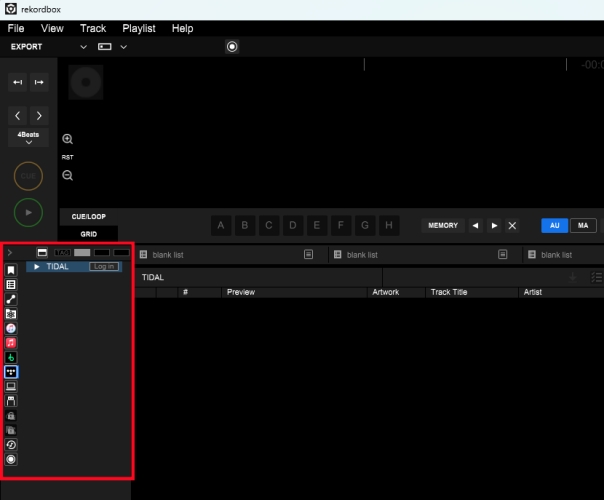
Step 1. Download and install rekordbox on a computer.
Step 2. In the browser tree (left-hand panel), scroll down to the Streaming section.
Step 3. Click the Tidal logo and select Log In to open a secure browser window.
Step 4. Enter your Tidal account and password to complete the login.
On a Phone
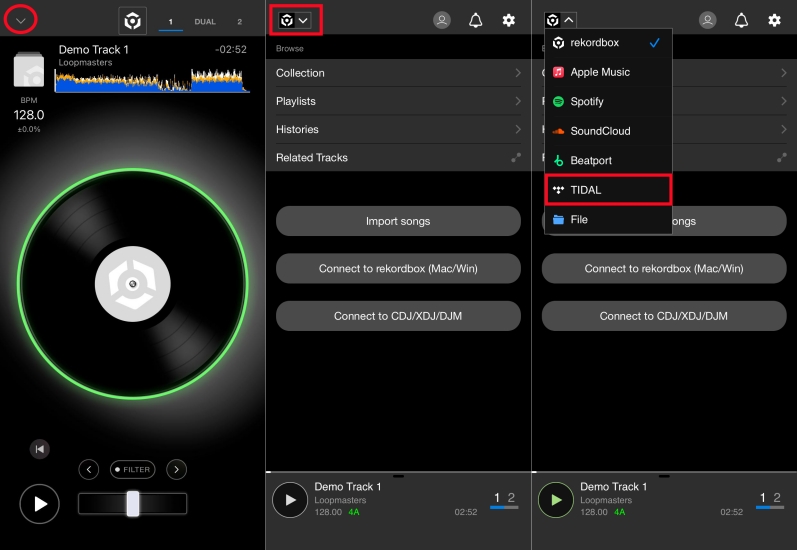
Step 1. Download and launch rekordbox on a phone.
Step 2. Tap the arrow icon, then tap the rekordbox icon.
Step 3. Select Tidal and enter your Tidal credentials to log in.
How to Log Out of Tidal on rekordbox:
To log out of Tidal on rekordbox, right-click on the Tidal icon in the tree view of the browser panel and then select Log Out. This will remove access to your Tidal music library, allowing you to log in with a different Tidal account.
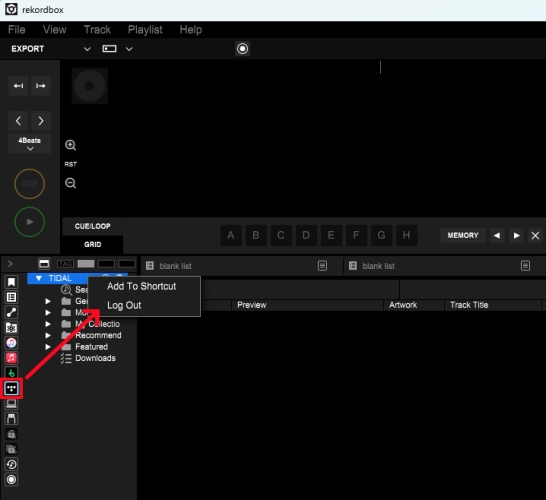
How to Use Tidal with rekordbox
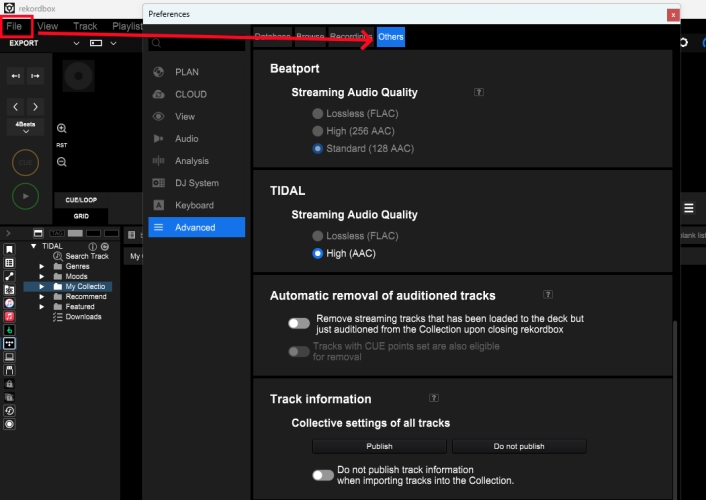
Step 1. After logging in, go to Files Preferences > Advanced > Others > Streaming.
Step 2. Choose between AAC for lower latency or FLAC for maximum fidelity.
Step 3. Go back to My Collection or Genres to browse and select music tracks to DJ.
How to Get Tidal rekordbox Offline
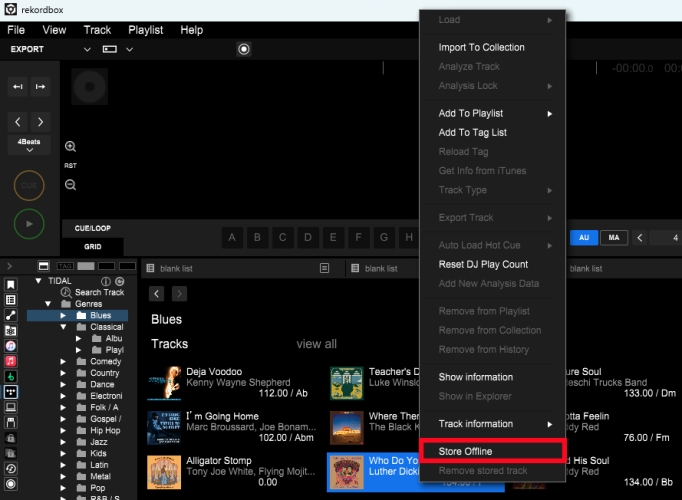
Step 1. In the Genres section, find and select any track to DJ offline.
Step 2. Right-click the track and select Store Offline.
Step 3. Wait to download and click the Downloads button to find the stored track.
Part 3. Workaround for Getting Tidal rekordbox Offline
Does Tidal work with rekordbox offline? One of the most searched questions by mobile and touring DJs is about the Offline Locker. Some applicable tracks on the Tidal tracklist can be stored for offline use in rekordbox, but the fact is that most Tidal tracks cannot be stored offline with the prompt of the Download error. It is a major point of frustration for many DJs that they cannot use many Tidal tracks within the rekordbox interface in Offline Mode.
3.1 Workarounds for Getting Tidal rekordbox Offline
For professionals who cannot risk a dropout, a common industry workaround involves preparing a local backup of your essential Tidal library. Tools like TunesMake Tidal Music Converter are frequently used for this purpose. It allows you to convert your Tidal playlists into high-quality FLAC, WAV, or MP3 files that live directly on your hard drive.
By using this tool to pre-download your must-play tracks, you can import them into rekordbox as local files. You can play them in Export Mode and use them without a subscription extension. And most importantly, this bypasses the need for an internet connection and ensures your most important transitions are bulletproof, regardless of the club's Wi-Fi quality.
| Features | Tidal DJ Extension | TunesMake Tidal Music Converter |
|---|---|---|
| Primary Purpose | Real-time streaming into DJ software | Convert Tidal tracks to local files for use |
| Connectivity | Require internet during the gig | Not need an internet connection |
| Cost | A standard subscription plus the DJ Extension ($19.99/month) | One-time purchase or monthly license ($14.99/month) |
| Output Formats | AAC or FLAC | MP3, FLAC, WAV, AIFF, M4A, M4B |
| Hardware Use | Limited to partnered DJ software | Work on all DJ software |
| Library Status | Tracks are rented (Loss of access if the subscription ends) | Tracks are yours to keep permanently |
| Metadata | Fully synced with Tidal servers | Preserve ID3 tags, artwork, and lyrics |
3.2 How to Download Tidal Tracks for rekordbox
rekordbox supports MP3, AAC, FLAC, AIFF, WAV, and ALAC audio files. To make Tidal tracks playable in rekordbox, use TunesMake Tidal Music Converter to download and convert Tidal music to MP3, FLAC, WAV, or AIFF. Once converted, these tracks function exactly like music bought from Beatport or Bandcamp.
TunesMake Tidal Music Converter –
Download Tidal music to computer without Premium
- Download songs, albums, playlists, and artists from Tidal without premium
- Convert Tidal music to MP3, FLAC, WAV, AIFF, M4A, and M4B losslessly
- Handle the conversion of Tidal music up to 25× faster speed and in batch
- Save a whole set of ID3 tags during the conversion process automatically
- Preserve the original audio quality up to HiRes FLAC or 320kbps MP3
Security Verified. 100% Clean & Safe.
Step 1 Import Tidal Songs to TunesMake
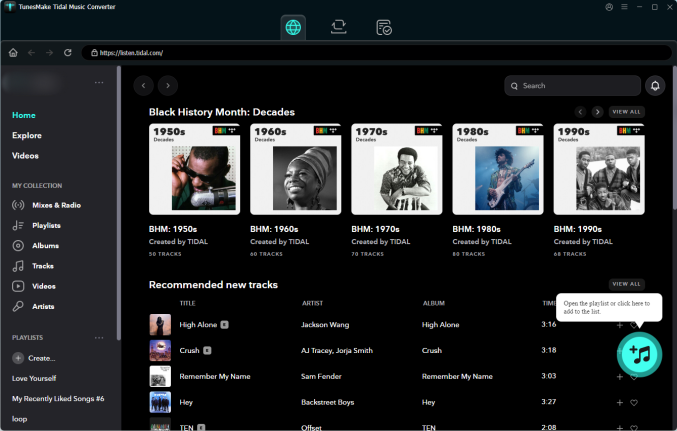
Start by opening TunesMake Tidal Music Converter on your computer, then log into the Tidal web player with your Tidal credentials. In My Collection, select any song, album, or playlist you want to download. Directly click the Add + button to add the target tracks into the conversion list.
Step 2 Set MP3 as the Output Audio Format
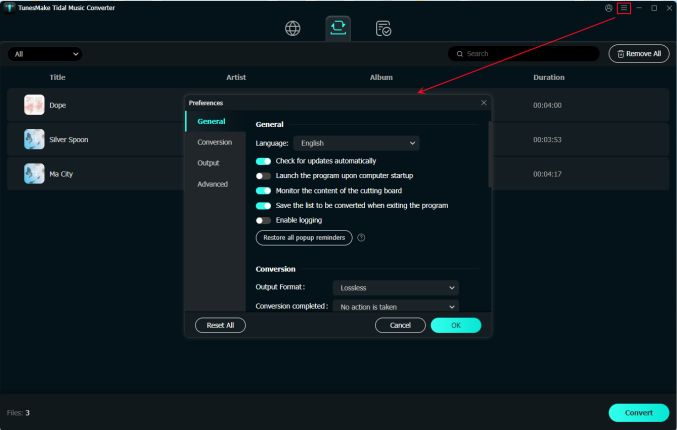
In the menu bar, click the Preferences button, then there will pop up a window where you can set the output format for Tidal. Here you can select MP3 as the output format and adjust the bit rate, sample rate, and channel. Later, save the settings by clicking the OK button.
Step 3 Download Tidal Tracks as MP3 Files
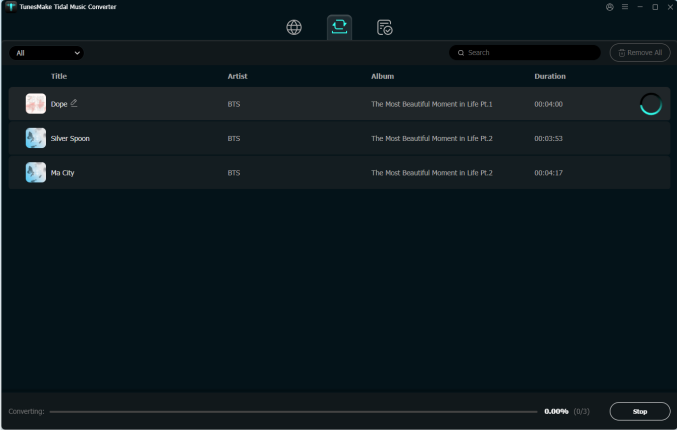
Click the Convert button to initiate the conversion of Tidal tracks to MP3. Then the software will save Tidal music as MP3 files to your computer. After conversion, you can view all the converted Tidal music in the history list by clicking the Converted icon on the top of the screen.
3.3 How to Add Tidal Local Files to rekordbox
Now you have get Tidal local music files, then you can import them into rekordbox for mixing. The process varies slightly depending on whether you are using a computer or a mobile device.
Import on Computer (Windows/Mac)
On a computer, you have two primary ways to bring your Tidal local files to rekordbox.
Option 1. Drag and Drop (Easiest)
Step 1. Open rekordbox in Export or Performance mode.
Step 2. Locate the folder of the converted Tidal music files on your computer.
Step 3. Highlight the music files or folders you want to add.
Step 4. Drag and drop them directly into the rekordbox Collection or a specific playlist you've created.
Option 2. Use File Menu
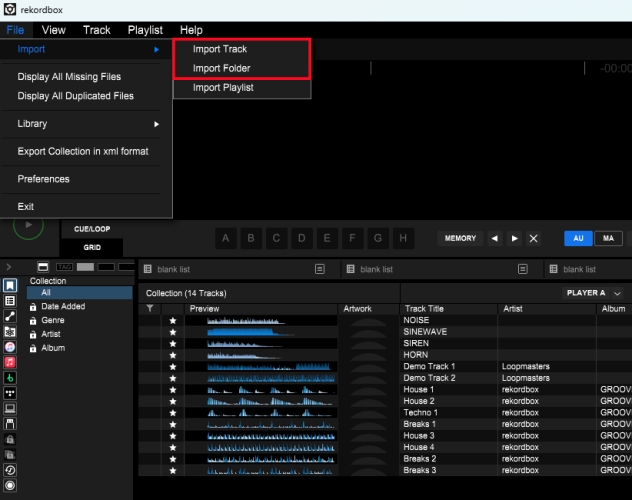
Step 1. In rekordbox, click File > Import, then select Import Track or Import Folder.
Step 2. Navigate to your music location and click Open.
Import on Mobile (Android/iOS)
The mobile app allows you to import files stored directly on your phone's internal memory.
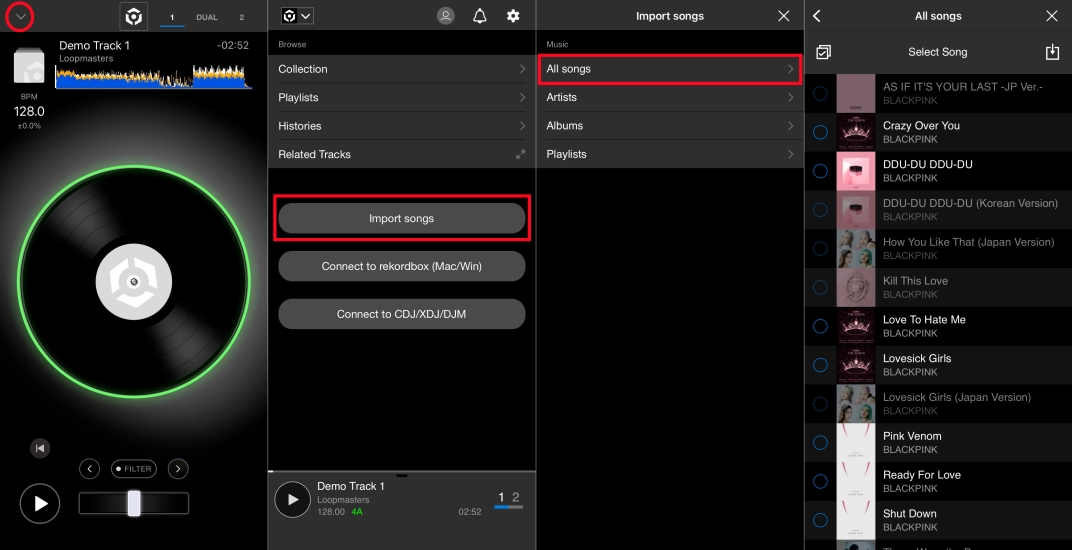
Step 1. Open the rekordbox app on your phone.
Step 2. Tap the arrow icon at the top left corner.
Step 3. Tap Import songs > All Songs to browse your phone's local folders.
Step 4. Choose the tracks you want to add into rekordbox.
Part 4. Troubleshooting Common Tidal rekordbox Issues
Without a doubt, there are many issues happening during the use of Tidal and rekordbox. No need to worry about, and here we have collected a lots of common issues between Tidal and rekordbox. Find the solutions to the issues you have encountered.
Login Failed or Subscription Errors
The most common cause of login issues is the Tidal DJ Extension. You must have the DJ Extension added to your Individual or Student plan. A standard Tidal subscription will no longer authenticate within rekordbox.
The Fix: Log into your Tidal account via a browser and verify the DJ Extension is active. If it is, log out of Tidal in rekordbox, restart the software, and log back in.
Browser Not Opening or Blank Login Window
rekordbox uses your system's default browser to authenticate. Ensure your default browser is updated. Chrome or Safari are recommended. But sometimes, the problem is related to the browser. In this case, clear cache in the browser.
The Fix: Open the Settings option and select Privacy and security. Then click Delete browsing data to clear your browser's cookies and cache specifically for tidal.com and rekordbox.com.
Audio Stuttering When Loading Tracks
Loading a high-res FLAC file from TIDAL while a deck is playing can cause a momentary glitch, especially in rekordbox 7. To resolve the issue, ensure that the Streaming Buffer is set to the maximum and the Radar Analysis is disabled.
The Fix: Go to Preferences > Advanced > Others and set the Streaming Butter to the maximum, caching more of the track before playback. Also, disable Radar Analysis in the Analysis tab.
Part 5. FAQs about Tidal Download Music
Can I use Tidal offline on rekordbox?
Yes, but you can only select the applicable tracks on the Tidal tracklist to download for offline playback. And some Tidal tracks cannot be stored offline. To get full Tidal rekordbox offline, you can use TunesMake Tidal Music Converter to download and convert Tidal music tracks as local files. Then you can import them into rekordbox for use offline anytime and anywhere.
Which countries can Tidal be used in rekordbox?
The Tidal service is available in many countries, including the United States of America, United Kingdom, Sweden, Singapore, France, Canada, and more. To check all the countries that support Tidal on rekordbox, go to the official Tidal website.
Why doesn't rekordbox show some tracks displayed on Tidal?
It is noticed that you must have an active Tidal subscription and the DJ Extension to access Tidal on rekordbox. If some tracks cannot be displayed properly, you should check your subscription first. Additionally, some certain tracks on Tidal are restricted due to copyright. Thus, you cannot find them shown on rekordbox.
Is Tidal free trial subscription available for using rekordbox?
Yes, you can get a Tidal free trial subscription to mix your preferred Tidal songs on rekordbox. Once your free trial ends, consider using a Tidal downloader lik TunesMake Tidal Music Convert to download your liked tracks without a Premium subscription. Then you can mix and edit them on rekordbox, even when offline.
Part 6. Conclusion
In a nutshell, rekordbox allows you to access and manage music from Tidal on multiple devices. With an active Tidal premium subscription plus the DJ Extension, you can connect your Tidal account to rekordbox for use online. But if you don't have neither a paid Tidal subscription or the DJ Extension, you can download Tidal music with TunesMake Tidal Music Converter. Then can you can not only worry about the subscription to Tidal but also use Tidal with rekordbox offline.
Related Articles

A senior editor from TunesMake, dedicated to sharing professional tutorials and solutions of software, movies, and music.
- 1
- 2
- 3
- 4
- 5
- 6
- 7
 Leave Your Comment
(0)
Leave Your Comment
(0)

 Download Center

