







 Store
Store


Choosing the right music streaming platform is essential to how you experience your favorite tunes. Spotify and SoundCloud are two of the most popular music streaming platforms in the world. Both of them provide millions of songs and diverse audio content, but their core features, user experience, and target audiences are different. Many audiophiles wonder which one is better for music enjoyment. If you are still hesitating and don’t know how to make a choice, this post can give you a hand. By analyzing these 2 platforms and comparing them in detail, this post will let you have a better understanding of them and find the one that meets your needs. SoundCloud vs Spotify, which meets your requirements better? Find the answer in the following content.
Part 1. Overview of SoundCloud and Spotify
Spotify
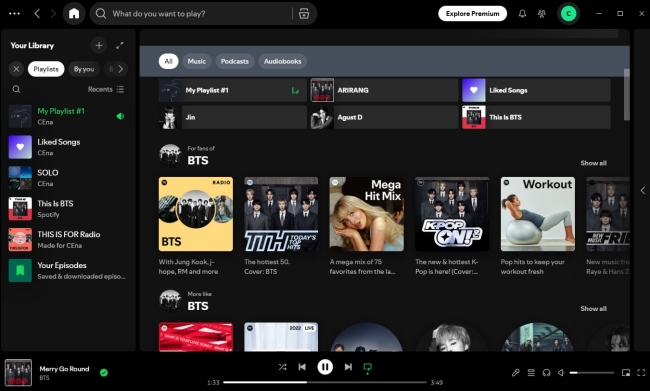
Spotify is a Swedish audio streaming and media service provider. It is the undisputed king of commercial music streaming, providing over 100 million tracks, 7 million podcasts, over 500,000 audiobooks, and various personalized playlists. Thanks to Spotify’s extensive cooperation, you can access Spotify on almost all kinds of devices. As of the fourth quarter of 2025, Spotify has 290 million Premium playing subscribers globally and a total of 751 million monthly active users. For users who are a beginner who are looking for a music platform, Spotify can be your first choice.
-
Pros
- Large-sized music library and diverse content
- Free users can access all tracks
- Offer music with high sound quality
- Available on most devices
- Easy to use
- User-friendly and concise UI design
- Many social features like Spotify Jam
- Don’t allow to play music on 2 devices at once
-
Cons
- Ads with Spotify Free account
- Offline listening limitations
- Lack of music from independent or lesser-known musicians
- Listening limitations in some regions
SoundCloud
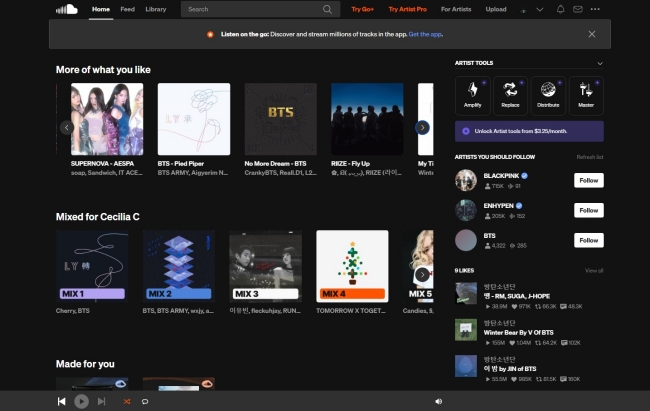
SoundCloud is also a popular online music streaming and sharing platform. But it was built from the ground up as a platform for creators. Most music lovers describe it as the YouTube for audio because it allows anyone to upload and share originally created sounds, such as music tracks, podcasts, spoken word, and more. Until now, it has become a vibrant community of creators and listeners from around the world. If you prefer discovering indie music or underground mixes, SoundCloud is the go-to option.
-
Pros
- Offer diverse content except for mainstream music
- Direct engagement between fans and artists
- Creators have more flexibility
- Provide personalized recommendations and curated playlist
- Have community features where users can share and discover music
-
Cons
- It’s hard for creators to earn income
- Limited music library
- Mediocre audio quality compared to other streaming platforms
- Listening limitations for free users
Part 2. Detailed Comparison: Spotify vs SoundCloud
If you already have a basic understanding of Spotify and SoundCloud, you can dive into this part to explore the main differences between them. We will focus on aspects like music library, sound quality, price, original features and functionalities, and availability. After reading this post, it will be easier for you to find the best music service depending on your personal situation.
| Spotify | SoundCloud | |
|---|---|---|
| Operating System | Android, iOS, Windows, Mac, and Linux | Android, iOS, and Windows |
| Music Library | Over 100 million songs | Over 400 million songs |
| Max Sound Quality | Up to 320 kbps | Up to 256 kbps for Go+ subscribers. |
| Music Format | Ogg Vorbis/AAC | AAC |
| Price | From $6.99 to $21.99 per month | From $4.99 to $19.99 per month |
| Free trial | 30 days | SoundCloud Go: 7 days SoundCloud Go+: 30 days |
| Free Tier Experience | Ad-supported and limited skips. | Ad-supported and access to millions of free uploads. |
2.1 Music Library Size
Spotify
It’s undeniable that Spotify’s music library stands as one of the most extensive in the world, boasting over 100 million tracks. Spanning a plethora of genres, from pop to classical, jazz to rock, Spotify caters to every musical taste imaginable. Whether you’re seeking mainstream hits or niche gems, Spotify offers a comprehensive array of options, ensuring a fulfilling experience for all music lovers. In addition, for users who don’t know what to listen to, Spotify provides many curated playlists and featured charts as recommendations. Except for music, you can also find numerous podcasts and audiobooks on Spotify.
SoundCloud
SoundCloud’s music library is one of the largest repositories of user-generated music and audio content. Since it is much easier to upload songs on SoundCloud than on Spotify, SoundCloud may have more music tracks than Spotify. But most of them can be low-quality content. While SoundCloud may not boast the extensive catalog of mainstream music found on Spotify, it’s a good platform to discover budding artists and musicians.
2.2 Music Sound Quality
Spotify
Spotify offers varying audio quality options based on your Spotify plan. If you are a Spotify Free user, you can get up to 160kbit/s. For Spotify Premium users, the maximum sound quality can be approximately 320kbit/s. You can adjust the audio quality to Low, Normal, High, or Very High(Premium users only) according to your needs. When it comes to sound quality, Spotify takes the lead by offering superior audio fidelity.
SoundCloud
Normally, SoundCloud offers audio quality ranging from 64kbps to 256kbps. But not all tracks are available to stream in High Quality and only subscribers can access the High Quality music. Also, the audio quality can be affected by the original upload quality by the artist and the compression applied to the audio file. Compared with Spotify, SoundCloud may have a lower music quality. You will encounter a range of qualities across different tracks.
2.3 Plan & Price
Spotify
Spotify has the ad-supported free plan and the premium plan which contains more features. Depending on your situation, you can choose a different plan. To meet the various needs of different users, Spotify even offers many premium options for you to choose from, including Premium Individual, Premium Duo, Premium Family, and Premium Student. With one Spotify Premium subscription, you can enjoy ad-free music listening. More so, you are allowed to download music to play offline, play songs in any order you like, get high audio quality, listen with friends in real-time, organize a listening queue, and more. When you are not sure whether the Spotify Premium subscription is worth it, you can get a free trial of Spotify to have a try.
| Individual | Duo | Family | Student |
|---|---|---|---|
| • 1 Premium account • $12.99/month |
• 2 Premium account • $18.99/month |
• Up to 6 Premium accounts • $21.99/month • Control content marked as explicit |
• 1 verified Premium account • $6.99/month |
SoundCloud
SoundCloud also has a free version and a paid version. Most people are accustomed to using the free version of SoundCloud. You can get vast amounts of music with ads. If you want to remove the ads or download music for offline playback, you can consider subscribing to SoundCloud Go and SoundCloud Go+. They both ensure your ad-free and offline music listening. But only the SoundCloud Go+ members can access the full catalog and High Quality audio. Not sure which subscription is better? Then, just get a free trial to try it out.
| SoundCloud Go | SoundCloud Go+ |
|---|---|
| • Ad-free listening • Download tracks for offline listening • $4.99/month • 7-day free trial for new users |
• Ad-free listening • Download tracks for offline listening • High quality audio • Mix music with select DJ apps • Contribute to fan-powered royalties that directly support artists • $9.99/month • 30-day free trial for new users |
2.4 Music Discovery
Spotify
Spotify has rolled out numerous features designed to enhance your music discovery experience. Based on its advanced algorithm, Spotify curates personalized playlists, such as Discover Weekly, which introduces you to new tracks every Monday. Additionally, the Daily Mix playlists offer a seamless way to uncover music tailored to your tastes. Spotify’s Release Radar also keeps you updated on new releases from artists you enjoy, ensuring you never miss out on something you’ll love.
For those who have no idea about what music to listen to, Spotify provides invaluable assistance through its robust search feature. When you enter the search section on the Spotify app, you will find that Spotify classifies music to different genres and moods. As a result, it’s a piece of cake for you to find something that resonates with your preferences. The best thing about Spotify is that it will give a yearly review about all the songs you listened to over the past year, like Spotify Wrapped.
SoundCloud
The algorithm of SoundCloud is not as complicated as Spotify’s but it also provides personalized music recommendations for users on the Daily Mix playlists section and the artist station section. Just like Spotify, SoundCloud also allows you to create and save favorite songs as a playlist on your music library, but this service lacks some advanced features of Spotify. If you are more into music and podcasts from independent artists, then SoundCloud can be your best choice.
2.5 Compatibility and Availability
Spotify
Spotify is easy to access via its official app and web player. You can download Spotify on your iOS, Android, Windows, and Mac devices for use. Spotify web player is also available on most platforms, including Chrome, Firefox, Edge, Opera, and Safari. Furthermore, Spotify has official integration with many brands and devices. You can get a special Spotify app version on some cars, smart TVs, game consoles, smartwatches, and more. Even if your device does not have a Spotify app, you can access your preferred music on it with the Spotify Connect feature. More wireless connections like Bluetooth, Apple AirPlay, Chromecast, Google Assistance, and more are all compatible with Spotify.
Spotify now already provides its service in most countries and regions around the world. You can check Spotify support page to see where you can sign up for Spotify.
SoundCloud
SoundCloud also has iOS and Android apps. You can download its app on your mobile phone from the App Store or the Google Play Store. If you want to listen to SoundCloud on your desktop, there is a valid desktop app as well. But its web player can only be used in Chrome, Brave, and Edge. You can access SoundCloud service on different devices, but it is not that smooth like Spotify.
SoundCloud is now current available on most countries, including the United States, Canada, the United Kingdom, Ireland, France, Germany, the Netherlands, Belgium, Italy, Portugal, Spain, and more. The government of Turkey and Russia blocked access to the SoundCloud service.
Part 3. How to Save Spotify or SoundCloud Music Forever
After reading the comparison above, you now have a better understanding of Spotify and SoundCloud. You can choose the one you like and start to enjoy your music experience. However, you should know that even with a Premium subscription, Spotify and SoundCloud places strict DRM protection on your downloaded songs. This means that you will lose all your downloads once your subscription expires. If you want to save your favorite Spotify or SoundCloud songs permanently, a powerful third-party music downloader is indispensable.
How to Download and Save Spotify Songs Forever
TunesMake Spotify Music Converter is a useful and versatile music converter designed for Spotify Free users and Premium users. It can easily remove the DRM protection of Spotify music and save it locally on your computer. With the TunesMake program, you can download Spotify songs, playlists, albums, and podcasts as local music files in diverse formats, like MP3, WAV, FLAC, AAC, M4A, and M4B. That is to say, you are able to keep the music forever without worrying it will expire and play it on other players or devices as you wish. It ensures your music enjoyment by maintaining the original high sound quality and ID3 tags.

TunesMake Spotify Music Converter –
Best Downloader for Keeping Spotify Songs Forever
- Unlimitedly download Spotify songs, playlists, and podcasts
- Losslessly convert Spotify music to MP3, FLAC, WAV, AIFF, etc.
- Remove ads from Spotify music tracks even with Free accounts
- Convert Spotify songs at 12X faster speed with ID3 tags kept
Security Verified. 100% Clean & Safe.
Step 1
Drag and drop music from Spotify to the TunesMake program
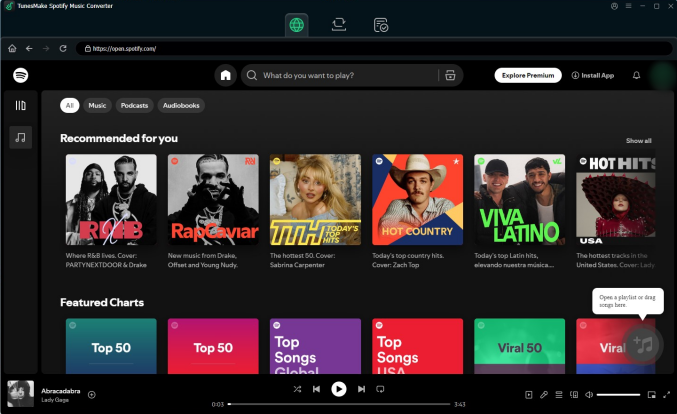
TunesMake Spotify Music Converter can be downloaded easily on your Windows or Mac computer via the Free Download button above. After installing it on your desktop, you should launch it and visit the Spotify web player in its interface. Now, select the playlist or album you want to save offline, and then click the Add icon at the bottom of the TunesMake program. When all the songs are listed, you can load them to the conversion list via the Add to List button.
Step 2
Adjust the audio output settings
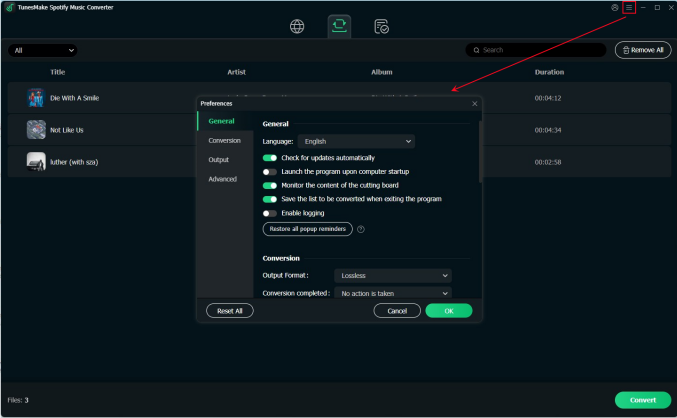
Click the menu icon at the top right and choose Preference. Then, switch to the Conversion tab, where you have the ability to adjust the audio settings depending on your needs. Choose the music format you want, then decide on the audio channel, bit rate, and sample rate. When you finish, click the OK button to save your changes.
Step 3
Begin downloading Spotify freely
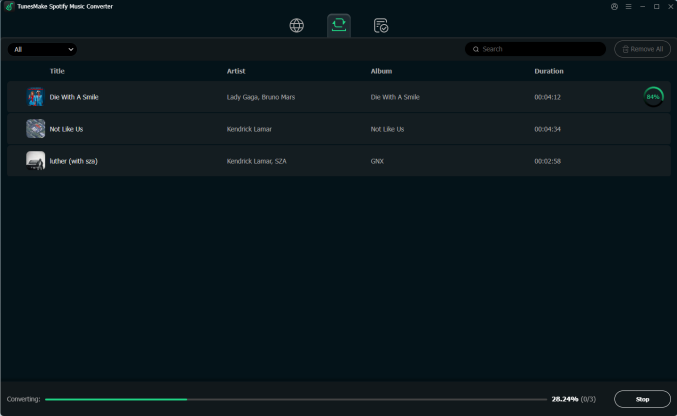
Now everything is ready. With one simple click on the Convert button, the TunesMake program can start to download the music you like. Wait for a while, then you can click the Converted icon to check the files on your computer. Feel free to transfer them to other players and devices for offline playing.
How to Download SoundCloud Songs Locally
For users who prefer SoundCloud songs, the best tool to save SoundCloud songs to local files is the TunesMake Streaming Audio Recorder. It is a popular music downloader and converter among all music lovers. With its advanced technology, you can easily download music tunes from SoundCloud to your local computer and convert them to other audio formats without quality loss. For example, you can choose from MP3, M4A, M4B, WAV, FLAC, and AIFF. In addition, the TunesMake program supports customizing the audio settings. According to your demands, you can reset the audio quality, channel, bit rate, sample rate, and more.

Streaming Audio Recorder –
Best SoundCloud Music Downloader
- Unlimitedly download streaming music songs, playlists, and podcasts
- Losslessly convert streaming music to MP3, M4A, M4B, WAV, FLAC, and AIFF
- Remove DRM protection from many streaming music platforms
- Convert streaming songs with original sound quality and ID3 tags kept
Security Verified. 100% Clean & Safe.
Part 4. Summary
SoundCloud vs Spotify, which one is better for you? Well, it depends on your requirements and personal situation. Determining what type of listener you are and what type of music you like can help you find a suitable platform for you. If you are a full-time music junkie and like most popular music, Spotify is your best choice. Its large music library and high-fidelity music ensure your music experience. Although Spotify and SoundCloud may put some limitations on the downloading feature, you can break them by using the TunesMake Spotify Music Converter and the TunesMake Streaming Audio Recorder to download your favorite music with ease.
Related Articles

An experienced freelance writer at TunesMake, specializes in using various streaming services from Spotify, Apple Music, to Amazon Music, and more other platforms.
- 1
- 2
- 3
- 4
- 5
- 6
- 7
 Leave Your Comment
(0)
Leave Your Comment
(0)

 Download Center

