








 Store
Store


Each year, millions of Spotify users look forward to the release of the Spotify Wrapped report. Well, the wait for this year is over! Spotify Wrapped 2025 has finally been released. You can now check this personalized summary of your 2025 music journey. In Spotify Wrapped 2025, there are several exciting new features and improvements coming. In this guide, we will walk you through everything you want to know about Spotify Wrapped 2025, including what’s new on it, how to find your Wrapped report, what to do if you can’t see your Wrapped, and how to save your Spotify Wrapped playlist forever. Without further ado, let’s get started!
Part 1. What’s New on Spotify Wrapped 2025
Spotify introduced the Wrapped campaign in 2015, and each year, we eagerly anticipate its arrival. Every year, Spotify will introduce a main topic or feature that defines this year’s social sharing. For 2025, it’s all about your Listening Age. Nowadays, Spotify has transformed from a simple data summary into an engaging experience. Let’s see what’s new on Spotify Wrapped this year.
What You Can Get on Spotify Wrapped
If you are new to Spotify, it’s essential to figure out what you can get on your Spotify Wrapped report. Spotify will offer the following classic features, giving you a deep look into your music journey over the past year.
The Minutes Listened
This section shows how may time you have spent listening to Spotify music, podcasts, and audiobooks.
Top Songs Playlist
Spotify collects your listening history and displays the top songs that you’ve listened to most. Then, it automatically formulates a personalized Your Top Songs 2025 playlist.
Top Artists
Here you can check the top five artists you played most over the past year.
Your Artist Clip
Spotify collaborates with many artists, sending you a thank-you message from one of your top artists. Clips include artists like Bad Bunny, Chappell Roan, Sabrina Carpenter, and many more.
Top Podcasts
It shows your top five podcasts in 2025.
What’s New on 2025 Wrapped
Except for classics, Spotify also releases some brand-new features in 2025, which bring more fun to how you explore your listening habits. Let’s have a look at what’s in store.
Listening Age
Undoubtedly, it is the most talked-about and fun feature released in 2025, Spotify Wrapped. Listening Age analyzes the years of the music you played in 2025, and then estimates the era your music taste belongs to. For example, if you have listened to a lot of early-2010s music, your listening age may be around 30. If your favorite tracks primarily date back to the early 1990s, your listening age will skew older, regardless of your real age. It’s a playful way to dive into whether your musical preferences are nostalgic or contemporary.
Clubs
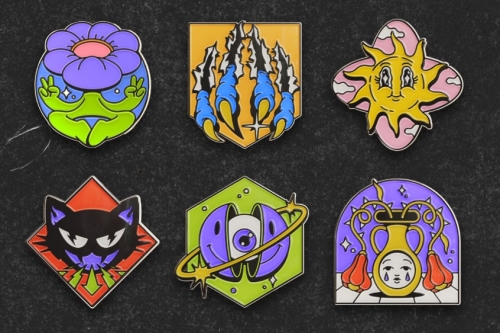
It is known that music tracks on Spotify can be tagged with different descriptors, for example, heartbreak or yearning. The Clubs feature will capture the emotional qualities of your favorite music in 2025, including the moods, genres, and musical terms. According to these terms, Spotify divided users into six different Clubs. Each Club represents a unique listening style.
Then, you can join your Club to see how your music preferences compare to those of others in the Club. Moreover, Spotify calculates a score based on your music streams and determines your “role” in the Club. Here are some available roles:
Leader: This role means your listening history is aligned with the club’s values. You are a perfect role model.
Archivist: Your listening brings you deep into past eras. So, the club history will never fade.
Collector: Users whose role is collector means they often save music to their library and have a large music collection.
Loyalist: If you get this role, it means you rarely skip tracks. You have shown your dedication to the club.
Broadcaster: You listen to podcasts more than others on your Club.
Scout: You often listen to the freshest and newest music tracks, helping your club to push forward.
Curator: You always focus on curating new playlists, combining the best songs of your club into mixes.
Recruiter: You often share music with others and keep attracting new members to your club.
Supporter: You are a loyal fan of your favorite artist, ensuring the artist’s vocals can be heard around your club.
Specialist: You prefer exploring and discovering new music and experimental sounds.
Wrapped Party
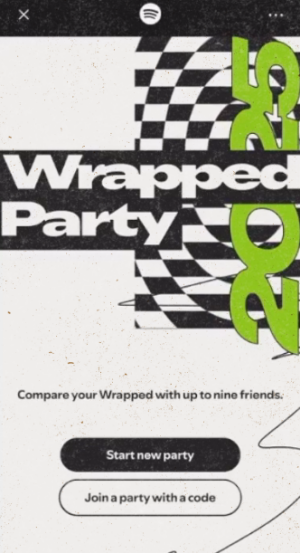
Wrapped Party is a fun, interactive feature released in Spotify Wrapped 2025. You can host a Party and invite up to nine friends to join. Then, through the Wrapped Party, your listening data becomes a live competition you can play with your friends. Also, it makes your music experience more immersive, as you can enjoy the community vibe with friends or other listeners. Besides, these features reveal several stats, like who was "Most Obsessed" with their top artist, who had the "Rarest Listen," and so on.
Note
To be eligible to access Wrapped Party, you must be aged 13 or older. Also, you must have listened to 30 valid streams across five or more artists.
Fan Leaderboard
This feature is for truly dedicated listeners. The Fan Leaderboard will track how you compare to other fans of your favorite artist based on your total minutes listened, showing recognition for your devotion to an artist. If you see this feature (it is not available for every listener), it means you have cracked the top percentile.
Listening Archive
This feature is a personalized snapshot, covering several significant listening days through the year, such as your Biggest Discovery Day, your Highest Energy Day, your Biggest Listening Day, and so on. This unique report is powered by AI. Spotify will first map your listening to its menu of special days, and then pick up to five of the best days. By focusing on specific dates and moments, Listening Archive makes your entire listening journey a personal music diary. You can have a more emotionally resonant yearly recap.
Part 2. How to Find Spotify Wrapped on Desktop/ Mobile Devices
Spotify Wrapped for 2025 has dropped on December 3, 2025. It is available for all Spotify Free and Premium users as long as you have listened to music on Spotify this year. Whether you are using Spotify on your mobile phone or desktop, you can easily find your Wrapped report. Here’s how to:
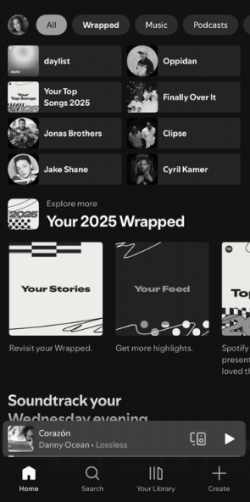
Step 1. Open the Spotify app or visit the Spotify web player on your mobile phone or computer. Then, sign in to your account.
Step 2. Head to the Home section, and you can see the Spotify Wrapped 2025 banner. Tap it, and then you can check your Wrapped report.
Step 3. For users who are using the mobile Spotify app, you can also tap the top Wrapped filter to find your Wrapped.
Step 4. When there is no Wrapped banner on your Spotify app, you can try to search for “Wrapped 2025” via the top search bar.
Step 5. If you want to keep your top songs, just tap the Add button to save Your Top Songs to your library. Then, you can access it anytime you want.
Part 3. How to Save Your 2025 Wrapped Playlist Forever
Spotify Wrapped offers a unique glimpse into your music year, but once the year ends, the interactive Wrapped report may disappear from your homepage. If you want to keep your 2025 Top Songs playlist preserved and ensure you can enjoy your Wrapped playlist anywhere, anytime you want, you need to take a proactive step. That is to download your Wrapped playlist locally. This is a true preservation since it convert the digital stream into a versatile file format that is independent of the streaming platform.
To create a backup of your Wrapped playlist, you will need the help of the TunesMake Spotify Music Converter. TunesMake Spotify Music Converter is a professional music converter designed for all Spotify users. It can help users download Spotify songs, playlists, albums, and podcasts to MP3, M4A, M4B, WAV, FLAC, and AIFF. This allows you to keep your top songs in a high-quality file format that you can play on any media player or device, even without the Spotify app. The best thing about this tool is that TunesMake allows you to personalize the audio settings as you wish. You don’t need to worry about your listening experience.

TunesMake Spotify Music Converter –
Save Spotify Wrapped Playlist Locally
- Unlimitedly download Spotify songs, playlists, and podcasts
- Losslessly convert Spotify music to MP3, FLAC, WAV, AIFF, etc.
- Remove ads from Spotify music tracks even with Free accounts
- Convert Spotify songs at 12X faster speed with ID3 tags kept
Security Verified. 100% Clean & Safe.
Step 1
Add Spotify Wrapped 2025 Playlist to the TunesMake Software
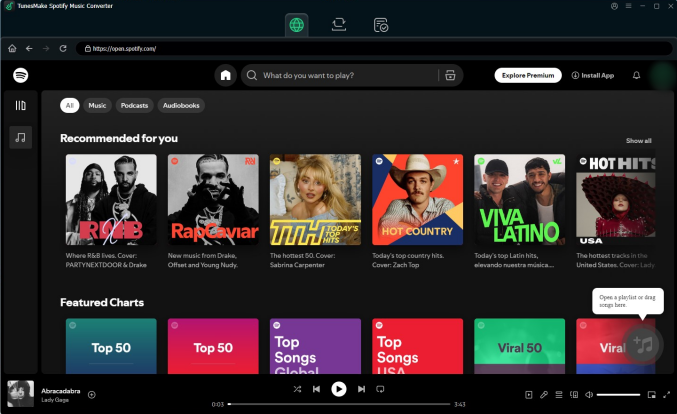
Install and launch the TunesMake Spotify Music Converter on your computer. Then, you can sign in to your Spotify account. You need to save your Wrapped playlist to your library first. Then, you can enter the detailed page of this playlist, and click the lower Add icon. When it pops up a new window, you can pick all the songs you like and load them to the TunesMake software by clicking Add to List.
Step 2
Personalize the Output Audio Settings
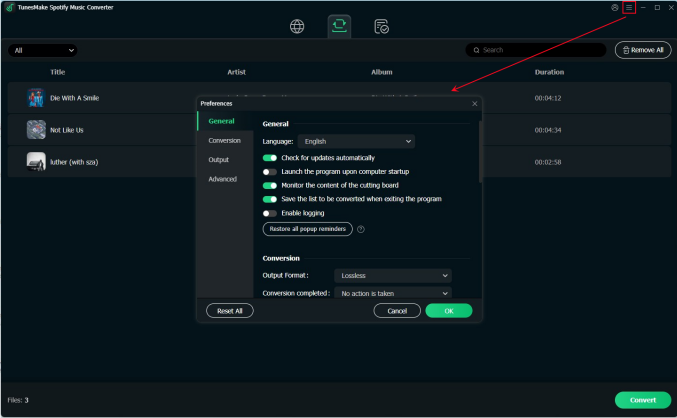
Once you have loaded all your top songs, it’s time to set the audio settings according to your needs. Click the top Menu icon at the top right corner. Then, select Preferences > Conversion. Here, you can select one output format. If you want to have a better listening experience, you can also change other parameters like channel, bit rate, sample rate, and so on. Don’t forget to click OK to save your changes.
Step 3
Download the Wrapped Playlist to Keep Forever
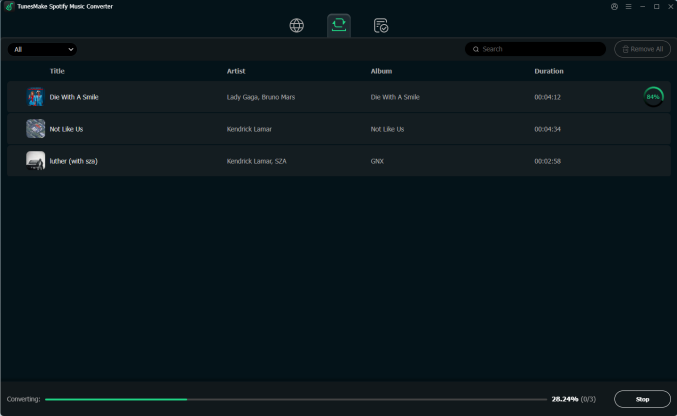
Now, you are fully prepared! Click the Convert button in the lower right corner. Then, the TunesMake software will begin downloading all your 2025 top songs automatically. You just need to wait for a while, and you can check the downloaded files by clicking the Converted icon at the top. Feel free to listen to the downloads on any device you want.
Part 4. FAQs about Spotify Wrapped
What day will Spotify Wrapped come out?
Spotify Wrapped is usually released in late November or early December each year. Spotify Wrapped 2025 has already been released on December 3, 2025.
Can I see my Spotify Wrapped if I don’t have a Premium account?
Absolutely, yes. Spotify Wrapped is available for both Spotify Premium and Free users. The only requirement to get your Wrapped report is meeting the minimum listening eligibility, such as at least 30 songs for over 30 seconds each, listening to at least 5 different artists, and so on.
Will my Wrapped playlist disappear?
Your Wrapped playlist won’t disappear after the end of the year. When the Wrapped event concludes, it may not be featured as prominently in the Spotify app. But the interactive stories will vanish after a few weeks. If you want to ensure you don’t lose your playlist, you can utilize the TunesMake Spotify Music Converter to download your playlist locally for unlimited offline playback.
Can your Spotify Wrapped be wrong?
Spotify Wrapped is based on your actual listening data, but it is not 100% accurate because of a mid-November data cut-off, background listening, short songs counting as full plays, and more.
Conclusion
Spotify Wrapped 2025 offers a lot of new features, making it a great and enjoyable way to reflect on your year in music. Whether you are discovering your most-played songs, playlists, and podcasts, sharing your Wrapped with friends, or troubleshooting issues, this comprehensive guide has you covered. Don’t forget to save your favorite Wrapped playlist forever via the TunesMake Spotify Music Converter. Once done, you can play your 2025 favorite songs offline on any device without hassles.
Related Articles

A senior editor from TunesMake, dedicated to sharing professional tutorials and solutions of software, movies, and music.
- 1
- 2
- 3
- 4
- 5
- 6
- 7
 Leave Your Comment
(0)
Leave Your Comment
(0)

 Download Center

