








 Store
Store


Music plays a big part in our lives, and with the rise of music streaming, it’s easier than ever to enjoy the songs we love. Spotify, as one of the most influential music streaming platforms, has exploded in popularity in recent years, offering more choices for us to search for the music we love. The downside of Spotify, however, is that it doesn’t allow free users to listen to songs offline. In this case, all kinds of Spotify playlist downloaders have come into being. If you are looking for a Spotify downloader, spotDL Spotify downloader is a good choice. With spotDL, you can find your liked Spotify songs on YouTube Music and download them online for free. If you want to know more about spotDL and are curious about whether it is safe to use in 2026, you should keep an eye on this post, a complete review of spotDL. Here, you can learn what spotDL is, its key features, pros and cons, how to use it, and the best alternative when it is not working.
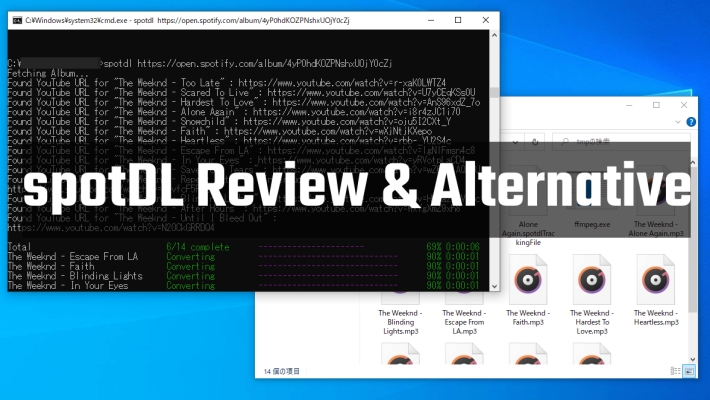
Part 1. What Is spotDL?
spotDL is a command-line music downloader that helps users find songs, albums, and playlists from Spotify on YouTube Music and download them for offline listening and personal use while preserving the album art, lyrics, and metadata. It is written in Python and supports different operating systems, including Windows, macOS, and Linux. It is a completely free and open-source tool, meaning that anyone can use it without any strings attached.
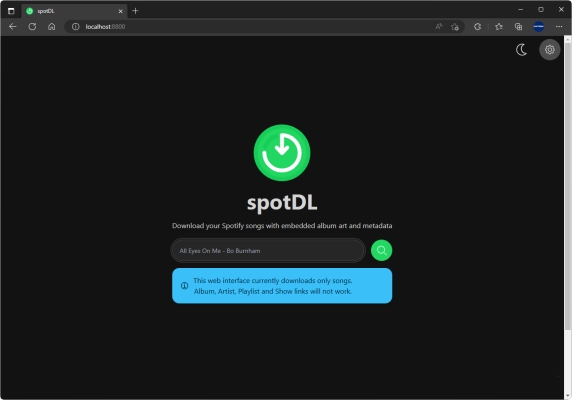
Key Features of spotDL
Download Spotify Music for Free
spotDL is an open-source tool whose source code is freely available to anyone. It enables all users to download their desired Spotify music via the YouTube platform. This helps Spotify free users listen to Spotify music offline without Premium subscriptions.
High Compatibility with Operating Systems
spotDL is a cross-platform tool compatible with several operating systems, such as Windows, macOS, and Linux. As a result, users can choose their preferred platform to use the tool no matter what operating system their computers run.
Enable High-Quality Audio Download
spotDL downloads songs at a bit rate no higher than 128kbps. However, it allows YouTube Music Premium subscribers to download songs in the M4A format at a 256kbps bit rate.
Several Popular Audio Formats Available
To get the best compatibility across different platforms and players, files can be downloaded in MP3 format and other output formats like M4A and OPUS are also supported for high audio quality.
Designed with a Commend-line Interface
It has a command-line interface that allows users to interact with the tool using text commands. This feature is pragmatic for people who are comfortable with using the command line.
Original Metadata Information Preserved
spotDL retrieves metadata for downloaded Spotify tracks, including artists, album art, track titles, lyrics, and more.
Pros and Cons of spotDL
-
😀Pros
- Download tracks, albums, and playlists from YouTube for free
- Compatible with Windows, macOS and Linux operating systems
- Support several popular audio formats like MP3, M4A, and OPUS
- Preserve downloaded music with ID3 tags and metadata information
-
☹️Cons
- Save music in low audio quality at only 128kbps bit rate
- Not really download and save music from Spotify
- A bit complex for starters to use
Part 2. Is spotDL Safe and Legal to Use?
When it comes to downloading any third-party software, users usually care about safety and legality most. So, users also want clear answers about whether spotDL is safe and legal to use in 2026. Read this part to understand the risks, so you can decide if spotDL fits your needs or not. For users who are looking for a 100& safe tool, we suggest you directly jump to Part 4 for the best alternative tool to spotDL.
Is spotDL Safe?
To make it clear first, spotDL is usually safe from viruses, but with a major warning. The spotDL itself is an open-source project, which means its original code is available for review. When you download the software from its official repository, it is considered safe. However, there are still potential safety concerns. You should avoid downloading the spotDL.exe file or the modded version from third-party software download sites. Many scammers may package the open-source code with malware. So, make sure to always stick to the official GitHub source.
Is spotDL Legal?
With regard to the legality issue, spotDL exists in a gray area. The legality of grey largely depends on how and where you use it. Because it retrieves and rips music from external sources like YouTube rather than Spotify directly.
In general:
- Downloading copyrighted music with a valid Premium subscription in the app is fully legal
- Downloading copyrighted music from Spotify through third-party tools violates its Terms of Use and may violate copyright laws in some regions
- Distributing and spreading copyrighted songs is usually illegal
To sum up, in most countries and regions, downloading streaming content for personal offline use only is tolerated, but distribution is strictly illegal. Understanding these boundaries helps you avoid legal issues and ensures responsible usage. If you still worry about this issue, it’s always wise to review local laws and platform policies before using any downloader.
Part 3. How to Install and Use spotDL for Downloading Music
Before you install spotDL, make sure you have already installed Visual C++ Redistributible and proceed to install Python and FFmpeg. According to spotDL’s official website, installing spotDL to your Windows via Python is recommended. The installation process for spotDL is comparably straightforward but can be challenging for those unfamiliar with computer operations. Here, we will show you how to install and use spotDL.
How to Install spotDL on Windows Computers
Step 1. Firstly, install Visual C++ 2019 redistributable on your computer.
Step 2. Install Python 3.7 or above on your PC.
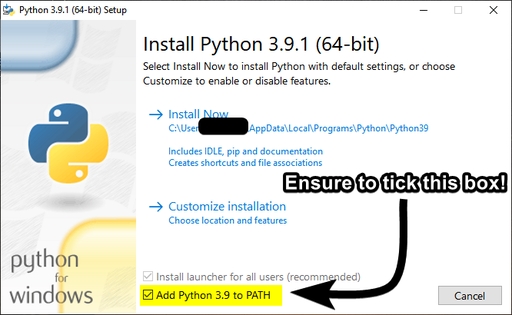
Step 3. Once installed Python, ensure to select “Add to PATH“.
Step 4. Open a terminal and install spotDL by running pip install spotDL.
How to Make spotDL Download Playlist from Spotify
Step 1. Firstly, open your browser and visit spotDL on Git Hub.
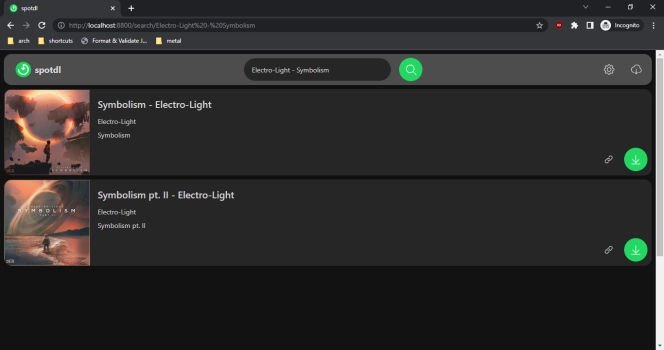
Step 2. Then type the songs, albums, artists, or playlists in the search field.
Step 3. Click on the Search button and a list of related results will be displayed below, just choose the music resource you want and click on the Download button, and spotDL will add the selected music resource to the download list.
Step 4. Click on the Cloud button in the upper right corner, and the download list will be opened.
Step 5. Finally, click on the Download button and the music will be downloaded in file as MP3 format.
SpotDL automatically downloads song files to the folder where spotDL is running. Open the folder you run spotDL, then you will find the songs you downloaded in it.
Part 4. Best Alternative to spotDL [Safer& More Reliable]
While spotDL is an excellent tool for downloading Spotify music for free, it still has its limitations. For instance, its output Spotify music is of low audio quality, and it can only be used on a computer. Also, many users found that spotDL is complicated to use, especially for users unfamiliar with command-line tools. Most importantly, it does not support users to directly download music from the Spotify app, and podcasts and audiobooks are not available for download. If you are looking for an alternative, TunesMake Spotify Music Converter is strongly recommended.
TunesMake Spotify Music Converter is a professional and dedicated Spotify downloader. Unlike spotDL, which only supports finding and downloading songs, playlists, and albums from YouTube, the TunesMake tool enables you to download songs, playlists, albums, and podcasts from Spotify to your local device directly. During the downloading process, there is no sound quality lost; even the ID3 tags and lyrics are retained.
What’s better, the TunesMake supports personalizing the output audio settings. According to your demands, you can choose an output format from MP3, M4A, M4B, WAV, FLAC, and AIFF. You can also change other parameters like channel, bit rate, sample rate, and more. Once downloaded, you actually own the files of your preferred Spotify songs, and can play them on other devices offline without limits.

TunesMake Spotify Music Converter –
Best Alternative to spotDL Spotify Downloader
- Unlimitedly download Spotify songs, playlists, and podcasts
- Losslessly convert Spotify music to MP3, FLAC, WAV, AIFF, etc.
- Remove ads from Spotify music tracks even with Free accounts
- Convert Spotify songs at 12X faster speed with ID3 tags kept
Security Verified. 100% Clean & Safe.
Step 1
Import Target Spotify Music to TunesMake
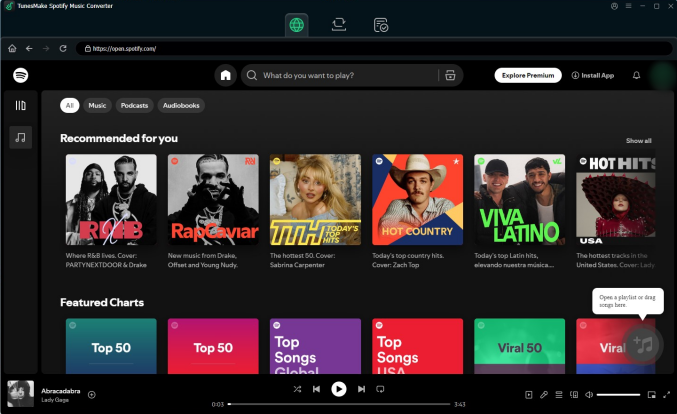
TunesMake Spotify Music Converter is easy to get on both Windows and Mac devices. Just click the Free Download button above, and you can install it on your desktop. Then, launch it to visit the official Spotify web player. Find the track you want to download, and then drag and drop it to the Add icon in the lower-right corner. If you need to download songs in batches, you can select a playlist or album first. Then, click the Add icon > Add to List.
Step 2
Customize Output Format and Parameters
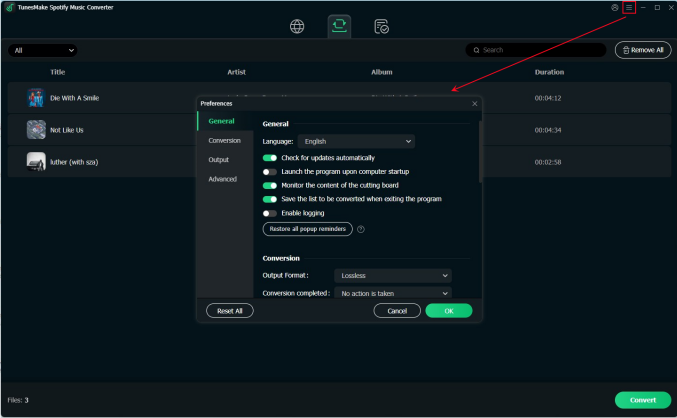
Click the Menu bar and choose the Preferences option to customize the output format and parameters. Then, click the Conversion tab to adjust the sample rate, channel, bit rate, and format, as well as choose to archive output tracks by albums or artists.
Step 3
Start Downloading Music from Spotify
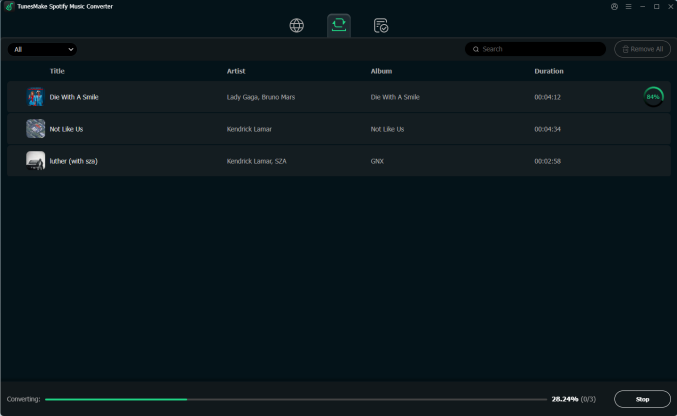
Click the Convert button to start converting all the tracks you added at 12× fast speed. After a few seconds, all imported Spotify songs will be downloaded and saved in the format you set. You can find their location on your computer by clicking the top Converted icon. Now, feel free to listen to them anytime and anywhere you want.
Part 5. Comparison and Conclusion
Undoubtedly, spotDL is a good option for anyone looking for a free Spotify downloader for offline listening. It is free to use, but still has some drawbacks. If you’re looking for a tool that offers more options and supports downloading all content from Spotify into many formats, TunesMake Spotify Downloader is the best alternative. Just try it and enjoy Spotify music at will.
| SpotDL | TunesMake Spotify Music Converter | |
|---|---|---|
| Supported OS | Windows, Mac, and Linux | Windows, Mac |
| Output Formats | MP3, M4A, and OPUS | MP3, M4A, M4B, WAV, FALC, AIFF |
| Supported Input Content | Spotify songs, playlists | Spotify songs, playlists, albums, podcasts, and audiobooks |
| Audio Quality | 128kbps or 256kbps | Lossless |
| Download Speed | 1x | 12x |
| Customize Output Parameters | ✘ | ✔ |
| Preserve ID3 Tags | ✔ | ✔ |
Related Articles

A passionate writer specialized in creating engaging content about music and entertainment, covering everything from the latest music trends and entertainment news to practical tutorials.
- 1
- 2
- 3
- 4
- 5
- 6
- 7
 Leave Your Comment
(0)
Leave Your Comment
(0)

 Download Center

