








 Store
Store


Setting up Spotify on Fedora Linux can feel different than on Ubuntu or Debian, primarily because Fedora prioritizes open-source packages and modern container formats like Flatpak out of the box. Depending on whether you prefer a traditional desktop app, zero-installation browser streaming, an offline local player, or a lightweight terminal interface, there are several distinct ways to play Spotify on Fedora Workstation, Silverblue, and Spins. This guide compares every option across system impact, setup complexity, and features, helping you choose and configure the right setup for your machine.
Part 1. How to Install Spotify on Fedora via GUI Client
For a traditional desktop experience complete with album artwork, drag-and-drop playlists, and system notification pop-ups, install the standalone GUI client via Flatpak or Snap.
Option 1. Install Spotify via Flatpak / Flathub (Recommended)
The most reliable way to run the Spotify desktop client on Fedora is via Flatpak through the Flathub repository. Flatpak isolates the application from your core system dependencies, preventing library breakage when updating your Fedora installation.
Step 1. Open your terminal and add the Flathub repository by running
flatpak remote-add --if-not-exists flathub https://dl.flathub.org/repo/flathub.flatpakrepo
Step 2. Execute the following command in your terminal
flatpak install flathub com.spotify.Client
Step 3. Type y when prompted to confirm the installation and proceed.
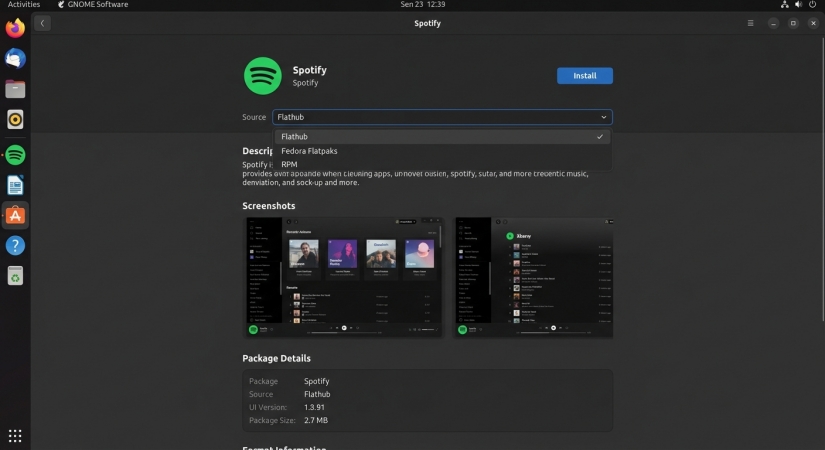
Alternatively, open GNOME Software, search for Spotify, ensure the source dropdown is set to Flathub, and click Install.
Option 2. Install Spotify via Snap Package
Canonical maintains an official Spotify package on the Snap Store. If your system already runs snapd or you prefer Snap packages over Flatpaks, this provides a direct alternative.
Step 1. Install snapd via DNF
sudo dnf install snapd
Step 2. Enable classic snap support
sudo ln -s /var/lib/snapd/snap /snap
Step 3. Restart your session, then install Spotify with the following command
sudo snap install spotify
Part 2. How to Play Spotify on Fedora without Installation
If you prefer not to install a standalone application on your computer, there are still two ways for you to listen to Spotify music on Fedora, that is to use Spotify Web Player or local media player. Let's explore the details.
Option 1. Play from Spotify Web Player
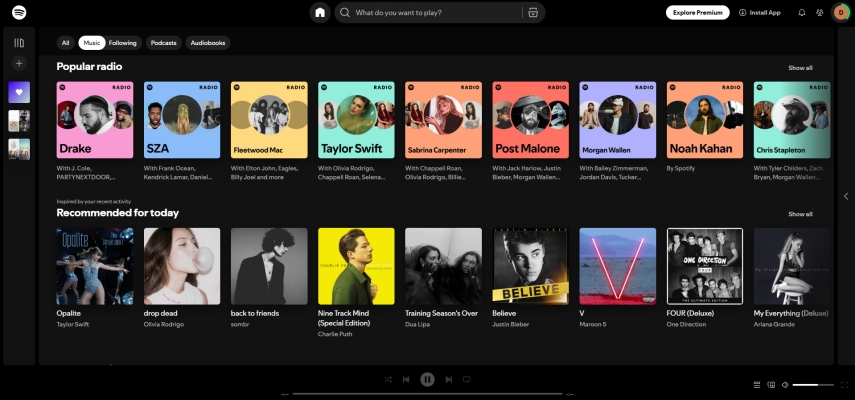
Spotify Web Player runs directly inside web browsers like Firefox or Google Chrome. Because Spotify streams encrypted audio files, your browser must support Google Widevine Digital Rights Management. Fedora disables proprietary DRM components by default in stock installations, meaning Firefox requires a quick setting toggle before playback will work. Follow the steps below to set up Spotify Web Player for Fedora.
Step 1. Launch Firefox and open Settings or type about:preferences in the address bar.
Step 2. Scroll to Digital Rights Management (DRM) Content.
Step 3. Check the box for Play DRM-controlled content.
Step 4. Open a new tab, navigate to about:addons, and select Plugins.
Step 5. Verify Google Widevine Content Decryption Module is set to Always Activate.
Step 6. Navigate to Spotify Web Player and log into with your account to start playing.
Option 2. Play through Local Media Player
Official Linux desktop clients and web streaming require a constant internet connection and impose restrictions on offline playback for free account tiers. If you prefer to play your Spotify tracks using lightweight Linux media players like Rhythmbox, Audacious, or VLC, downloading and converting Spotify tracks directly provide a flexible alternative.
TunesMake Spotify Music Converter allows both Free and Premium users to download and convert Spotify songs, albums, playlists, podcasts, and audiobooks into unprotected audio formats such as MP3, FLAC, WAV, AIFF, M4A, or M4B. With TunesMake, you can get converted Spotify music files and transfer them to Fedora for playing through a local media player.

TunesMake Spotify Music Converter –
Download music from Spotify without premium
- Download Spotify songs, albums, playlists, audiobooks, and podcasts
- Losslessly convert Spotify music to MP3, FLAC, WAV, AIFF, and more
- Remove ads from Spotify music tracks even with a Free account
- Convert Spotify music at 15× faster speed in batch with ID3 tags kept
Security Verified. 100% Clean & Safe.
Step 1 Import Spotify Music to TunesMake
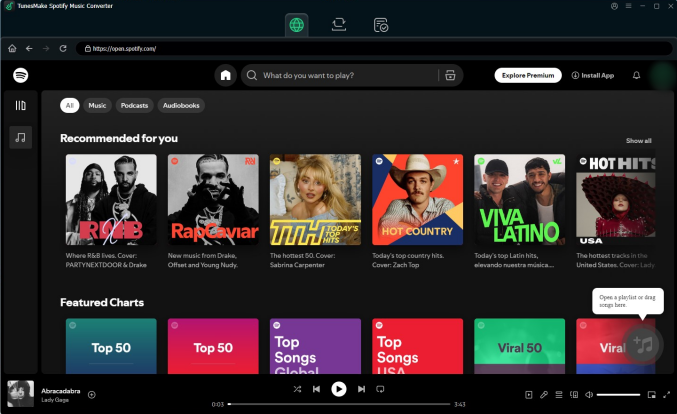
When you open TunesMake Spotify Music Converter, the built-in Spotify web player will load immediately. You can then browse your music library and search for some content to download. Just open the target items and click the + button to load them into the conversion list.
Step 2 Adjust the Audio Format for Fedora
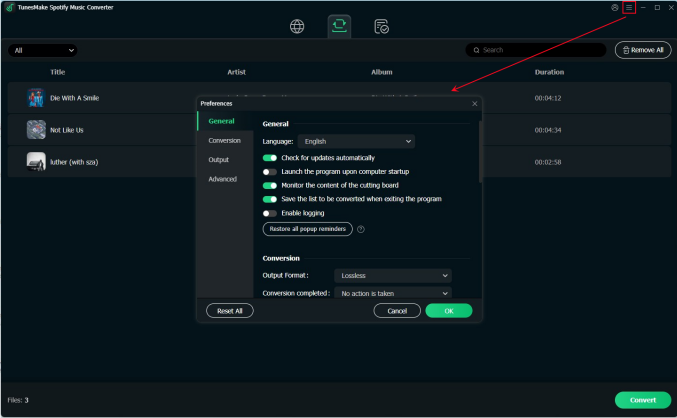
Once loaded the files, you can select the output format and parameters in the three-line icon on the top right of the main screen. In the pop-up menu, choose Preference > Conversion to set sample rate, bit rate, channel, and archive according to your needs.
Step 3 Download Spotify Music for Fedora
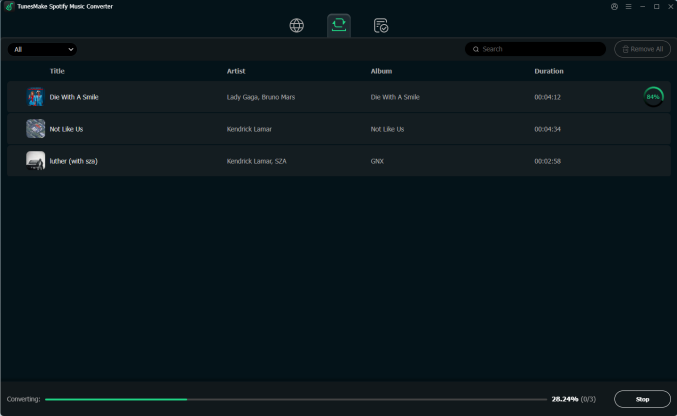
After setting the output audio formats, you can click the Convert button at the bottom right corner of the program to start the conversion. Once complete, you can click the Converted button to locate your Spotify music files on your local drive.
Step 4 Play Spotify Music on Fedora
Now you can move the downloaded audio files to the music folder on your Fedora via local network storage, USB drive, or cloud synchronization. Continue to import the local files into Fedora's default music players like Rhythmbox, Audacious, or VLC Media Player for playing.
Part 3. How to Get Spotify for Fedora via Terminal interface
For users running Fedora on lightweight hardware, older laptops, or headless terminal setups, the official desktop client can feel heavy due to its Electron base. ncspot is an ncurses-based terminal UI written in Rust that consumes a fraction of system resources.
Note:
ncspot utilizes Spotify's official API/librespot library, which strictly requires a Spotify Premium account. Make sure that you have a Spotify Premium subscription.
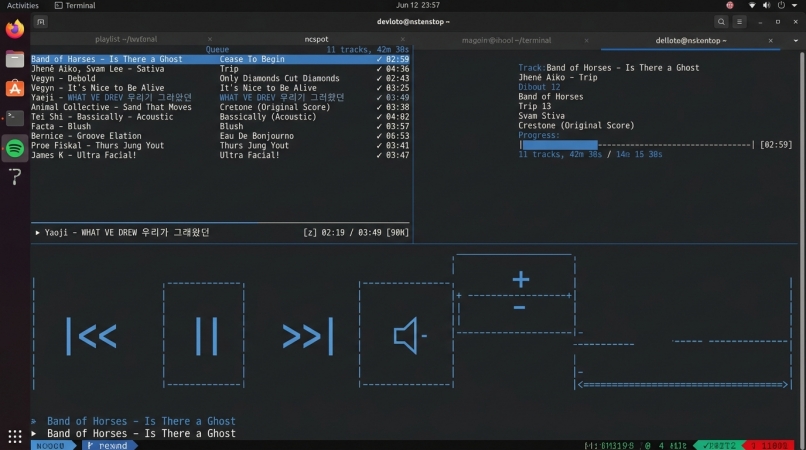
Step 1. Install the required development packages
sudo dnf install cargo openssl-devel libdbusmenu-gtk3-devel alsa-lib-devel pulse-audio-libs-devel
Step 2. Install ncspot using Cargo
cargo install ncspot
Step 3. Launch the client in terminal.
Part 4. FAQs for Spotify on Fedora
Is Spotify officially supported on Fedora Linux?
Spotify provides official Linux support primarily via Snap and Debian packages. However, the Flatpak package available on Flathub is maintained with community support and provides an identical experience to builds on Fedora.
Can I use a Spotify Free account on Fedora?
Yes. The official Flatpak desktop client, Snap package, and browser web player all work with both Spotify Free and Spotify Premium accounts. Only third-party CLI tools like ncspot require a Spotify Premium subscription due to API requirements.
Part 5. Conclusion
Playing Spotify on Fedora Linux ultimately comes down to choosing the approach that best aligns with your hardware, preferred workflow, and desktop environment. Installing the Spotify package from Flathub via Flatpak remains the most balanced, reliable choice for most users, providing the full desktop user interface along with clean system updates and isolated dependencies.
For those who prefer avoiding extra desktop software completely, enabling Google Widevine DRM in Firefox allows seamless web browser streaming directly at the web player. If you need offline listening capabilities using native Linux audio managers like Rhythmbox or VLC, converting your tracks with TunesMake Spotify Music Converter yields open local audio files. Finally, power users looking for minimal resource footprint on Spotify Premium can opt for ncspot to run a lightweight, terminal-based user interface.
Related Articles






A senior editor from TunesMake, dedicated to sharing professional tutorials and solutions of software, movies, and music.
- 1
- 2
- 3
- 4
- 5
- 6
- 7
 Leave Your Comment
(0)
Leave Your Comment
(0)

 Download Center

