









 Store
Store


Downloading music from Spotify directly to your local drive is one of the most common challenges for music lovers. Whether you want to listen to your favorite tracks on a traditional MP3 player, transfer music to a USB drive for your car, or keep offline backups of your carefully curated playlists, extracting audio using a Spotify URL is the fastest solution. In this comprehensive guide, you will learn how to download a Spotify URL to MP3 across devices.

Part 1. How to Get and Validate a Spotify URL
A broken conversion attempt often traces back to an improperly copied link or an unsupported URL format. Spotify provides distinct link structures for tracks, albums, and playlists across its applications. Follow the steps below to correctly copy a Spotify link on a computer or a phone.
Extract Links on Desktop (Windows / Mac / Web Player)

Step 1. Open the Spotify desktop app or visit open.spotify.com.
Step 2. Navigate to the desired song, album, or playlist.
Step 3. Click the three dots (...) menu icon next to the title.
Step 4. Select Share > Copy Song Link or Copy Link to Playlist.
Extract Links on Mobile (iOS / Android)

Step 1. Open the Spotify mobile app.
Step 2. Tap the three dots (... ) icon on the player screen or beside any track.
Step 3. Tap Share, then select Copy Link.
Validate Your Copied Spotify URL
Before pasting your link into any Spotify link to MP3 converter, ensure it matches standard Spotify URL formats.
- Track URL: [https://open.spotify.com/track/](https://open.spotify.com/track/)
- Playlist URL: [https://open.spotify.com/playlist/](https://open.spotify.com/playlist/)
- Album URL: [https://open.spotify.com/album/](https://open.spotify.com/album/)
Note:
Clean parameters by removing extra tracking tags like anything starting with ?si= at the end of the URL if your converter throws an "Invalid Link" error.
Part 2. Best Spotify Link to MP3 Downloader for All Content
While online Spotify downloaders and free Spotify downloader bots exist, TunesMake Spotify Music Converter stands out as the most reliable, high-speed, and loss-free tool to convert any Spotify track, album, playlist, artist, podcast, or audiobook link into studio-grade MP3 files.
Why TunesMake Is the Best Spotify Link to MP3 Downloader
Tunesmake Spotify Music Converter is engineered specifically to convert Spotify URLs into high-fidelity local audio files without the friction, ads, or speed limits of web-based tools.
Key Features That Make TunesMake Superior:
-
True 320kbps Sound Quality: Unlike online downloaders that compress audio into low bit-rate streams, TunesMake preserves original, uncompressed sound quality.
-
Batch Conversion at 15× Speed: Convert entire playlists containing hundreds of tracks in just a few clicks, no manual track-by-track clicking required.
-
100% Complete ID3 Tag Preservation: Keeps essential song metadata intact, including song title, artist, album art, track number, year, and genre.
-
Multiple Output Audio Formats: Go beyond standard MP3 with support for AIFF, WAV, FLAC, M4A, and M4B formats.
-
Work with Free Accounts: Simply copy and paste any public Spotify link to start downloading without a paid Spotify Premium subscription.
Comparison of TunesMake vs Other Downloading Tools:
| Feature | Free Online Downloaders | Free Bots | TunesMake Spotify Music Converter |
|---|---|---|---|
| Supported Content | Track, album, playlist | Track, album, playlist | Track, album, playlist, artist, podcast, audiobook |
| Output Format | MP3 | MP3 | MP3, AIFF, WAV, FLAC, M4A, M4B |
| Audio Quality | 128kbps | 160kbps | True 320kbps |
| Download Speed | Slow | Slow | Fast (Up to 15×) |
| Batch Download | Not support | Not support | Support |
| Full Playlist Support | No (Fails on long lists) | No (Fails on long lists) | Yes (100+ tracks at once) |
| ID3 Tag & Cover Art | Basic tags only | Basic tags only | Complete Metadata |
| Stability | Moderate | Low (Bot downtime) | High |
| Ad Experience | Pop-ups & redirects | Pop-ups | 100% ad-free |
How to Convert Spotify Link to MP3 in 3 Steps
With an intuitive and user-friendly interface, TunesMake Spotify Music Converter is suitable for all users, even though you don't have any technical skill. It takes only three simple steps to complete the conversion of Spotify URL to MP3.
Step 1 Copy and Paste the Spotify Link
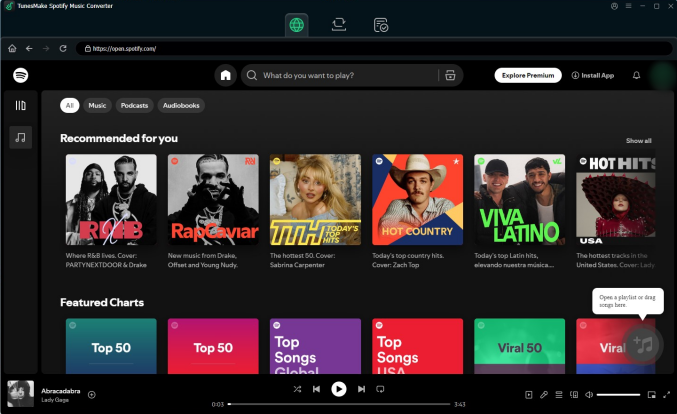
Launch TunesMake Spotify Music Converter on your computer. Copy the track or playlist link from Spotify and paste it directly into the search bar at the top of the interface, then click the + button to load the tracks.
Step 2 Choose the MP3 Audio Output
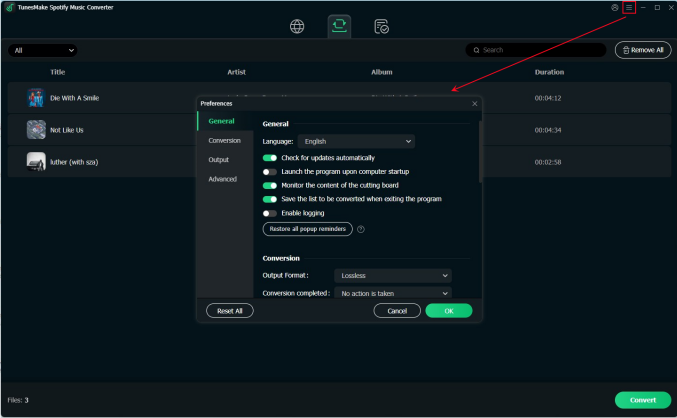
Click the Menu icon in the top right, navigate to Preferences > Conversion, select MP3 as your output format, and set the bitrate to 320 kbps for maximum audio fidelity. Remember to save the settings you have set.
Step 3 Save Spotify URL to MP3 Locally
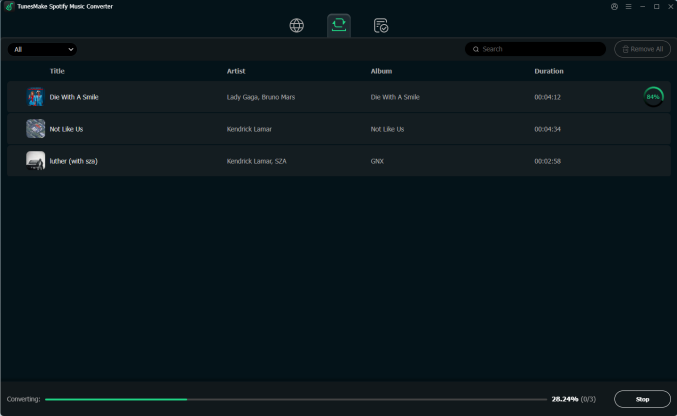
Click the Convert button in the bottom right corner. TunesMake will process all tracks at 15× speed and save the MP3 files directly to your chosen local destination folder. You can click the Converted tab to browse.
Part 3. How to Download MP3 from Spotify Link Online
If you only need to grad a few individual Spotify songs without installing third-party software on your computer, web-based online downloaders are the quickest option. Here are the most prominent free online Spotify downloaders available.
- SpotDown: A browser tool allows users to paste a Spotify track URL and generate a direct MP3 download link within seconds.
- Spotidownloader: A clean web utility tailored for quick Spotify track extraction with minimal browser overhead.
- Spowload: A popular web tool that parses Spotify links and fetches matching audio streams from YouTube for quick saving.

Step 1. Copy the Spotify song URL from your device.
Step 2. Open a reliable online Spotify URL converter in your web browser.
Step 3. Paste the URL into the search or input bar on the homepage.
Step 4. Click the Search or Convert button to process the link.
Step 5. Click Download MP3 to save the converted file to your local download folder.
😀 Pros
- Work in any browser like Chrome, Safari, or Firefox
- No subscriptions or software purchases required
- Compatible with mobile devices and laptops
☹️ Cons
- Often capped at 128kbps audio quality
- Fail or freeze on long playlists download
- Frequent pop-ups and redirect ads
- Exist potential malware warnings
Part 4. How to Download Spotify URL to MP3 on Android/iOS
For users looking for free batch conversions without intrusive web ads on a mobile device, messaging bots offer alternative pathways. Several Telegram bots allow you to send a Spotify URL directly into a chat window. The bot parses the URL, retrieves the audio file, and sends the MP3 file back to you to download directly onto your phone.
- @SpotSeekBot: Convert Spotify URLs by matching tracks against high-quality audio sources and send back a tagged MP3 file containing the track title, artist name, and album artwork.
- @Spotify_downloa_bot: Allow search via Spotify URLs or track names and occasionally offers lossless FLAC options alongside standard MP3s.
- @SpotifyMusicDownloaderBot: Recognizes links from Spotify, YouTube Music, and Shazam, making it a versatile tool for general audio fetching.
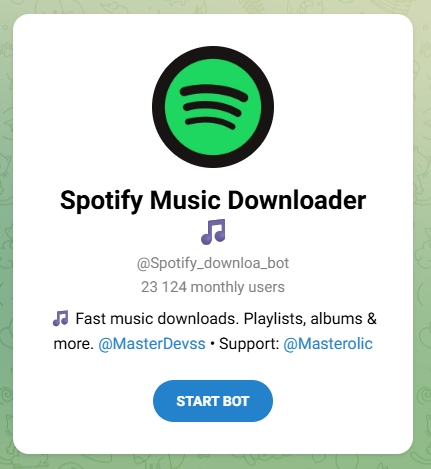
Step 1. Get the Spotify song URL on your device.
Step 2. Open Telegram, tap the Search icon, and type the bot name.
Step 3. Open the Chat and click or type /start to activate the bot.
Step 4. Paste the copied Spotify link directly into the chat window and hit Send.
Step 5. Tap the three dots (...) on the received audio file.
Step 6. Select Save to Music or Save to Files on your device.
😀 Pros
- Operate entirely inside the Telegram app
- No web pop-ups, redirects, or malicious ad banners
- Keep cover art, artist names, and album details
- Function on both mobile and desktop web browsers
☹️ Cons
- Occasionally return the wrong audio version
- Struggle with massive playlists
- Fail or delay responses sometimes
- Taken down or blocked due to API updates
Part 5. FAQs about Spotify URL to MP3
Can I convert a full Spotify playlist URL to MP3 at once?
Yes. While free online downloaders often struggle or fail with multi-track playlists, a professional Spotify downloader like TunesMake Spotify Music Conaverter is specifically designed to convert entire Spotify playlist URLs in a single batch.
Does converting a Spotify URL require a Spotify Premium account?
No. You can copy URLs from both free and Spotify Premium accounts. The URL structure for songs, albums, and playlists remains identical regardless of subscription level.
Is it legal to download Spotify links to MP3?
Ripping protected audio violates Spotify's Terms of Service. However, creating personal backup copies of media for private offline listening generally falls under fair use in many jurisdictions, provided the files are never redistributed or commercialized.
Is converting a Spotify URL to MP3 safe?
Using reputable converting tools like TunesMake Spotify Music Converter or clean open-source tools is safe. However, using free online Spotify downloaders carries risks of intrusive pop-up ads, fake download buttons, and malicious redirects.
Part 6. Conclusion
Downloading Spotify links to MP3 format opens up complete flexibility for offline listening across any device. While free online Spotify downloaders offer a convenient quick fix for single tracks, they come with compromises like compressed 128kbps quality, pop-up ads, and unreliable playlist conversion. For music lovers seeking high-fidelity sound, full playlist batch downloads, and automatic ID3 metadata retention, TunesMake Spotify Music Converter deliver the most reliable, ad-free experience.
Related Articles

A senior editor from TunesMake, dedicated to sharing professional tutorials and solutions of software, movies, and music.
- 1
- 2
- 3
- 4
- 5
- 6
- 7
 Leave Your Comment
(0)
Leave Your Comment
(0)

 Download Center

